Master Your Outlook Signature Template for Brand Consistency
In a competitive landscape where every interaction matters, creating a cohesive brand identity is crucial. Email signatures, often overlooked, serve as a
Sophie Grant
Email Signature Specialist, Scribe
Introduction
In a competitive landscape where every interaction matters, creating a cohesive brand identity is crucial. Email signatures, often overlooked, serve as a powerful tool for reinforcing brand consistency and enhancing professional communication. This article explores best practices for mastering Outlook signature templates, providing insights on designing, implementing, and leveraging these signatures for maximum impact. Organizations must ensure their email signatures effectively reflect their brand while engaging recipients.
Establish Brand Consistency in Your Signature Design
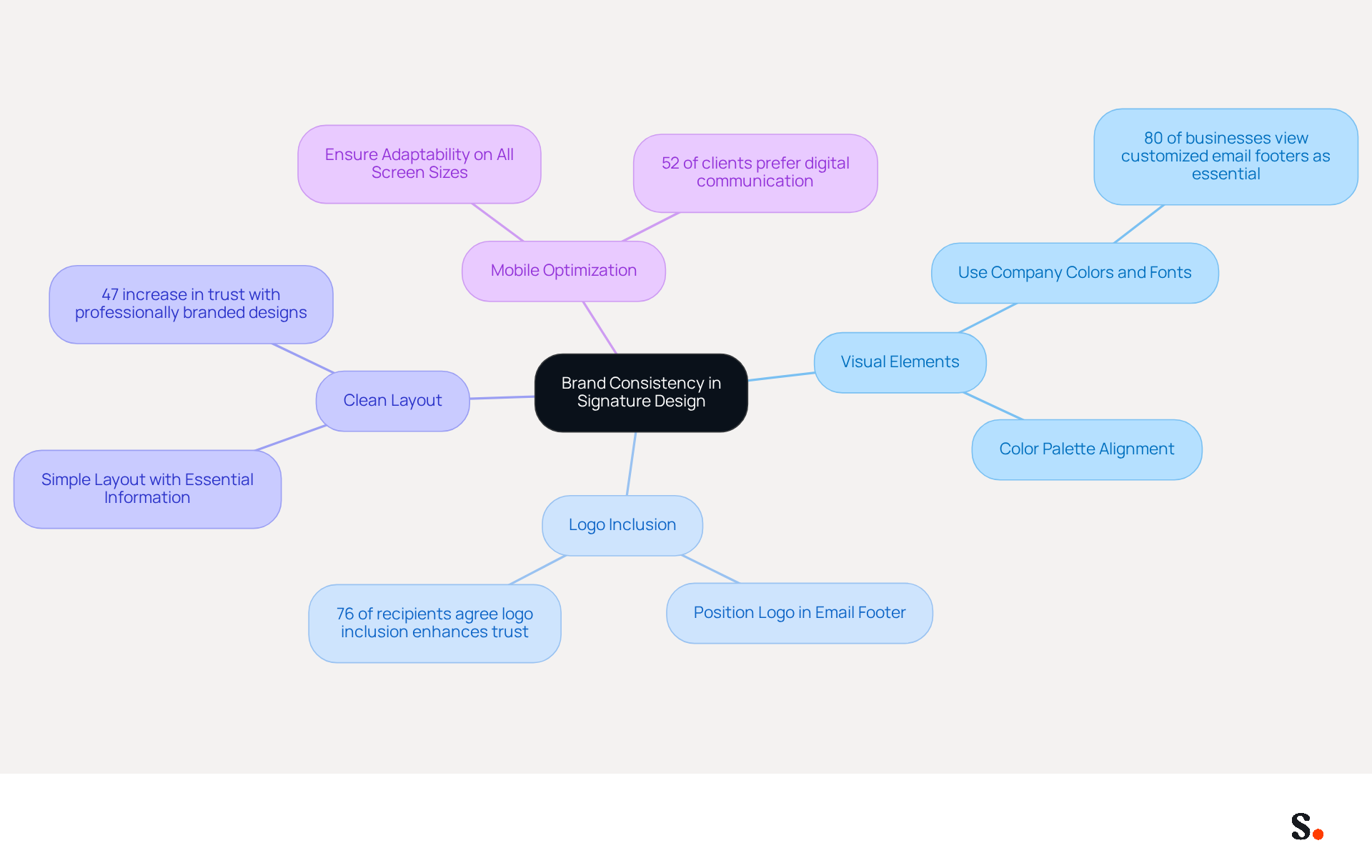
To create consistency in your visual identity design, start by defining your visual elements. This includes selecting a color palette that aligns with your brand, choosing fonts that reflect your personality, and prominently incorporating your logo. Here are some best practices:
- Use Company Colors and Fonts: Ensure that the colors and fonts in your email signature match those used in your marketing materials. This creates a cohesive appearance that strengthens recognition of the brand. Research indicates that 80% of businesses view a customized email footer as essential for their identity, underscoring the need for visual consistency to build trust and recognition.
- Include Your Logo: Position your company logo in the email footer to enhance brand visibility. Make sure your logo is high quality and the right size to avoid distortion; a well-crafted logo boosts professionalism and builds trust. Branded identifiers significantly enhance trust; 76% of recipients agree, making logo inclusion essential.
- Maintain a Clean Layout: Without a clean layout, your brand image may suffer, leading to potential disengagement from recipients. Use a simple layout that includes essential information such as your name, title, and contact details, while leaving enough white space for readability. Research indicates that messages with professionally branded designs enhance consumer trust by 47%. This trust can translate into higher engagement and response rates, ultimately benefiting your business.
- Optimize for Mobile: As many messages are viewed on mobile devices, ensure that your branding is adaptable and visually appealing on all screen sizes. Testing your logo across various devices is essential to verify its appearance, as 52% of potential clients and customers prefer digital communication as their primary channel with companies.
Furthermore, utilizing Scribe's integration with Aircall guarantees that any modifications made in your Aircall setup will automatically be reflected in your Scribe configurations. This synchronization not only saves time but also ensures that your communication identifiers remain aligned with your latest marketing efforts, enhancing consistency across all interactions. By following these guidelines, you can create a professional closing with an Outlook signature template that not only appears polished but also enhances your brand identity in every communication. By prioritizing visual consistency, you not only enhance your brand's professionalism but also foster stronger connections with your audience.
Implement Effective Signature Templates in Outlook
Implementing an effective Outlook signature template is crucial for maintaining a professional brand image. Follow these steps to create and manage your email signatures effectively:
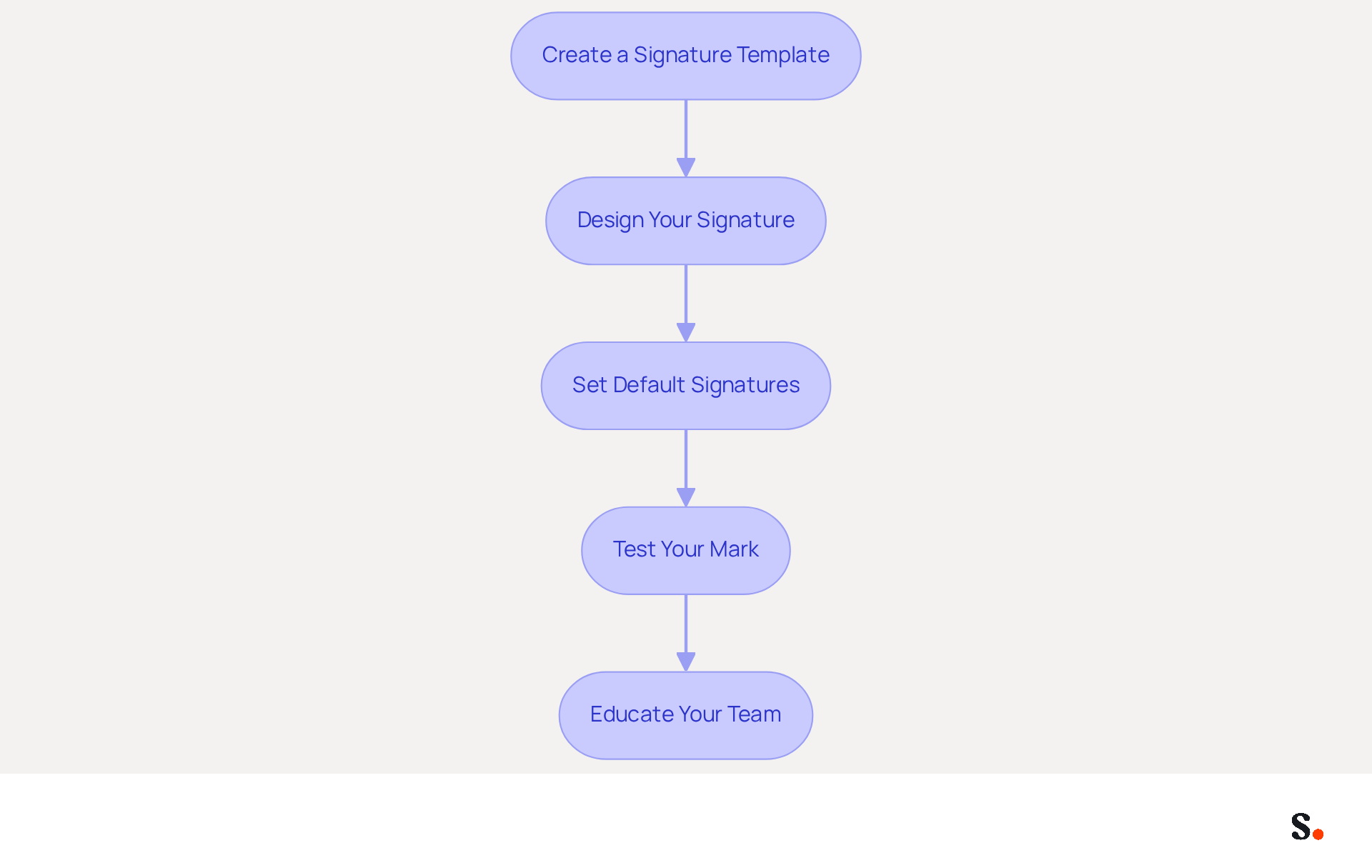
- Create a Signature Template: Open Outlook and navigate to the 'File' menu. Select 'Options' and then 'Mail'. Click on 'Signatures' to access the signing settings. Here, you can create a new signature by clicking 'New'.
- Design Your Signature: Utilize the formatting tools to craft your signature. Include essential elements such as your name, title, company name, and contact information. Incorporating your logo and social media links can improve visibility for your business. Ensure that the design complies with your guidelines for consistency.
- Set Default Signatures: Set default signatures for new messages and replies to ensure consistency across all communications. This approach strengthens your brand identity by maintaining a uniform format in every message.
- Test Your Mark: Send test messages to yourself and colleagues to confirm that the signature displays correctly across various messaging clients. Make necessary adjustments to ensure compatibility and readability.
- Educate Your Team: Provide training or resources to your team on effectively using the template. This should include clear instructions on selecting the appropriate signature when sending emails.
By implementing these steps, you ensure that every employee utilizes an Outlook signature template to maintain a consistent email format, which is essential for reinforcing your identity in every communication. Furthermore, syncing your Google Workspace with Scribe saves time as your teammates' data is automatically updated, enabling effortless management of information. This integration ensures that any changes, such as job position updates or group movements, are reflected in Scribe without manual input, enhancing consistency across all communications. Moreover, integrating with Aircall enables smooth synchronization, guaranteeing that your correspondence identifiers are consistently current and in harmony with your brand's identity. Ultimately, a well-managed email signature not only reflects professionalism but also strengthens your brand's presence in every communication.
Leverage Signatures for Marketing and Engagement
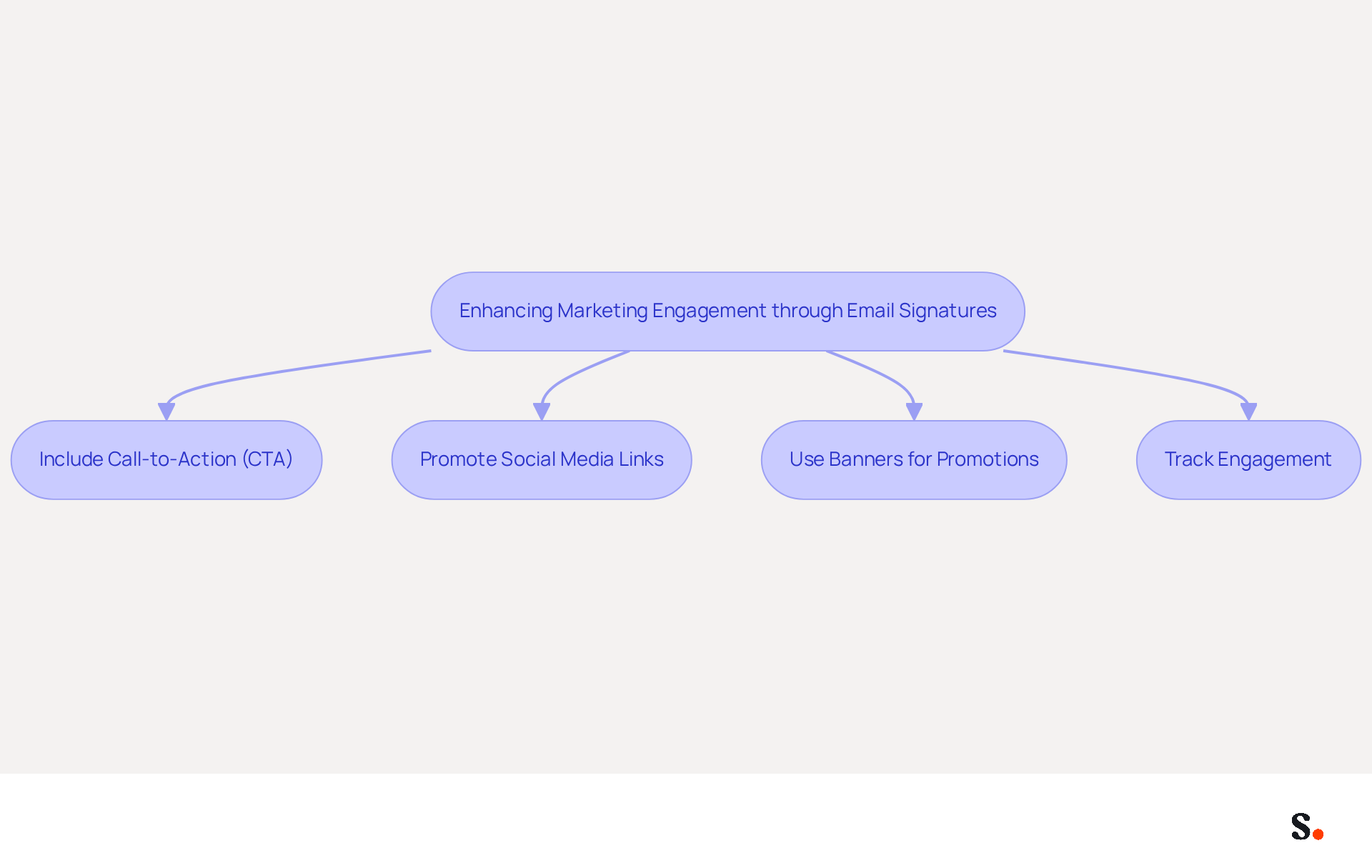
Email footers often remain underutilized, yet they hold significant potential for marketing engagement. Here are several strategies to enhance marketing engagement through your email signatures:
- Include Call-to-Action (CTA): Integrate a clear CTA in your signature, directing recipients to your latest blog post, promotional offer, or upcoming event. This encourages recipients to take action and engage more with your organization.
- Promote Social Media Links: Add icons linking to your social media profiles. This not only drives traffic to your channels but also encourages recipients to connect with your identity across multiple platforms, enhancing your online presence.
- Use Banners for Promotions: Incorporate visually appealing promotional banners in your signature to highlight special offers or campaigns. Align these banners with your brand's aesthetic to maintain consistency and attract attention.
- Track Engagement: Implement tracking links in your CTAs to measure engagement and effectiveness. This data is essential for enhancing your promotional strategies and understanding what resonates with your audience.
By incorporating these marketing elements into your emails, you transform each message into an opportunity for engagement and promotion, enhancing your marketing strategy. Organizations that employ branded digital identifiers report a 22% rise in response rates, linked to consistent branding across teams. Moreover, 89% of participants ranked daily one-to-one correspondence as their most crucial business communication channel, and 76% of recipients feel more trust towards senders with branded communication identifiers. This highlights the need to optimize email signatures for better engagement. Neglecting this opportunity could mean missing out on valuable connections and trust-building with your audience.
Automate Signature Management for Efficiency
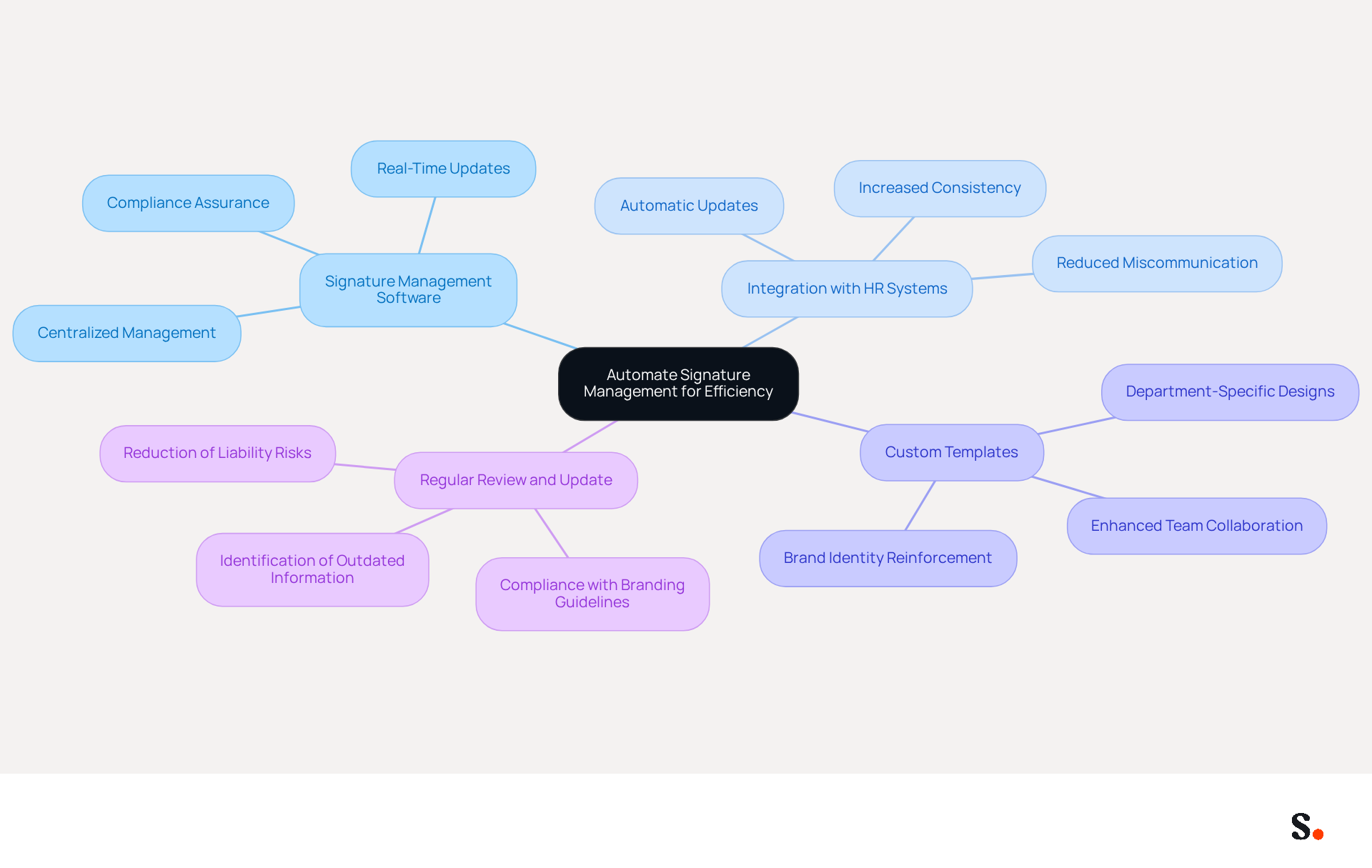
To enhance operational efficiency and ensure brand consistency, organizations should consider implementing an Outlook signature template for automating their email signature management.
- Use Signature Management Software: Implement tools like Scribe that enable centralized management of email signatures across your organization. This ensures all signatures are consistent and can be updated in real-time, reducing errors and compliance risks. Scribe's SOC 2 Type II certification and compliance with GDPR and CCPA further enhance security and trust.
- Integrate with HR Systems: Connect your document management tool with HR systems to automatically update signatures when employee information changes. Without integration, organizations face challenges in keeping signatures up-to-date, leading to potential miscommunication. Companies that have adopted centralized management solutions report an 85% increase in consistency and a 22% rise in response rates, demonstrating the strategy's effectiveness.
- Create specific Outlook signature templates tailored for various departments or roles within your organization. This method enables customization while preserving overall brand consistency, ensuring that every message sent reinforces your brand identity. Furthermore, Scribe enables the automatic filling of your teammates' information, enhancing team collaboration in managing their signatures.
- Regularly Review and Update: Schedule consistent evaluations of your email signatures to ensure they remain compliant with branding guidelines and reflect any changes in marketing strategies. Regular audits can help identify outdated information and ensure adherence to legal requirements, reducing liability risks.
Ultimately, embracing automation in signature management can transform how organizations communicate, leading to improved engagement and brand representation.
Conclusion
A consistent email signature is not just a formality; it is a strategic tool for reinforcing brand identity and enhancing professional communication. Focusing on visual elements like color palettes, fonts, and logos helps organizations create a cohesive look that builds trust and recognition. Implementing effective signature templates in Outlook streamlines communication and ensures that every message reflects the brand's professionalism and commitment to quality.
We discussed key strategies like:
- Having a clean layout
- Optimizing for mobile
- Integrating marketing elements such as calls-to-action and social media links
Using tools like Scribe makes managing signatures easier and more efficient for everyone involved, allowing for real-time updates and compliance with security standards such as SOC 2 Type II, GDPR, and CCPA. This method saves time and keeps all communications in line with the latest branding efforts, ensuring consistency.
In conclusion, optimizing email signatures is a powerful yet often overlooked opportunity for organizations to engage with their audience and promote their brand. By prioritizing email signature optimization, organizations can unlock new avenues for engagement and brand loyalty that they may not have previously considered. Embracing these strategies will not only enhance brand consistency but also contribute to measurable marketing ROI, making it a vital aspect of any comprehensive marketing strategy.
Frequently Asked Questions
How can I establish brand consistency in my email signature design?
To establish brand consistency, start by defining your visual elements, including selecting a color palette, choosing fonts that reflect your brand personality, and prominently incorporating your logo.
Why is it important to use company colors and fonts in my email signature?
Using company colors and fonts ensures that your email signature matches your marketing materials, creating a cohesive appearance that strengthens brand recognition. Research shows that 80% of businesses consider a customized email footer essential for their identity.
What role does including a logo play in my email signature?
Including your company logo in the email footer enhances brand visibility and professionalism. A high-quality logo builds trust, as 76% of recipients agree that branded identifiers significantly enhance trust.
How should I layout my email signature for optimal impact?
Maintain a clean layout that includes essential information such as your name, title, and contact details, while ensuring enough white space for readability. A professionally branded design can enhance consumer trust by 47%.
Why is it important to optimize my email signature for mobile devices?
Optimizing your email signature for mobile devices is crucial because many messages are viewed on mobile. Ensuring your branding is adaptable and visually appealing on all screen sizes can improve engagement, as 52% of potential clients prefer digital communication.
How does Scribe integrate with Aircall to enhance brand consistency?
Scribe's integration with Aircall ensures that any modifications made in your Aircall setup are automatically reflected in your Scribe configurations, saving time and maintaining alignment with your latest marketing efforts.
What are the benefits of prioritizing visual consistency in my email signature?
Prioritizing visual consistency enhances your brand's professionalism and fosters stronger connections with your audience, ultimately benefiting your business through higher engagement and response rates.
List of Sources
- Establish Brand Consistency in Your Signature Design
- Research Recap: Branded Email Signatures Increase Company Recognition, Trust - B2BMX INSIGHTS (https://demandgenreport.com/industry-news/research-recap-branded-email-signatures-increase-company-recognition-trust/47252)
- 40+ Email Signature Statistics for 2026 (Data + Insights) (https://wavecnct.com/blogs/email-signature-statistics)
- The impact of email signatures on your branding (https://signitic.com/en/resources/the-impact-of-email-signatures-on-your-branding)
- Why Email Signatures Must Be In Your 2026 Marketing Plan | Rocketseed (https://rocketseed.com/blog/2026-marketing-plan-email-signatures)
- Implement Effective Signature Templates in Outlook
- Best Practices for Creating a Signature for Outlook That Engages (https://scribe-mail.com/en-US/blog/best-practices-for-creating-a-signature-for-outlook-that-engages)
- Top 10+ best practices for email signatures design in 2026 (https://mysignature.io/blog/email-signature-best-practices)
- The ultimate guide to email signatures in 2026 (https://signitic.com/en/resources/email-signature)
- Email Signature Best Practices for 2026 (+ 15 Pro Examples) (https://wavecnct.com/blogs/email-signature-best-practices-2026)
- The Complete Email Signature Guide 2026: Best Practices and Policy (https://opensense.com/complete-email-signature-guide)
- Leverage Signatures for Marketing and Engagement
- Why Email Signatures Must Be In Your 2026 Marketing Plan | Rocketseed (https://rocketseed.com/blog/2026-marketing-plan-email-signatures)
- Email Signature Trends 2026: Centralized Control & Automation | SIGNandGO posted on the topic | LinkedIn (https://linkedin.com/posts/signngo_email-signature-trends-to-watch-in-2026-activity-7401523471786217473-zAVL)
- 40+ Email Signature Statistics for 2026 (Data + Insights) (https://wavecnct.com/blogs/email-signature-statistics)
- 2026 Marketing Trends: Email Signatures as a Marketing Tool (https://bluechiptt.com/blog/5-marketing-trends-for-2026-and-how-your-email-signature-fits-in)
- Email signature statistics: Why every business should optimize their email signatures — Stripo.email (https://stripo.email/blog/email-signature-statistics-why-every-business-should-optimize-their-email-signatures)
- Automate Signature Management for Efficiency
- Company-Wide Email Signature Management | CloudM (https://cloudm.io/blog/optimize-your-process-with-company-wide-email-signature-management)
- Email Signature Automation: How It Works and How to Set It Up (https://scribe-mail.com/en-US/blog/4-best-practices-for-effective-email-signature-automation)
- Company Email Signatures: Policy, Templates and Company-Wide Management (https://scribe-mail.com/en-US/blog/best-practices-for-company-wide-email-signature-management)
- How to combine automation and email signatures (https://signitic.com/en/resources/how-to-combine-automation-and-email-signatures)
- Automating Email Signatures: How IT Teams Streamline Processes & Reduce Risk (https://exclaimer.com/blog/streamlining-it-processes-automated-email-signatures)
Get started with Scribe
Build a professional email signature
Free 14-day trial — no credit card.