Maximize Brand Impact with the Facebook Icon for Email Signature
In a landscape where every email represents a chance to strengthen brand identity, the strategic use of social media icons, especially the Facebook icon, is
Sophie Grant
Email Signature Specialist, Scribe

On this page
Introduction
In a landscape where every email represents a chance to strengthen brand identity, the strategic use of social media icons, especially the Facebook icon, is crucial. By integrating this icon thoughtfully, brands can enhance their visibility and engagement with audiences, turning a simple email footer into a powerful marketing tool.
However, brands often find it tricky to make the icon look good while sticking to their brand guidelines and using it to drive traffic and interaction.
What strategies can organizations adopt to effectively use the Facebook icon in their email signatures and avoid common pitfalls?
Get started with Scribe
See why teams switch to Scribe
Free 14-day trial — no credit card.
Choose the Right Facebook Icon for Brand Consistency
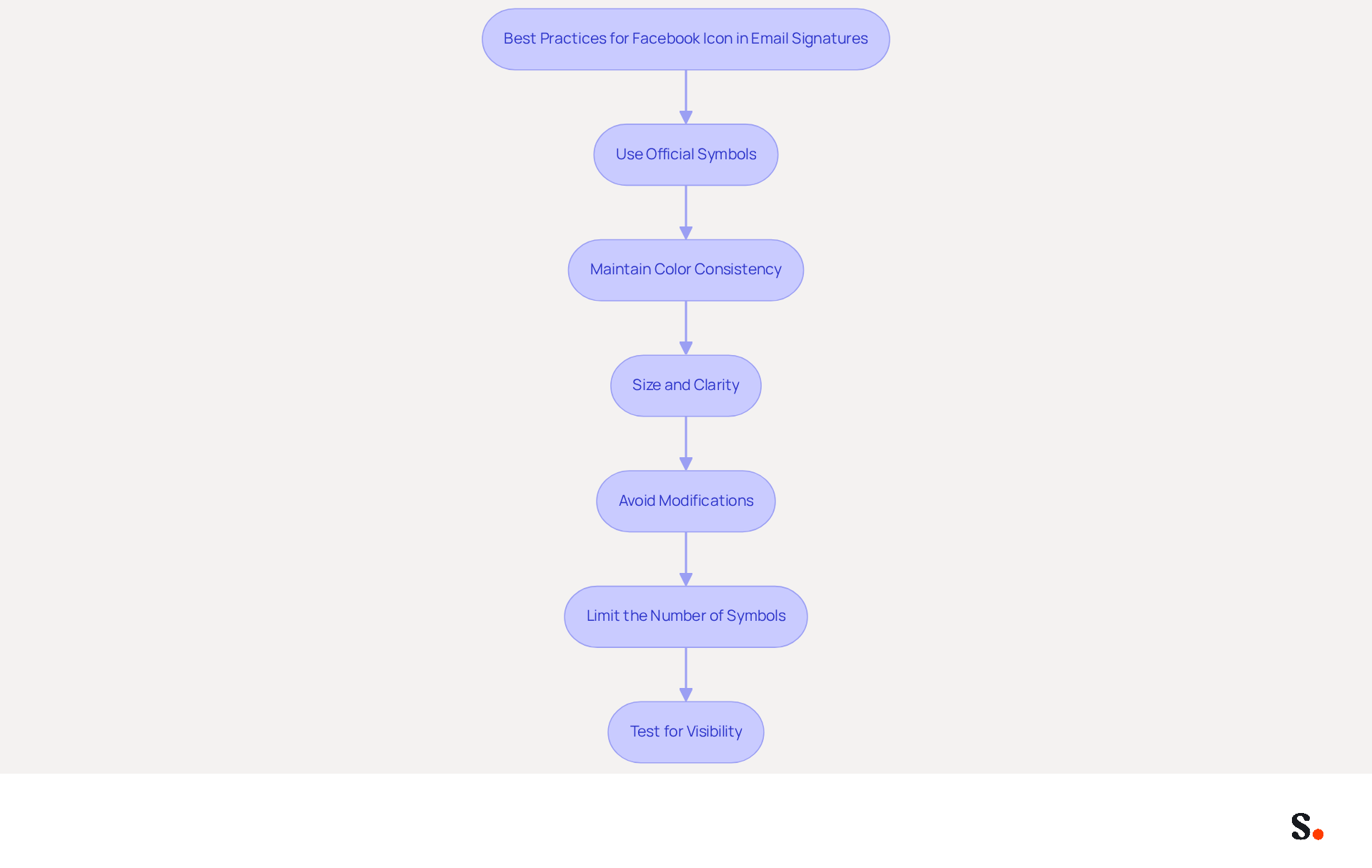
To effectively represent your brand in email signatures, aligning your social media symbols with your branding strategy is crucial. Here are some best practices:
- Use Official Symbols: Always employ the official emblem from the brand's resources. This ensures that your symbol is recognizable and adheres to the platform's branding guidelines.
- Maintain Color Consistency: Choose a symbol that complements your brand colors. If your brand has a specific color palette, consider using a version of the Facebook symbol that harmonizes with these colors.
- Size and Clarity: Ensure the graphic is appropriately sized, typically between 20-25 pixels square, to maintain clarity without overwhelming the signature. A clear symbol boosts visibility and engagement, ensuring a professional appearance.
- Avoid Modifications: Do not alter the design of the symbol, such as changing its shape or color. Altering the symbol risks diluting your brand's message and confusing your audience. Not adhering to these guidelines could expose you to legal risks, so it's essential to comply with the established standards.
- Limit the Number of Symbols: To maintain a clean layout, restrict the quantity of social media symbols in your email footer to about five. This helps avoid a cramped appearance and ensures better spacing.
- Test for Visibility: Before finalizing, check the symbol across various messaging clients to ensure it displays correctly and is easily recognizable on different devices. Research shows that 76% of marketers agree branded digital identifiers significantly enhance sender trust, making visibility a key factor in effective communication.
Using the Facebook icon for email signature in your emails expands your reach and strengthens connections with your audience. A well-designed message footer strategy can greatly improve brand visibility, as shown by the fact that a 100-person team produces around 60,000-80,000 branded impressions monthly through message footers. By syncing your Google Workspace with Scribe, you save time and ensure that any updates to your team’s information are automatically reflected in your contact details, maintaining brand consistency effortlessly. Additionally, Scribe's SOC 2 Type II certification and compliance with GDPR and CCPA ensure that your data handling is secure and compliant. By following these best practices, you not only enhance your brand's visibility but also safeguard its integrity.
Integrate the Facebook Icon into Your Email Signature Effectively
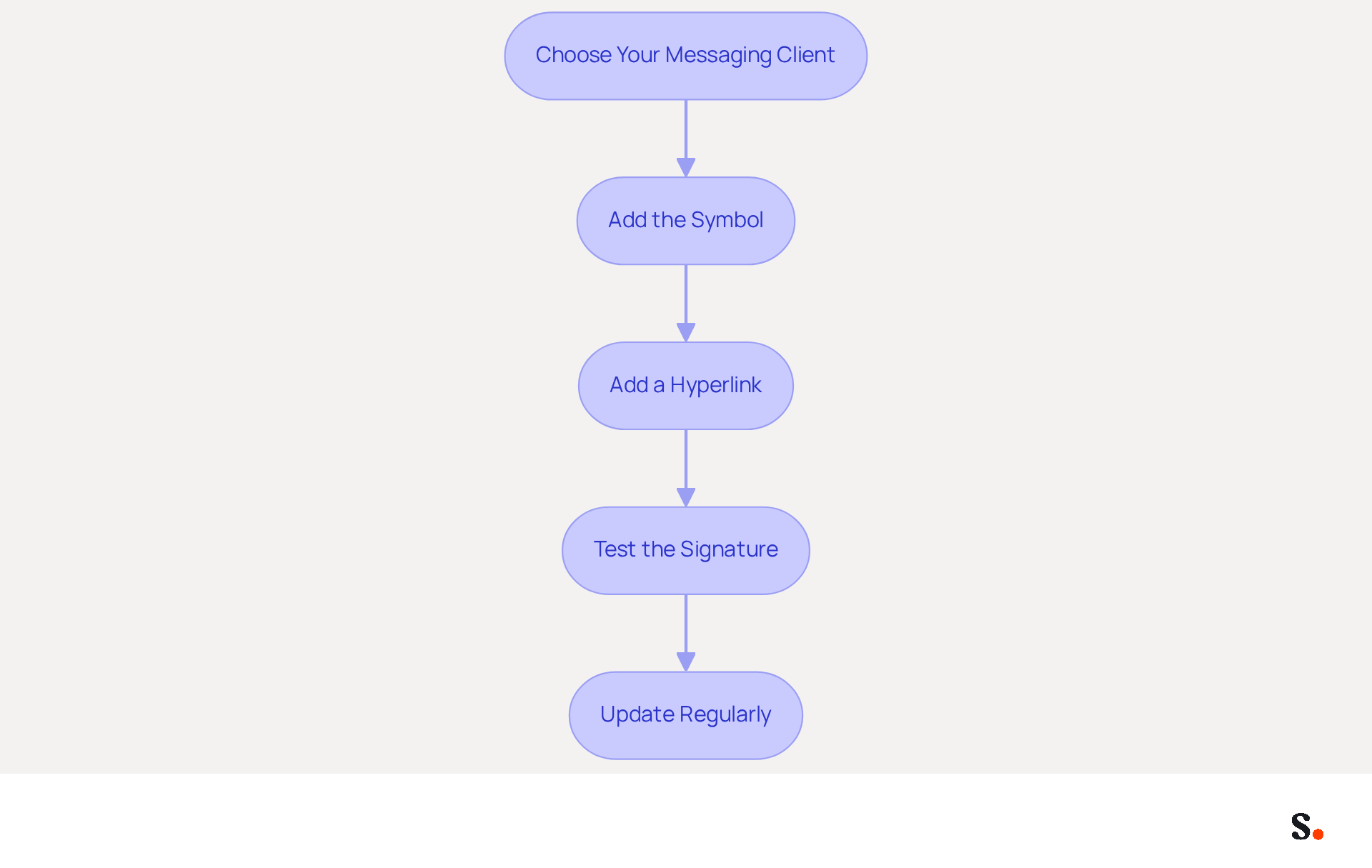
Incorporating a Facebook icon for email signature into your email signatures can significantly enhance your brand's visibility and engagement. With over 2.9 billion monthly active users, this platform is essential for connecting with your audience. By utilizing Scribe's seamless integration with Google Workspace, you can streamline managing your signatures, which can include a Facebook icon for email signature. Follow these steps for a seamless integration:
- Choose Your Messaging Client: The integration process may vary slightly depending on whether you use Outlook, Gmail, or another messaging client. Refer to your client’s documentation for specific instructions.
- Add the Symbol: In your email settings, include the Facebook symbol as an image. Ensure that the Facebook icon for email signature is hosted on a reliable server to prevent any broken links. The optimal symbol size is between 24px and 32px, with recommended spacing of 10 to 15px between symbols for a professional appearance. Arranging a Facebook icon for email signature along with other social media symbols at the bottom of your signature can also improve visual appeal and consistency.
- Add a Hyperlink: Connect the graphic to your social media page by highlighting the graphic and selecting the hyperlink option in your messaging client. Ensure the link directs to your official social media page, which can help expand reach and drive traffic, such as including a Facebook icon for email signature.
- Test the Signature: Send test messages to yourself and colleagues to ensure the icon appears correctly and the link functions as intended. Check how it displays on both desktop and mobile devices to ensure compatibility across platforms.
- Update Regularly: Keep your contact information refreshed with any changes to your Facebook page or branding. Regular updates ensure that your mark remains relevant and effective, enhancing your social presence and facilitating connections with recipients by incorporating a Facebook icon for email signature.
By utilizing Scribe's automated management of digital signatures, you save time as your teammates' information is synced, enabling effortless updates. Managing digital signatures manually can lead to errors and wasted time. This automation not only saves time but also ensures that your branding remains consistent and up-to-date. Ultimately, this integration can transform your email signatures into effective marketing tools that strengthen your connection with your audience.
Leverage the Facebook Icon to Boost Engagement and Traffic
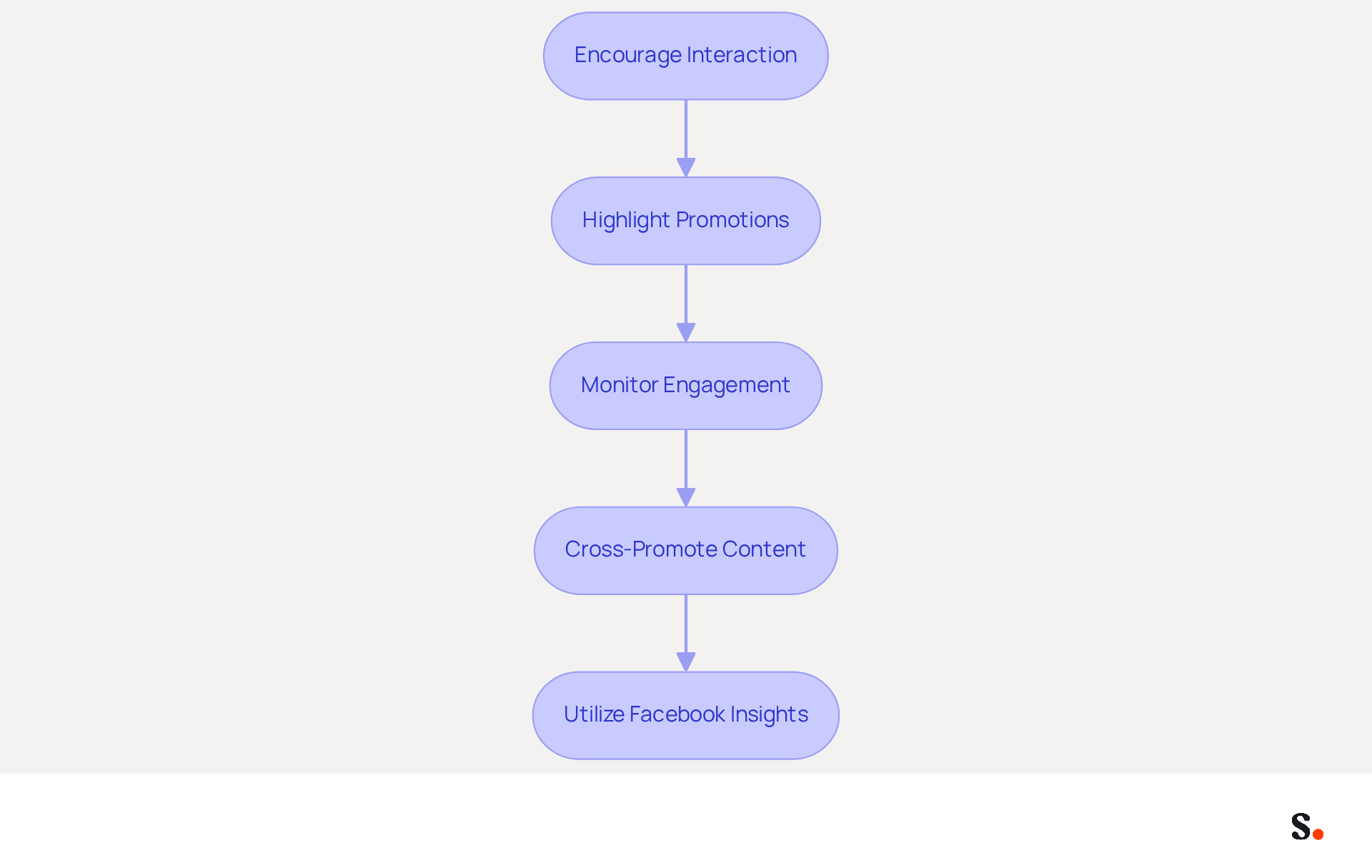
To enhance the effectiveness of the Facebook icon in your email signature, strategic implementation is essential:
- Encourage Interaction: Incorporate a clear call-to-action (CTA) near the social media symbol, such as 'Follow us on our platform for updates!' This encourages recipients to interact with your social media, strengthening their connection to your brand.
- Highlight Promotions: Many recipients overlook promotions in emails, missing opportunities to engage. Mentioning ongoing promotions in your email signature can help address this. This approach can motivate recipients to visit your social media page, where they can find the Facebook icon for email signature for further details.
- Monitor Engagement: Utilize analytics tools to track the number of clicks your social media icon receives. This information offers insights into the effectiveness of your message footer and allows for necessary adjustments to enhance performance.
- Cross-Promote Content: Share exclusive material or promotions on your social media page that are emphasized in your signature. This establishes a cohesive marketing strategy that drives traffic between your communications and social media, enhancing overall engagement.
- Utilize Facebook Insights: Leverage Facebook's analytics tools to gain a deeper understanding of your audience. Customizing your content based on these insights can greatly improve engagement and promote more interactions from your recipients.
By effectively utilizing CTAs, you can significantly enhance recipient interaction. Incorporating these strategies can lead to increased engagement rates, as shown by the fact that messages with a CTA can achieve a click-through rate of up to 7% (source: internal analytics). Moreover, utilizing buttons in CTAs can boost conversion rates by 28% (source: Campaign Monitor), making the design and placement of your social media icon essential for maximizing its effectiveness. For example, Cargo Crew effectively employed Facebook retargeting ads to share valuable content related to past purchases, achieving an impressive 29.9x return on ad spend (ROAS), illustrating the success of integrating social media strategies into communications. Ultimately, the strategic use of social media icons can transform your email communications into powerful engagement tools.
Avoid Common Mistakes with Facebook Icons in Email Signatures
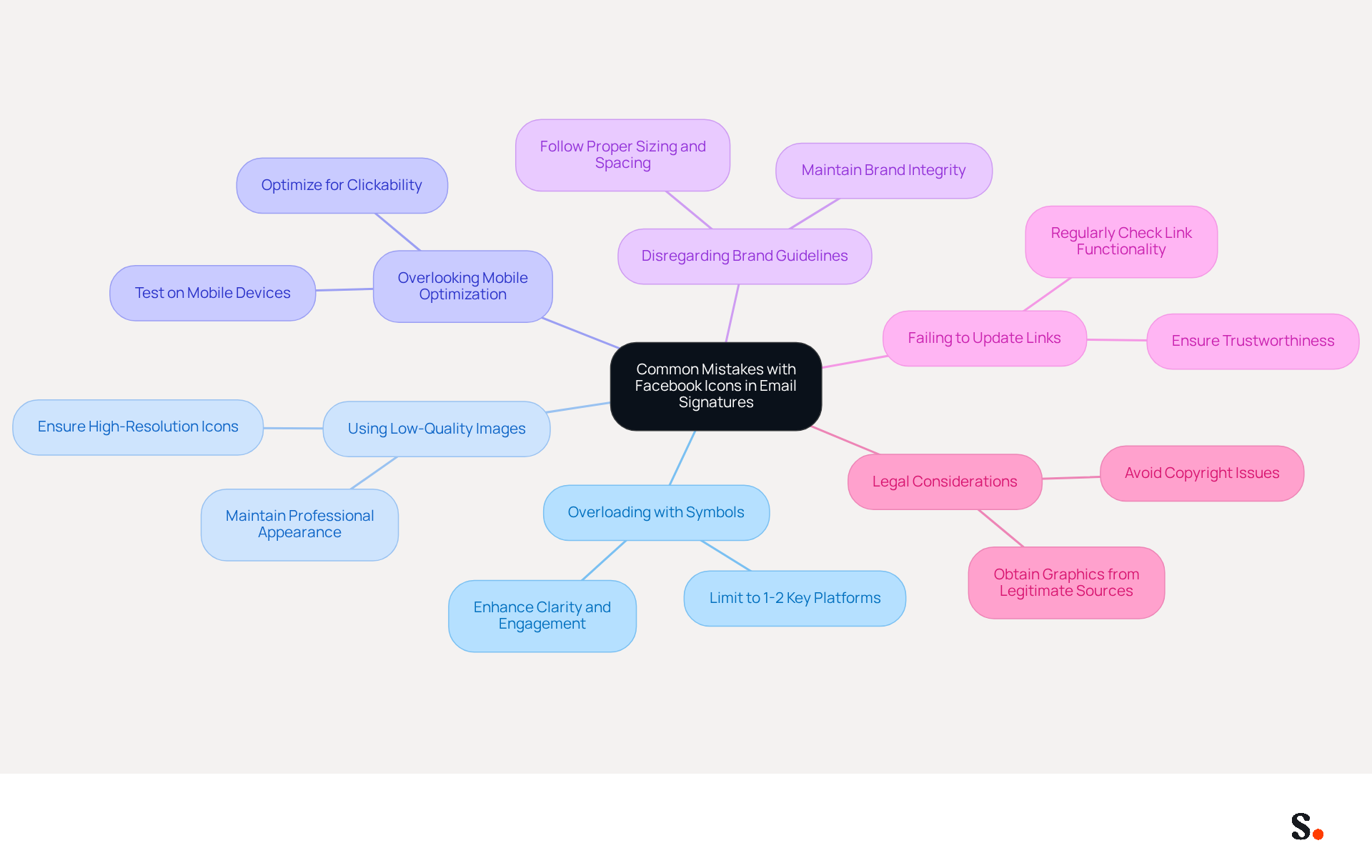
To maximize the effectiveness of your email signature, it is crucial to avoid common pitfalls that can undermine professionalism:
- Overloading with Symbols: Including too many social media symbols can clutter your signature and distract from your main message. Stick to one or two key platforms, such as LinkedIn and another option, to maintain focus. Limiting social media symbols to two or four enhances clarity and engagement.
- Using Low-Quality Images: Ensure that the social media symbol is high-resolution and clear. Low-quality images can make your brand appear unprofessional and may not display well on all devices. Maintaining high image quality is essential for a polished appearance and compliance with brand guidelines.
- Overlooking Mobile Optimization: Test your email footer on mobile devices to ensure that the social media symbol is visible and clickable. With 42% of all messages accessed on mobile devices, a poorly formatted signature can lead to lost engagement. Optimizing graphics for mobile enhances user experience and interaction.
- Disregarding Brand Guidelines: Always follow the brand standards of the platform when using their symbol. This includes proper sizing, spacing, and color usage to maintain brand integrity. Consistent branding can lead to a 22% increase in response rates, making adherence to guidelines crucial.
- Failing to Update Links: Regularly check that the link associated with your Facebook graphic is active and directs to the correct page. Broken links can frustrate recipients and diminish trust in your brand. Regular updates are necessary to ensure that your email signature remains a reliable point of contact.
- Legal Considerations: Ensure that you obtain social media graphics from legitimate sources to avoid copyright issues. Utilizing symbols without authorization can result in legal issues, so it’s crucial to adhere to the guidelines provided by the respective platforms.
By integrating Scribe into your management of digital signatures, you can automate the synchronization of your signatures with platforms like Aircall and Google Workspace. This ensures that updates to your team’s information appear instantly, saving you time and ensuring brand consistency across all communications. Scribe is also SOC 2 Type II certified and compliant with GDPR and CCPA, ensuring secure data handling. As Sophie Grant, an Email Signature Specialist, emphasizes, 'In an era where email serves as a primary communication tool, incorporating a Facebook icon for email signature is essential for enhancing brand visibility and engagement.' By ensuring your email signature is well-crafted, you not only enhance your brand's professionalism but also foster trust and engagement with your audience.
Conclusion
Integrating the Facebook icon into email signatures presents a strategic opportunity for brands to enhance visibility and engagement. By adhering to best practices, organizations can ensure that their email communications not only reflect their brand identity but also foster stronger connections with their audience. Using the Facebook icon effectively can turn an ordinary email footer into a powerful marketing tool that boosts traffic and engagement.
Key insights from this article highlight the importance of:
- Using official symbols
- Maintaining color consistency
- Ensuring clarity in design
Additionally, integrating the Facebook icon seamlessly into email signatures through platforms like Scribe can streamline management and ensure that branding remains consistent across all communications. Organizations often struggle with maintaining professionalism when email signatures are cluttered or poorly designed, so avoiding common pitfalls, such as overloading with symbols or using low-quality images, is essential for maintaining professionalism and trust.
Failing to leverage the Facebook icon effectively can lead to missed opportunities in brand engagement. By implementing these best practices, organizations can maximize their marketing efforts and create a lasting impression on their audience. By neglecting to utilize social media icons effectively, organizations risk diminishing their brand's impact and connection with their audience.
Frequently Asked Questions
Why is it important to choose the right Facebook icon for brand consistency in email signatures?
Choosing the right Facebook icon is crucial for aligning your social media symbols with your branding strategy, which helps effectively represent your brand and enhances visibility and engagement.
What are the best practices for using the Facebook icon in email signatures?
Best practices include using official symbols, maintaining color consistency with your brand, ensuring appropriate size and clarity, avoiding modifications to the symbol, limiting the number of symbols, and testing for visibility across different messaging clients.
What size should the Facebook icon be in an email signature?
The Facebook icon should typically be sized between 20-25 pixels square to maintain clarity without overwhelming the signature.
Can I modify the Facebook icon for my brand?
No, you should not alter the design of the Facebook icon, such as changing its shape or color, as this risks diluting your brand's message and could lead to legal risks.
How many social media symbols should I include in my email footer?
It is recommended to limit the number of social media symbols in your email footer to about five to maintain a clean layout and ensure better spacing.
Why is testing for visibility important before finalizing the email signature?
Testing for visibility is important to ensure the symbol displays correctly and is easily recognizable across various messaging clients and devices, which enhances sender trust.
How does using the Facebook icon in email signatures benefit brand visibility?
Using the Facebook icon can expand your reach and strengthen connections with your audience, contributing to a significant number of branded impressions monthly.
How does Scribe help maintain brand consistency in email signatures?
Scribe allows you to sync your Google Workspace, saving time and ensuring that updates to your team’s information are automatically reflected in your contact details, thus maintaining brand consistency effortlessly.
What certifications does Scribe have regarding data handling?
Scribe is SOC 2 Type II certified and complies with GDPR and CCPA, ensuring that data handling is secure and compliant.
List of Sources
- Choose the Right Facebook Icon for Brand Consistency
- 40+ Email Signature Statistics for 2026 (Data + Insights) (https://wavecnct.com/blogs/email-signature-statistics)
- Logo | Brand Resource Center (https://meta.com/brand/resources/facebook/logo?srsltid=AfmBOoqijtCdFmuquGDcMKEiRZGyKQDABEKu53Aa3CHhF4iz8o-f1tZp)
- Best Practices for Social Media Icon Email Signature Integration (https://scribe-mail.com/en-US/blog/best-practices-for-social-media-icon-email-signature-integration)
- Social Media Icons for Email Signatures - NEWOLDSTAMP - NEWOLDSTAMP (https://newoldstamp.com/blog/how-to-add-social-media-icons-to-email-signature)
- Best Practices for Using Social Icons in Email Signatures - Gimmio (https://blog.gimm.io/best-practices-for-using-social-icons-in-email-signatures)
- Integrate the Facebook Icon into Your Email Signature Effectively
- Social Media Icons for Email Signatures - NEWOLDSTAMP - NEWOLDSTAMP (https://newoldstamp.com/blog/how-to-add-social-media-icons-to-email-signature)
- How to Add Social Media Icons to Your Email Signature [+ Free Resources] (https://blog.hubspot.com/marketing/social-media-icons-for-email-signature)
- How to Create and Add Social Media Icons to Your Email Signature Like a Pro | Email Signature Rescue Blog (https://emailsignaturerescue.com/blog/how-to-add-social-media-icons-to-your-email-signature)
- How to Use the Facebook Icon in an Email Auto Signature (https://smallbusiness.chron.com/use-facebook-icon-email-auto-signature-29582.html)
- Insert hyperlinks to Facebook and X (formerly Twitter) in your Outlook email signature | Microsoft Support (https://support.microsoft.com/en-us/outlook/insert-hyperlinks-to-facebook-and-x-formerly-twitter-in-your-outlook-email-signature)
- Leverage the Facebook Icon to Boost Engagement and Traffic
- The Ultimate Guide to Email Signature Call-to-Action - NEWOLDSTAMP (https://newoldstamp.com/blog/the-ultimate-guide-to-email-signature-call-to-action)
- Facebook Adds Option to Send Marketing Emails via Pages App (https://socialmediatoday.com/news/facebook-adds-option-to-send-marketing-emails-via-pages-app/579003)
- 49 Top Email Marketing Statistics (https://forbes.com/advisor/business/software/email-marketing-statistics)
- How to use Facebook for Email Marketing - Klaviyo (https://klaviyo.com/blog/facebook-email-marketing)
- Email Signature Statistics: A Closer Look at Email Signatures in 2026 (https://mysignature.io/blog/email-signature-statistics)
- Avoid Common Mistakes with Facebook Icons in Email Signatures
- Professional Email Signature Etiquette Dos & Don’ts (https://blinq.me/blog/professional-email-signature-etiquette)
- Best Practices for Using Social Icons in Email Signatures - Gimmio (https://blog.gimm.io/best-practices-for-using-social-icons-in-email-signatures)
- 40+ Email Signature Statistics for 2026 (Data + Insights) (https://wavecnct.com/blogs/email-signature-statistics)
- How to Optimize Your Email Signature for Mobile Devices - Gimmio (https://blog.gimm.io/how-to-optimize-your-email-signature-for-mobile-devices)
- Best Practices for Social Media Icon Email Signature Integration (https://scribe-mail.com/en-US/blog/best-practices-for-social-media-icon-email-signature-integration)
Get started with Scribe
See why teams switch to Scribe
Free 14-day trial — no credit card.