Optimize Your Email Signatures with Office 365 for Brand Consistency
In an era dominated by digital communication, many businesses underestimate the impact of their email signatures on brand identity. Email signatures serve as a
Sophie Grant
Email Signature Specialist, Scribe
Introduction
In an era dominated by digital communication, many businesses underestimate the impact of their email signatures on brand identity. Email signatures serve as a powerful tool for reinforcing brand consistency and enhancing marketing efforts.
Let’s explore how to optimize email signatures within Office 365 for maximum impact, examining how organizations can leverage these digital identifiers to maintain professionalism while driving engagement and marketing success.
By optimizing email signatures, businesses can transform a simple communication tool into a strategic asset that enhances brand visibility and engagement.
Create On-Brand Signature Templates for Consistency
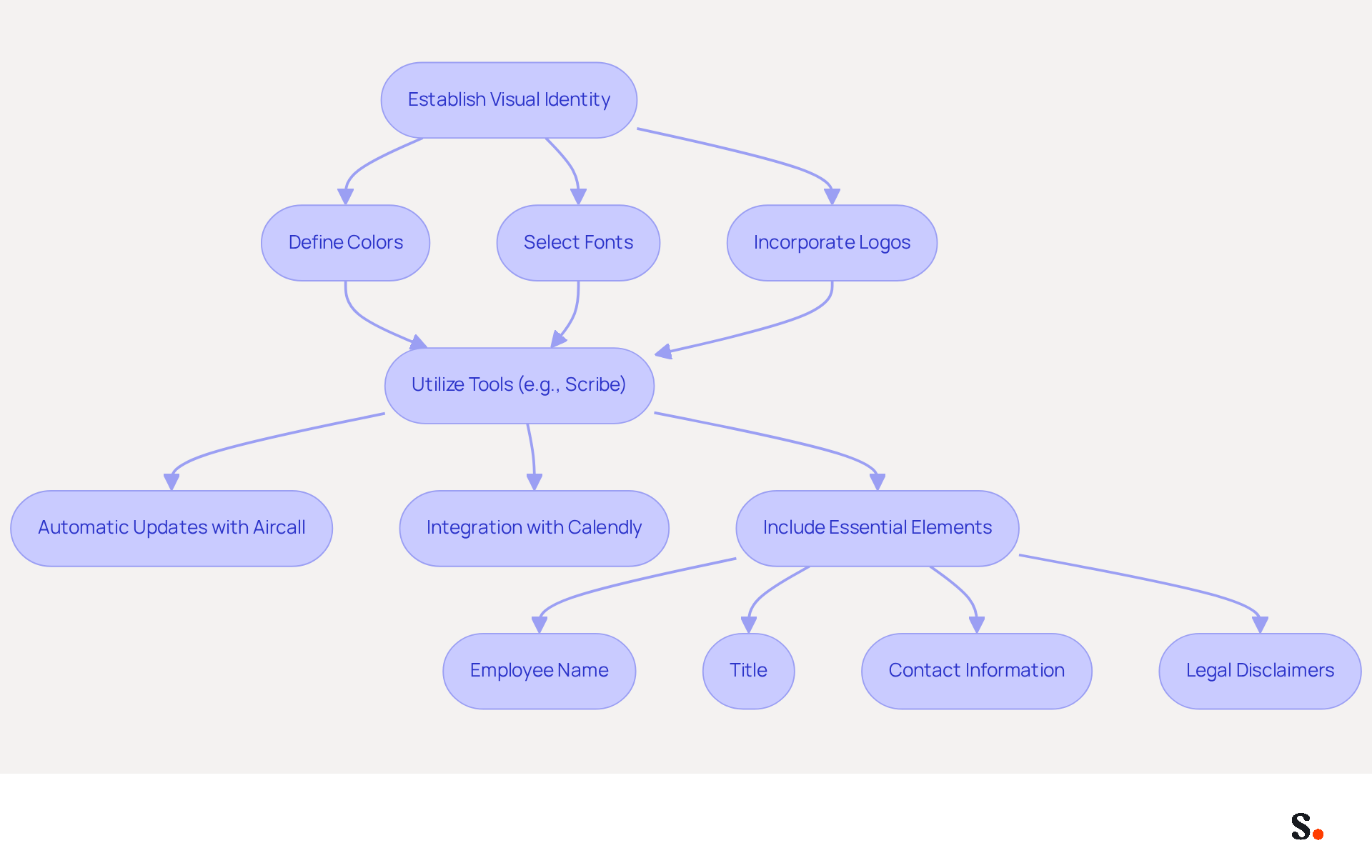
To create on-message unique templates, it is essential to establish a clear visual identity that reflects your brand's professionalism, including colors, fonts, and logos. Utilize tools such as Scribe to create templates that conform to your standards. Scribe automatically updates your correspondence identifiers with any changes made in your Aircall setup, ensuring seamless synchronization and consistency. Additionally, Scribe's integration with Calendly allows for automatic updates to your signatures when scheduling changes occur, reinforcing your brand's professional image.
Ensure that each template includes essential elements such as the employee's name, title, and contact information, along with any legal disclaimers. By standardizing these elements, you can maintain a professional appearance in every message sent. For example, a company like On Deck has successfully implemented on-brand templates, resulting in improved brand consistency and recognition among clients.
Regularly review and update these templates to reflect any changes in branding or company information. Recent trends show that 78% of marketers agree on the significance of consistent branding in digital communications, emphasizing the necessity for organizations to prioritize this element in their messaging.
Leverage Email Signatures as Marketing Tools
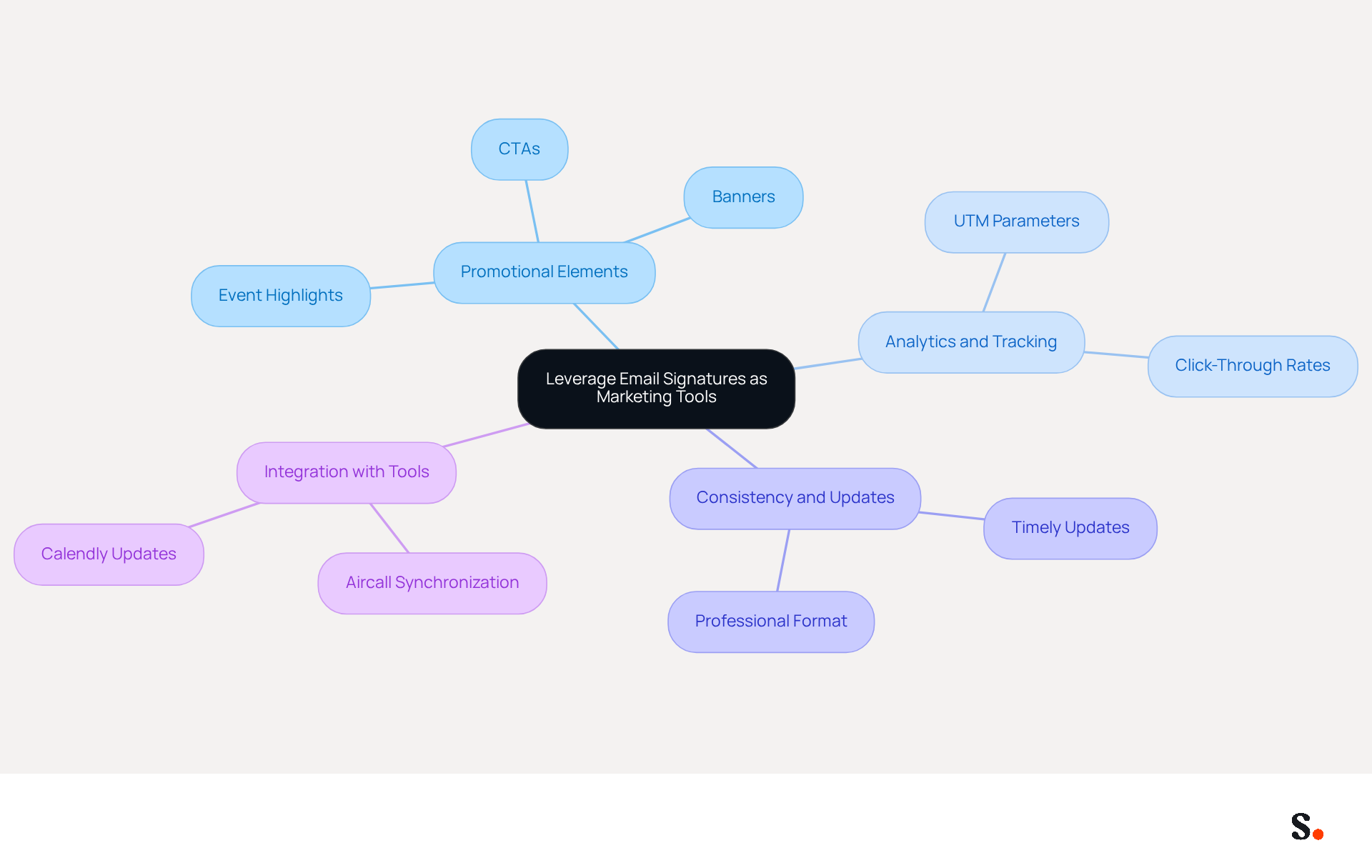
Integrating promotional elements into digital identifiers is essential for maximizing marketing effectiveness. To effectively utilize digital identifiers as marketing tools, businesses should incorporate promotional banners or calls-to-action (CTAs) directly within the identifier. Highlighting upcoming webinars, special offers, or new product launches can significantly enhance engagement.
Scribe's features allow businesses to schedule marketing campaigns through digital communications, keeping messaging timely and relevant. For instance, a case analysis from Payfit showed that adding promotional elements into communication footers led to a 20% rise in event registrations.
Regularly analyzing these marketing elements with analytics tools, like UTM parameters for tracking clicks and traffic sources, is vital for refining strategies and maximizing ROI. With promotional banners achieving click-through rates that can vary from 1.5% to over 3% for well-targeted campaigns, this can lead to significant increases in lead generation and customer engagement.
By keeping a consistent format while adding campaign elements, businesses can maintain professionalism and clarity, which drives better engagement. Timely updates to promotional banners are essential; if they aren't updated, businesses risk losing audience trust and engagement.
Furthermore, with Scribe's automated synchronization of communications identifiers with Aircall, any modifications made in your Aircall settings will automatically reflect in your identifiers, enhancing brand consistency across all interactions. Moreover, the smooth integration of Calendly with Scribe enables automatic updates to digital identifiers, guaranteeing that all promotional components are up-to-date and consistent with your marketing initiatives.
Automate Signature Management for Efficiency
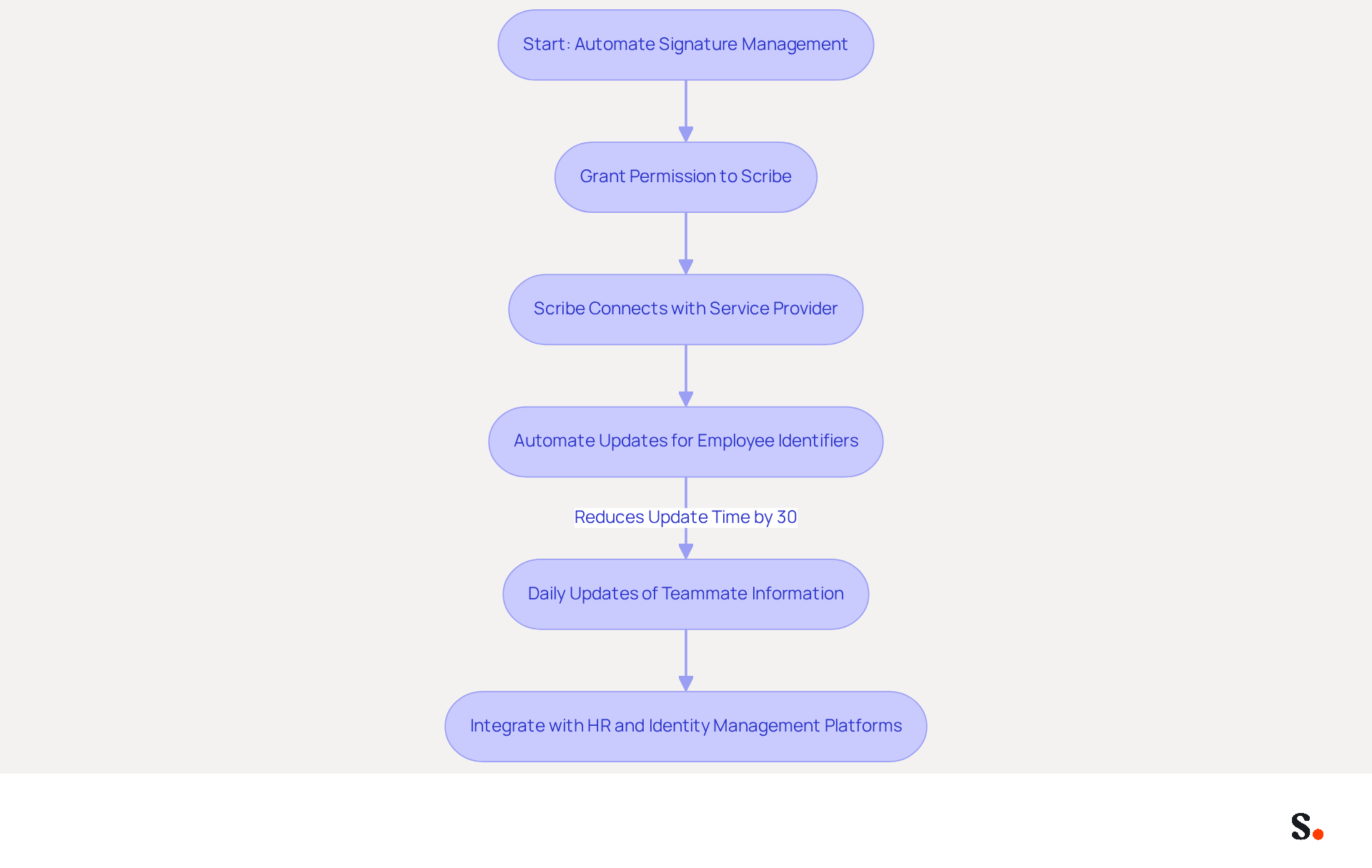
Automating the management of digital correspondence is crucial for enhancing operational efficiency. To enable one-click synchronization, you must grant permission to Scribe to connect with your service provider, requiring Super Admin access. Scribe automates updates for all employee identifiers, ensuring immediate reflection of any changes in branding or contact details. This automation eliminates the need for manual updates, significantly reducing the risk of errors and inconsistencies.
For example, Gorillas utilized Scribe's automation capabilities, resulting in a 30% reduction in update time, as demonstrated by their operational metrics. Additionally, Scribe automatically updates teammate information daily, ensuring that the marks are always current.
Integrate your electronic approval management system with HR and identity management platforms for automatic updates as employee information changes. With Scribe's SOC 2 Type II compliance, you can be assured that your data is secure while enhancing your branding efforts. This integration not only secures your data but also streamlines your branding efforts, positioning your organization for success.
Integrate Signature Management with Microsoft 365
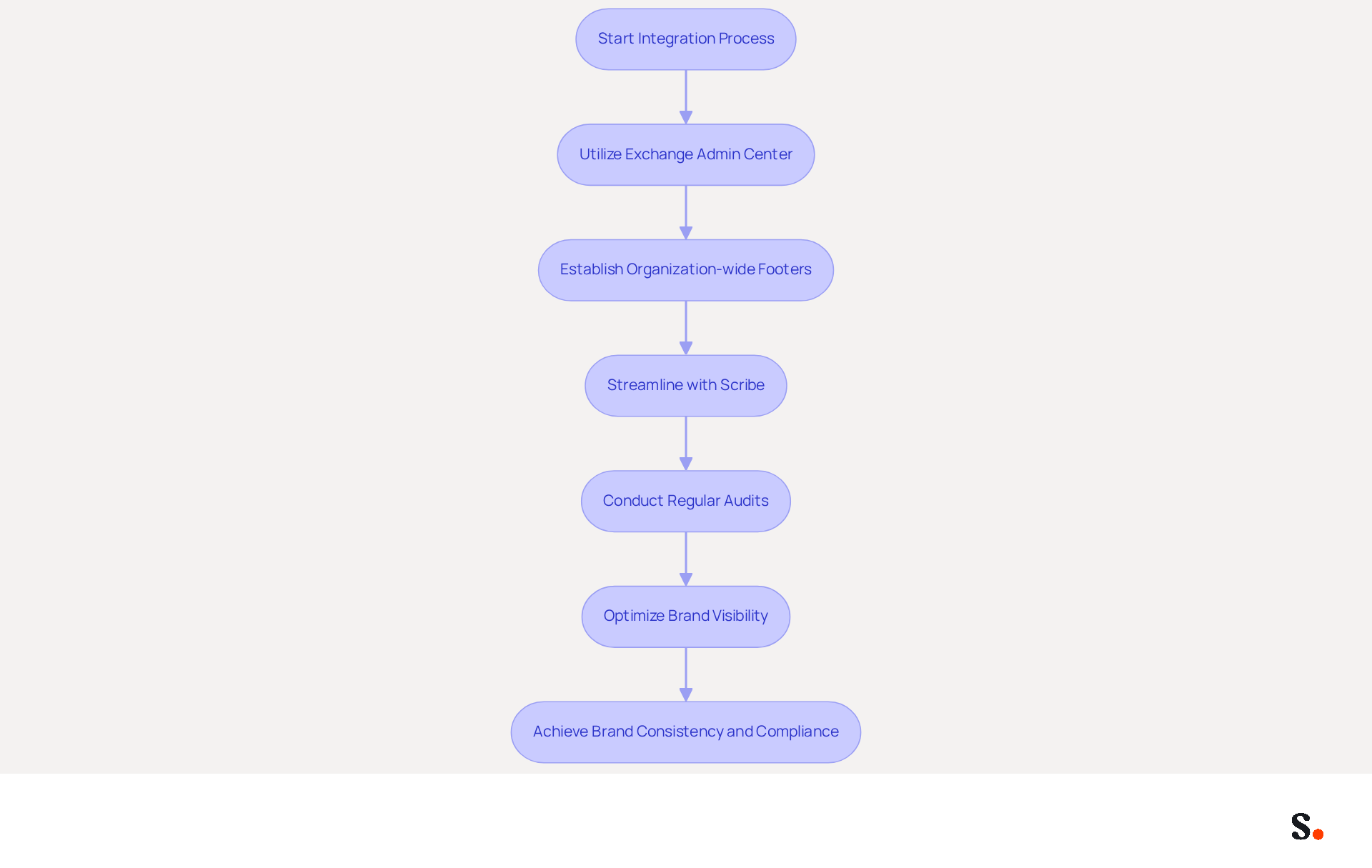
Effective management of email footers is essential for maintaining brand consistency across communications. Integrating the management of footers with signature office 365 involves utilizing the Exchange Admin Center to establish organization-wide footers, ensuring that every message sent from your domain maintains a consistent branding message. Scribe streamlines this integration, allowing for straightforward updates and effective management of user approvals. For instance, Sprig successfully executed their communication management using signature office 365, which led to a measurable increase in message consistency and adherence to compliance standards. Regular audits of the integration settings are essential to align with any updates in company policies or branding guidelines.
Statistics indicate that only 18% of U.S. organizations currently utilize a centralized communication solution, emphasizing the necessity for effective management tools. By utilizing Scribe, businesses can not only optimize their management of sign-offs but also convert digital signatures into impactful marketing tools, creating substantial impressions for their identity each day.
As organizations increasingly recognize the importance of email signatures in their marketing strategies, integrating signature office 365 management becomes a critical step in optimizing brand visibility and compliance. Organizations that overlook this integration risk diluting their brand message and missing out on valuable marketing opportunities.
Conclusion
Optimizing email signatures within Office 365 is not just beneficial; it is essential for organizations aiming to maintain brand consistency and enhance their marketing effectiveness. By leveraging tools like Scribe, organizations can create on-brand signature templates, automate updates, and seamlessly integrate marketing elements into their digital communications. This strategy not only helps maintain a professional image but also turns email signatures into effective marketing tools that boost engagement and generate leads.
Key strategies discussed include:
- The importance of establishing a clear visual identity
- Utilizing promotional banners
- Automating signature management to ensure accuracy and efficiency
The integration of Scribe with Office 365 allows for streamlined updates and compliance with security standards, such as SOC 2 Type II, ensuring that organizations can confidently manage their branding efforts. Notable examples from companies like On Deck and Gorillas highlight the significant advantages of adopting these best practices.
However, many organizations struggle to effectively manage their email signatures, leading to inconsistencies and missed opportunities. By adopting these best practices and utilizing Scribe's capabilities, organizations can enhance their brand visibility, improve operational efficiency, and ultimately achieve a measurable return on investment from their email communications. By neglecting to optimize email signatures, organizations risk losing valuable engagement opportunities and undermining their brand's impact.
Frequently Asked Questions
What is the importance of creating on-brand signature templates?
Creating on-brand signature templates is essential for establishing a clear visual identity that reflects your brand's professionalism, which includes consistent use of colors, fonts, and logos.
How can Scribe assist in creating signature templates?
Scribe helps create templates that conform to your branding standards and automatically updates your correspondence identifiers with any changes made in your Aircall setup, ensuring seamless synchronization and consistency.
What integration does Scribe offer to enhance signature updates?
Scribe integrates with Calendly, allowing for automatic updates to your signatures when scheduling changes occur, which reinforces your brand's professional image.
What essential elements should be included in each signature template?
Each signature template should include the employee's name, title, contact information, and any legal disclaimers to maintain a professional appearance in every message sent.
Can you provide an example of a company that successfully implemented on-brand templates?
On Deck is an example of a company that has successfully implemented on-brand templates, resulting in improved brand consistency and recognition among clients.
How often should signature templates be reviewed and updated?
Signature templates should be regularly reviewed and updated to reflect any changes in branding or company information.
What do recent trends indicate about the significance of consistent branding in digital communications?
Recent trends show that 78% of marketers agree on the significance of consistent branding in digital communications, highlighting the necessity for organizations to prioritize this element in their messaging.
List of Sources
- Create On-Brand Signature Templates for Consistency
- Why Email Signatures Must Be In Your 2026 Marketing Plan | Rocketseed (https://rocketseed.com/blog/2026-marketing-plan-email-signatures)
- Email Signature Trends to Watch in 2026 | The Future of Email Signatures (https://signandgo.io/blog/email-signature-trends-to-watch-in-2026)
- 40+ Email Signature Statistics for 2026 (Data + Insights) (https://wavecnct.com/blogs/email-signature-statistics)
- Top email signature trends for companies in 2026 (https://bybrand.io/blog/trends-email-signatures)
- Best Practices for Outlook Email Signature Templates That Boost Engagement (https://scribe-mail.com/en-US/blog/best-practices-for-outlook-email-signature-templates-that-boost-engagement)
- Leverage Email Signatures as Marketing Tools
- 2026 Marketing Trends: Email Signatures as a Marketing Tool (https://bluechiptt.com/blog/5-marketing-trends-for-2026-and-how-your-email-signature-fits-in)
- Email Signatures for Event Promotions & Webinar Registrations (https://blog.sigsync.com/how-to-use-email-signatures-for-event-promotions-and-webinar-registrations.html)
- Email Signature Event Promotion: A Practical Guide to Driving Registrations from Everyday Emails (https://bulksignature.com/blog/email-signature-event-promotion-a-practical-guide-to-driving-registrations-from-everyday-emails)
- Email signature banner: the guide to transform your emails into campaigns (https://signitic.com/en/resources/campaign-banners-in-the-email-signature-the-marketing-guide)
- Examples of marketing campaigns to set up via your email signature (https://signitic.com/en/resources/examples-of-marketing-campaigns-to-set-up-via-your-email-signature)
- Automate Signature Management for Efficiency
- Email Signature Essentials: Key Statistics to Know for 2023 (https://blog.hubspot.com/marketing/email-signature-statistics)
- Automating Email Signatures: How IT Teams Streamline Processes & Reduce Risk (https://exclaimer.com/blog/streamlining-it-processes-automated-email-signatures)
- 40+ Email Signature Statistics for 2026 (Data + Insights) (https://wavecnct.com/blogs/email-signature-statistics)
- Email signature statistics and trends in 2024 (https://wisestamp.com/blog/email-signature-statistics)
- Email Automation Adoption: Stats, Time Savings & Reality | Super Mailer (For Gmail) (https://supermailer.koira.ai/blog/email-automation-adoption-stats-time-savings)
- Integrate Signature Management with Microsoft 365
- Create Organization-wide Email Signatures and Disclaimers - Microsoft 365 admin (https://learn.microsoft.com/en-us/microsoft-365/admin/setup/create-signatures-and-disclaimers?view=o365-worldwide)
- How to Manage Email Signatures in Microsoft 365 for Your Entire Company (2026 Guide) (https://bulksignature.com/blog/microsoft-365-email-signature-management)
- What’s New With Email Signature in 2026? | Crossware365 (https://crossware365.com/blog/whats-new-with-email-signature-in-2026)
- New email signature management and editor features in Outlook on the web | Topedia Blog (https://blog-en.topedia.com/2026/01/new-email-signature-management-and-editor-features-in-outlook-on-the-web)
- Outlook vs Microsoft 365 Email Signature Management Guide (https://exclaimer.com/email-signature-handbook/outlook-microsoft-365-email-signature-management-setup-guide)
Get started with Scribe
Manage signatures across your whole team
Free 14-day trial — no credit card.