Sync Your Outlook Signature Across Devices: A Step-by-Step Guide
Maintaining a consistent email signature across devices is essential for establishing professionalism and brand identity in digital communications. As
Sophie Grant
Email Signature Specialist, Scribe
On this page
- Introduction
- Understand the Importance of Syncing Outlook Signatures
- Explore Manual and Automated Syncing Methods
- Manual Syncing
- Automated Syncing with Scribe
- Troubleshoot Common Syncing Issues
- Signature Not Syncing
- Signature Formatting Issues
- Signature Missing on Mobile
- Additional Insights
- Utilize Tools for Enhanced Signature Management
- Scribe
- Conclusion
- Frequently Asked Questions
- List of Sources
Introduction
Maintaining a consistent email signature across devices is essential for establishing professionalism and brand identity in digital communications. As organizations increasingly rely on email for outreach, the importance of a uniform signature cannot be overstated; it enhances trust among recipients and streamlines communication efforts.
Despite the importance of consistency, many professionals struggle to implement it effectively across devices. How can one effectively sync their Outlook signature across multiple devices without losing the integrity of their branding?
This guide will provide actionable strategies to overcome these challenges, including the powerful capabilities of Scribe, to ensure that every email sent reflects a cohesive and professional image.
Understand the Importance of Syncing Outlook Signatures
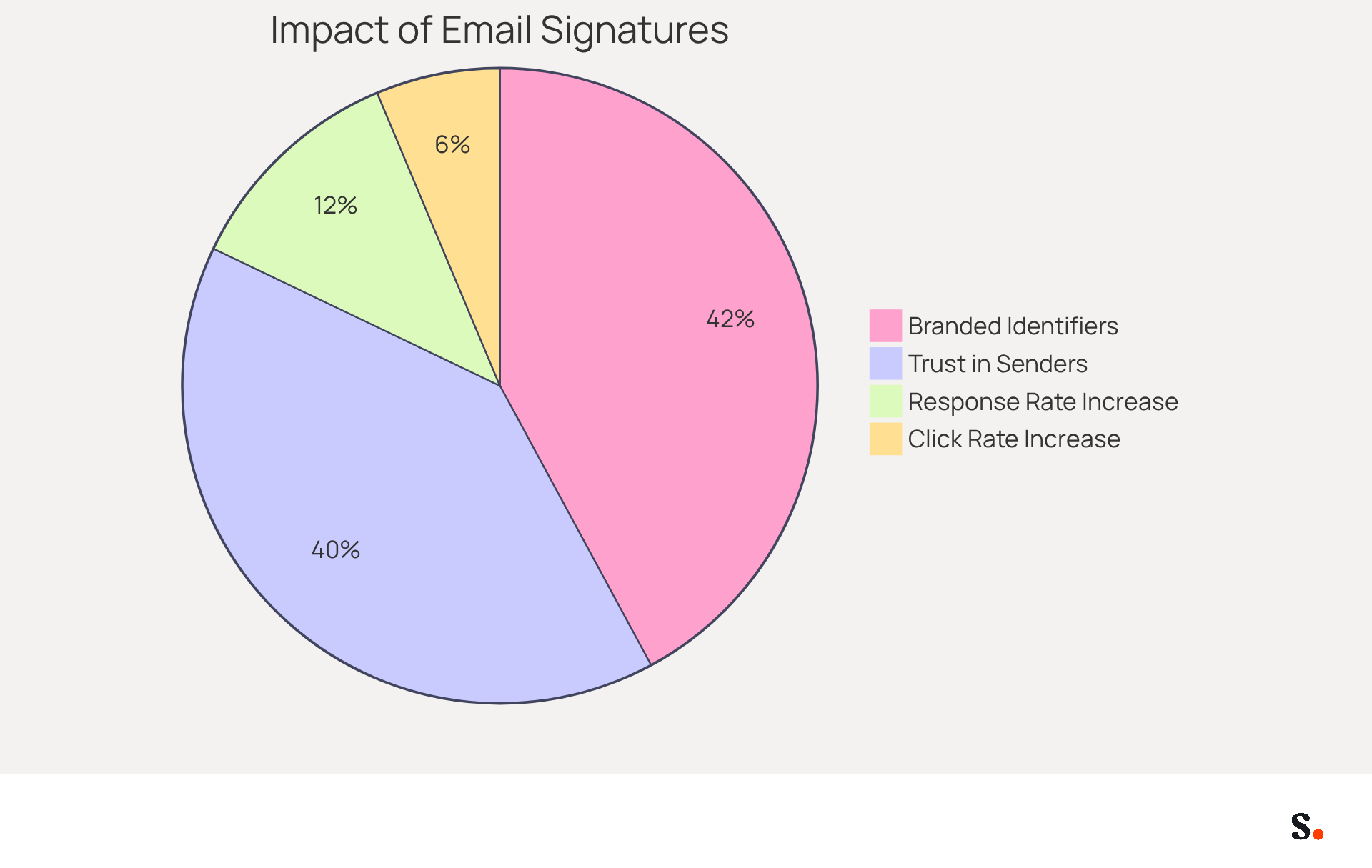
It is crucial to sync Outlook signature across devices to maintain a consistent email template and project a professional image in all communications. A uniform mark not only strengthens your brand identity but also ensures that recipients receive essential contact information consistently. This consistency helps eliminate confusion that may arise from varying marks, which can lead to miscommunication and diminish professionalism. In fact, 80% of businesses consider a branded electronic identifier a crucial factor for establishing trust, while 76% of recipients report heightened trust in the sender when a consistent mark is used.
In addition, a consistent approach to digital identifiers enhances brand trustworthiness and improves efficiency in online communications. Centralized management of approvals ensures adherence to branding standards and reduces the workload for IT teams, saving an average of two hours per employee each year. Research indicates that organizations employing consistent messaging formats see a 22% boost in response rates and a notable increase in website click rates, from 3% to 15%. By adopting a streamlined approach to email management, businesses can significantly enhance their communication strategies and foster stronger relationships with their audience.
Explore Manual and Automated Syncing Methods
To maintain consistency in your email signatures across devices, consider both manual and automated syncing methods:
Manual Syncing
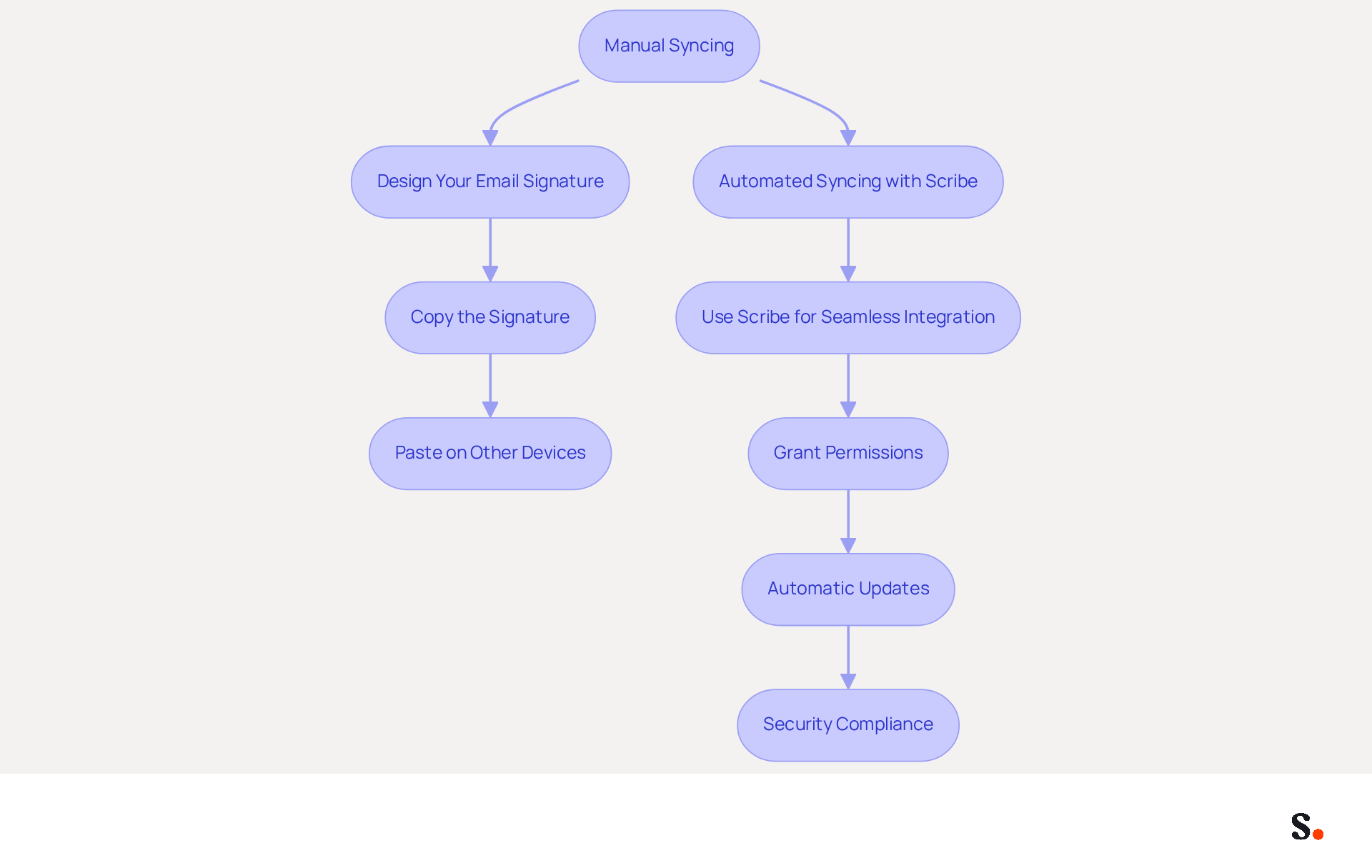
- Design Your Email Signature: Start by designing your signature in Outlook on your desktop. Go to
File > Options > Mail > Signaturesto create your personal signature. - Copy the Signature: After designing your signature, simply copy it to your clipboard.
- Paste on Other Devices: Open Outlook on your other devices (mobile or web) and navigate to the settings for your email block. Paste the copied signature into the designated field.
Automated Syncing with Scribe
- Use Scribe for Seamless Integration: By syncing your Google Workspace with Scribe, you can automate the management of your signature configurations. This synchronization process streamlines updates, ensuring efficiency.
- Grant Permissions: To enable synchronization, ensure you are a Super Admin of your provider and allow Scribe access to connect. You can choose which teammates to sync, ensuring that only relevant data is shared.
- Automatic Updates: Any changes made in your Google Workspace, such as updates to job positions or group changes, will automatically reflect in the application without any manual input. This guarantees that your messages are consistently current across all platforms.
- Security Compliance: The platform is SOC 2 Type II compliant, guaranteeing that your data is managed securely during synchronization. This compliance is crucial for maintaining brand integrity and protecting sensitive information.
By grasping these techniques, particularly the automated syncing features of Scribe, you can select the one that best suits your workflow and effectively sync Outlook signature across devices to ensure your email branding remains consistent.
Troubleshoot Common Syncing Issues
Syncing issues can disrupt your ability to sync Outlook signature across devices, despite having the best intentions. Here are some common problems and their solutions:
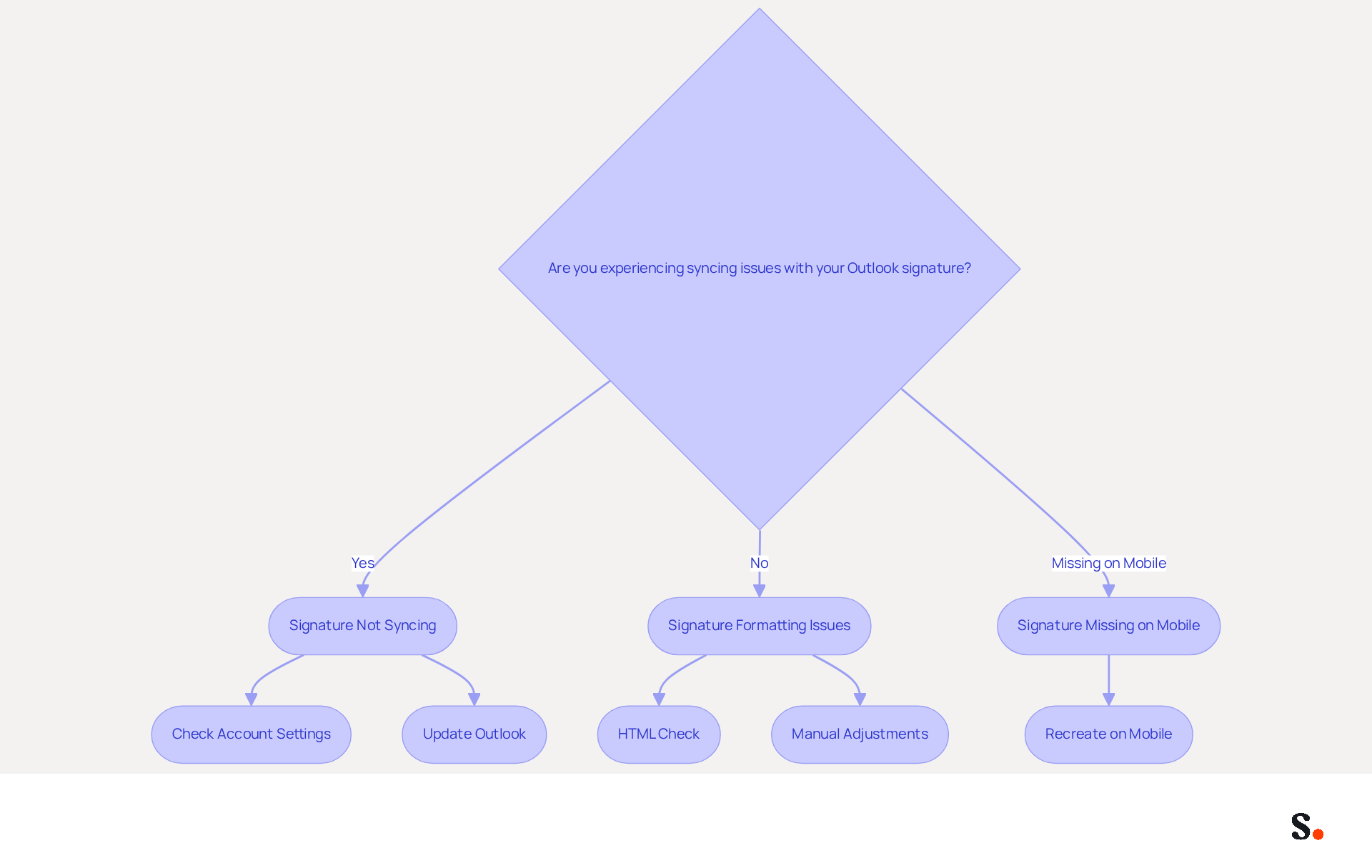
Signature Not Syncing
- Check Account Settings: Ensure you are logged into the same Microsoft account on all devices. If not, the process to sync Outlook signature across devices will not occur.
- Update Outlook: Outdated software can lead to problems that affect your ability to sync Outlook signature across devices. Navigate to
File > Office Account > Update Options > Update Nowto ensure you have the latest version.
Signature Formatting Issues
- HTML Check: Check if you are using HTML formatting, as this can cause your signature to look different across platforms. Some gadgets may not support certain HTML elements, which can lead to inconsistencies.
- Manual Adjustments: You may need to manually modify the formatting on each gadget to ensure consistency.
Signature Missing on Mobile
- Recreate on Mobile: Many users find their signatures missing on mobile devices, leading to frustration. If your signature does not appear on your mobile device, you may need to manually recreate it in the Outlook app. Go to
Settings > Signatureand paste your mark there.
Additional Insights
- Statistics indicate that 42% of organizations do not track email signature performance, which can hinder your ability to measure engagement effectively.
- Additionally, a company with 100 employees produces roughly 60,000-80,000 branded impressions each month, highlighting the significance of maintaining consistent branding across platforms.
- By resolving these issues, you can ensure your branding remains strong and recognizable.
Utilize Tools for Enhanced Signature Management
To further streamline your email signature management, consider utilizing specialized tools:
Scribe
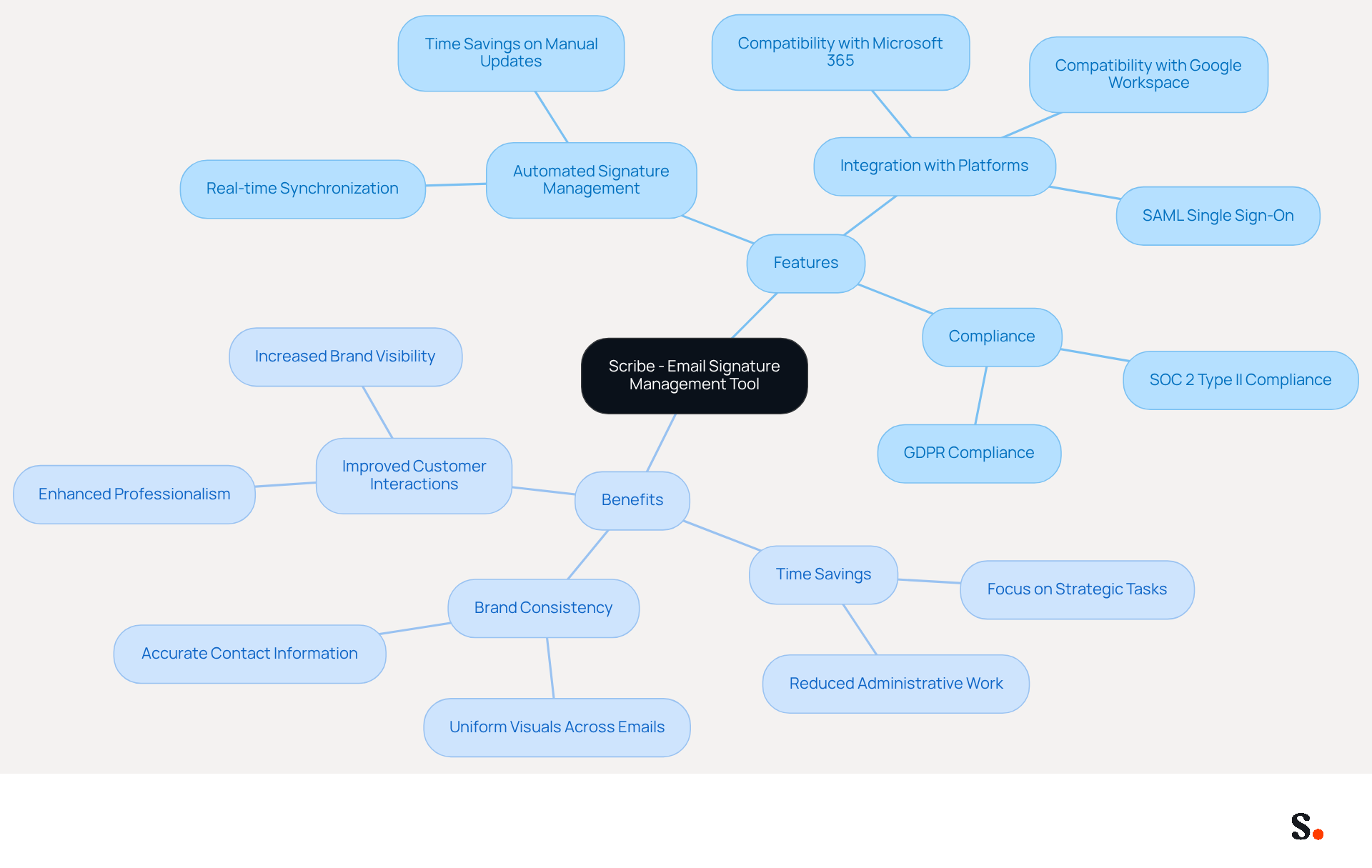
- Automated Signature Management: Scribe automates the creation and management of email signatures, ensuring consistency across all devices with just a few clicks. This automation saves valuable time on manual updates, enabling teams to concentrate on strategic tasks. With Scribe, your teammates' identification details are always synced with your business phone system, and any modifications in your connected source are automatically updated, ensuring real-time synchronization. Furthermore, Scribe is SOC 2 Type II compliant, guaranteeing that your data is managed securely, which is essential for maintaining trust and compliance in your communications.
- Integration with Platforms: It integrates seamlessly with popular tools like Microsoft 365 and Google Workspace, making it easy to manage email footers across different platforms. This ensures that every team member has up-to-date and compliant identifiers, reinforcing brand identity in every correspondence. Furthermore, the platform supports SAML single sign-on integration, providing secure access through your identity provider, and is GDPR compliant, ensuring that your data practices meet regulatory standards.
By utilizing Scribe, you can improve your management process for communications, allowing you to sync your outlook signature across devices and ensure that your branding remains consistent and professional in all interactions. The effectiveness of automated email signature management tools is evident in case studies where organizations have reported increased brand visibility and improved customer interactions, showing how these solutions enhance brand visibility and customer interactions. Investing in automated solutions not only streamlines processes but also elevates your brand's presence in every communication.
Conclusion
Maintaining a consistent Outlook signature across devices is vital for projecting a professional image and reinforcing brand identity. By ensuring that every email sent carries the same signature, organizations can enhance trust and clarity, ultimately leading to improved engagement and response rates. This consistency is crucial for establishing credibility and fostering effective communication.
The article outlines both manual and automated methods for syncing Outlook signatures, emphasizing the efficiency of using Scribe for seamless integration. Manual methods, while effective, can lead to inconsistencies and wasted time, whereas Scribe offers a streamlined solution that not only saves time but also ensures compliance with security standards like SOC 2 Type II, GDPR, and CCPA. With Scribe, organizations can easily automate updates and keep their brand consistent, allowing marketing teams to focus on strategic initiatives rather than administrative tasks.
In conclusion, syncing Outlook signatures across devices is a strategic advantage that enhances branding and communication. Organizations should prioritize adopting tools like Scribe to improve their email signature management, ensuring that every communication reflects their brand accurately and professionally. Investing in automated solutions not only enhances branding but also strengthens relationships with clients and stakeholders. Embrace the power of consistent branding in your communications and watch as it transforms your professional interactions.
Frequently Asked Questions
Why is it important to sync Outlook signatures across devices?
Syncing Outlook signatures across devices is important to maintain a consistent email template and project a professional image in all communications. It strengthens brand identity and ensures recipients receive essential contact information consistently.
How does a uniform email signature affect brand trust?
A uniform email signature enhances brand trustworthiness, as 80% of businesses consider a branded electronic identifier crucial for establishing trust. Additionally, 76% of recipients report heightened trust in the sender when a consistent mark is used.
What are the benefits of having a consistent approach to digital identifiers?
A consistent approach to digital identifiers improves efficiency in online communications, enhances brand trustworthiness, and ensures adherence to branding standards. It also reduces the workload for IT teams.
How much time can organizations save by managing email signatures centrally?
Centralized management of email signatures can save an average of two hours per employee each year.
What impact does consistent messaging have on response rates and website click rates?
Organizations employing consistent messaging formats see a 22% boost in response rates and an increase in website click rates from 3% to 15%.
How can businesses enhance their communication strategies?
By adopting a streamlined approach to email management and ensuring consistent branding, businesses can significantly enhance their communication strategies and foster stronger relationships with their audience.
List of Sources
- Understand the Importance of Syncing Outlook Signatures
- Email signature statistics and trends in 2024 (https://wisestamp.com/blog/email-signature-statistics)
- Exclaimer Research: 67% of Marketers Expect Email Signatures to Support With Lead Gen In 2023 (https://businesswire.com/news/home/20230612141095/en/Exclaimer-Research-67-of-Marketers-Expect-Email-Signatures-to-Support-With-Lead-Gen-In-2023)
- The impact of email signatures on your branding (https://signitic.com/en/resources/the-impact-of-email-signatures-on-your-branding)
- Email signature statistics: Why every business should optimize their email signatures — Stripo.email (https://stripo.email/blog/email-signature-statistics-why-every-business-should-optimize-their-email-signatures)
- 40+ Email Signature Statistics for 2026 (Data + Insights) (https://wavecnct.com/blogs/email-signature-statistics)
- Explore Manual and Automated Syncing Methods
- 40+ Email Signature Statistics for 2026 (Data + Insights) (https://wavecnct.com/blogs/email-signature-statistics)
- Email Signatures Not Syncing | Microsoft Community Hub (https://techcommunity.microsoft.com/discussions/microsoft-365/email-signatures-not-syncing/3214931)
- Synchroniseer je Outlook-handtekening over al je apparaten (https://mica.nl/en/outlook-signature-syncing-across-devices?srsltid=AfmBOooYOZY7-ECkD5o42RpiKvYhmPAhoTs117pWfe8tw3TpWfm3_XjY)
- Managing Outlook Signatures Across Microsoft 365 Devices | Microsoft Community Hub (https://techcommunity.microsoft.com/discussions/outlookgeneral/managing-outlook-signatures-across-microsoft-365-devices/4521215)
- Signatures are not syncing between Outlook Desktop and Outlook Web App | Microsoft Support (https://support.microsoft.com/en-us/support/known-issues/signatures-are-not-syncing-between-outlook-desktop-and-outlook-web-app)
- Troubleshoot Common Syncing Issues
- 40+ Email Signature Statistics for 2026 (Data + Insights) (https://wavecnct.com/blogs/email-signature-statistics)
- Fix: Outlook Signatures Not Syncing Between Desktop & Web App (https://ptg.co/post/outlook-signatures-not-syncing-between-desktop-and-web-app)
- Signatures are not syncing between Outlook Desktop and Outlook Web App | Microsoft Support (https://support.microsoft.com/en-us/support/known-issues/signatures-are-not-syncing-between-outlook-desktop-and-outlook-web-app)
- Fix: Outlook Signatures Not Syncing Between Desktop & Web App | The ProActive Technology Group (https://linkedin.com/posts/proactivetg_fix-outlook-signatures-not-syncing-between-activity-7292234882330603522-n_fG)
- Email Signatures Not Syncing | Microsoft Community Hub (https://techcommunity.microsoft.com/discussions/microsoft-365/email-signatures-not-syncing/3214931)
- Utilize Tools for Enhanced Signature Management
- Microsoft 365 email signature software | CodeTwo (https://codetwo.com/email-signatures)
- Why you should be using an email signature manager (https://blinq.me/blog/why-you-should-be-using-an-email-signature-manager)
- 5 Benefits of Using Centrally Managed Email Signatures | Crossware365 (https://crossware365.com/blog/5-benefits-of-using-centrally-managed-email-signatures)
- One moment, please... (https://paayatech.com/blog/5-effective-ways-to-manage-email-signatures)
- Automating Email Signatures: How IT Teams Streamline Processes & Reduce Risk (https://exclaimer.com/blog/streamlining-it-processes-automated-email-signatures)
Get started with Scribe
Create your signature in minutes
Free 14-day trial — no credit card.