Transform Your Email Marketing: Changer sa Signature Outlook Effectively
Email signatures represent an often-overlooked opportunity for enhancing brand visibility and engagement. By adopting best practices for creating and managing
Sophie Grant
Email Signature Specialist, Scribe
Introduction
Email signatures represent an often-overlooked opportunity for enhancing brand visibility and engagement. By adopting best practices for creating and managing email signatures, organizations can ensure consistent branding while leveraging these digital identifiers for effective marketing campaigns. This struggle often leads to missed opportunities for brand engagement and visibility. Addressing these challenges is essential for companies aiming to fully leverage email signatures as a strategic marketing tool.
Create On-Brand Signature Templates
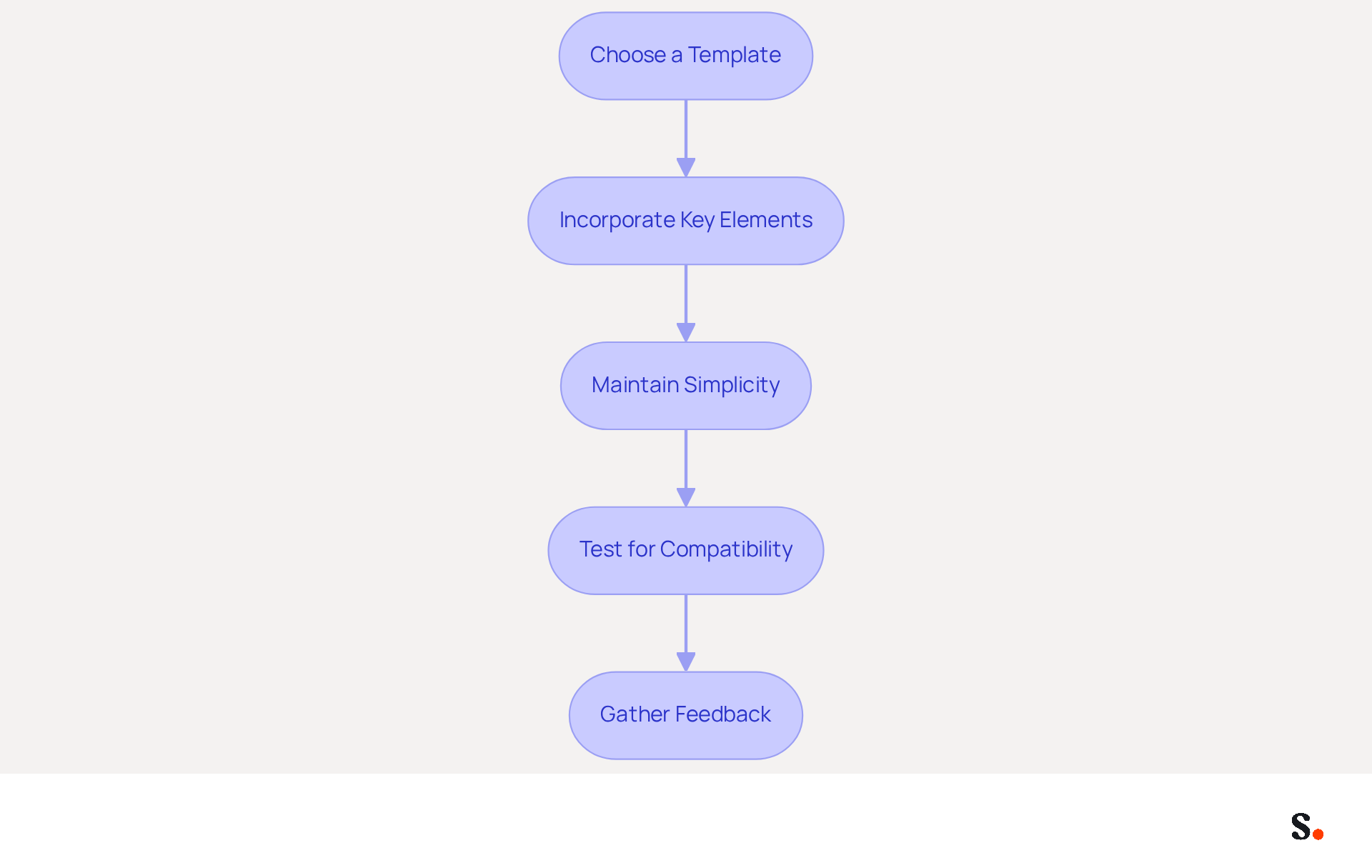
Defining your visual elements is the first step in creating effective email templates that convey your brand message clearly. Here are actionable steps to guide you:
- Choose a Template: Select a professional template that aligns with your aesthetic. Scribe offers customizable templates that align with your needs, ensuring any changes in your Aircall setup are automatically updated in your Scribe configurations for consistent branding. Furthermore, connecting with Calendly enables effortless updates to your contact details.
- Incorporate Key Elements: Include essential information like the sender's name, title, company logo, and contact details. Ensure the logo is high-resolution and appropriately sized to avoid distortion.
- Maintain Simplicity: Limit the number of colors and fonts to avoid clutter. Stick to two or three colors that symbolize your identity and use one or two fonts for readability.
- Test for Compatibility: Ensure your mark displays correctly across various messaging clients (e.g., Outlook, Gmail) and devices (desktop, mobile) to prevent formatting issues that can undermine your professional image if not addressed.
- Gather Feedback: Before finalizing the template, collect input from team members to ensure it meets branding standards and is visually appealing.
By implementing these strategies, your email templates will not only look professional but also enhance your brand's recognition in every communication, supported by Scribe's automated synchronization capabilities. Ultimately, a well-crafted email template can significantly elevate your brand's presence in every communication.
Leverage Signatures for Marketing Campaigns
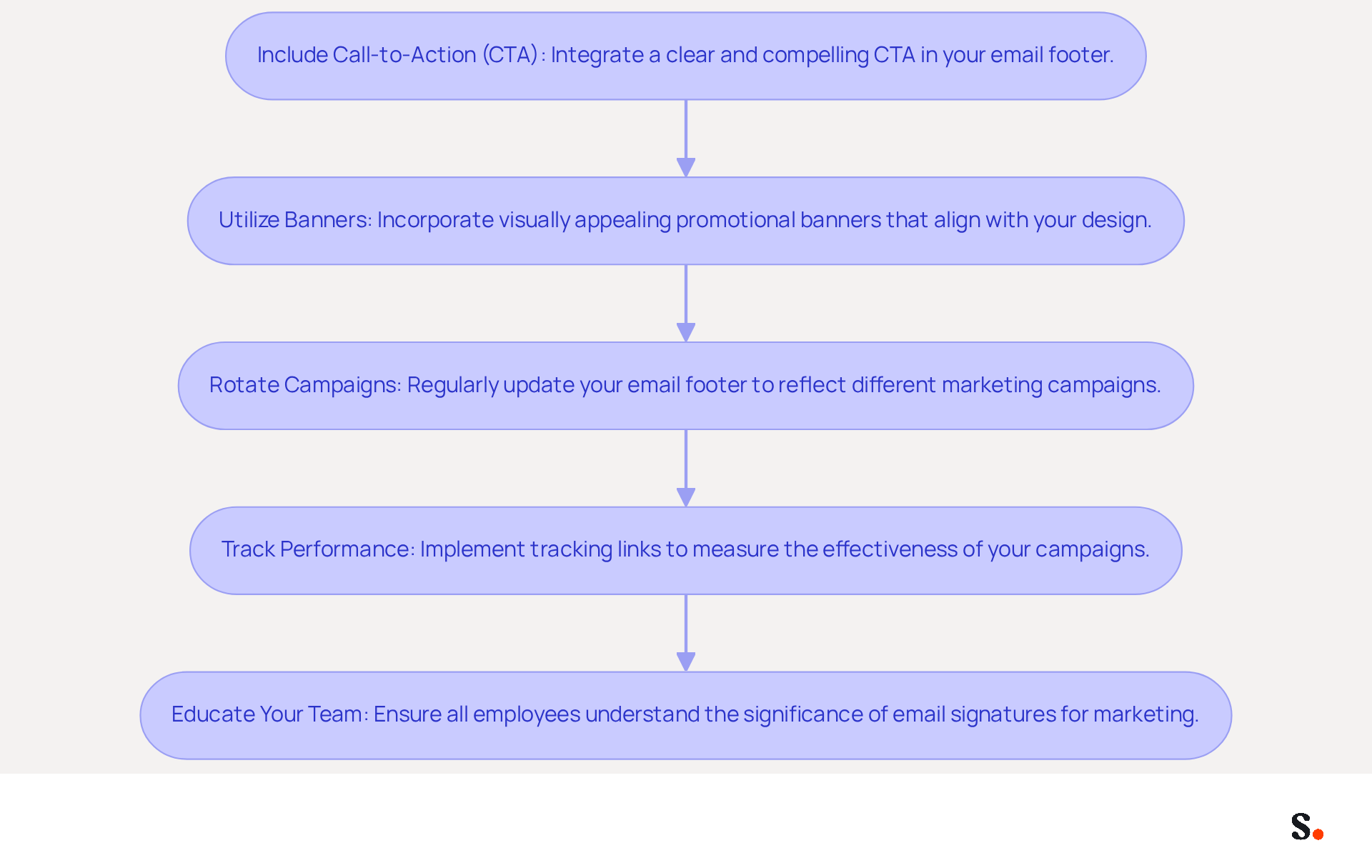
To maximize the effectiveness of email signatures in marketing campaigns, it is essential to adopt strategic approaches:
- Include Call-to-Action (CTA): Integrate a clear and compelling CTA in your email footer, such as a link to a new product, a special offer, or an upcoming event. Including a CTA can boost engagement rates by as much as 40%.
- Utilize Banners: Incorporate visually appealing promotional banners that highlight current campaigns or offers. Ensure these banners align with your design to maintain consistency and professionalism. An effective email footer acts as a cost-efficient marketing tool, reinforcing brand identity and increasing visibility.
- Rotate Campaigns: Regularly update your email footer to reflect different marketing campaigns. This keeps your communications fresh and relevant, encouraging recipients to engage with new content and offers. Companies without structured signing programs may find it challenging to optimize lead generation.
- Track Performance: Implement tracking links to measure the effectiveness of your branded campaigns. Examining click-through rates, which average around 4% for email marketing campaigns, will help you understand what resonates with your audience, allowing for data-driven adjustments to your strategies.
- Educate Your Team: Ensure that all employees comprehend the significance of utilizing the mark for marketing purposes. Provide clear guidelines on how to effectively incorporate marketing messages into their email footers. Maintaining consistent branding can significantly boost revenue and enhance brand recognition for companies that prioritize it across communications.
By using strategies to change your signature outlook in line with your marketing goals, you can unlock new avenues for engagement and growth. Additionally, avoid common pitfalls such as using irrelevant CTAs that do not align with your audience's interests, which can lead to disengagement.
Integrate Seamlessly with Popular Tools
To achieve effective email signature integration, businesses must adopt strategic best practices:
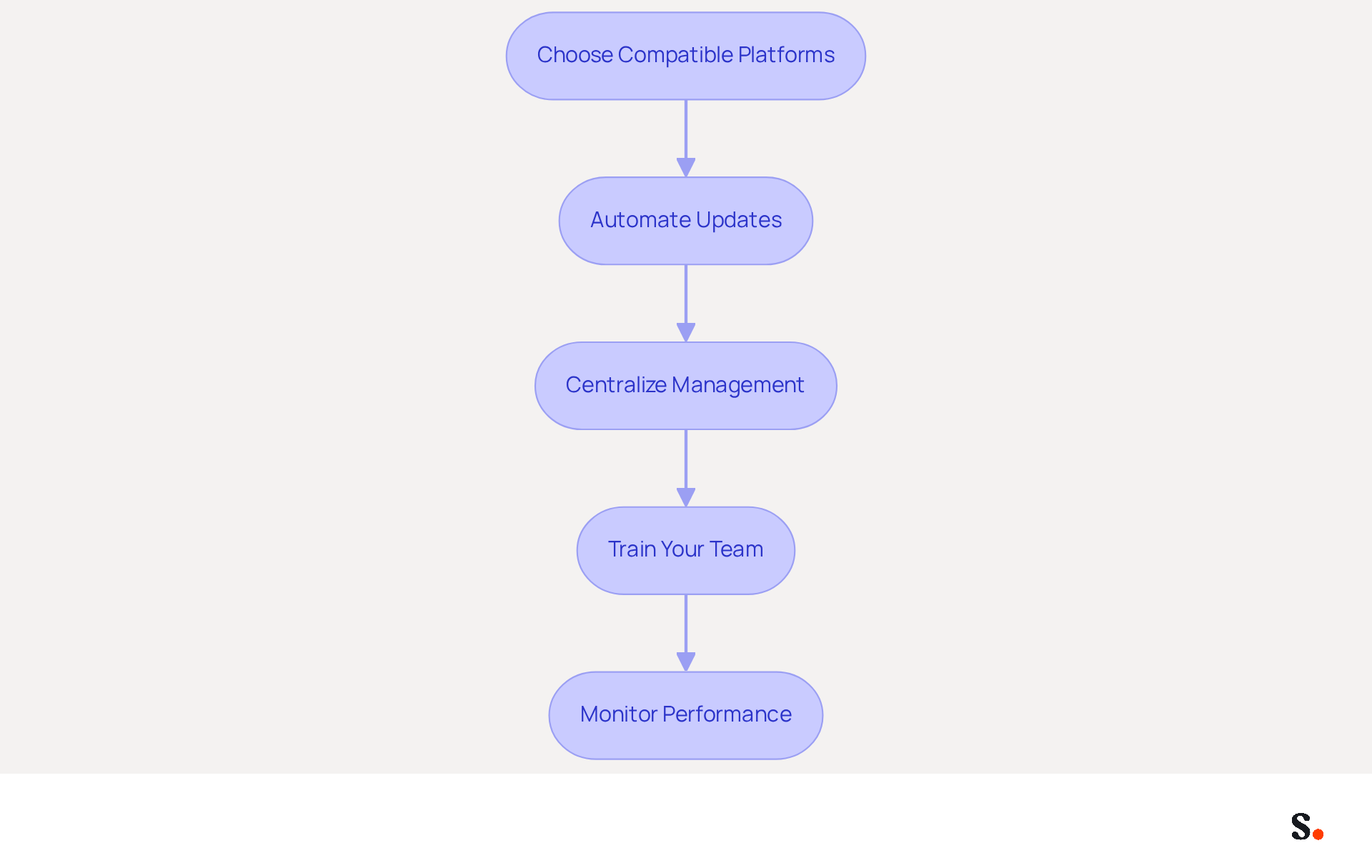
- Choose Compatible Platforms: Opt for an email branding management tool that integrates effectively with your existing platforms, such as Google Workspace and Microsoft 365. Scribe offers strong integration features that make this process easier and improve user experience.
- Automate Updates: Utilize features that allow for automatic updates of identifiers across all users. This ensures that any changes to branding or contact information are instantly reflected, maintaining consistency and reducing manual effort. Without automation, manual updates can lead to inconsistencies and errors in branding.
- Centralize Management: Implement a centralized management system for email identifiers. This method promotes collaboration between marketing and IT teams, ensuring that all approvals adhere to brand guidelines and legal standards, which helps maintain compliance across diverse markets.
- Train Your Team: Provide comprehensive training for employees on how to effectively use the integrated tools. This can include tutorials on accessing and updating their identifiers, which enhances user engagement and compliance with branding standards.
- Monitor Performance: Regularly analyze the effectiveness of your digital identifiers using the analytics provided by the integration tools. This information is essential for enhancing your strategy and boosting engagement rates, as 67% of users anticipate that digital identifiers will aid in lead generation. This leads to increased customer trust and higher conversion rates.
Ultimately, the right integration strategy can transform how businesses communicate and engage with their audience.
Automate Signature Management for Efficiency
To automate email signature management effectively, follow these essential steps:
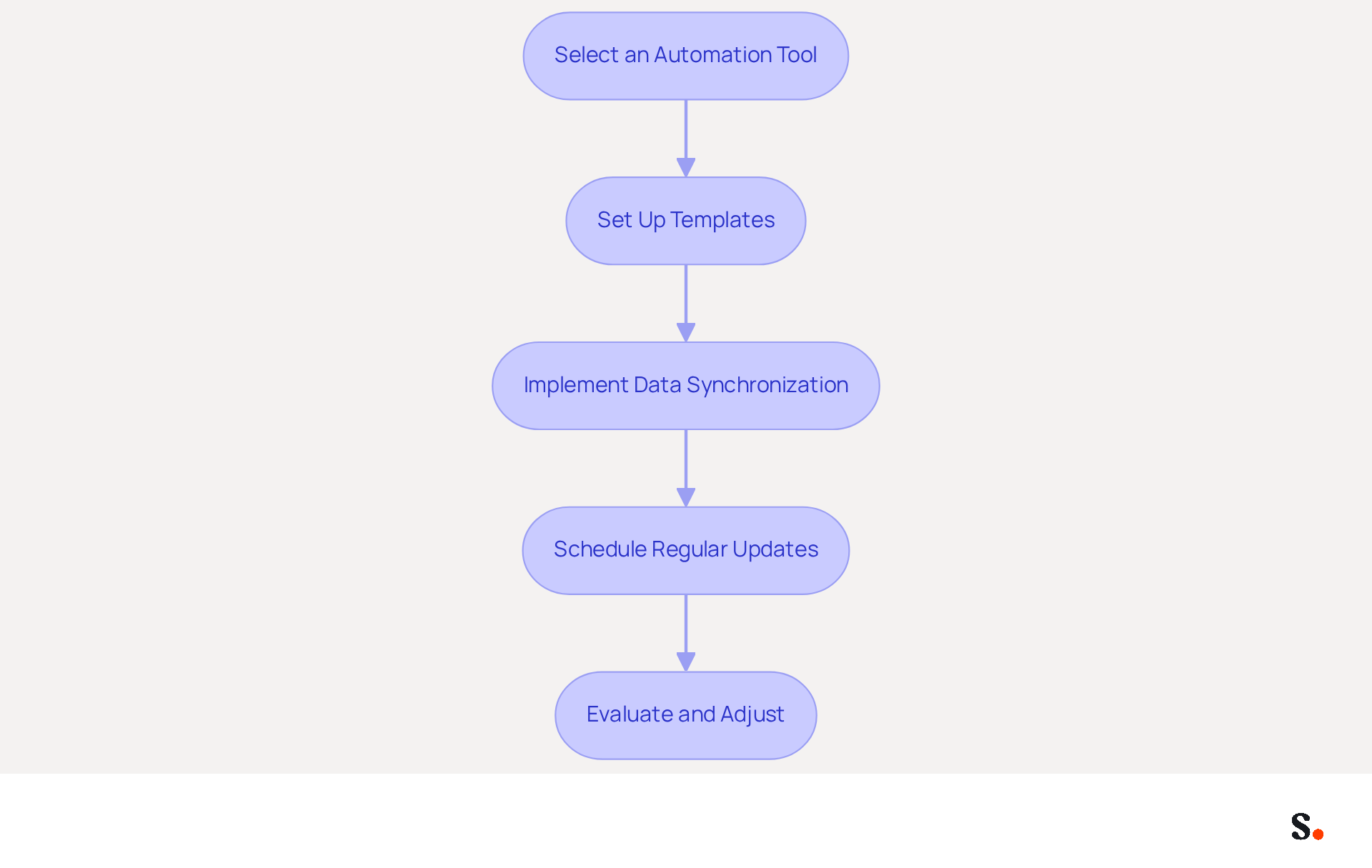
- Select an Automation Tool: Choose a dependable management tool for electronic correspondence that provides automation features. Scribe is specifically designed to streamline the creation and management of digital identifiers, ensuring brand consistency across all communications. Its distinctive positioning enables Marketing teams to manage digital identifiers independently after the initial IT setup, enhancing operational efficiency.
- Set Up Templates: Create standardized templates that can be automatically populated with employee information. This reduces manual input and ensures consistency in markings, which helps uphold your brand's reputation and legal compliance.
- Implement Data Synchronization: Integrate the application with your messaging provider to enable one-click synchronization. As a Super Admin, you can allow Scribe to connect with your provider, ensuring that identifiers are updated automatically whenever employee information changes. Outdated information can lead to miscommunication and damage professional credibility. Scribe also updates teammate information from HR software and other sources, keeping your contact details current.
- Schedule Regular Updates: Establish a routine for refreshing your email footers, incorporating seasonal promotions or new branding elements. Regular updates not only keep your communications fresh and relevant but also ensure compliance with brand guidelines and legal standards, which is essential for maintaining trust and professionalism.
- Evaluate and Adjust: Continuously assess the effectiveness of your automated signing management system. Collect feedback from users and make necessary adjustments to improve functionality and user experience. Regular reviews help pinpoint improvements and adapt the system to your organization's changing needs.
By automating document management with Scribe, businesses can greatly improve operational efficiency, minimize mistakes, and maintain consistent branding across all messages. Scribe's SOC 2 Type II compliance ensures the security of your data, offering reassurance as you implement automated messaging. Organizations that neglect automated email signatures risk losing credibility and engagement with their audience.
Conclusion
Effective email signature management is a strategic necessity, not merely an aesthetic choice. By implementing best practices for creating on-brand signature templates, organizations can significantly enhance brand visibility and engagement. This approach ensures that every email sent serves as a powerful marketing touchpoint. Scribe enables marketing teams to take charge of managing these signatures independently, ensuring brand consistency and compliance with industry standards.
Key strategies discussed include:
- The importance of incorporating clear calls-to-action
- Utilizing visually appealing banners
- Automating updates to maintain accuracy and relevance
The integration of email signatures with tools like Google Workspace and Microsoft 365 further streamlines the process, allowing for efficient management and performance tracking. With Scribe's SOC 2 Type II certification, organizations can trust that their data remains secure while they optimize their email marketing efforts.
By refining this critical aspect of communication, organizations can transform their email interactions into powerful marketing tools. Prioritizing this often-overlooked element not only enhances brand recognition but also drives measurable marketing ROI, positioning organizations for success and fostering a culture of professionalism and consistency in every interaction.
Frequently Asked Questions
What is the first step in creating effective email templates?
The first step is defining your visual elements to ensure the templates convey your brand message clearly.
How can I choose a suitable template for my emails?
Select a professional template that aligns with your aesthetic. Scribe offers customizable templates that can be tailored to your needs.
What features does Scribe provide for template customization?
Scribe ensures that any changes in your Aircall setup are automatically updated in your Scribe configurations for consistent branding. It also allows for effortless updates to your contact details when connected with Calendly.
What key elements should be included in an email template?
Essential information to include is the sender's name, title, company logo, and contact details. The logo should be high-resolution and appropriately sized to avoid distortion.
How can I maintain simplicity in my email templates?
Limit the number of colors and fonts to avoid clutter. Stick to two or three colors that represent your identity and use one or two fonts for readability.
Why is it important to test for compatibility in email templates?
Testing ensures that your email displays correctly across various messaging clients (e.g., Outlook, Gmail) and devices (desktop, mobile) to prevent formatting issues that can undermine your professional image.
Should I gather feedback on my email template before finalizing it?
Yes, collecting input from team members is important to ensure the template meets branding standards and is visually appealing.
How can a well-crafted email template benefit my brand?
A well-crafted email template can significantly elevate your brand's presence in every communication and enhance brand recognition, supported by Scribe's automated synchronization capabilities.
List of Sources
- Create On-Brand Signature Templates
- 4 Best Practices for Brand Consistency in Email Signatures (https://scribe-mail.com/en-US/blog/4-best-practices-for-brand-consistency-in-email-signatures)
- Why Email Signatures Must Be In Your 2026 Marketing Plan | Rocketseed (https://rocketseed.com/blog/2026-marketing-plan-email-signatures)
- Why Team Email Signatures Matter More Than You Think: The Hidden Impact on Brand Trust and Customer Experience (https://getmailbird.com/why-team-email-signatures-matter-brand-trust)
- The impact of email signatures on your branding (https://signitic.com/en/resources/the-impact-of-email-signatures-on-your-branding)
- 40+ Email Signature Statistics for 2026 (Data + Insights) (https://wavecnct.com/blogs/email-signature-statistics)
- Leverage Signatures for Marketing Campaigns
- Why Email Signatures Must Be In Your 2026 Marketing Plan | Rocketseed (https://rocketseed.com/blog/what-are-the-biggest-email-trends-for-2026)
- 6 Ways to Use Email Signature to Support Marketing Campaigns (https://clearout.io/blog/use-email-signature-to-support-marketing-campaigns)
- How to Run a Successful Email Signature Marketing Campaign - NEWOLDSTAMP - NEWOLDSTAMP (https://newoldstamp.com/blog/email-signature-marketing-guide)
- What is email signature marketing? Complete B2B definition (2026) (https://signitic.com/en/resources/what-is-email-signature-marketing-a-complete-definition-for-b2b-teams)
- 4 Best Practices to Boost Your Email Signature Campaign Success (https://scribe-mail.com/en-US/blog/4-best-practices-to-boost-your-email-signature-campaign-success)
- Integrate Seamlessly with Popular Tools
- What’s New With Email Signature in 2026? | Crossware365 (https://crossware365.com/blog/whats-new-with-email-signature-in-2026)
- Email Signature Statistics: A Closer Look at Email Signatures in 2026 (https://mysignature.io/blog/email-signature-statistics)
- Email signature statistics and trends in 2024 (https://wisestamp.com/blog/email-signature-statistics)
- 40+ Email Signature Statistics for 2026 (Data + Insights) (https://wavecnct.com/blogs/email-signature-statistics)
- Automate Signature Management for Efficiency
- Email Signature Management: What It Is and Why Companies Need It in 2026 (https://signandgo.io/blog/email-signature-management-what-it-is-and-why-companies-need-it-in-2026)
- 4 Best Practices for Automated Email Signature with Office 365 (https://scribe-mail.com/en-US/blog/4-best-practices-for-automated-email-signature-with-office-365)
- Company Email Signature Management (2026) (https://hubspot.com/email-signature-generator/email-signature-management)
- Best Email Signature Management Software: Top 12 Tools (2026)
- NEWOLDSTAMP (https://newoldstamp.com/blog/email-signature-software)
- Email Signature Trends 2026: Centralized Control & Automation | SIGNandGO posted on the topic | LinkedIn (https://linkedin.com/posts/signngo_email-signature-trends-to-watch-in-2026-activity-7401523471786217473-zAVL)
Get started with Scribe
Create your signature in minutes
Free 14-day trial — no credit card.