4 Best Practices for Effective Office 365 Email Disclaimers
In a landscape where every email can influence a brand's reputation, many organizations overlook the potential pitfalls of inadequate Office 365 email
Sophie Grant
Email Signature Specialist, Scribe
On this page
- Introduction
- Understand the Importance of Email Disclaimers for Brand Consistency
- Create On-Brand Email Disclaimers Using Automated Templates
- Integrate Email Disclaimers with Office 365 for Seamless Management
- Measure the Impact of Email Disclaimers on Engagement and ROI
- Conclusion
- Frequently Asked Questions
- List of Sources
Introduction
In a landscape where every email can influence a brand's reputation, many organizations overlook the potential pitfalls of inadequate Office 365 email disclaimers. These disclaimers serve not only as legal safeguards but also as powerful tools for reinforcing brand identity and consistency across corporate communications. By implementing effective email disclaimers, businesses can enhance their professionalism and foster trust with clients, ultimately driving engagement and loyalty. By recognizing the value of well-crafted disclaimers, businesses can transform their email communications into a strategic asset.
Get started with Scribe
Keep every signature compliant
Free 14-day trial — no credit card.
Understand the Importance of Email Disclaimers for Brand Consistency
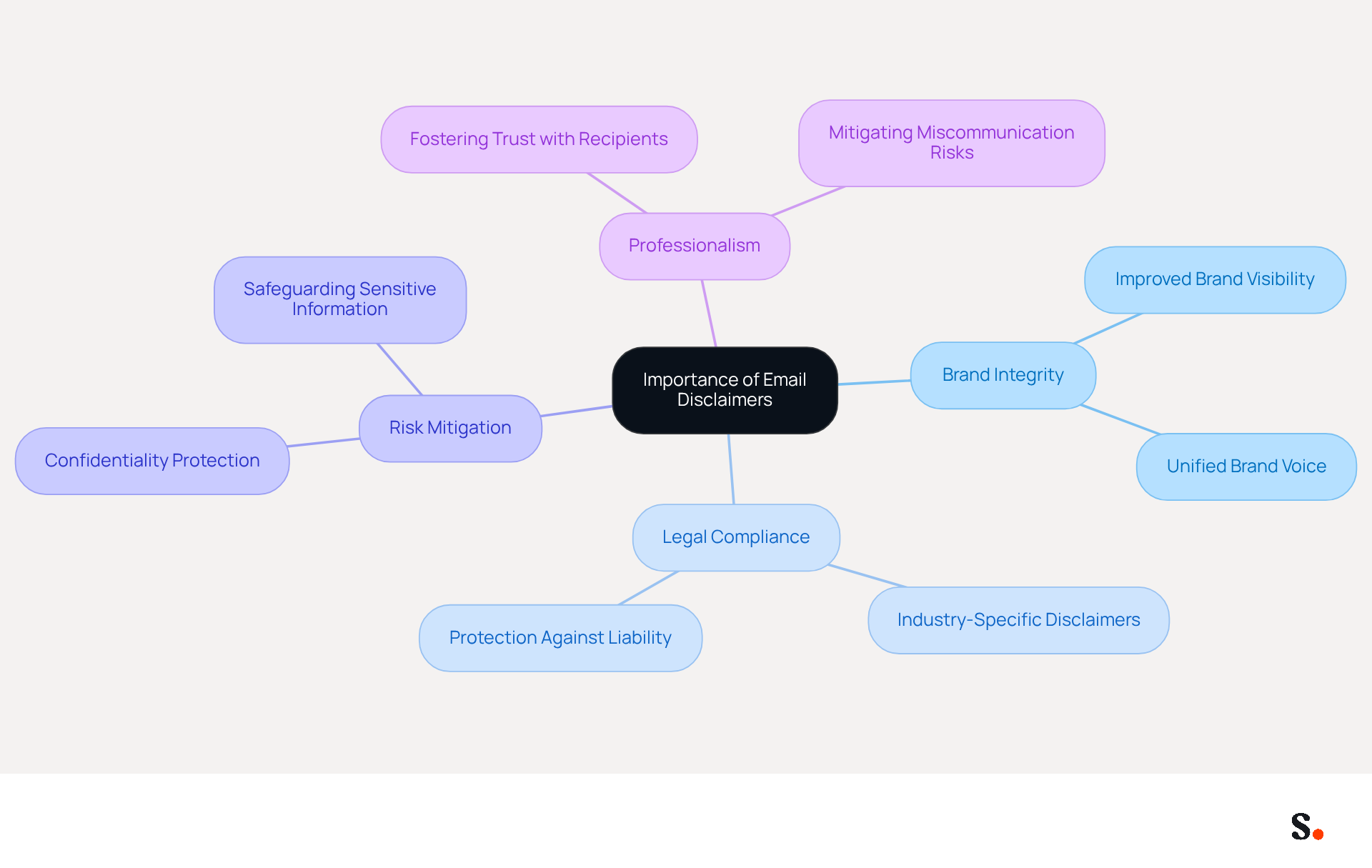
Incorporating an Office 365 email disclaimer is essential for maintaining brand integrity and legal compliance in corporate communications. These notices ensure that every message aligns with the brand's identity and adheres to legal standards. They play a vital role in mitigating risks associated with confidentiality breaches and miscommunication. For example, a clear notice can specify the confidentiality of the message. This not only protects sensitive information but also fosters trust with recipients. Consistent use of notices across all communications reinforces professionalism and establishes a unified brand voice, crucial for maintaining credibility and recognition in the marketplace.
Consider this: nearly 30% of emails include notices, highlighting their critical role in branding. Furthermore, businesses that adopt standardized email signatures, including notices, report improved brand visibility and trust among clients. In sectors with strict legal obligations, such as finance and healthcare, it is essential to add an Office 365 email disclaimer to prevent compliance issues.
Experts agree that these notices serve as a safeguard against legal issues and enhance the professionalism of corporate communications. By incorporating notices thoughtfully, businesses can effectively convey their dedication to compliance and brand integrity, ultimately supporting their marketing strategies and fostering customer loyalty. Ultimately, neglecting these notices could jeopardize not only compliance but also the trust that clients place in a brand.
Create On-Brand Email Disclaimers Using Automated Templates
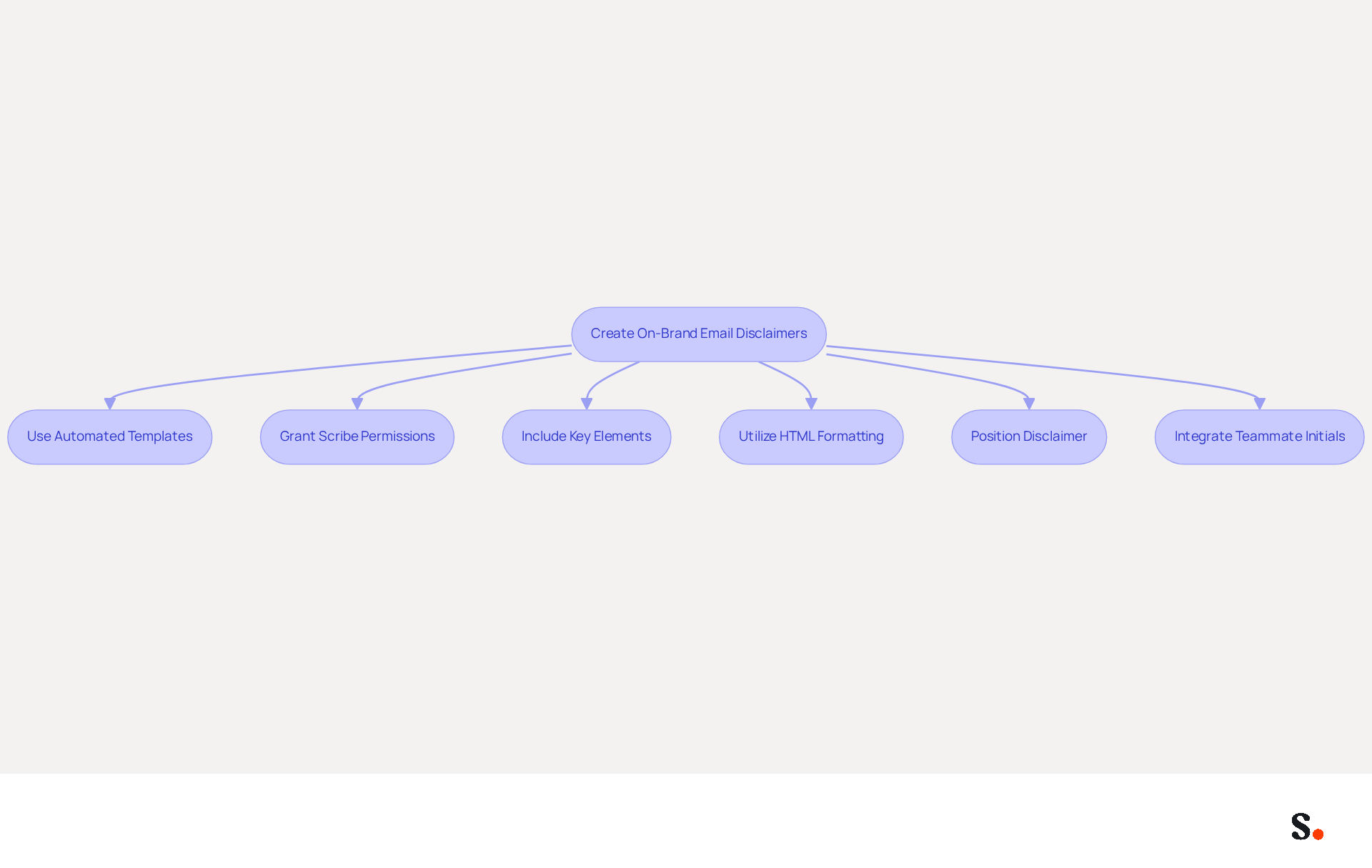
Automated templates that reflect a brand's identity are essential for effective communication notices. Platforms like Scribe enable the easy creation and management of signatures and notices. To synchronize with one click, grant Scribe permission to connect with your service provider. Note that only a Super Admin can provide these permissions. Key elements to include in these templates are:
- The company logo
- Contact information
- A brief statement of terms
Utilizing HTML formatting can enhance visual appeal and readability. Moreover, the placement of the Office 365 email disclaimer is essential; it should be positioned visibly yet discreetly, ideally just below the body of the message. Automating this process ensures that all outgoing messages maintain a consistent look and feel, reinforcing brand image with every communication.
Significantly, businesses that utilize branded digital identifiers report a 22% increase in response rates and a 15% rise in click-through rates to their websites, demonstrating the tangible benefits of this strategy. Furthermore, a typical firm with 100 employees can produce between 60,000 to 80,000 branded impressions monthly, maximizing marketing opportunities without incurring extra distribution costs. By adopting these best practices, businesses can enhance their communications and strengthen their brand presence.
Furthermore, Scribe's auto-filling feature enables smooth integration of teammate initials using your business phone system, ensuring that all signing information is consistently current. You can rest easy knowing that Scribe's SOC 2 Type II compliance keeps your data secure while you manage your signatures.
Integrate Email Disclaimers with Office 365 for Seamless Management
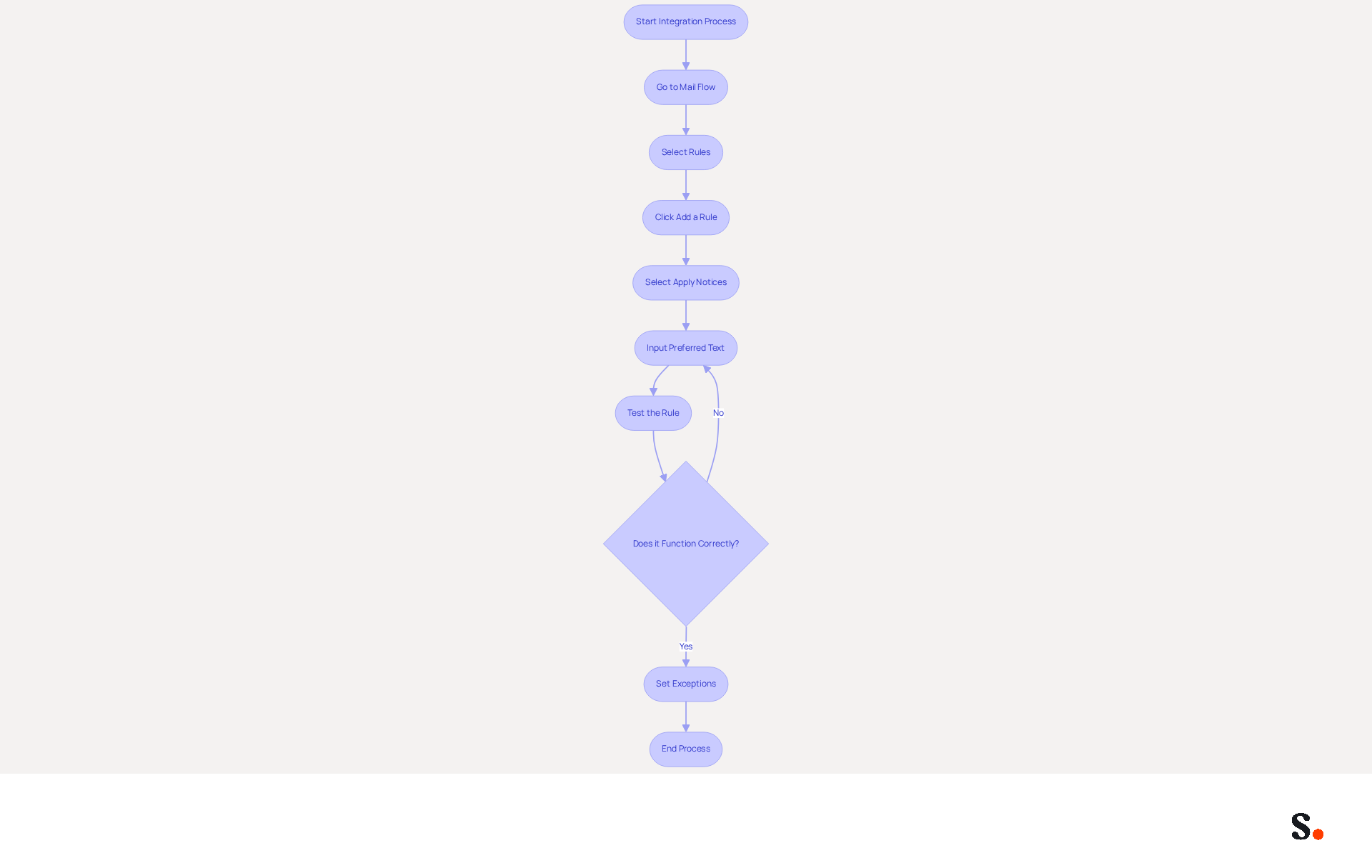
Simplifying the incorporation of messaging notices into Office 365 is crucial for effective communication management. Administrators can create mail flow regulations that automatically add notices to all outgoing messages. Start by going to the 'Mail flow' section, then select 'Rules' and click 'Add a rule'. Select 'Apply notices' and input the preferred text for the statement. Testing the rule is essential to ensure it functions correctly without disrupting the content of the message.
To maintain clarity, businesses must set exceptions to avoid multiple notices cluttering message threads, leading to confusion among recipients. Effectively managing the Office 365 email disclaimer helps meet legal requirements and ensures your brand remains consistent across all interactions.
For organizations aiming to improve their management of messaging identifiers, Scribe provides automated solutions that synchronize with platforms such as Google Workspace and HRIS, enabling the auto-filling of teammates' information. This guarantees that any modifications in employee details are automatically refreshed, conserving time and upholding brand consistency across all interactions. Additionally, Scribe's SOC 2 Type II compliance ensures that your data is managed securely, offering reassurance as you optimize your communication processes. By leveraging Scribe's solutions, organizations can enhance their communication strategies while ensuring compliance and professionalism.
Measure the Impact of Email Disclaimers on Engagement and ROI
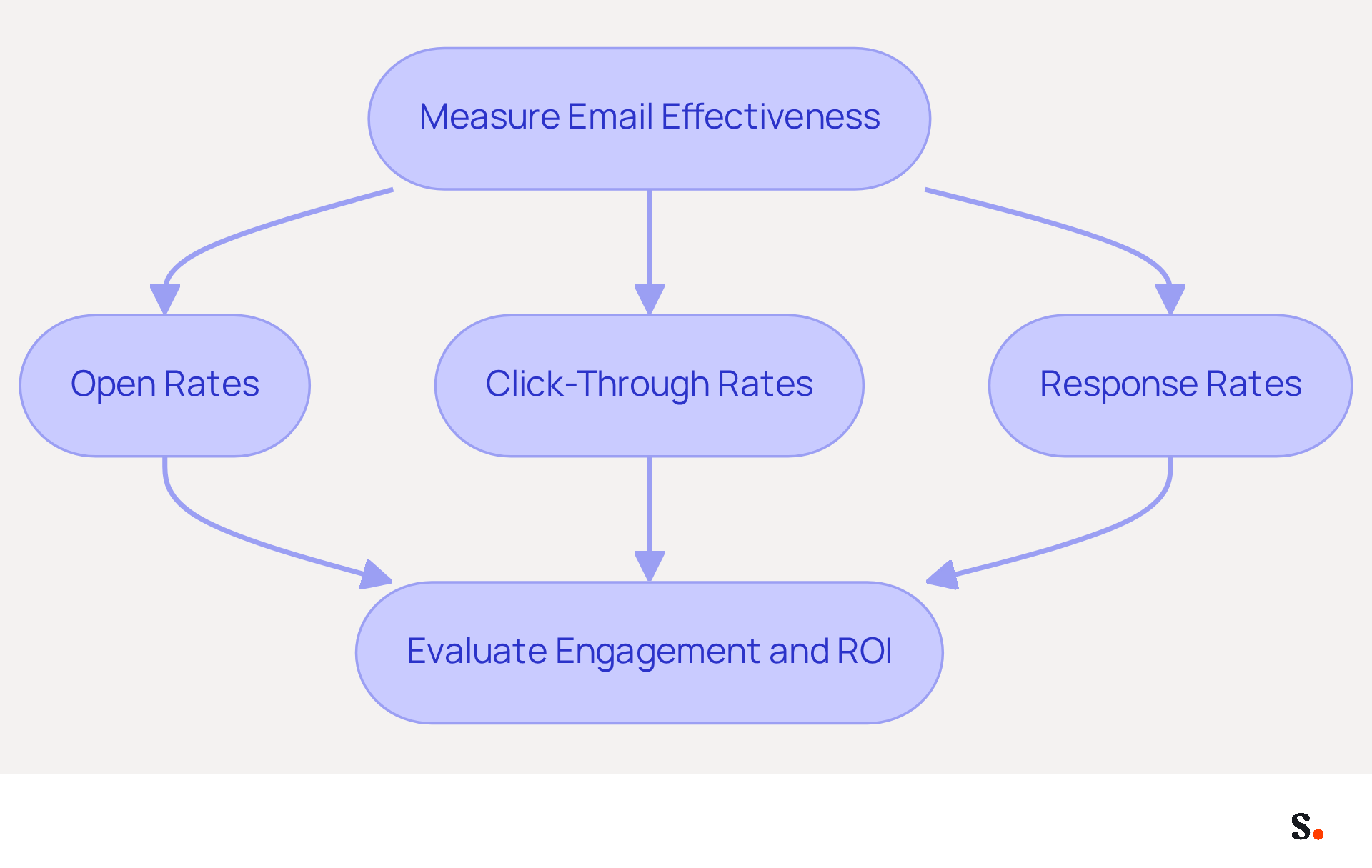
Many businesses find it challenging to determine if their messaging notices are truly effective. To assess this effectiveness, they should establish tracking mechanisms that monitor key engagement metrics, including:
- Open rates
- Click-through rates
- Response rates
Examining these metrics allows companies to evaluate whether their statements resonate with recipients and encourage desired actions. Furthermore, integrating tools that provide insights into email performance can clarify the ROI of email communications. For example, if a notice includes a call-to-action that leads to increased website traffic or conversions, this effect can be measured to demonstrate the financial advantages of the notice. By regularly reviewing these metrics, businesses can optimize their strategies, ensuring they effectively engage their audience and achieve their marketing goals.
Conclusion
Effective email disclaimers in Office 365 are essential for compliance and serve as a strategic asset for enhancing brand professionalism. When every email reflects the brand's identity and meets legal standards, organizations not only build trust with recipients but also reduce the risks of miscommunication, which can lead to costly errors.
The article highlights several best practices for creating and managing email disclaimers, including:
- The use of automated templates that align with brand identity
- Seamless integration with Office 365 for efficient management
- The importance of measuring engagement metrics to assess the effectiveness of these disclaimers
Using tools like Scribe helps marketing teams take charge of email signatures and disclaimers, ensuring they stay compliant with regulations like GDPR and CCPA.
Ultimately, the significance of email disclaimers extends beyond mere legal protection; they serve as a vital component of a company's branding strategy. By adopting these best practices, organizations can not only enhance their communication efforts but also leverage email disclaimers as a powerful tool for driving engagement and demonstrating their commitment to brand integrity. Prioritizing effective email disclaimers not only safeguards compliance but also transforms communication into a strategic advantage for brand integrity.
Frequently Asked Questions
Why are email disclaimers important for businesses?
Email disclaimers are essential for maintaining brand integrity and legal compliance in corporate communications. They ensure that messages align with the brand's identity and adhere to legal standards, mitigating risks associated with confidentiality breaches and miscommunication.
How do email disclaimers protect sensitive information?
A clear email disclaimer can specify the confidentiality of the message, which helps protect sensitive information and fosters trust with recipients.
What impact do consistent email disclaimers have on a brand?
Consistent use of email disclaimers reinforces professionalism and establishes a unified brand voice, which is crucial for maintaining credibility and recognition in the marketplace.
What percentage of emails include disclaimers, and what does this indicate?
Nearly 30% of emails include disclaimers, highlighting their critical role in branding and the importance of standardized communication.
In which sectors is it particularly important to include email disclaimers?
It is particularly important to include email disclaimers in sectors with strict legal obligations, such as finance and healthcare, to prevent compliance issues.
How do email disclaimers enhance professionalism in corporate communications?
Experts agree that email disclaimers serve as a safeguard against legal issues and enhance the professionalism of corporate communications, conveying a dedication to compliance and brand integrity.
What are the potential consequences of neglecting email disclaimers?
Neglecting email disclaimers could jeopardize compliance and undermine the trust that clients place in a brand.
List of Sources
- Understand the Importance of Email Disclaimers for Brand Consistency
- Email signature statistics: Why every business should optimize their email signatures — Stripo.email (https://stripo.email/blog/email-signature-statistics-why-every-business-should-optimize-their-email-signatures)
- Email signature statistics and trends in 2024 (https://wisestamp.com/blog/email-signature-statistics)
- Does Your Business Need an Email Confidentiality Disclaimer? - Newport Attorney | Wakefield Attorneys (https://srtflaw.com/does-your-business-need-an-email-confidentiality-disclaimer)
- The Importance of Email Disclaimers for Businesses - Tyler Law LLP (https://tylerlawllp.com/blog-posts/the-importance-of-email-disclaimers-for-businesses)
- Create On-Brand Email Disclaimers Using Automated Templates
- 40+ Email Signature Statistics for 2026 (Data + Insights) (https://wavecnct.com/blogs/email-signature-statistics)
- Email Disclaimer Examples with Templates to Copy (https://clearout.io/blog/email-disclaimer-examples-templates)
- 4 Best Practices for Your Disclaimer Email Footer (https://scribe-mail.com/en-US/blog/4-best-practices-for-your-disclaimer-email-footer)
- Email Disclaimer Guide With 12 Templates & Examples - Termly (https://termly.io/resources/articles/email-disclaimers)
- Master Email Disclaimers: Essential Practices for Marketing Success (https://scribe-mail.com/en-US/blog/master-email-disclaimers-essential-practices-for-marketing-success)
- Integrate Email Disclaimers with Office 365 for Seamless Management
- Get Microsoft 365 Mail Traffic Statistics by User (https://admindroid.com/how-to-get-user-email-activity-report-in-microsoft-365)
- Email Disclaimer Management for Microsoft 365: Central and Multilingual (https://conbool.com/blog/email-disclaimer-management-microsoft-365-en)
- Add signatures and disclaimers to your email with Office 365 | AI at Work Blog (https://microsoft.com/en-us/copilot/blog/2012/06/04/add-signatures-and-disclaimers-to-your-email-with-office-365)
- How to Deploy Email Disclaimers in Office 365 Company-Wide (https://wisestamp.com/guides/how-to-deploy-disclaimers-in-office-365-email-company-wide)
- Measure the Impact of Email Disclaimers on Engagement and ROI
- The ROI for Email Marketing: The Good News and the Bad News (https://litmus.com/blog/the-roi-for-email-marketing-the-good-news-and-the-bad-news)
- Email Marketing Attribution: Highest-ROI Channel | Arcalea (https://arcalea.com/blog/the-importance-of-email-marketing)
- Measure what matters: 7 key metrics for effective email campaigns | Granicus (https://granicus.com/uk/blog/measure-what-matters-7-key-metrics-for-effective-email-campaigns)
- Email Marketing ROI Statistics: The Ultimate List for 2026 (https://emailmonday.com/email-marketing-roi-statistics)
Get started with Scribe
Keep every signature compliant
Free 14-day trial — no credit card.