4 Best Practices for Implementing an API for Email Signature
While implementing an API for email signatures promises to enhance digital branding, many organizations face significant challenges in navigating its
Sophie Grant
Email Signature Specialist, Scribe

Introduction
While implementing an API for email signatures promises to enhance digital branding, many organizations face significant challenges in navigating its complexities. By establishing clear requirements and selecting compatible tools, businesses can streamline their processes and enhance brand consistency. This adaptability is crucial for maintaining relevance in a fast-paced digital environment. This article explores four best practices that will empower marketing and IT teams to effectively implement an API for email signatures, ensuring both efficiency and compliance in a rapidly evolving digital landscape.
Get started with Scribe
Let AI build your signature — from a screenshot
Free 14-day trial — no credit card.
Define API Requirements and Objectives
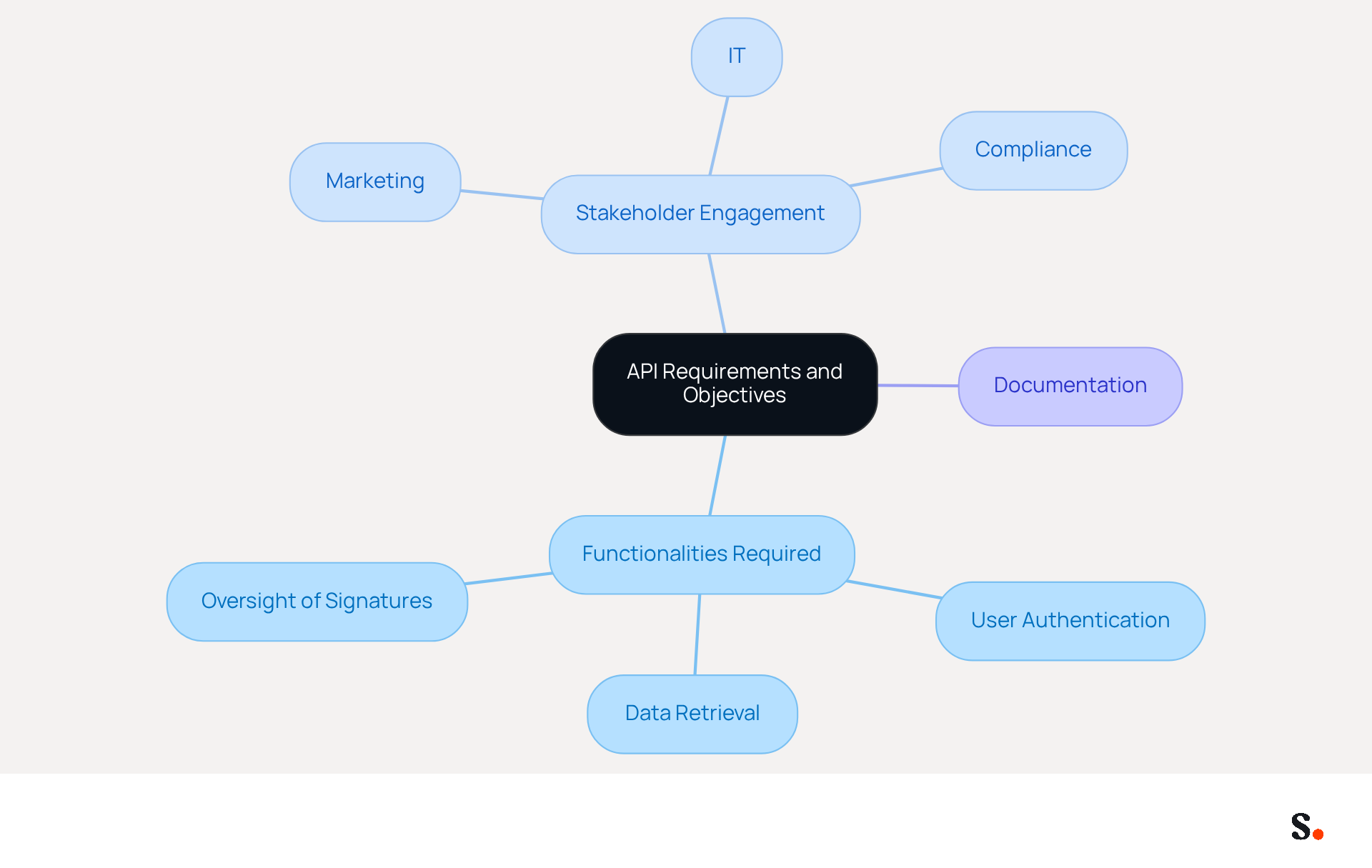
Before exploring API integration, it is essential to establish clear requirements and objectives. This process begins with identifying specific functionalities required, such as:
- User authentication
- Data retrieval
- Oversight of signatures
Engaging stakeholders from various departments, such as marketing, IT, and compliance, can provide valuable insights into their expectations for the API. Thorough documentation of these requirements will guide the development process and ensure alignment with the overall business strategy. For instance, if the goal is to improve brand consistency through digital identifiers, the API should enable simple updates and oversight of template designs throughout the organization.
Centralized oversight of digital identifiers ensures branding consistency and helps meet legal and marketing requirements more effectively. Organizations that manage digital signatures as a strategic administrative asset achieve better long-term consistency, highlighting the importance of a well-defined API strategy.
Choose Compatible Tools and Platforms
Selecting the right tools for API integration is essential to avoid compatibility issues that can disrupt business operations. Begin by assessing your current systems, such as messaging clients and CRM platforms, to determine which APIs can be integrated with minimal modifications. For instance, organizations utilizing Microsoft 365 should prioritize APIs specifically designed for seamless integration with this platform. Additionally, consider the scalability of the tools to accommodate future growth and evolving business needs. Platforms that provide robust documentation and community support can significantly ease the implementation process and troubleshooting efforts. Research shows that 71% of professionals depend on third-party APIs, underscoring the need to choose tools that meet industry standards. By focusing on compatibility and support, businesses can enhance their digital signature management strategies effectively.
Scribe enhances this process by automating the synchronization of signatures with Aircall, which helps maintain brand consistency in your communications. To enable one-click synchronization, you must grant Scribe permission to connect with your service provider, which requires Super Admin access. This integration allows for selective syncing of teammates, ensuring that not all Google Workspace accounts need to be synced. Changes made in your provider directory are automatically reflected in Scribe, and the platform enhances teammate information from HR software and other sources after the sync. Scribe automatically syncs teammate data from your service provider daily at your local time. For immediate updates, click 'Refresh' in the Teammates tab. Scribe's SOC 2 Type II compliance ensures the safety of your data, addressing these security concerns head-on.
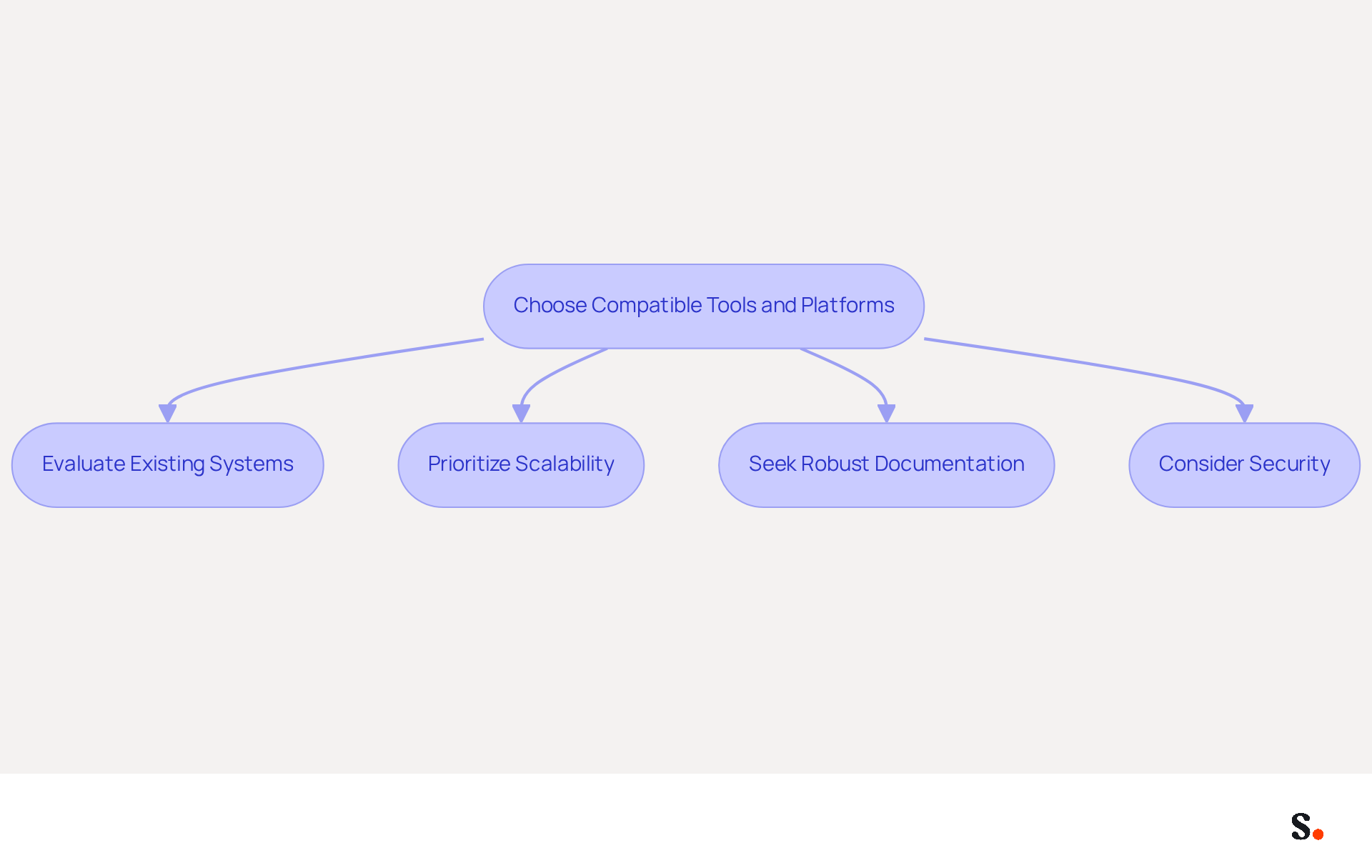
To apply these principles, consider the following:
- Evaluate Existing Systems: Assess your current email clients and CRM platforms to determine compatibility.
- Prioritize Scalability: Choose tools that can grow with your business needs.
- Seek Robust Documentation: Look for platforms that offer comprehensive guides and community support.
- Consider Security: Ensure that the tools comply with industry security standards to mitigate risks.
Making informed decisions about API tools can significantly enhance your organization's efficiency and security in managing digital identifiers.
Establish Data Synchronization Protocols
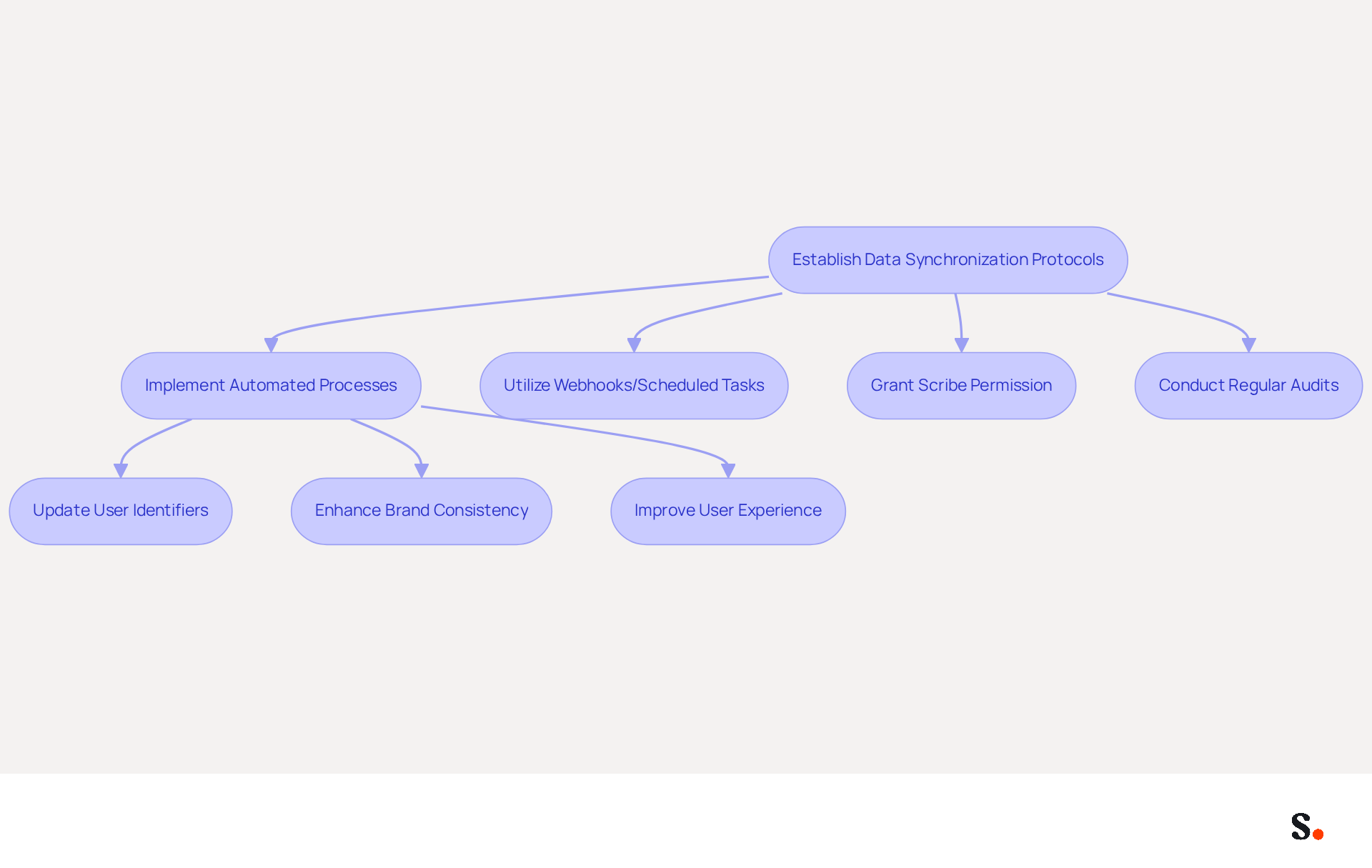
To ensure effective communication, organizations must prioritize robust data synchronization protocols. Automated processes should be implemented to regularly update user identifiers in response to changes in employee information or branding guidelines. Utilizing webhooks or scheduled tasks can facilitate real-time updates across all platforms. For instance, when an employee updates their contact details, the API should automatically reflect this change in their signature. This approach enhances brand consistency and improves user experience by reducing the chances of outdated information being shown.
To enable one-click synchronization, you must grant Scribe permission to connect with your service provider, requiring Super Admin access. Scribe offers a streamlined synchronization feature that enables seamless integration with providers like Google Workspace and Microsoft 365. This ensures that all modifications made in the provider directory are automatically synced with Scribe, enhancing teammate information and saving time. Studies indicate that organizations using automated management for digital signatures can cut update times from days to mere minutes, ensuring that every employee's identification is precise and compliant. Moreover, a study showed that branded digital identifiers receive twice the engagement compared to unbranded ones, emphasizing the effectiveness of maintaining a cohesive brand presence.
Best practices for establishing these protocols include:
- Regular audits of the synchronization process to identify inconsistencies and ensure compliance with legal standards.
- Role-based access controls to enable marketing and compliance teams to manage key elements without IT intervention, enhancing agility while maintaining oversight.
By adopting these protocols, organizations can ensure that their communications are not only accurate but also enhance their overall brand image. Neglecting these protocols can jeopardize compliance and tarnish an organization's reputation. With Scribe's SOC 2 Type II compliance, organizations can trust that their data is secure while enhancing their communication branding.
Monitor and Optimize API Performance
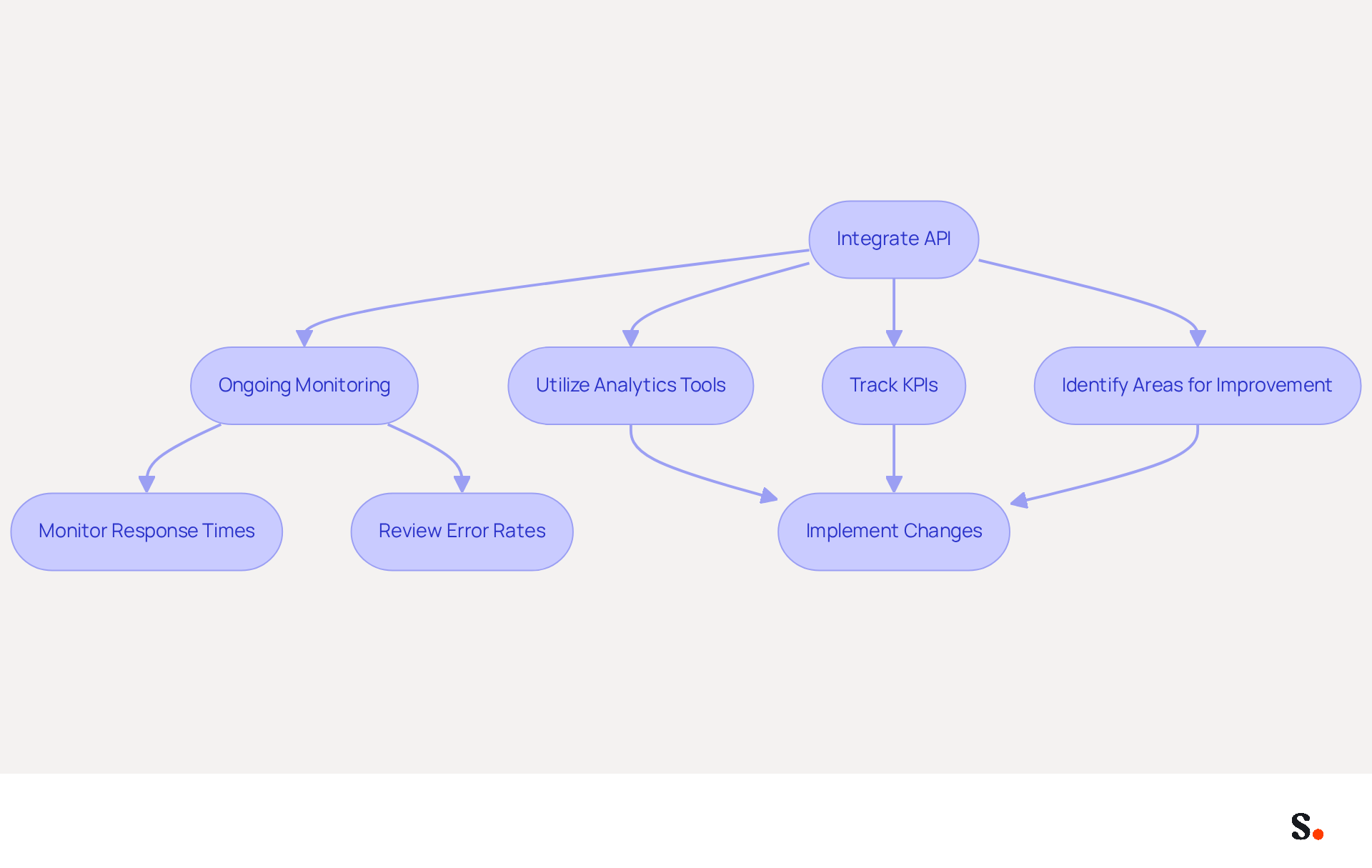
Integrating the API is just the first step; ongoing monitoring is essential to ensure it meets business goals. Syncing your Google Workspace with Scribe saves time by automatically updating your teammates' information, making contact details easier to manage.
Utilizing analytics tools to track key performance indicators (KPIs) such as response times, error rates, and user engagement metrics is essential. Regularly reviewing this data allows for the identification of areas needing improvement, enabling timely adjustments. For instance, users face challenges when attempting to update their identifiers due to a high error rate. It's essential to identify root causes and improve the API's functionality.
Proactive management of the API for email signature performance boosts user satisfaction and enhances your return on investment in email branding. Organizations that implement robust API monitoring practices can achieve significant cost savings by preventing downtime and optimizing performance, ultimately leading to improved user experiences and increased customer satisfaction.
Furthermore, Scribe's SOC 2 Type II compliance ensures that your data handling meets the highest security standards. As noted by Kaustav Roy, proactive monitoring helps maintain API stability, detect anomalies, and gain insights into usage patterns, ultimately enhancing the user experience and ensuring smooth API operations.
Additionally, leveraging both Real User Monitoring (RUM) and synthetic monitoring together provides comprehensive oversight of API performance, allowing for timely identification and resolution of issues. Furthermore, all changes made to your Calendly configuration automatically sync with your Scribe signatures, ensuring brand consistency and seamless updates.
Ultimately, neglecting the performance of the API for email signature can compromise user satisfaction and diminish the effectiveness of your email branding efforts.
Conclusion
Implementing an API for email signatures is essential for achieving brand consistency and operational efficiency. Without clear definitions, organizations risk misalignment between API integration and business goals. This foundational step sets the stage for a successful implementation, allowing for streamlined management of digital identifiers across the organization.
Key practices such as:
- Selecting compatible tools
- Establishing robust data synchronization protocols
- Continuously monitoring API performance
are crucial for maximizing the benefits of an email signature API. Choosing the right tools ensures seamless integration with existing systems, while effective data synchronization keeps information accurate and up-to-date. Furthermore, ongoing performance monitoring allows organizations to identify and address issues proactively, enhancing user satisfaction and optimizing the return on investment in email branding.
Leveraging an API for email signatures improves operational efficiency and reinforces brand identity in today's digital landscape. Organizations are encouraged to adopt these best practices to ensure their email signatures are not just functional but also a powerful marketing tool. By embracing these practices, businesses can transform their email signatures into a strategic advantage that drives engagement and results.
Frequently Asked Questions
What is the first step in API integration?
The first step in API integration is to define clear requirements and objectives, which involves identifying specific functionalities needed, such as user authentication, data retrieval, and oversight of signatures.
Why is it important to engage stakeholders in the API development process?
Engaging stakeholders from various departments, such as marketing, IT, and compliance, provides valuable insights into their expectations for the API, ensuring that the development process aligns with the overall business strategy.
How should API requirements be documented?
API requirements should be thoroughly documented to guide the development process and ensure that all functionalities align with the organization's goals.
What is an example of a goal that an API might help achieve?
An example of a goal is to improve brand consistency through digital identifiers, which would require the API to enable simple updates and oversight of template designs throughout the organization.
What is the benefit of centralized oversight of digital identifiers?
Centralized oversight of digital identifiers ensures branding consistency and helps organizations meet legal and marketing requirements more effectively.
How does managing digital signatures as a strategic asset benefit organizations?
Organizations that manage digital signatures as a strategic administrative asset achieve better long-term consistency, highlighting the importance of a well-defined API strategy.
List of Sources
- Define API Requirements and Objectives
- User email signature management via Graph API - Microsoft Q&A (https://learn.microsoft.com/en-us/answers/questions/1093518/user-email-signature-management-via-graph-api)
- Outlook Signature API Makes Management Easier (https://office365itpros.com/2020/09/25/outlook-signature-api)
- API-Based Email Signature Management Explained - Signite (https://signite.io/learn/core-concepts-architecture/api-based-email-signature-management-explained)
- How to integrate an email signature API (https://signitic.com/en/resources/how-to-integrate-an-email-signature-api)
- Choose Compatible Tools and Platforms
- Microsoft 365 email signature software | CodeTwo (https://codetwo.com/email-signatures)
- Email Client Compatibility Crisis 2025-2026: What Third-Party Users Need to Know (https://getmailbird.com/email-client-compatibility-crisis-third-party-guide)
- Email Client Market Share: Trends & Statistics 2026 (https://litmus.com/email-client-market-share)
- API Management Statistics: A New Interface Tech (2026) (https://scoop.market.us/api-management-statistics)
- Best Email Signature Software for Google Workspace and Microsoft 365 (2026) (https://bulksignature.com/blog/best-email-signature-software)
- Establish Data Synchronization Protocols
- WiseStamp Launches the Industry's First AI-Powered Email Signature Platform, Eliminating the Gap Between Brand Design and Instant Deployment (https://prnewswire.com/news-releases/wisestamp-launches-the-industrys-first-ai-powered-email-signature-platform-eliminating-the-gap-between-brand-design-and-instant-deployment-302774232.html)
- WiseStamp Sets a New Standard for Email Signature Creation (https://prnewswire.com/news-releases/wisestamp-sets-a-new-standard-for-email-signature-creation-302689811.html)
- Email signature do’s & don’ts: from chaos to consistency and performance in every send (https://marketingtechnews.net/news/email-signature-dos-donts-from-chaos-to-consistency-and-performance-in-every-send)
- Automating Email Signatures: How IT Teams Streamline Processes & Reduce Risk (https://exclaimer.com/blog/streamlining-it-processes-automated-email-signatures)
- Email Signature Automation with Azure and Intune | Xpand (https://xpandsoftware.com/knowledge-hub/news/250706-from-manual-to-autonomous-the-evolution-of-signature-updates)
- Monitor and Optimize API Performance
- API Management: The Monitor Phase (https://celigo.com/builders-hub/api-management-the-monitor-phase)
- Top Tools for Monitoring API Performance | Teamgate Blog (https://teamgate.com/blog/top-tools-for-monitoring-api-performance)
- What is API Monitoring? Benefits and Use Cases (https://konghq.com/blog/learning-center/what-is-api-monitoring)
- 5 ways to monitor the performance of your APIs (https://tyk.io/blog/5-ways-to-monitor-the-performance-of-your-apis)
- What is API monitoring? (https://dynatrace.com/news/blog/what-is-api-monitoring)
Get started with Scribe
Let AI build your signature — from a screenshot
Free 14-day trial — no credit card.