Maximize ROI with CRM Integration and Email Signature Software
While integrating CRM systems with email signature software offers significant advantages, many organizations face hurdles in realizing its full potential. By
Sophie Grant
Email Signature Specialist, Scribe

Introduction
While integrating CRM systems with email signature software offers significant advantages, many organizations face hurdles in realizing its full potential. By synchronizing customer data, businesses can ensure that every email footer reflects the most current information, fostering stronger relationships and significantly improving response rates. Despite the potential benefits, many organizations struggle to implement this integration effectively. Navigating these challenges is crucial for companies seeking to enhance their marketing strategies and customer interactions.
Get started with Scribe
Let AI build your signature — from a screenshot
Free 14-day trial — no credit card.
Integrate CRM Systems with Email Signature Software
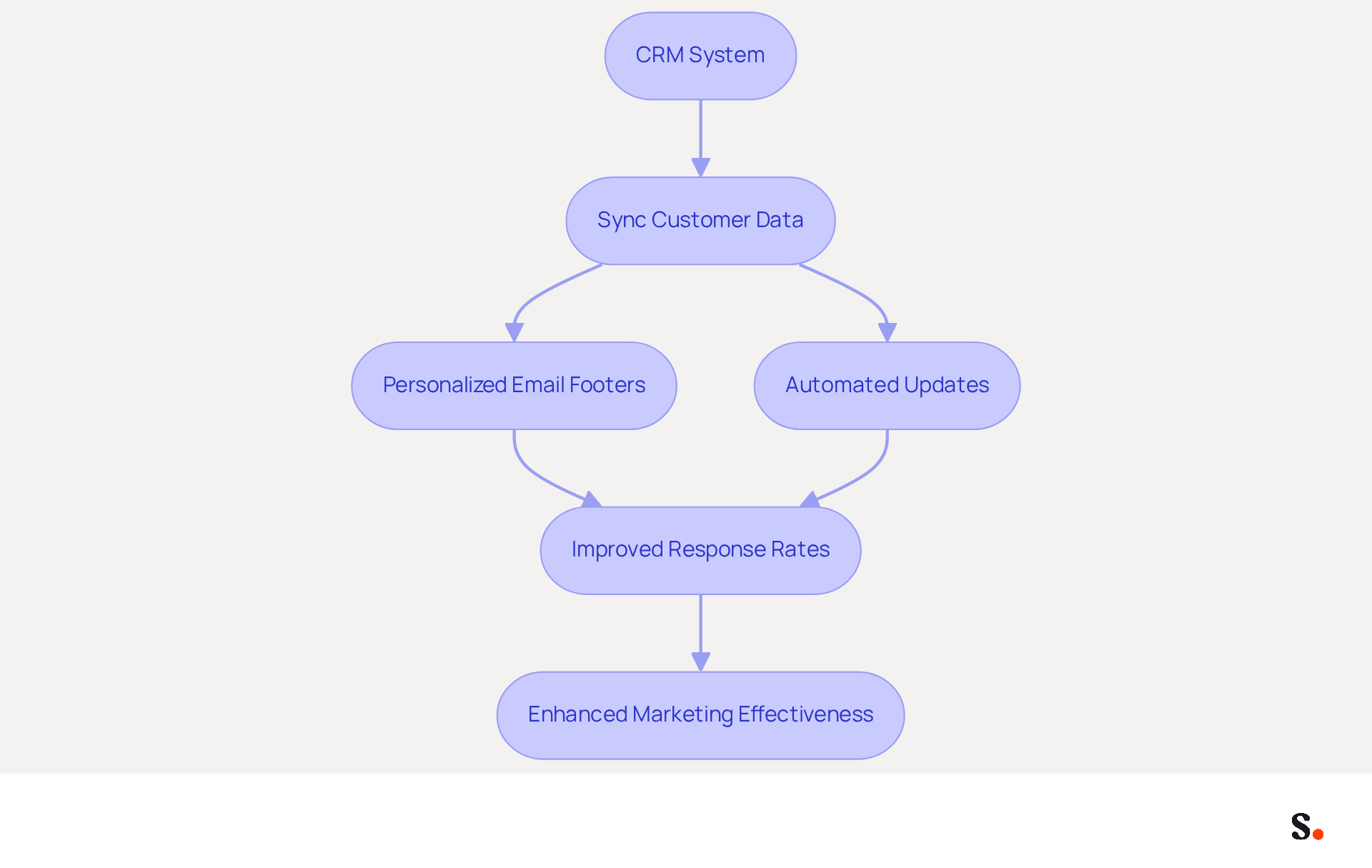
The crm integration with email signature software addresses common challenges in marketing efficiency. Syncing customer data ensures that each message footer contains the latest information about your contacts, including their preferences and past interactions. This personalization fosters stronger relationships and significantly improves response rates, as evidenced by case studies.
For instance, when a sales representative sends an email to a potential client, having their closing automatically updated with relevant promotions or personalized messages can lead to a significant improvement in response rates. Furthermore, Scribe's automated synchronization with platforms such as Google Workspace and Aircall eliminates the need for manual updates, reducing errors and saving time.
Many organizations using Scribe's integration see a 12% average click-through rate on banners, showcasing the real benefits of this solution. With Scribe's SOC 2 Type II compliance, you can be assured that your data is managed securely, enabling your team to focus on strategic initiatives that can significantly enhance marketing effectiveness.
Create On-Brand Email Signature Templates
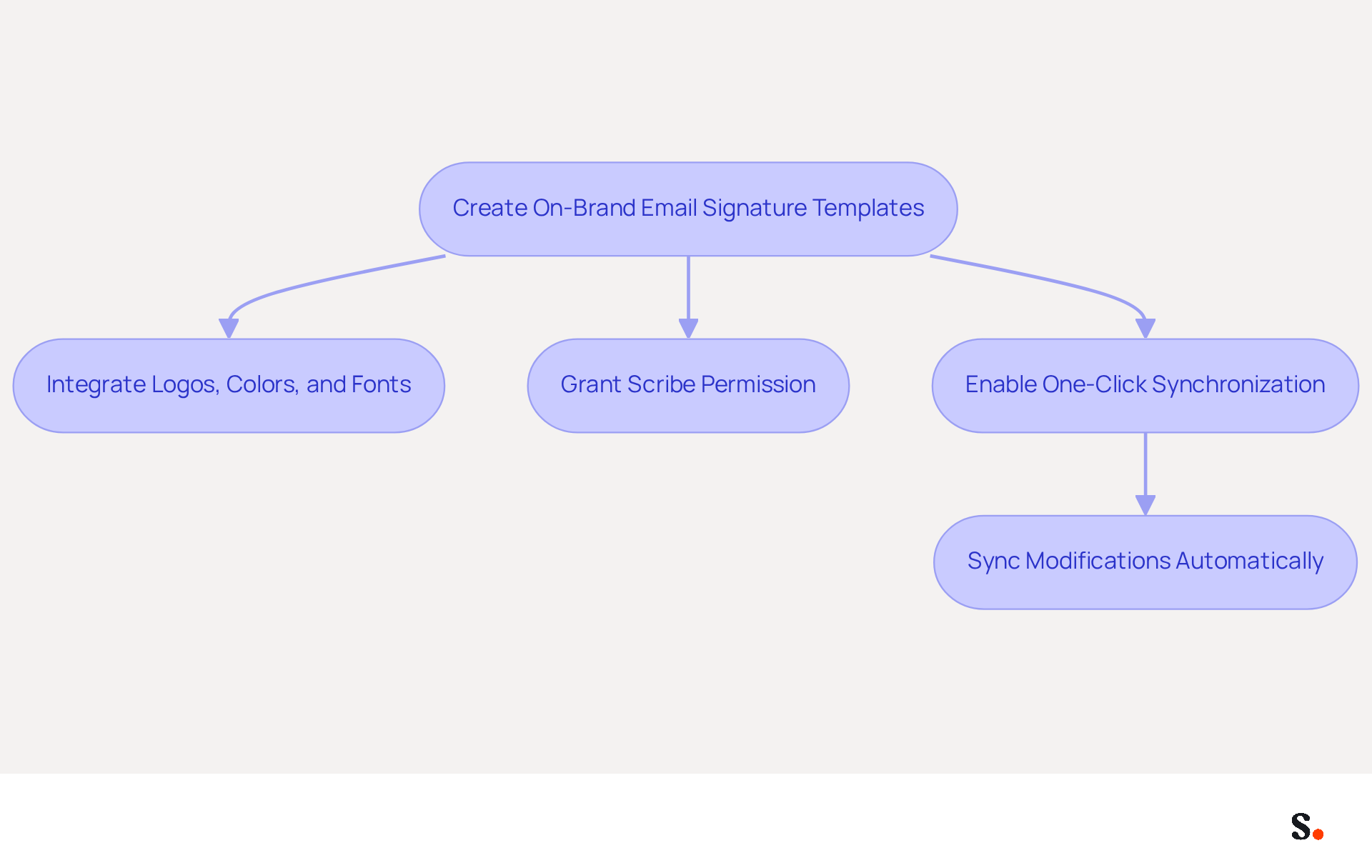
Creating on-brand templates is not just a design choice; it's a strategic necessity for effective communication. This tool enables the creation of signatures that accurately reflect your brand's identity. You can integrate logos, colors, and fonts that align with your overall marketing strategy.
While enabling one-click synchronization requires granting Scribe permission to connect with your provider and Super Admin access, this step is crucial for seamless integration. This ensures that any modifications made in your provider directory are automatically synced with Scribe, enhancing brand consistency across all touchpoints.
Consider this: businesses that maintain consistent electronic communication identifiers see a 22% increase in response rates, underscoring the significance of visual coherence. For instance, a well-designed emblem featuring a professional logo and cohesive color scheme can significantly enhance recognition and trust. Additionally, adding links to your social media profiles or website can really boost traffic and engagement, extending the impact of your message.
Case studies indicate that organizations prioritizing brand consistency in their email formats see enhanced marketing performance and customer trust, making this a strategic investment for 2026 and beyond. With Scribe's automated synchronization with platforms like Aircall, any modifications made in your configurations are promptly reflected in your branding, ensuring that your identity remains consistent. Investing in brand consistency today will yield significant returns in customer engagement and trust tomorrow.
Automate Data Synchronization for Efficiency
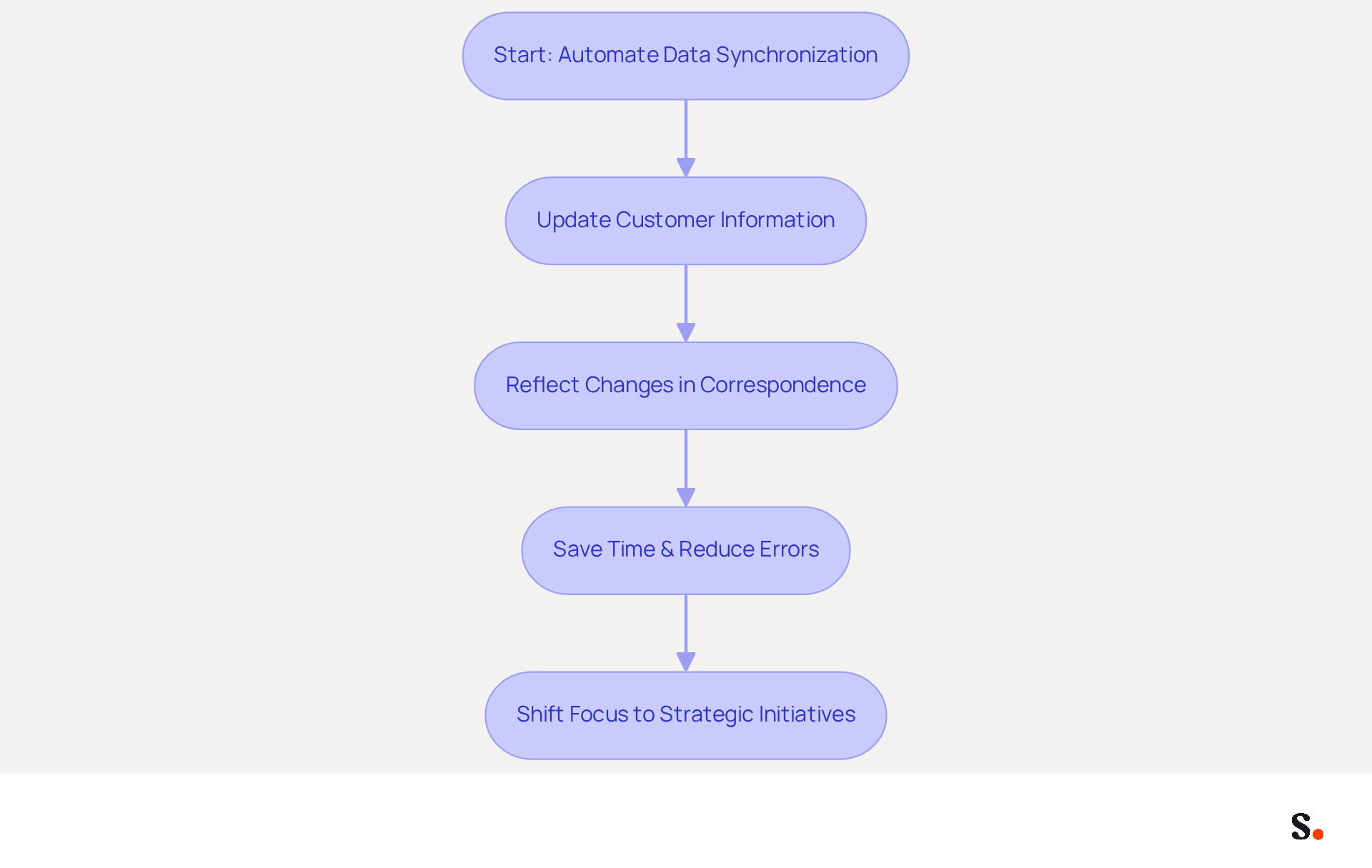
Automating data synchronization between your CRM and messaging software addresses the critical challenge of maintaining accurate customer information. With Scribe, any updates to customer information - such as name, title, or contact details - are automatically reflected in correspondence. This automation saves time and minimizes the risk of sharing outdated information, which can harm your brand's credibility. For example, when a team member changes roles, their email signature updates automatically, ensuring that all communications remain accurate and professional.
This level of automation allows teams to shift their focus from administrative tasks to strategic initiatives, resulting in better resource allocation and improved return on investment (ROI). Research shows that businesses using automated data synchronization see engagement rates rise by as much as 40% due to timely and relevant communications. Moreover, case studies indicate that organizations utilizing Scribe's automated solutions have regained substantial hours once dedicated to manual updates, enabling IT and promotional teams to concentrate on higher-value projects.
The trend of automating data synchronization in promotional communications is set to grow significantly by 2026, with many companies recognizing its importance for maintaining brand consistency and compliance. By utilizing Scribe's features, including seamless integration with Google Workspace and Aircall, businesses can ensure that their messaging reflects the most up-to-date information while also serving as effective marketing tools that drive engagement and lead generation. As Dave Willis, Senior Content Manager, states, "Automating message management helps IT teams remove manual updates, decrease support tickets, and uphold brand consistency across all users and devices." Furthermore, Scribe's SOC 2 Type II compliance guarantees that your information is protected, making it a trustworthy option for organizations aiming to optimize their management of digital signatures. Defining governance and ownership before implementing automation is crucial to clarify responsibilities for branding and compliance.
Utilize Personalized Banners and Call-to-Action Buttons
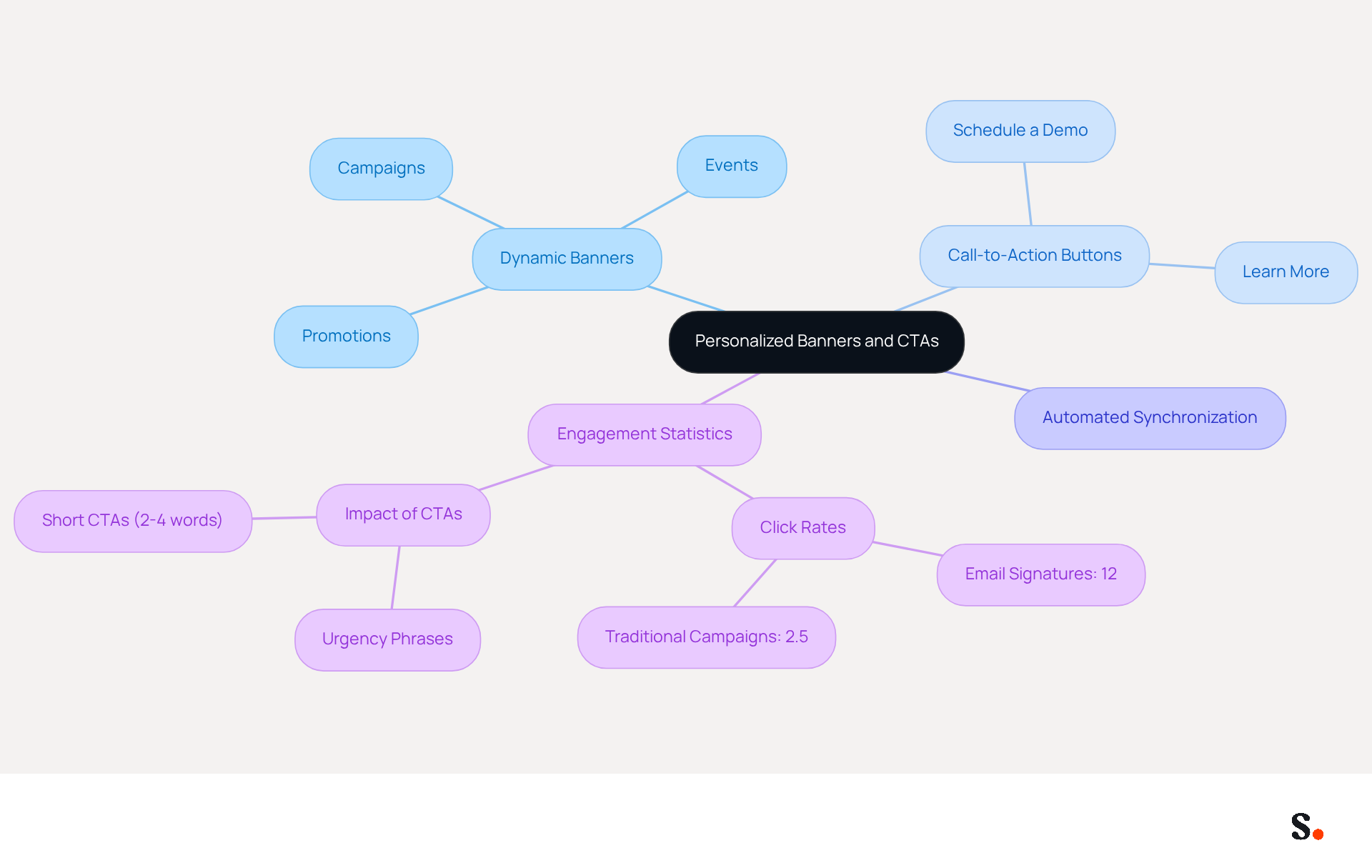
Incorporating customized banners and call-to-action buttons into your messages is essential for maximizing engagement rates. This tool allows for the inclusion of dynamic banners that advertise ongoing campaigns, events, or special promotions right in your message footer. For instance, a banner promoting a limited-time discount can encourage recipients to act quickly.
Furthermore, with automated synchronization from Aircall, any changes made in your Aircall configuration will be reflected in your Scribe profiles, ensuring brand consistency across all communications. Including a clear CTA button - such as 'Schedule a Demo' or 'Learn More' - can effectively guide recipients toward the next steps you want them to take.
Using visual elements strategically boosts the appeal of your communications and leads to measurable engagement results, contributing to a higher ROI from your outreach efforts. Statistics indicate that signatures can achieve click rates of 12%, surpassing traditional campaigns, which average around 2.5%. By implementing these strategies, businesses can transform their email communications into powerful marketing tools.
Conclusion
Integrating CRM systems with email signature software is not merely advantageous; it is a necessity for achieving marketing success in today's digital landscape. By leveraging automated data synchronization and personalized branding, organizations can enhance their communication effectiveness, foster stronger customer relationships, and ultimately drive higher engagement rates.
The article highlights several key strategies, including:
- The importance of creating on-brand email signature templates
- Automating data synchronization
- Utilizing personalized banners and call-to-action buttons
These strategies not only maintain brand consistency but also enhance response rates and overall marketing effectiveness. With Scribe's capabilities, businesses can achieve a 12% average click-through rate on signature banners, showcasing the tangible benefits of this approach.
As organizations navigate the complexities of digital marketing, adopting tools like Scribe for CRM integration and email signature management is essential. By prioritizing these strategies, companies can streamline their operations and enhance their overall marketing ROI. By investing in these solutions now, organizations can secure a competitive edge in communication and customer engagement moving forward.
Frequently Asked Questions
What is the purpose of integrating CRM systems with email signature software?
The integration addresses common challenges in marketing efficiency by syncing customer data, ensuring that email footers contain the latest information about contacts, which fosters stronger relationships and improves response rates.
How does personalized email signature content affect response rates?
Personalizing email signatures with relevant promotions or messages can lead to significant improvements in response rates, as demonstrated by case studies.
What platforms does Scribe's email signature software integrate with?
Scribe's email signature software integrates with platforms such as Google Workspace and Aircall.
What are the benefits of Scribe's automated synchronization?
Automated synchronization eliminates the need for manual updates, reducing errors and saving time for users.
What is the average click-through rate for organizations using Scribe's integration?
Organizations using Scribe's integration see an average click-through rate of 12% on banners.
How does Scribe ensure data security for its users?
Scribe is SOC 2 Type II compliant, ensuring that user data is managed securely.
List of Sources
- Integrate CRM Systems with Email Signature Software
- Positive connects Positive Signitic to the CRM – the email signature becomes a marketing channel in its own right (https://positivegroup.com/news/signitic-crm-email-signature-marketing)
- Salesforce Connector: Now Live! (https://letsignit.com/blog/salesforce-integration)
- CRM Email Signature Tools: List and Comparison | Signitic (https://signitic.com/en/resources/crm-email-signature-tools-the-complete-guide-to-align-sales-and-marketing)
- Why Email Signatures Must Be In Your 2026 Marketing Plan | Rocketseed (https://rocketseed.com/blog/what-are-the-biggest-email-trends-for-2026)
- Why CRM‑Integrated Email Marketing has the Advantage over Standalone Platforms - Keystroke.ca - World's #1 Act! Reseller (https://keystroke.ca/en/blog/general/why-crm-integrated-email-marketing-has-the-advantage-over-standalone-platforms.html?srsltid=AU7gw4WobifeVI8O-_fEV9nmMnckt2Vm_ek6OeoUPHRjVH_JTrVxs086)
- Create On-Brand Email Signature Templates
- Why Email Signatures Must Be In Your 2026 Marketing Plan | Rocketseed (https://rocketseed.com/blog/2026-marketing-plan-email-signatures)
- Email signature statistics and trends in 2024 (https://wisestamp.com/blog/email-signature-statistics)
- The impact of email signatures on your branding (https://signitic.com/en/resources/the-impact-of-email-signatures-on-your-branding)
- 10 Professional Business Email Signature Examples to Boost Your Brand (https://scribe-mail.com/en-US/blog/10-professional-business-email-signature-examples-to-boost-your-brand)
- Why Team Email Signatures Matter More Than You Think: The Hidden Impact on Brand Trust and Customer Experience (https://getmailbird.com/why-team-email-signatures-matter-brand-trust)
- Automate Data Synchronization for Efficiency
- Automating Email Signatures: How IT Teams Streamline Processes & Reduce Risk (https://exclaimer.com/blog/streamlining-it-processes-automated-email-signatures)
- How to combine automation and email signatures (https://signitic.com/en/resources/how-to-combine-automation-and-email-signatures)
- Top marketing automation statistics (https://oracle.com/cx/marketing/automation/what-is-marketing-automation/statistics)
- 4 Best Practices for Effective Automated Email Signatures (https://scribe-mail.com/en-US/blog/4-best-practices-for-effective-automated-email-signatures)
- Why Scribe is the Best Email Signature Management Tool for Marketers (https://scribe-mail.com/en-US/blog/why-scribe-is-the-best-email-signature-management-tool-for-marketers)
- Utilize Personalized Banners and Call-to-Action Buttons
- Using Email Signatures as a Marketing Tool: Ideas for Generating Leads and Promoting Business (https://blog.ringostat.com/en/using-email-signatures-as-a-marketing-tool-ideas-for-generating-leads-and-promoting-business)
- Why Email Signatures Must Be In Your 2026 Marketing Plan | Rocketseed (https://rocketseed.com/blog/2026-marketing-plan-email-signatures)
- Email signature banner: the guide to transform your emails into campaigns (https://signitic.com/en/resources/campaign-banners-in-the-email-signature-the-marketing-guide)
- The Ultimate Guide to Email Signature Call-to-Action - NEWOLDSTAMP (https://newoldstamp.com/blog/the-ultimate-guide-to-email-signature-call-to-action)
- 2026 Marketing Trends: Email Signatures as a Marketing Tool (https://bluechiptt.com/blog/5-marketing-trends-for-2026-and-how-your-email-signature-fits-in)
Get started with Scribe
Let AI build your signature — from a screenshot
Free 14-day trial — no credit card.