4 Work Email Signature Examples to Boost Brand Engagement
An effective email signature is not merely a digital sign-off; it is a strategic branding tool that enhances recipient engagement. Organizations can enhance
Sophie Grant
Email Signature Specialist, Scribe

On this page
- Introduction
- Incorporate Essential Elements for Professional Email Signatures
- Utilize Visual Branding to Strengthen Brand Identity
- Integrate Call-to-Action Buttons for Enhanced Engagement
- Automate Email Signature Management for Consistency and Efficiency
- Conclusion
- Frequently Asked Questions
- List of Sources
Introduction
An effective email signature is not merely a digital sign-off; it is a strategic branding tool that enhances recipient engagement. Organizations can enhance professionalism and drive action by incorporating essential elements and visual branding strategies into their email signatures. Many businesses face challenges in ensuring consistency and compliance in their email communications.
How can companies leverage automation to ensure their email signatures consistently reflect their brand identity while maximizing engagement? This article will demonstrate how best practices can transform email signatures into impactful marketing assets, ensuring brands maximize engagement and effectiveness.
Incorporate Essential Elements for Professional Email Signatures
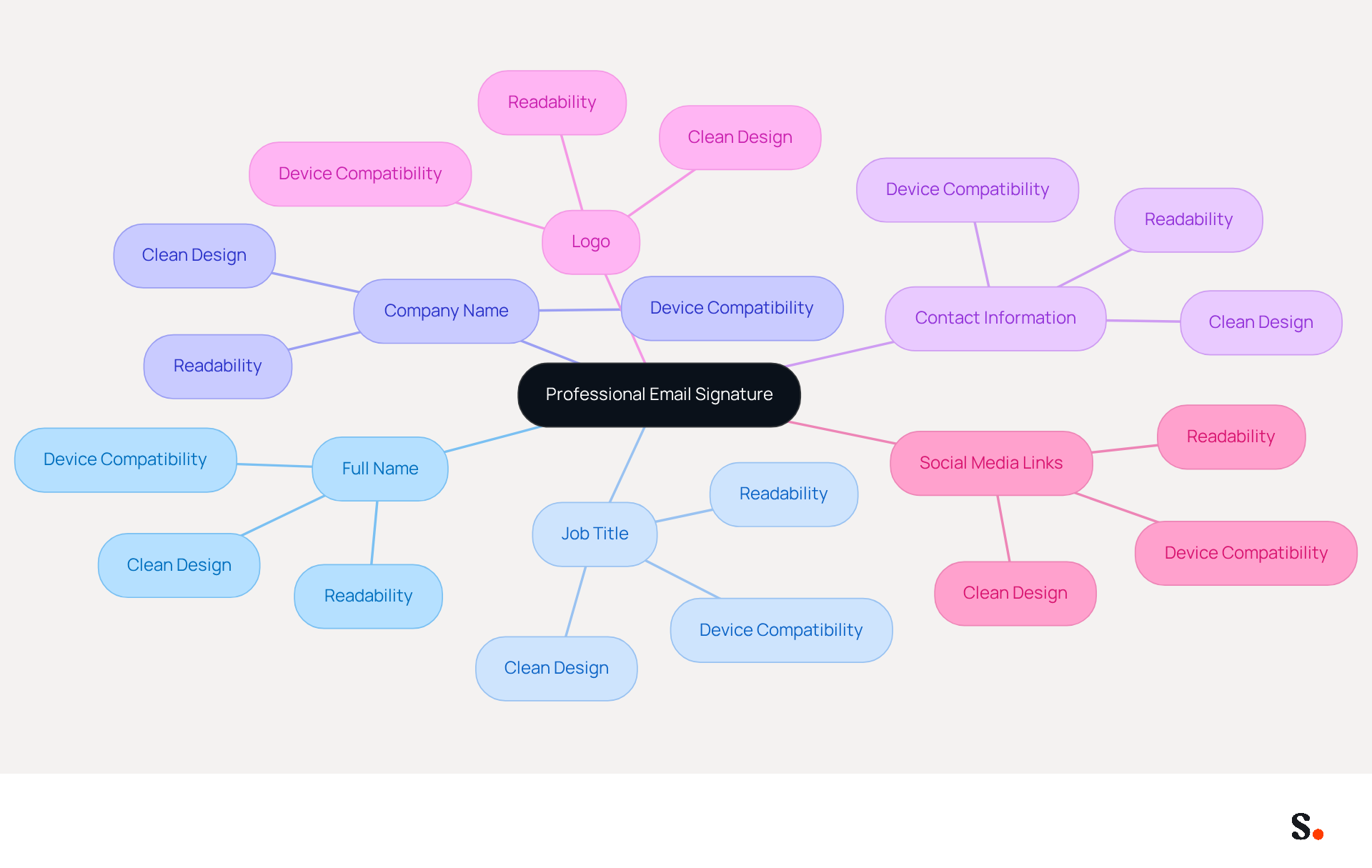
To create a professional email signature that stands out, certain key elements must be included:
- Full Name: Clearly state your name to ensure recipients know who the message is from.
- Job Title: Include your position to establish authority and context, reinforcing your role within the organization.
- Company Name: This reinforces identity and helps recipients recognize your organization, enhancing trust and credibility.
- Contact Information: Provide a phone number and contact address for easy communication, ensuring recipients can reach you without hassle.
- Logo: A logo enhances recognition and adds a visual element to your mark, making it more memorable.
- Social Media Links: Include links to your professional social media profiles to encourage further engagement and connect with your audience.
Including these elements ensures your correspondence is informative and projects a professional image, enhancing your presence in every interaction. To enhance your communications, best practices for 2026 recommend optimizing your identifier for readability, utilizing a clean design, and ensuring compatibility across devices. With Scribe, every modification made in your Aircall setup will automatically be reflected in your digital identifiers, ensuring brand consistency without manual updates. Moreover, syncing your Google Workspace with Scribe conserves time by automatically refreshing your teammates' details, facilitating effortless management of identifiers. With Scribe, you can trust that your data is handled securely, as it meets SOC 2 Type II standards and complies with GDPR and CCPA. According to recent statistics, electronic correspondence can achieve an engagement rate of 40%, significantly higher than traditional marketing campaigns. Moreover, a well-crafted emblem can foster confidence and trust among recipients, as emphasized by industry experts. For example, a case study revealed that Scribe, which standardized its electronic correspondence identifiers, experienced a 25% rise in traffic to particular landing pages, illustrating the effectiveness of these optimal practices.
Utilize Visual Branding to Strengthen Brand Identity
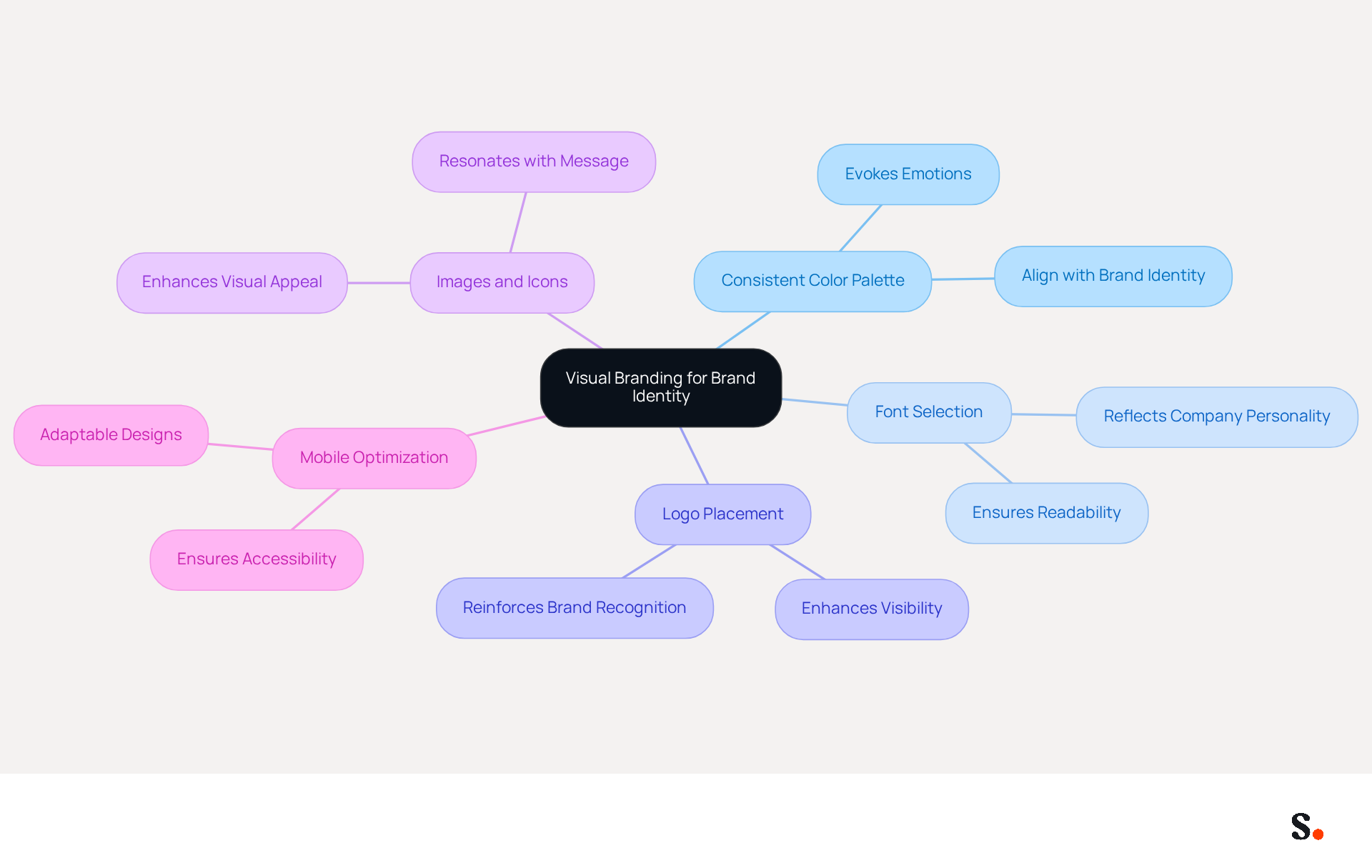
To establish a strong brand presence, it is essential to effectively utilize visual branding in your email signatures. Consider the following strategies:
- Consistent Color Palette: Use colors that align with your identity to create a cohesive look.
- Font Selection: Choose fonts that reflect your company's personality and ensure readability.
- Logo Placement: Position your logo prominently to enhance visibility.
- Images and Icons: Incorporate relevant images or icons that resonate with your message.
- Mobile Optimization: Ensure that your visual elements are optimized for mobile devices, as many recipients will view messages on their phones.
Failing to implement these strategies may result in a fragmented brand identity that undermines your professional image.
Integrate Call-to-Action Buttons for Enhanced Engagement
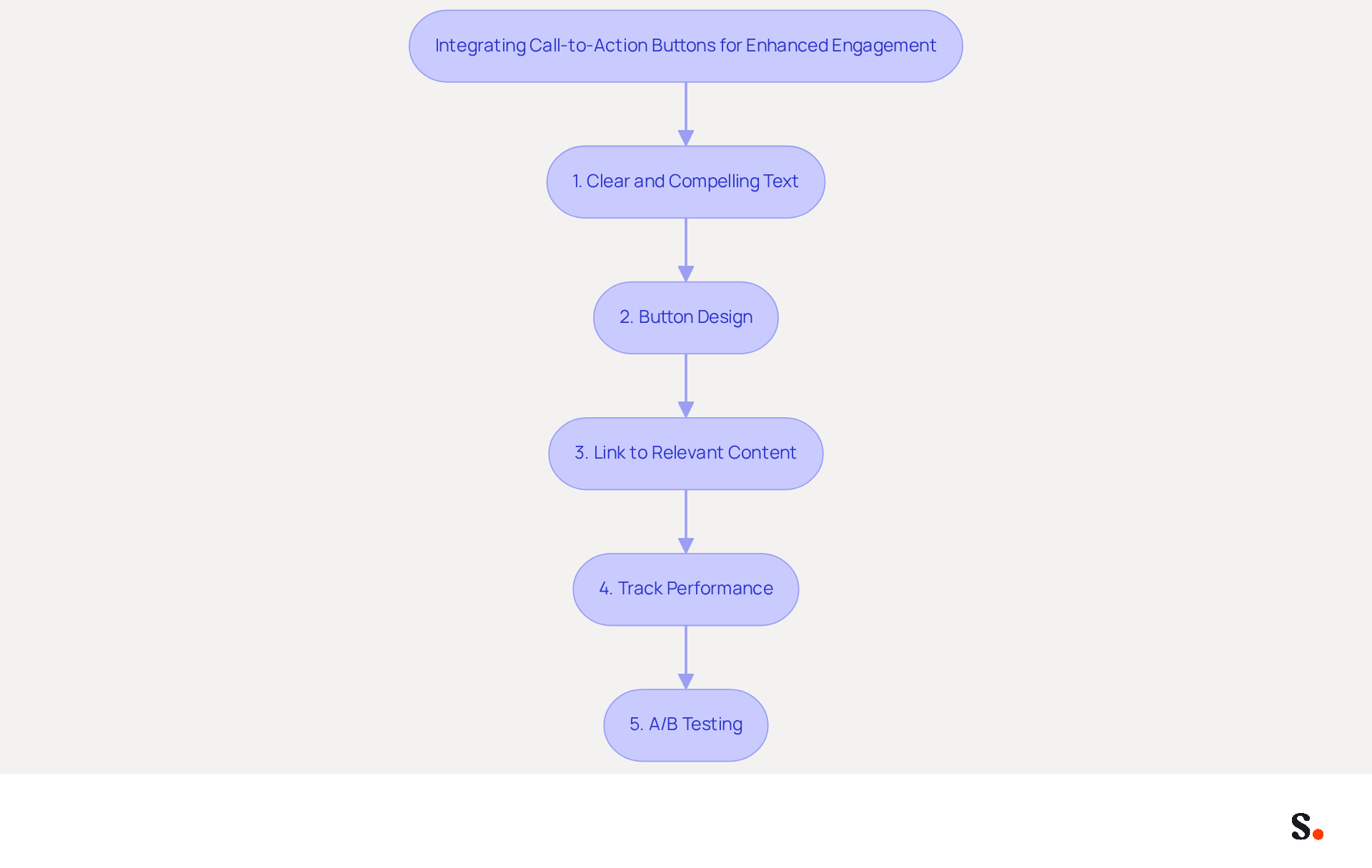
Integrating call-to-action buttons effectively in email signatures can significantly influence recipient engagement. To achieve this, adhere to the following best practices:
- Clear and Compelling Text: Utilize action-oriented language that prompts recipients to engage, such as 'Schedule a Meeting' or 'Download Our Guide.' Short, impactful phrases are more likely to drive clicks. Incorporating strong action verbs enhances clarity and drives engagement.
- Button Design: Ensure the button is visually distinct by employing contrasting colors and legible fonts. A well-crafted button stands out and invites interaction.
- Link to Relevant Content: Direct the CTA to a specific landing page that offers value, such as a product page or a sign-up form. This relevance increases the likelihood of conversion.
- Track Performance: Without tracking, understanding the impact of your CTAs becomes challenging. Implement tracking links to assess effectiveness. Analyzing performance data allows for informed adjustments to optimize engagement strategies. For instance, calendar booking links have a 26% click-through rate (CTR), while resource downloads achieve a 19% CTR.
- A/B Testing: Regularly experiment with various CTA designs and texts to identify which versions yield the best results. Continuous A/B testing is essential for improving click-through rates and overall effectiveness, as evidenced by case studies that show consistent improvements in engagement through testing.
Incorporating effective CTAs into your correspondence can significantly enhance engagement and drive desired actions from your recipients. For example, sales emails featuring calendar links have been demonstrated to achieve three times higher meeting bookings, while marketing emails with resource downloads generate five times more marketing qualified leads than generic CTAs. By implementing these strategies, you can transform your email signatures into powerful tools for driving engagement and conversions. Furthermore, by syncing your Google Workspace and Aircall with Scribe, you can simplify management of your correspondence identifiers, ensuring that any updates to your team’s information are automatically reflected in your identifiers, saving time and enhancing brand consistency.
Automate Email Signature Management for Consistency and Efficiency
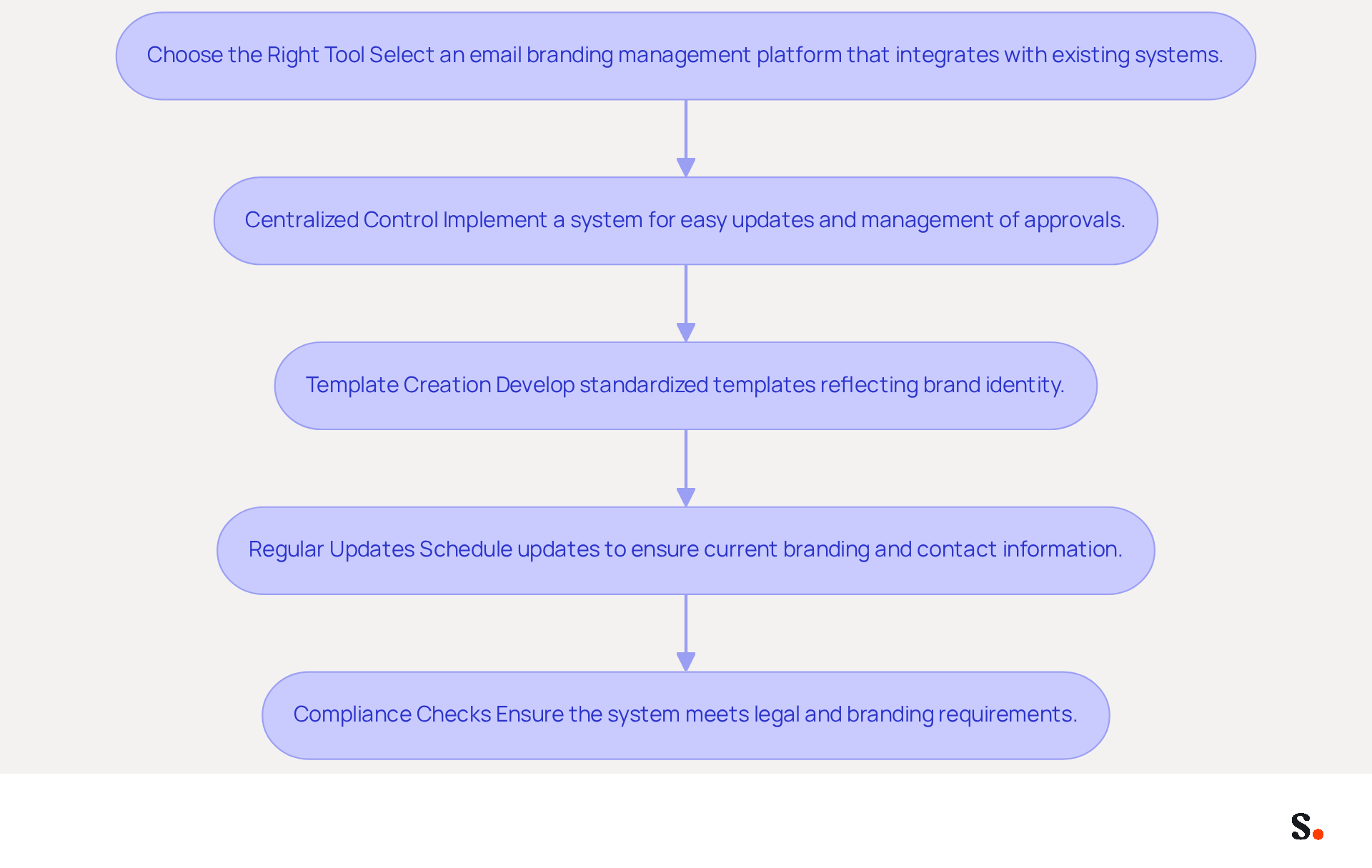
To streamline email signature management and enhance brand consistency, organizations must adopt effective automation strategies.
- Choose the Right Tool: Over 10,000 businesses use this platform, ensuring consistent application of your branding across all communications. Select an email branding management platform that integrates seamlessly with your existing email systems, such as Scribe.
- Centralized Control: Implement a centralized system that allows for easy updates and management of approvals across the organization. Scribe's one-click synchronization feature allows you to sync teammate information effortlessly, enhancing consistency and reducing errors and support tickets.
- Template Creation: Develop standardized templates that reflect your brand's identity, ensuring consistency across all sign-offs. Standardized designs enhance professionalism and attention to detail in every correspondence, which is crucial for maintaining client trust.
- Regular Updates: Schedule regular updates to ensure that all endorsements reflect current branding, promotions, and contact information. Automation allows these updates to be completed in minutes, significantly reducing the time spent on manual changes and freeing IT teams to focus on higher-priority projects. This tool automatically synchronizes teammate information from your provider daily, ensuring that your identifiers are always current. Manual updates can lead to outdated information, causing inconsistencies in branding.
- Compliance Checks: Ensure that your automated system includes compliance checks to meet legal and branding requirements. Scribe is SOC 2 Type II compliant and GDPR compliant, ensuring that your management of digital identifiers adheres to necessary security standards. Automated digital identifiers can enforce compliant disclaimers consistently across departments, reducing the risk of fines and enhancing overall efficiency.
Dave Willis, Senior Content Manager, emphasizes that automating message management allows IT teams to eliminate manual updates, reduce support tickets, and maintain brand consistency across all users and devices. By automating email signature management with Scribe, organizations can maintain a professional appearance, reduce manual workload, and ensure that all communications include work email signature examples that are consistent and up-to-date. This strategic shift not only enhances operational efficiency but also empowers IT teams to contribute more significantly to organizational goals.
Conclusion
A well-crafted email signature is more than just a digital signature; it is a strategic asset that enhances brand engagement and professional identity. By incorporating essential elements such as your name, job title, company name, and contact information, along with visual branding and call-to-action buttons, organizations can significantly improve their communication effectiveness. Utilizing tools like Scribe allows for seamless management of these signatures, ensuring brand consistency and compliance with security standards.
The article outlines essential strategies for optimizing email signatures, emphasizing the need for:
- A consistent color palette
- Thoughtful font selection
- Effective placement of logos and CTAs
These elements not only enhance visual appeal but also drive engagement, as evidenced by notable click-through rates for well-designed CTAs. Automating email signature management with Scribe further streamlines this process, allowing marketing teams to maintain control over their branding while IT departments can focus on more critical tasks.
Ultimately, a well-crafted email signature plays a crucial role in your brand's identity and engagement. It serves as a powerful tool for brand identity and engagement, capable of transforming routine communications into opportunities for connection and conversion. Organizations are encouraged to adopt best practices in email signature design and management, leveraging platforms like Scribe to ensure their branding remains consistent, compliant, and impactful across all communications. By leveraging the power of email signatures, organizations can transform everyday communications into significant opportunities for engagement and conversion.
Frequently Asked Questions
What are the essential elements to include in a professional email signature?
The essential elements to include in a professional email signature are your full name, job title, company name, contact information, logo, and social media links.
Why is it important to include your full name in an email signature?
Including your full name ensures that recipients know who the message is from, establishing clarity and recognition.
How does including a job title in an email signature benefit the sender?
Including a job title establishes authority and context, reinforcing the sender's role within the organization.
What role does the company name play in an email signature?
The company name reinforces identity and helps recipients recognize the organization, enhancing trust and credibility.
Why should contact information be provided in an email signature?
Providing contact information, such as a phone number and address, allows for easy communication, ensuring recipients can reach you without hassle.
How does a logo enhance an email signature?
A logo enhances recognition and adds a visual element to your signature, making it more memorable for recipients.
What is the benefit of including social media links in an email signature?
Including social media links encourages further engagement and helps connect with your audience on professional platforms.
What best practices are recommended for email signatures in 2026?
Best practices for 2026 recommend optimizing your identifier for readability, utilizing a clean design, and ensuring compatibility across devices.
How does Scribe help with managing email signatures?
With Scribe, modifications made in your Aircall setup are automatically reflected in your digital identifiers, ensuring brand consistency without manual updates.
What security standards does Scribe meet for handling data?
Scribe meets SOC 2 Type II standards and complies with GDPR and CCPA for secure data handling.
What engagement rate can electronic correspondence achieve compared to traditional marketing?
Electronic correspondence can achieve an engagement rate of 40%, significantly higher than traditional marketing campaigns.
How can a well-crafted email signature impact recipient trust?
A well-crafted email signature can foster confidence and trust among recipients, as emphasized by industry experts.
What was the outcome of Scribe standardizing its electronic correspondence identifiers?
Scribe experienced a 25% rise in traffic to particular landing pages after standardizing its electronic correspondence identifiers, illustrating the effectiveness of optimal practices.
List of Sources
- Incorporate Essential Elements for Professional Email Signatures
- Email Signature Best Practices - NEWOLDSTAMP (https://newoldstamp.com/blog/email-signature-best-practices)
- The ultimate guide to email signatures in 2026 (https://signitic.com/en/resources/email-signature)
- The impact of email signatures on your branding (https://signitic.com/en/resources/the-impact-of-email-signatures-on-your-branding)
- Why Email Signatures Are So Important (https://findlight.net/salesacademy/why-email-signatures-are-so-important)
- Research Recap: Branded Email Signatures Increase Company Recognition, Trust - Demand Gen Report (https://demandgenreport.com/industry-news/research-recap-branded-email-signatures-increase-company-recognition-trust/47252)
- Utilize Visual Branding to Strengthen Brand Identity
- Email Signature Branding: Consistency and Impact | Crossware365 (https://crossware365.com/blog/mastering-email-signature-branding-market-presence)
- Research Recap: Branded Email Signatures Increase Company Recognition, Trust - Demand Gen Report (https://demandgenreport.com/industry-news/research-recap-branded-email-signatures-increase-company-recognition-trust/47252)
- Email Signature Inspiration: Compare Trends Across Industries (https://scribe-mail.com/en-US/blog/email-signature-inspiration-compare-trends-across-industries)
- The impact of email signatures on your branding (https://signitic.com/en/resources/the-impact-of-email-signatures-on-your-branding)
- 15 Ways Email Signatures Can Boost Your Brand | Rocketseed (https://rocketseed.com/blog/15-ways-email-signature-branding-can-boost-your-brand)
- Integrate Call-to-Action Buttons for Enhanced Engagement
- Email Signature Best Practices for 2026 (+ 15 Pro Examples) (https://wavecnct.com/blogs/email-signature-best-practices-2026)
- The Ultimate Guide to Email Signature Call-to-Action - NEWOLDSTAMP (https://newoldstamp.com/blog/the-ultimate-guide-to-email-signature-call-to-action)
- CTAs lead the way in email engagement tactics (https://emarketer.com/content/ctas-lead-way-email-engagement-tactics)
- Create Effective CTA Email Signatures (Examples & Templates) (https://wisestamp.com/examples/cta-email-signature)
- Automate Email Signature Management for Consistency and Efficiency
- Email Signature Trends 2026: Centralized Control & Automation | SIGNandGO posted on the topic | LinkedIn (https://linkedin.com/posts/signngo_email-signature-trends-to-watch-in-2026-activity-7401523471786217473-zAVL)
- Automating Email Signatures: How IT Teams Streamline Processes & Reduce Risk (https://exclaimer.com/blog/streamlining-it-processes-automated-email-signatures)
- Company-Wide Email Signature Management | CloudM (https://cloudm.io/resources/blog/optimize-your-process-with-company-wide-email-signature-management)
- Compare 5 Software for Email Signature: Features and Benefits for Marketers (https://scribe-mail.com/en-US/blog/compare-5-software-for-email-signature-features-and-benefits-for-marketers)
Get started with Scribe
Build a professional email signature
Free 14-day trial — no credit card.