5 Best Practices for Automated Email Signature Updates
Choosing an email signature management tool is not merely a technical choice; it is a strategic decision that can greatly influence brand consistency and
Sophie Grant
Email Signature Specialist, Scribe

Introduction
Choosing an email signature management tool is not merely a technical choice; it is a strategic decision that can greatly influence brand consistency and compliance. With the increasing significance of digital communication, understanding best practices for automated email signature updates is essential for marketing and IT professionals alike. Organizations face significant hurdles in achieving brand uniformity and compliance in their email communications.
What strategies can businesses employ to navigate these complexities and ensure their email communications are both seamless and impactful? Successfully addressing these challenges is vital for businesses aiming to enhance their email communications and uphold their brand identity.
Choose the Right Email Signature Management Tool
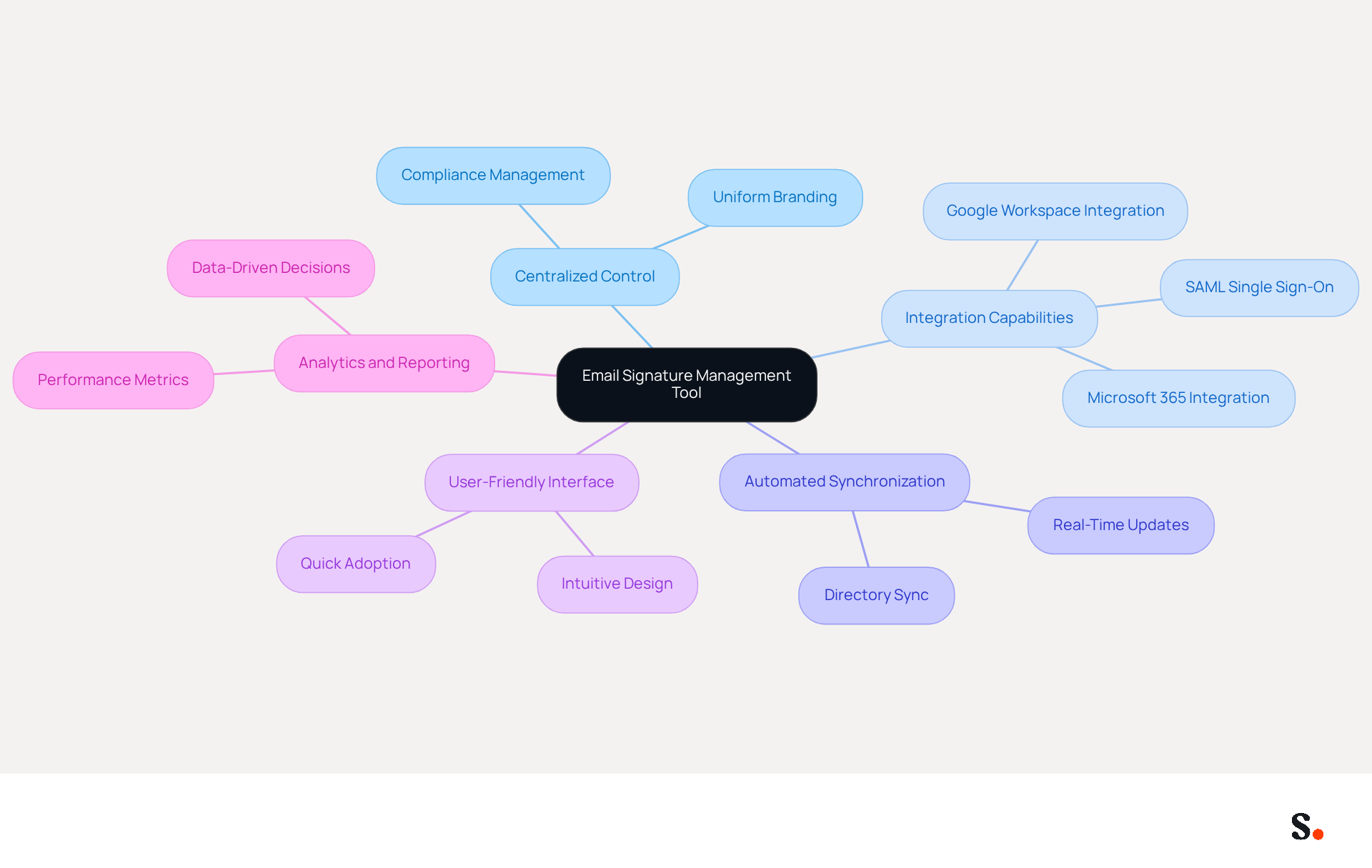
Selecting the right management tool is crucial for facilitating automated email signature updates and ensuring brand consistency across an organization. Key features to consider include:
- Centralized Control: Look for a tool that enables easy management of signatures across the organization, ensuring uniformity in branding and compliance.
- Integration Capabilities: The tool should seamlessly connect with existing communication platforms like Google Workspace and Microsoft 365, facilitating smooth operations. This platform, for instance, provides SAML single sign-on integration, enabling employees to access it securely through their identity provider.
- Automated Synchronization: The tool automates the synchronization of email identifiers with your business phone system, ensuring that any modifications made are instantly reflected across all identifiers. This feature saves time and boosts brand consistency, all without needing team members to take extra steps.
- User-Friendly Interface: A simple and intuitive interface will encourage quick adoption by team members, minimizing the learning curve.
- Analytics and Reporting: Opt for a tool that provides insights into performance metrics, allowing for data-driven decisions to optimize marketing efforts.
Scribe stands out with its comprehensive features, including automated email signature updates, that automate branding updates and ensure consistency, making it a preferred choice for many organizations. Notably, Scribe's dedication to GDPR adherence and SOC 2 Type II certification ensures that your data is handled securely, addressing critical employee data management requirements. Organizations often struggle with inconsistent branding and compliance oversights in managing electronic correspondence identifiers. Addressing these challenges not only improves brand integrity but also enhances overall marketing effectiveness.
Integrate with Your Email Environment
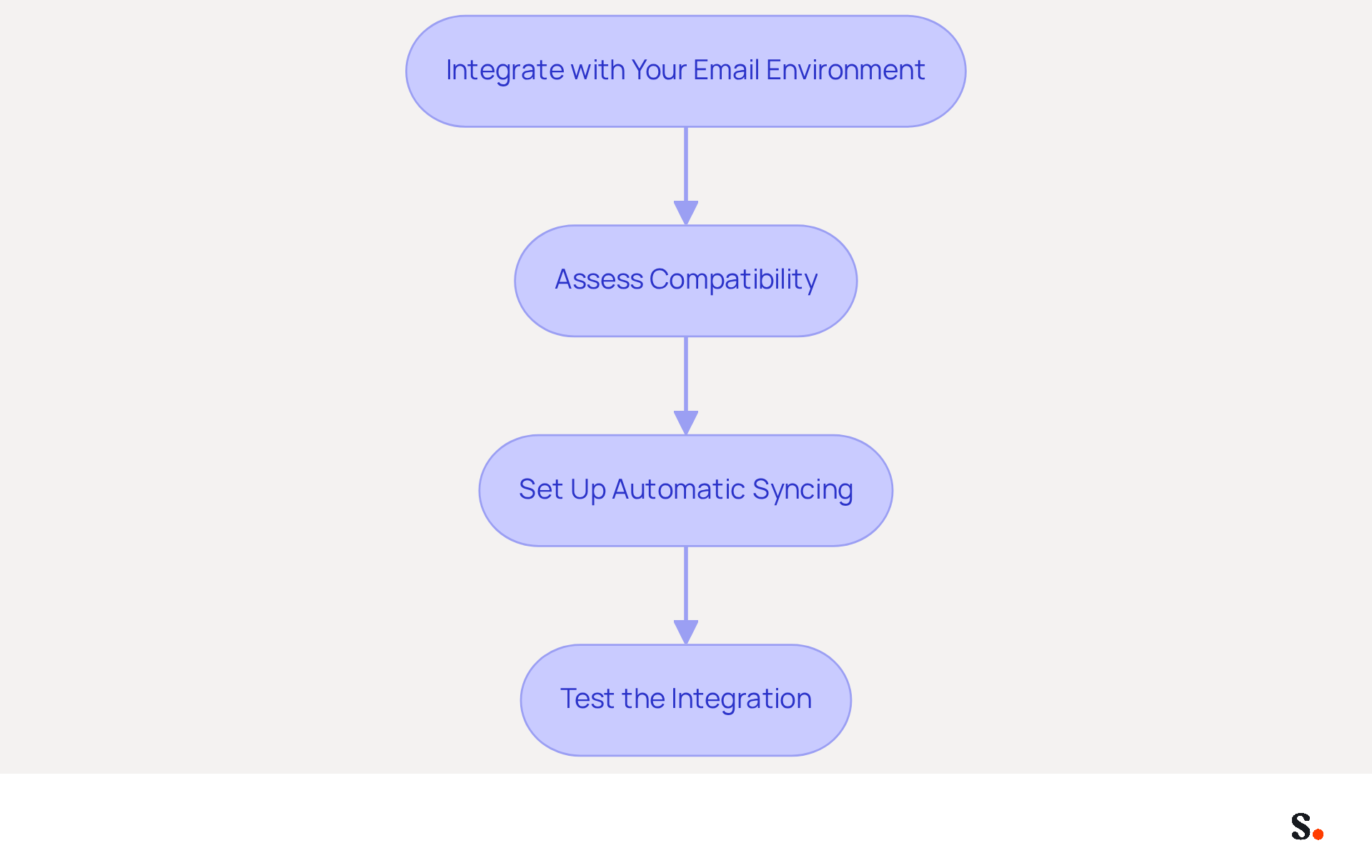
Effective integration of your management tool is essential for maintaining consistent branding across all communications. Follow these key steps for effective integration:
- Assess Compatibility: Confirm that the tool is compatible with your email platform, such as Outlook or Gmail.
- Set Up Automatic Syncing: Configure Scribe to automatically synchronize with your contact directory, ensuring that any changes in employee information are reflected in their identifiers. Note that you must be a Super Admin of your service provider to grant the necessary permissions for this integration.
- Test the Integration: It's advisable to conduct tests before rolling out the integration completely to ensure that identifiers display correctly across various messaging clients.
This tool facilitates seamless integration with popular messaging platforms, ensuring real-time updates to identifiers without manual intervention. This capability not only improves brand consistency but also simplifies the management process, as organizations can effortlessly maintain current identifiers with automated email signature updates. Research indicates that companies leveraging integrated management tools see a significant reduction in manual errors and improved engagement metrics. Case studies show that organizations utilizing such integrations have effectively improved their branding initiatives and marketing efficiency through consistent messaging in every communication sent. Moreover, Scribe's SOC 2 Type II compliance guarantees that your data is secure, further enhancing its practicality for managing digital signatures. Ultimately, the right integration not only secures your data but also elevates your brand's communication strategy.
Design and Test Signature Templates
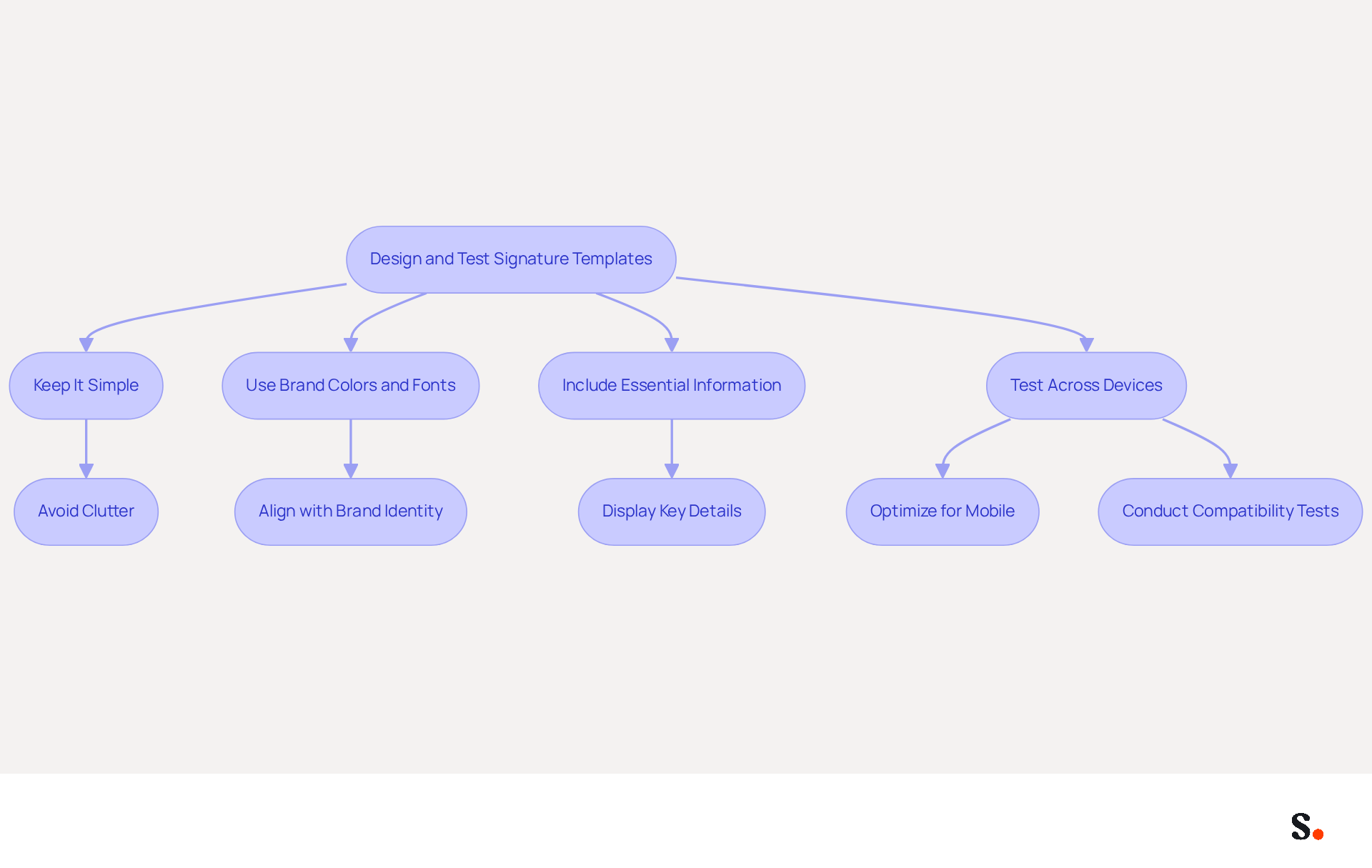
Effective email templates are essential for clear communication and brand representation. Creating effective templates for correspondence requires a balance of design and functionality. Here are key best practices to follow:
- Keep It Simple: Limit the number of elements to avoid clutter. A clean design enhances readability and ensures that essential information stands out.
- Use Brand Colors and Fonts: Align the email with your brand's visual identity by incorporating consistent colors and fonts. This reinforces brand recognition and professionalism.
- Include Essential Information: Ensure that key details such as the sender's full name, job title, company logo, and contact information are prominently displayed. This facilitates easy communication and enhances credibility.
- Test Across Devices: Given that nearly 89% of messages are accessed on mobile devices, optimizing for mobile is crucial. Conduct tests on various devices and messaging clients to ensure compatibility.
It's important to watch out for pitfalls like information overload and outdated details that can undermine your email signature's effectiveness. Additionally, including legal disclaimers where necessary ensures compliance with industry regulations. For instance, customizable templates are offered that can be adapted for various departments, which also facilitate automated email signature updates to ensure brand consistency. Furthermore, with the integration of Scribe and Aircall, any modifications made in your Aircall settings will ensure automated email signature updates are automatically reflected in your profiles, ensuring seamless updates and enhanced brand consistency. With SOC 2 Type II certification and compliance with GDPR and CCPA, Scribe ensures your data is secure and meets industry standards. A tech firm successfully implemented customized identifiers for their sales and support teams, resulting in a 25% increase in engagement and relevance in their communications. By implementing these strategies, organizations can significantly enhance their email communication effectiveness and brand image.
Roll Out Organization-Wide
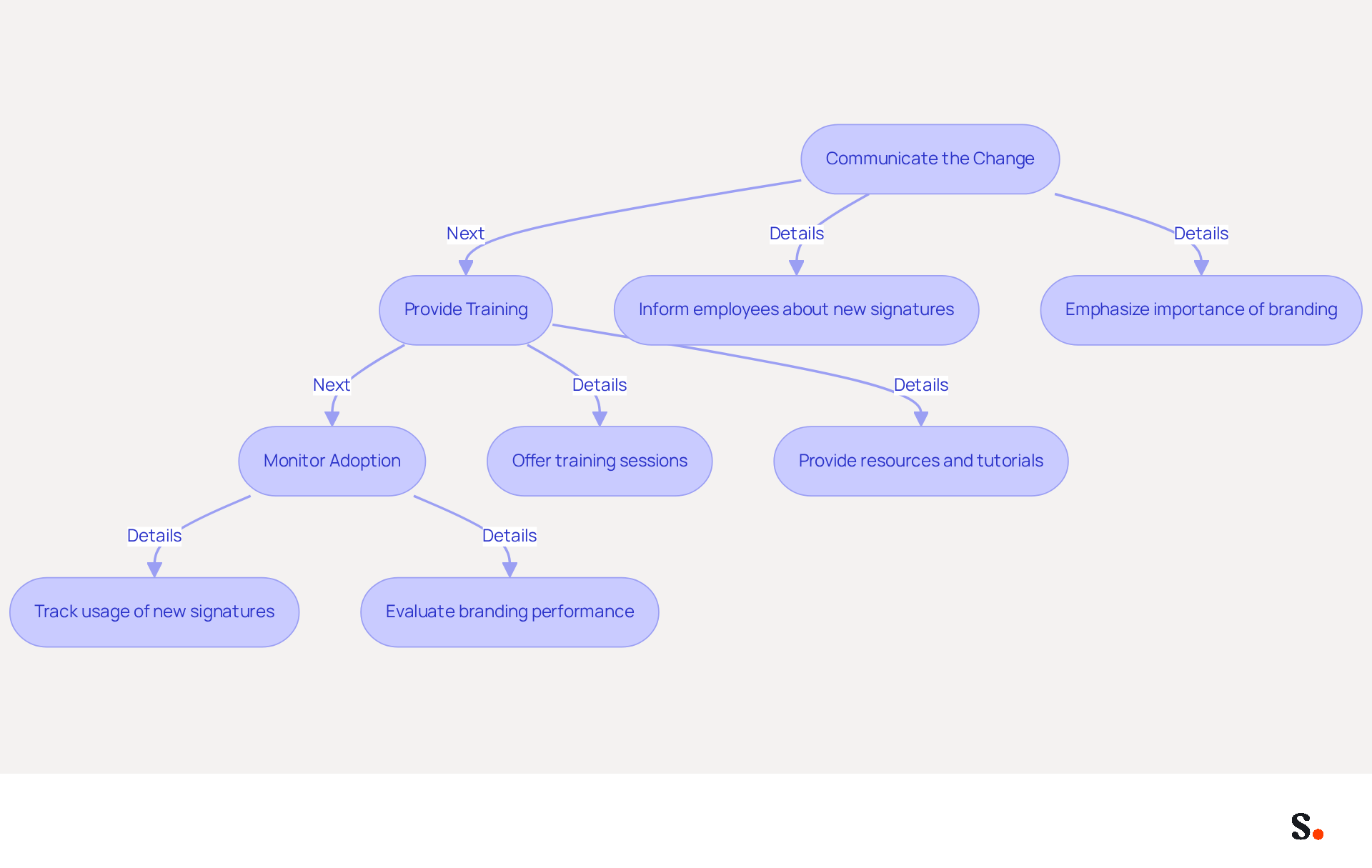
To maximize the impact of your automated email signature updates, effective rollout across the organization is essential. Here’s how to do it effectively:
- Communicate the Change: Clearly inform all employees about the new signatures and emphasize the importance of consistent branding in email communications. A notable 69% of consumers think a professional email footer is crucial for a company's image, making this communication essential.
- Provide Training: Offer training sessions or resources to help employees understand how to use the new identifiers effectively. This may involve tutorials on using dynamic elements like clickable banners and calls to action, which can boost click-through rates by as much as 22%.
- Monitor Adoption: Track the usage of the new identifiers to ensure compliance and address any issues that arise. Regular evaluation of branding performance is crucial, as many organizations overlook the importance of monitoring communication effectiveness, leading to missed opportunities for improvement.
For instance, the platform allows for one-click deployment of sign-offs, making it easier for large teams to implement updates without needing individual changes. This centralized management not only enhances brand consistency but also saves IT teams an average of two hours per year per employee, streamlining the entire process. Moreover, Scribe's SOC 2 Type II compliance guarantees that your correspondence management adheres to high security and compliance standards, further enhancing trust and reliability. Without proper monitoring, organizations risk stagnation in their branding efforts, ultimately affecting their market presence.
Maintain and Monitor Email Signatures
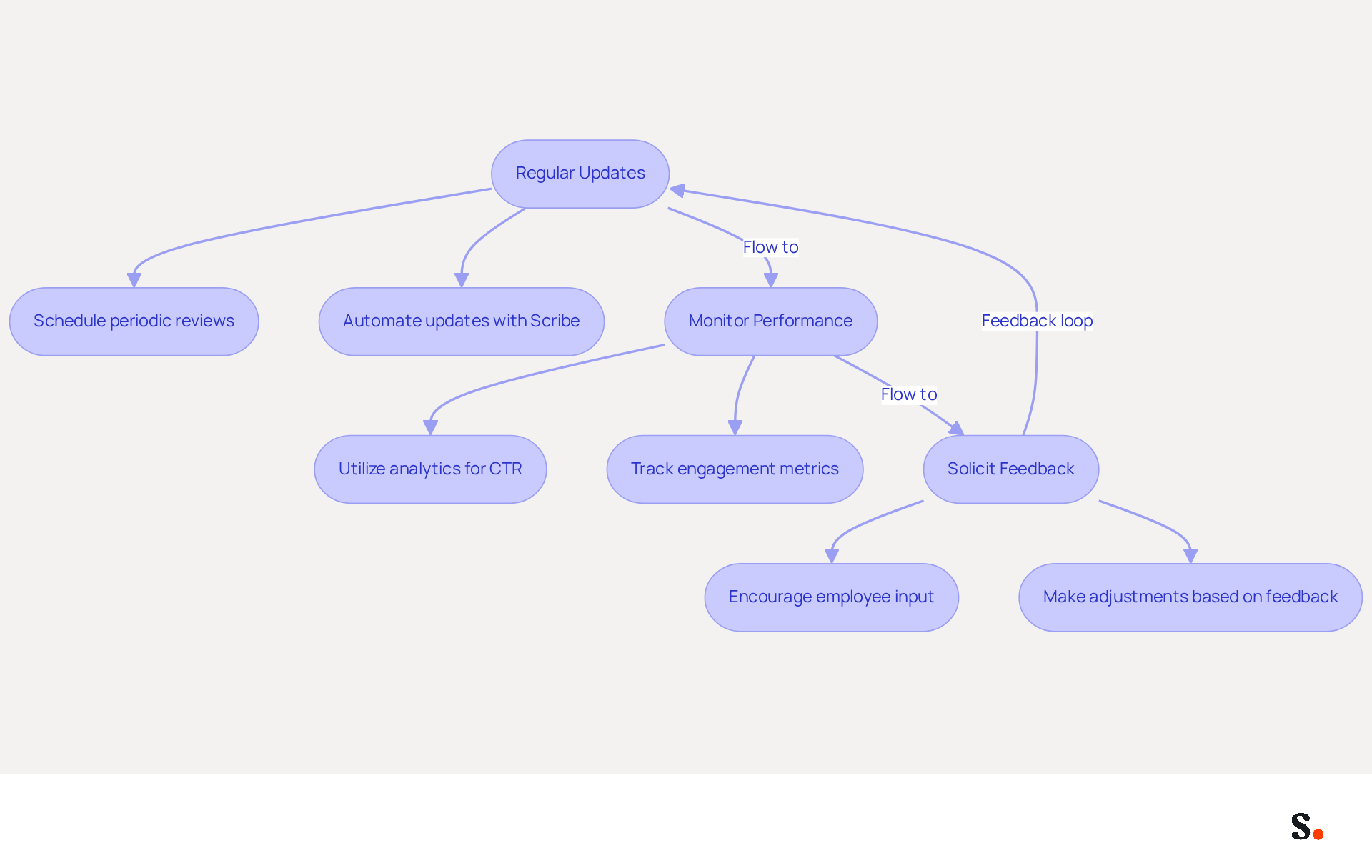
To maintain effective and compliant email signatures, a proactive maintenance and monitoring strategy is essential:
- Regular Updates: Schedule periodic reviews of signatures to ensure that all information is current and accurate. It's surprising that 44.4% of professionals only update their contact details a few times a year, and 31.6% do so rarely, which can lead to missed opportunities. With Scribe, you can automate this process; modifications made in your provider directory will be automatically synced with Scribe, ensuring that your identifiers are always current.
- Monitor Performance: Utilize analytics to track engagement metrics, such as click-through rates (CTR) on personalized links. Businesses that utilize branded messaging footers see a 15% rise in website CTR compared to those that do not. By leveraging analytics, organizations can transform their email strategies and enhance engagement metrics. Scribe's analytics features enable organizations to monitor the effectiveness of their digital branding, enhancing marketing strategies and boosting engagement based on real-time data.
- Solicit Feedback: Encourage employees to provide input on the documents and make adjustments as necessary. Getting input from employees can really boost how effective your emails are, since they often have great insights into how recipients view these messages. Scribe's efficient one-click synchronization enables straightforward updates based on this feedback, ensuring that your messages reflect the latest branding and regulatory standards.
By adopting these best practices and leveraging Scribe's automated email signature updates, businesses can maintain compliance and maximize the impact of their email communications, positioning your brand for success.
Conclusion
Effective email signature management is crucial for organizations aiming to maintain brand consistency and compliance. By implementing best practices in management tool selection, email platform integration, template design, and organization-wide updates, businesses can enhance their communication strategies significantly. Scribe stands out as a premier solution, providing features that streamline these processes while ensuring data security through its SOC 2 Type II certification and compliance with GDPR and CCPA.
Key insights from the article highlight the importance of:
- Centralized control
- User-friendly interfaces
- Automated synchronization in email signature management
Organizations that leverage Scribe's capabilities can expect improved engagement metrics, with a notable 12% average click-through rate on signature banners. Furthermore, the ability to monitor performance and solicit feedback ensures that email signatures remain effective and compliant over time.
This proactive approach not only safeguards brand integrity but also drives measurable marketing success. Ultimately, organizations that embrace automated email signature management will not only enhance their brand presence but also foster deeper connections with their audience.
Frequently Asked Questions
Why is selecting the right email signature management tool important?
Selecting the right management tool is crucial for facilitating automated email signature updates and ensuring brand consistency across an organization.
What key features should I look for in an email signature management tool?
Key features to consider include centralized control, integration capabilities, automated synchronization, a user-friendly interface, and analytics and reporting.
How does centralized control benefit an organization?
Centralized control enables easy management of signatures across the organization, ensuring uniformity in branding and compliance.
What integration capabilities should the tool have?
The tool should seamlessly connect with existing communication platforms like Google Workspace and Microsoft 365, and provide features like SAML single sign-on integration for secure access.
What is automated synchronization in an email signature management tool?
Automated synchronization ensures that any modifications made to email identifiers are instantly reflected across all identifiers, saving time and boosting brand consistency.
Why is a user-friendly interface important for an email signature management tool?
A simple and intuitive interface encourages quick adoption by team members, minimizing the learning curve.
How can analytics and reporting features help organizations?
Analytics and reporting provide insights into performance metrics, allowing for data-driven decisions to optimize marketing efforts.
What makes Scribe a preferred choice for email signature management?
Scribe stands out with its comprehensive features, including automated email signature updates, GDPR adherence, and SOC 2 Type II certification, ensuring secure data handling.
What challenges do organizations face in managing electronic correspondence identifiers?
Organizations often struggle with inconsistent branding and compliance oversights, which can negatively impact brand integrity and marketing effectiveness.
What steps should be taken for effective integration of the management tool?
Key steps include assessing compatibility with your email platform, setting up automatic syncing, and testing the integration before full rollout.
How does Scribe facilitate seamless integration with messaging platforms?
Scribe allows for real-time updates to identifiers without manual intervention, improving brand consistency and simplifying management processes.
What benefits do organizations see from using integrated management tools?
Organizations leveraging integrated management tools experience a significant reduction in manual errors and improved engagement metrics, enhancing their branding initiatives and marketing efficiency.
List of Sources
- Choose the Right Email Signature Management Tool
- Best Email Signature Managers for 2026 (https://textexpander.com/blog/best-email-signature-managers)
- 12 Must-Have Features in the Best Email Signature Software Platforms (https://exclaimer.com/blog/what-a-great-email-signature-platform-looks-like)
- 10 Best Email Signature Software Reviewed In 2026 (https://thecmo.com/tools/best-email-signature-software)
- Top 10 Email Signature Management Tools in 2026 (Compared) (https://mailbutler.io/blog/email/email-signature-management-tools)
- Best Email Signature Software for Google Workspace and Microsoft 365 in 2026 (https://bulksignature.com/blog/best-email-signature-software)
- Integrate with Your Email Environment
- Email Signature Management for Google Workspace - NEWOLDSTAMP (https://newoldstamp.com/google-workspace-email-signature-software)
- 10 Best Email Signature Software Reviewed In 2026 (https://thecmo.com/tools/best-email-signature-software)
- Design and Test Signature Templates
- Email Signature Best Practices for 2026 (+ 15 Pro Examples) (https://wavecnct.com/blogs/email-signature-best-practices-2026)
- Email Signature Best Practices - NEWOLDSTAMP (https://newoldstamp.com/blog/email-signature-best-practices)
- Email signature design guide: elements, layout & tips (https://exclaimer.com/email-signature-handbook/email-signature-design)
- Top 10+ best practices for email signatures design in 2026 (https://mysignature.io/blog/email-signature-best-practices)
- "Email Signature Trends for 2026: What's In, What's Out" | Crossware posted on the topic | LinkedIn (https://linkedin.com/posts/crossware-ltd_new-year-new-trends-even-for-your-email-activity-7394554686046908416-vD_O)
- Roll Out Organization-Wide
- 40+ Email Signature Statistics for 2026 (Data + Insights) (https://wavecnct.com/blogs/email-signature-statistics)
- The impact of email signatures on your branding (https://signitic.com/en/resources/the-impact-of-email-signatures-on-your-branding)
- Email signature statistics: Why every business should optimize their email signatures — Stripo.email (https://stripo.email/blog/email-signature-statistics-why-every-business-should-optimize-their-email-signatures)
- Maintain and Monitor Email Signatures
- How to measure the performance of your email signatures? (https://letsignit.com/blog/email-signatures-measure-performance-2)
- Email signature statistics: Why every business should optimize their email signatures — Stripo.email (https://stripo.email/blog/email-signature-statistics-why-every-business-should-optimize-their-email-signatures)
- Exclaimer Research: 67% of Marketers Expect Email Signatures to Support With Lead Gen In 2023 (https://businesswire.com/news/home/20230612141095/en/Exclaimer-Research-67-of-Marketers-Expect-Email-Signatures-to-Support-With-Lead-Gen-In-2023)
- How to Track Email Signature Performance: Email Signature Analytics & UTM Guide (https://bulksignature.com/blog/how-to-track-email-signature-performance-email-signature-analytics-utm-guide)
- Email Signature Analytics: Unlocking Potential for Business Growth (https://wisestamp.com/blog/email-signature-analytics)
Get started with Scribe
Manage signatures across your whole team
Free 14-day trial — no credit card.