Compare Email Signature Software for Exchange: Pros, Cons & Use Cases
Organizations often overlook the potential of email signatures, missing out on a vital branding opportunity in their communications. Many businesses are
Sophie Grant
Email Signature Specialist, Scribe

On this page
- Introduction
- Key Evaluation Criteria for Email Signature Software on Exchange
- Overview of Leading Email Signature Software for Exchange in 2026
- Pros and Cons of Each Email Signature Software Solution
- Best Use Cases for Each Email Signature Software Solution
- Conclusion
- Frequently Asked Questions
- List of Sources
Introduction
Organizations often overlook the potential of email signatures, missing out on a vital branding opportunity in their communications. Many businesses are looking to improve their brand consistency and marketing effectiveness, making the choice of email signature software for Microsoft Exchange essential. This article examines the advantages and disadvantages of top email signature solutions, highlighting how they can turn email communications into effective marketing channels. What unique features distinguish these tools, and how can organizations utilize them to enhance their impact?
Key Evaluation Criteria for Email Signature Software on Exchange
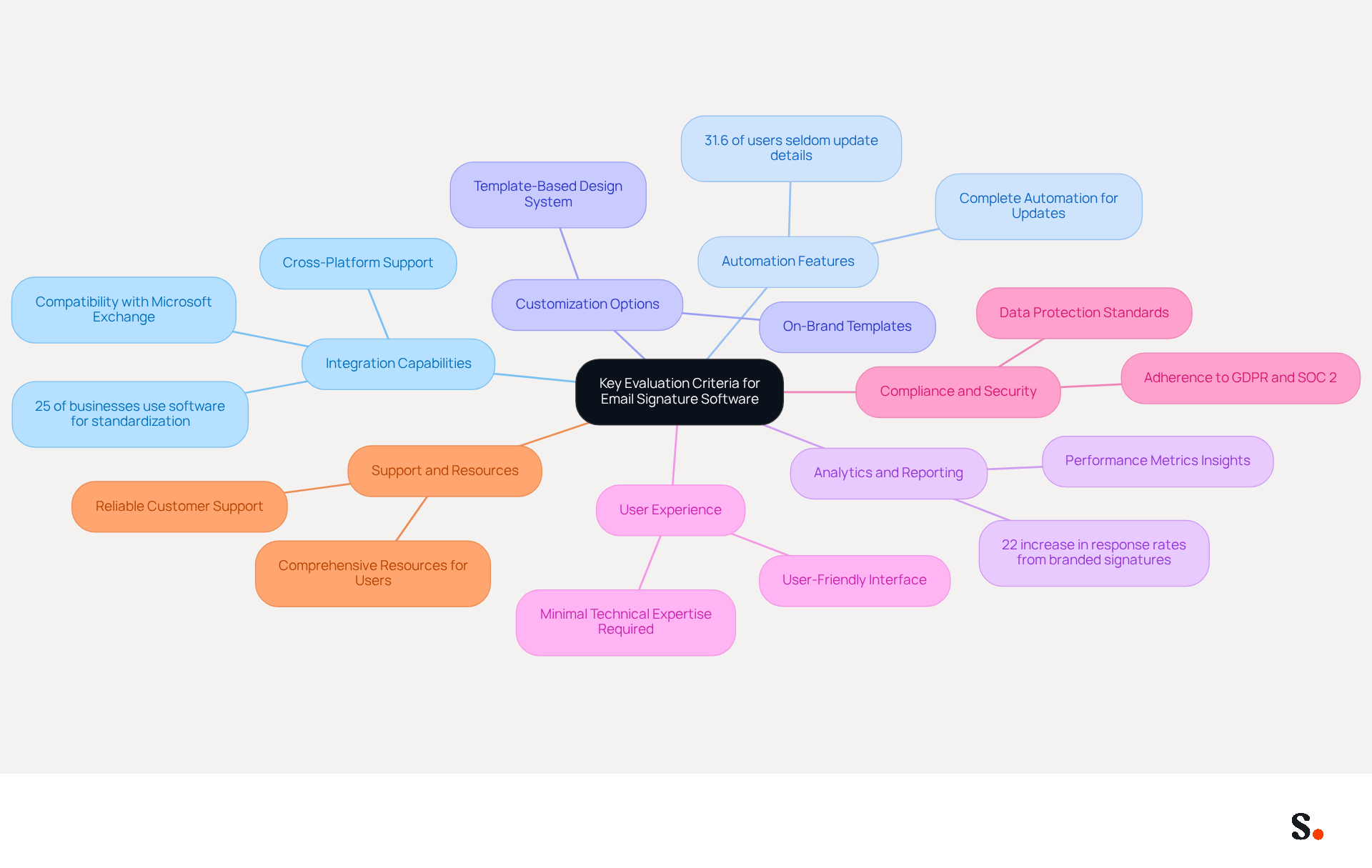
When selecting email signature software for Microsoft Exchange, it is essential to evaluate several critical criteria that impact operational efficiency:
- Integration Capabilities: The software must seamlessly integrate with Microsoft Exchange and other platforms like Google Workspace and Salesforce. This compatibility is crucial for ensuring that all tools work together seamlessly. Notably, 25% of businesses currently employ software for standardizing their identifiers, underscoring the necessity for compatibility.
- Automation Features: Look for solutions that provide complete automation for update processes. This reduces the need for manual updates and helps keep everything consistent, which is crucial considering that 31.6% of users seldom update their email details. This inconsistency can lead to miscommunication and a lack of professionalism.
- Customization Options: The ability to create on-brand templates tailored to different departments or campaigns is vital for maintaining brand identity. A template-based design system promotes scalability and consistency, allowing structured layouts to be applied across teams.
- Analytics and Reporting: Effective software should provide insights into performance metrics, such as click-through rates on promotional banners. Statistics indicate that branded digital identifiers can drive a 22% increase in response rates, making analytics a crucial aspect for measuring ROI.
- User Experience: The software should be user-friendly, requiring minimal technical expertise for setup and management. A user-friendly platform simplifies scheduling and management of marketing campaigns, enhancing participant engagement.
- Compliance and Security: Ensure that the software adheres to industry standards for data protection, such as GDPR compliance and SOC 2 certification. This is critical as organizations must safeguard sensitive information while maintaining compliance with regulations.
- Support and Resources: Reliable customer support and comprehensive resources significantly enhance the user experience, especially during implementation and troubleshooting. Ultimately, choosing the right email signature software exchange can transform how organizations manage their email signatures, resulting in enhanced brand perception and communication clarity.
Overview of Leading Email Signature Software for Exchange in 2026
In 2026, the landscape of email signature software is defined by solutions that prioritize automation, security, and user experience:
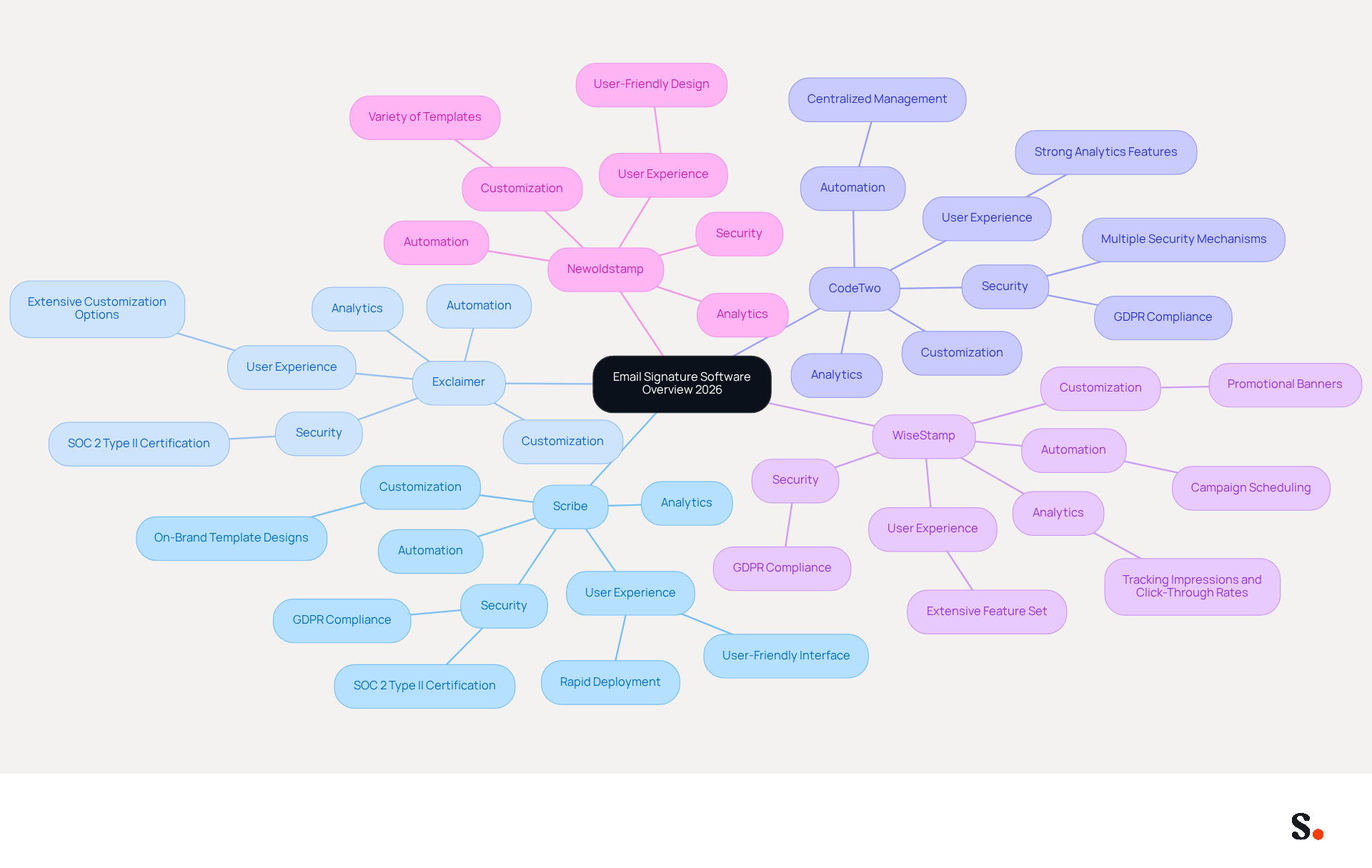
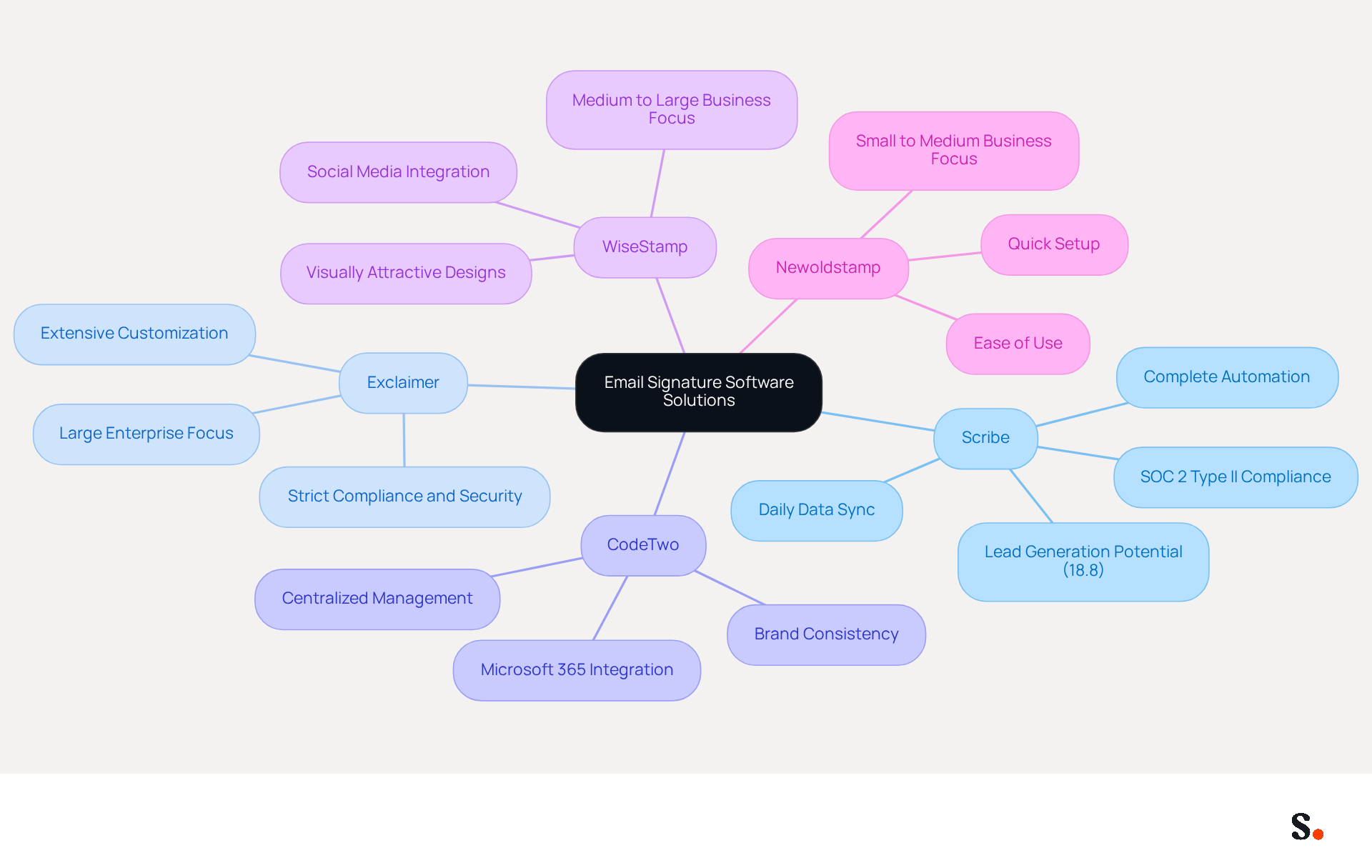
- Scribe: Renowned for its 100% automation and user-friendly interface, Scribe enables businesses to effortlessly create on-brand template designs and schedule marketing campaigns. Its seamless integration with popular tools, including SAML-based Single Sign-On for secure access, and automated data synchronization with business phone systems, positions it as a preferred choice for companies of all sizes. Scribe meets GDPR compliance and holds SOC 2 Type II certification, ensuring secure data management. Its rapid deployment allows for company-wide installation in as little as one day.
- Exclaimer: As a market leader, Exclaimer is distinguished by its robust security features, including SOC 2 Type II certification. It excels in compliance support and offers extensive customization options, making it particularly suitable for larger enterprises that require stringent security and branding standards.
- CodeTwo: Highly regarded for its centralized management capabilities, CodeTwo allows users to deploy email footers across Microsoft 365 and Exchange environments efficiently. Its strong analytics features enable organizations to track signature performance, ensuring effective brand representation in all communications.
- WiseStamp: Aiming at medium to large enterprises, WiseStamp offers an extensive array of features, including promotional banners and social media icons, which greatly improve brand visibility in every message. Its focus on user engagement makes it a valuable tool for marketing teams.
- Newoldstamp: This software emphasizes user-friendly design and offers a variety of templates and customization options, making it ideal for businesses looking to enhance their branding without requiring extensive technical knowledge. Its intuitive interface allows for quick implementation and effective branding.
Selecting an effective email signature software exchange can transform how customers perceive your brand, fostering trust and loyalty.
Pros and Cons of Each Email Signature Software Solution
When evaluating email signature software solutions, it's essential to weigh the strengths and weaknesses of each option to make an informed decision:
-
- Pros:
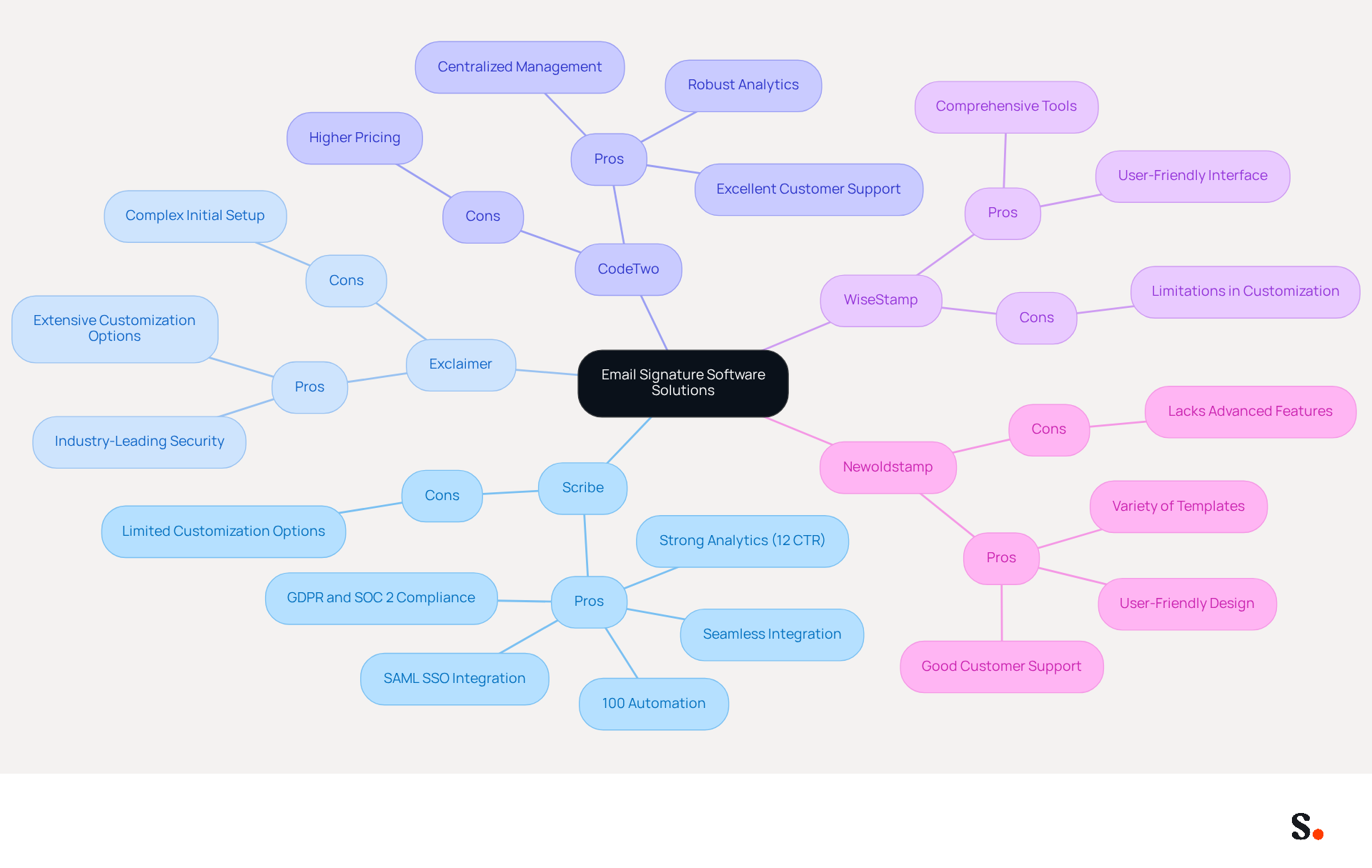
- Scribe stands out for its 100% automation, enabling effortless setup and management.
- Strong analytics capabilities provide insights into engagement, with an average click-through rate of 12% on banners, indicating significant success in promotion.
- Seamless integration with platforms like Google Workspace and Microsoft 365 enhances usability.
- Compliant with GDPR and SOC 2 Type II standards, ensuring secure data handling and management.
- SAML single sign-on integration allows employees to access Scribe through their identity provider, enhancing security and ease of use.
- Cons:
- Advanced users may find limited customization options insufficient for specific branding needs, which could restrict its appeal for those requiring more tailored solutions.
- Pros:
-
Exclaimer
- Pros:
- Exclaimer is renowned for its industry-leading security and extensive customization options, excelling in compliance features suitable for regulated industries.
- Cons:
- Initial setup can be complex, often requiring dedicated IT resources, which may deter smaller businesses.
- Pros:
-
CodeTwo
- Pros:
- CodeTwo offers centralized management and robust analytics, making it a strong choice for Microsoft environments, complemented by excellent customer support.
- Cons:
- Pricing may be higher than simpler solutions, posing a barrier for smaller organizations.
- Pros:
-
WiseStamp
- Pros:
- WiseStamp features a comprehensive set of tools, including marketing banners and social media integration, all within a user-friendly interface.
- Cons:
- Some users report limitations in advanced customization and reporting features, which may not meet all user needs.
- Pros:
-
Newoldstamp
- Pros:
- Newoldstamp is known for its user-friendly design and variety of templates, also offering good customer support, making it accessible for many users.
- Cons:
- It may lack some advanced features found in more robust solutions, which could limit its appeal for larger enterprises.
- Pros:
Ultimately, the choice of email signature software exchange should align with your organization's specific needs and capabilities, ensuring both functionality and user satisfaction.
Best Use Cases for Each Email Signature Software Solution
Leading email signature software solutions offer distinct advantages tailored to various business needs:
- Scribe: This platform is perfect for businesses aiming for complete automation in managing their footers. Granting Scribe permission to connect with your service provider requires Super Admin access, enabling one-click synchronization. It excels for teams aiming to execute campaigns through digital identifiers without the need for manual updates, turning each message into a potential marketing tool. Additionally, Scribe automatically syncs teammate data from your service provider daily, enhancing branding consistency across all communications. Interestingly, 18.8% of users leverage professional emails to generate leads, highlighting the potential of Scribe to convert every message into a promotional opportunity. Furthermore, Scribe is SOC 2 Type II compliant, guaranteeing the security of your data while you utilize digital branding as active promotional channels.
- Exclaimer: Best suited for large enterprises that require strict compliance and security measures. Its extensive customization options cater to organizations with diverse branding needs across various departments, ensuring that all communications remain on-brand.
- CodeTwo: A strong choice for companies heavily invested in Microsoft 365, offering seamless integration and centralized management. This makes it easy to maintain brand consistency across all communications, which is crucial for larger organizations.
- WiseStamp: Perfect for medium to large businesses looking to enhance their email marketing efforts. It offers visually attractive designs that can incorporate social media links and promotional banners, facilitating engagement with recipients.
- Newoldstamp: This solution is tailored for small to medium-sized businesses that prioritize ease of use and quick setup. It enables users to create professional sign-offs without needing extensive technical expertise, making it accessible for teams of all sizes.
In 2026, the trend towards utilizing digital identifiers as active promotional channels continues to expand, with companies leveraging tools like Scribe to generate significant brand impressions. For example, organizations with thousands of employees can achieve hundreds of thousands of brand impressions daily through effective management of their branding. This evolution underscores the importance of selecting the right email signature software exchange to meet specific marketing and branding objectives.
Conclusion
Choosing the right email signature software is essential for organizations aiming to improve brand consistency and communication effectiveness. The comparative analysis highlights the importance of evaluating key criteria such as:
- Integration capabilities
- Automation features
- Customization options
- Compliance with security standards
Scribe stands out with its complete automation, easy-to-use design, and strong analytics, making it a top choice for businesses looking to use email signatures effectively.
Throughout the article, various software solutions were examined, each with its unique strengths and weaknesses. Scribe's seamless integration with platforms like Google Workspace and Microsoft 365, along with its compliance with GDPR and SOC 2 Type II standards, positions it as a reliable option for organizations of all sizes. Other solutions like Exclaimer and CodeTwo cater to larger enterprises with stringent security needs, while WiseStamp and Newoldstamp provide user-friendly interfaces suitable for small to medium-sized businesses.
As the landscape of email signature management continues to evolve, organizations are encouraged to consider how these tools can transform their email communications into effective marketing channels. By choosing the right email signature software, businesses can not only ensure brand consistency but also unlock significant marketing ROI, transforming each email into a chance for meaningful engagement and brand visibility. By adopting these solutions, organizations can significantly enhance their marketing efforts and strengthen their brand presence.
Frequently Asked Questions
What are the key evaluation criteria for email signature software on Microsoft Exchange?
The key evaluation criteria include integration capabilities, automation features, customization options, analytics and reporting, user experience, compliance and security, and support and resources.
Why are integration capabilities important for email signature software?
Integration capabilities are important because the software must seamlessly work with Microsoft Exchange and other platforms like Google Workspace and Salesforce to ensure all tools function together effectively.
What role do automation features play in email signature software?
Automation features reduce the need for manual updates, helping to maintain consistency in email signatures, which is crucial since many users seldom update their email details.
How does customization benefit email signature software users?
Customization allows users to create on-brand templates tailored to different departments or campaigns, promoting brand identity and enabling scalability and consistency across teams.
Why is analytics and reporting a crucial aspect of email signature software?
Analytics and reporting provide insights into performance metrics, such as click-through rates, which can help measure ROI and improve communication effectiveness.
What should be considered regarding user experience in email signature software?
The software should be user-friendly, requiring minimal technical expertise for setup and management, which simplifies the scheduling and management of marketing campaigns.
What compliance and security measures should email signature software adhere to?
The software should comply with industry standards for data protection, such as GDPR compliance and SOC 2 certification, to safeguard sensitive information and maintain regulatory compliance.
How does support and resources impact the user experience with email signature software?
Reliable customer support and comprehensive resources enhance the user experience, especially during implementation and troubleshooting, making it easier for organizations to manage their email signatures effectively.
List of Sources
- Key Evaluation Criteria for Email Signature Software on Exchange
- Create Organization-wide Email Signatures and Disclaimers - Microsoft 365 admin (https://learn.microsoft.com/en-us/microsoft-365/admin/setup/create-signatures-and-disclaimers?view=o365-worldwide)
- 12 Must-Have Features in the Best Email Signature Software Platforms (https://exclaimer.com/blog/what-a-great-email-signature-platform-looks-like)
- Microsoft 365 email signature software | CodeTwo (https://codetwo.com/email-signatures)
- 40+ Email Signature Statistics for 2026 (Data + Insights) (https://wavecnct.com/blogs/email-signature-statistics)
- Best Email Signature Management Software: Top 12 Tools (2026)
- NEWOLDSTAMP (https://newoldstamp.com/blog/email-signature-software)
- Overview of Leading Email Signature Software for Exchange in 2026
- Top 10 Email Signature Management Tools in 2026 (Compared) (https://mailbutler.io/blog/email/email-signature-management-tools)
- Email Signature Manager for Any Scale | WiseStamp (https://wisestamp.com)
- Microsoft 365 email signature software | CodeTwo (https://codetwo.com/email-signatures)
- The best email signature management software in 2026 — Signally (https://signally.io/en/blog/best-email-signature-software)
- Market-leading Email Signature Software | Exclaimer (https://exclaimer.com)
- Pros and Cons of Each Email Signature Software Solution
- 10 Best Email Signature Software Reviewed In 2026 (https://thecmo.com/tools/best-email-signature-software)
- Best Email Signature Management Software (Evaluated May 2026) (https://wisestamp.com/guides/best-email-signature-management-software)
- Best Email Signature Management Software: Top 12 Tools (2026)
- NEWOLDSTAMP (https://newoldstamp.com/blog/email-signature-software)
- Scribe vs. Competitors: Best Email Signature Software for Office 365 (https://scribe-mail.com/en-US/blog/scribe-vs-competitors-best-email-signature-software-for-office-365)
- Best Use Cases for Each Email Signature Software Solution
- Email Signature Trends 2026: Centralized Control & Automation | SIGNandGO posted on the topic | LinkedIn (https://linkedin.com/posts/signngo_email-signature-trends-to-watch-in-2026-activity-7401523471786217473-zAVL)
- Email Signature Statistics: A Closer Look at Email Signatures in 2026 (https://mysignature.io/blog/email-signature-statistics)
- Why Email Signatures Must Be In Your 2026 Marketing Plan | Rocketseed (https://rocketseed.com/blog/what-are-the-biggest-email-trends-for-2026)
- Top 10 Email Signature Management Tools in 2026 (Compared) (https://mailbutler.io/blog/email/email-signature-management-tools)
- What’s New With Email Signature in 2026? | Crossware365 (https://crossware365.com/blog/whats-new-with-email-signature-in-2026)
Get started with Scribe
Manage signatures across your whole team
Free 14-day trial — no credit card.