How to Buy Automated Email Signature Software in 5 Simple Steps
Automated email signature software is essential for enhancing brand visibility and marketing effectiveness. By ensuring consistent branding across all
Sophie Grant
Email Signature Specialist, Scribe
On this page
- Introduction
- Understand the Importance of Automated Email Signature Software
- Identify Essential Features for Your Email Signature Solution
- Research and Compare Available Email Signature Software Options
- Purchase and Implement Your Chosen Email Signature Software
- Manage and Optimize Your Email Signature Strategy
- Conclusion
- Frequently Asked Questions
- List of Sources
Introduction
Automated email signature software is essential for enhancing brand visibility and marketing effectiveness. By ensuring consistent branding across all communications, this software not only reinforces brand identity but also opens up new marketing opportunities with every email sent. Yet, with so many options available, businesses often find it challenging to navigate the purchasing process effectively. This guide will walk you through five essential steps to help you make informed decisions, ensuring you choose software that meets your marketing goals and operational needs.
Understand the Importance of Automated Email Signature Software
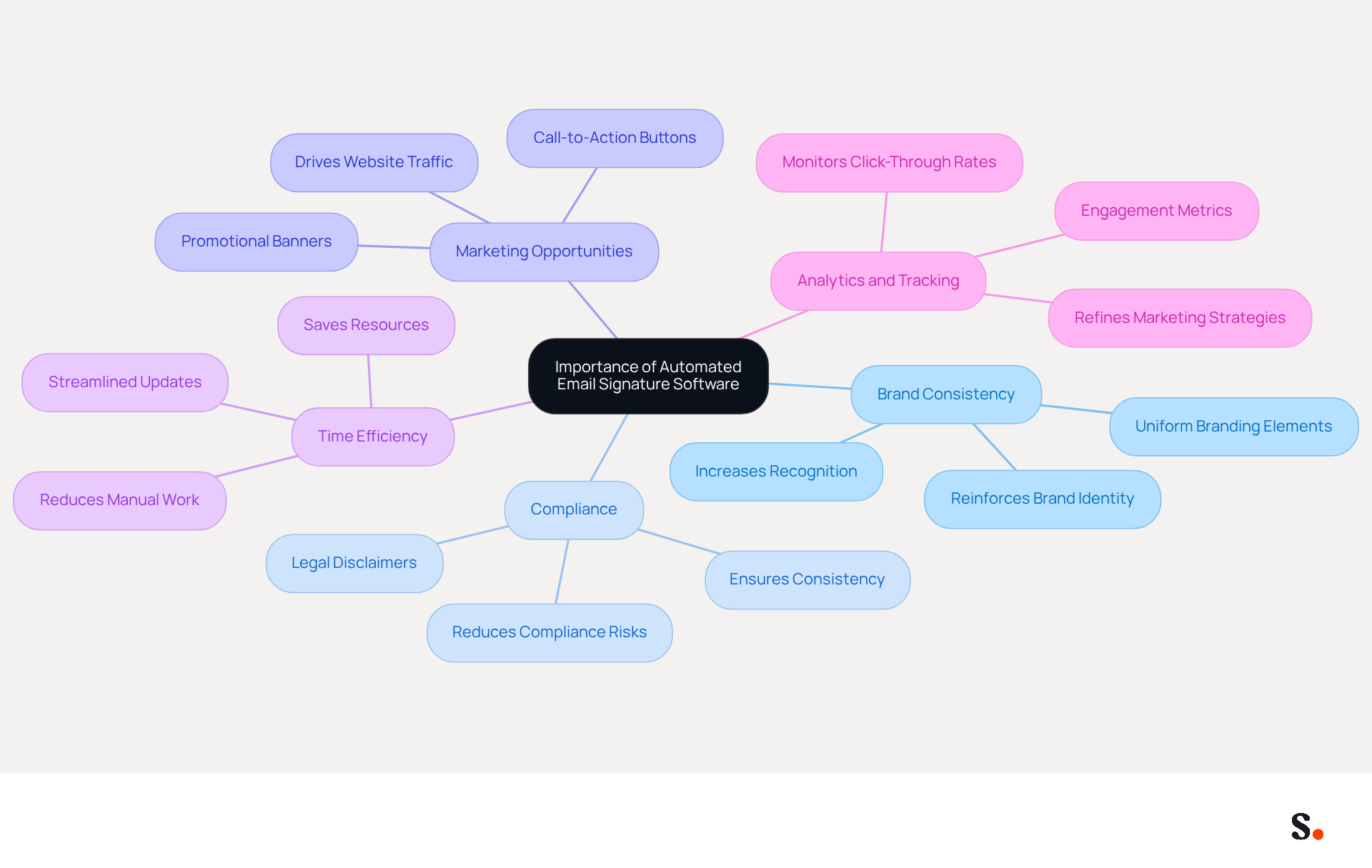
For businesses striving for brand consistency, it is essential to buy automated email signature software as it enhances marketing potential with every communication. Here are the key reasons why this software is indispensable:
- Brand Consistency: Automated signatures ensure that every message sent from your organization features uniform branding elements, including logos, colors, and fonts. This consistency reinforces your brand identity, making it easily recognizable to recipients.
- Compliance: In many sectors, specific legal disclaimers are required in written communications. Automated software ensures these disclaimers are consistently included in every message, significantly reducing the risk of non-compliance and potential legal issues.
- Marketing Opportunities: Email footers can be leveraged as effective marketing channels. By incorporating promotional banners or call-to-action buttons, businesses can drive traffic to their websites or social media platforms, enhancing engagement and conversion rates.
- Time Efficiency: Manual updates can consume significant time and resources, leading to inefficiencies in communication. Automated tools streamline this process, enabling rapid updates across all employee initials with just a few clicks, conserving valuable time and resources.
- Analytics and Tracking: Many automated solutions come equipped with analytics features that enable businesses to monitor engagement metrics, such as click-through rates on links within email footers. This data provides valuable insights into the effectiveness of marketing efforts and helps refine strategies for better results.
Understanding these advantages underscores why companies looking to enhance their marketing strategies in 2026 should buy automated email signature software as part of their investment in automated solutions for digital branding.
Identify Essential Features for Your Email Signature Solution
When selecting automated email signature software, businesses must prioritize essential features that enhance brand visibility and operational efficiency:
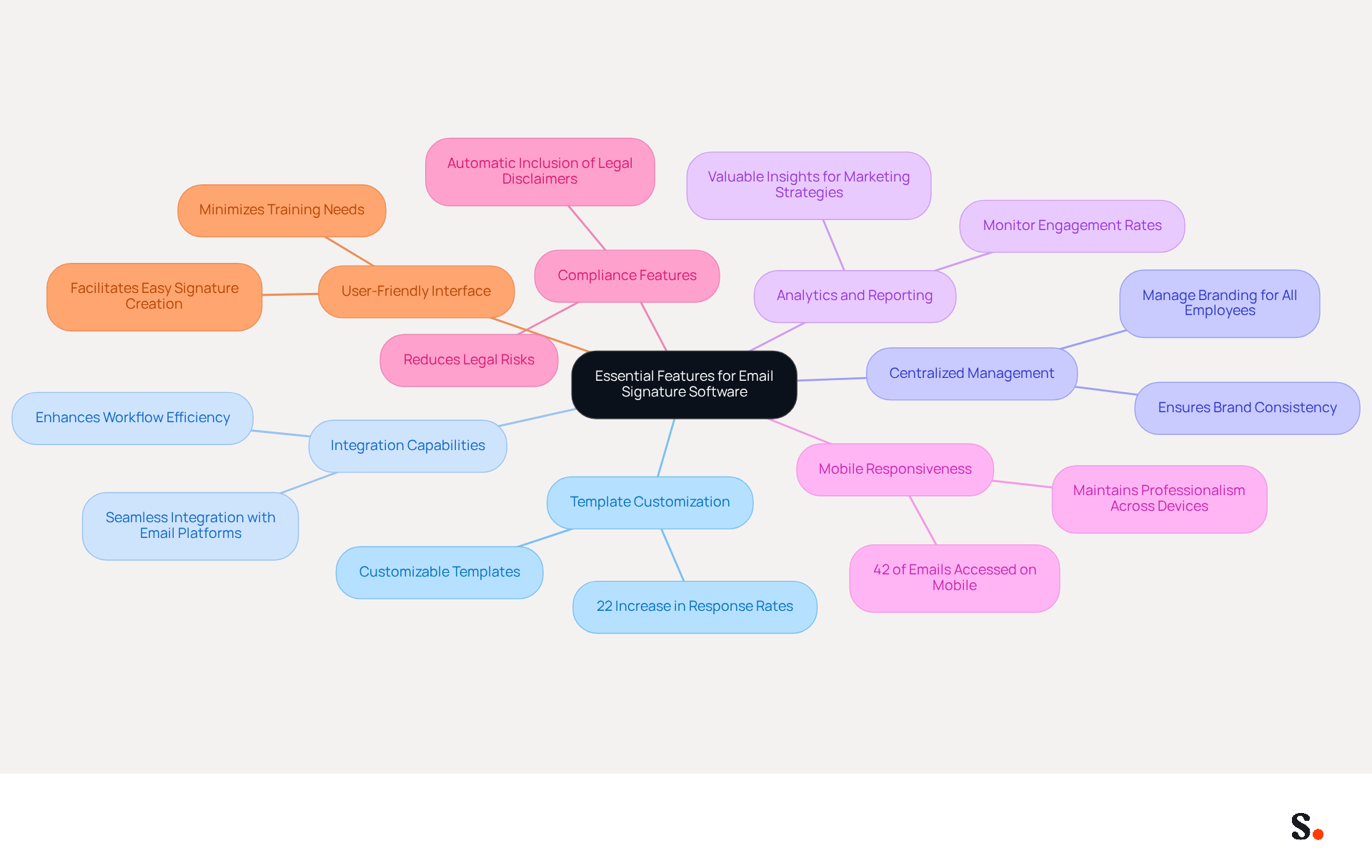
- Template Customization: Choose a program that offers customizable templates, ensuring your designs reflect your brand's visual identity. Branded digital identifiers can lead to a 22% increase in response rates, making this feature essential for effective communication.
- Integration Capabilities: The software should seamlessly integrate with existing email platforms like Google Workspace and Microsoft 365, as well as CRM systems. This integration enhances workflow efficiency. It ensures that approvals are updated consistently across all platforms.
- Centralized Management: A centralized dashboard allows administrators to manage and update branding for all employees easily, ensuring brand consistency. Many businesses struggle to maintain updated contact information, leading to potential confusion and lost opportunities.
- Analytics and Reporting: Choose software that offers analytics to monitor the performance of digital footers, such as engagement rates and click-through statistics. Without monitoring digital branding performance, organizations risk missing out on valuable insights that could enhance their marketing strategies.
- Mobile Responsiveness: Ensure that the email displays well on mobile devices, as 42% of emails are accessed on smartphones. A responsive design is essential for maintaining professionalism and engagement across all devices.
- Compliance Features: The application should support the automatic inclusion of legal disclaimers and compliance notices, reducing the risk of legal issues. This is particularly important for organizations operating in regulated industries.
- User-Friendly Interface: A simple and intuitive interface will facilitate easy signature creation and management for your team, minimizing the need for extensive training. This makes it easier for all employees to use the application effectively.
By focusing on these critical features, organizations can not only meet their immediate needs but also prepare to buy automated email signature software for future growth and success.
Research and Compare Available Email Signature Software Options
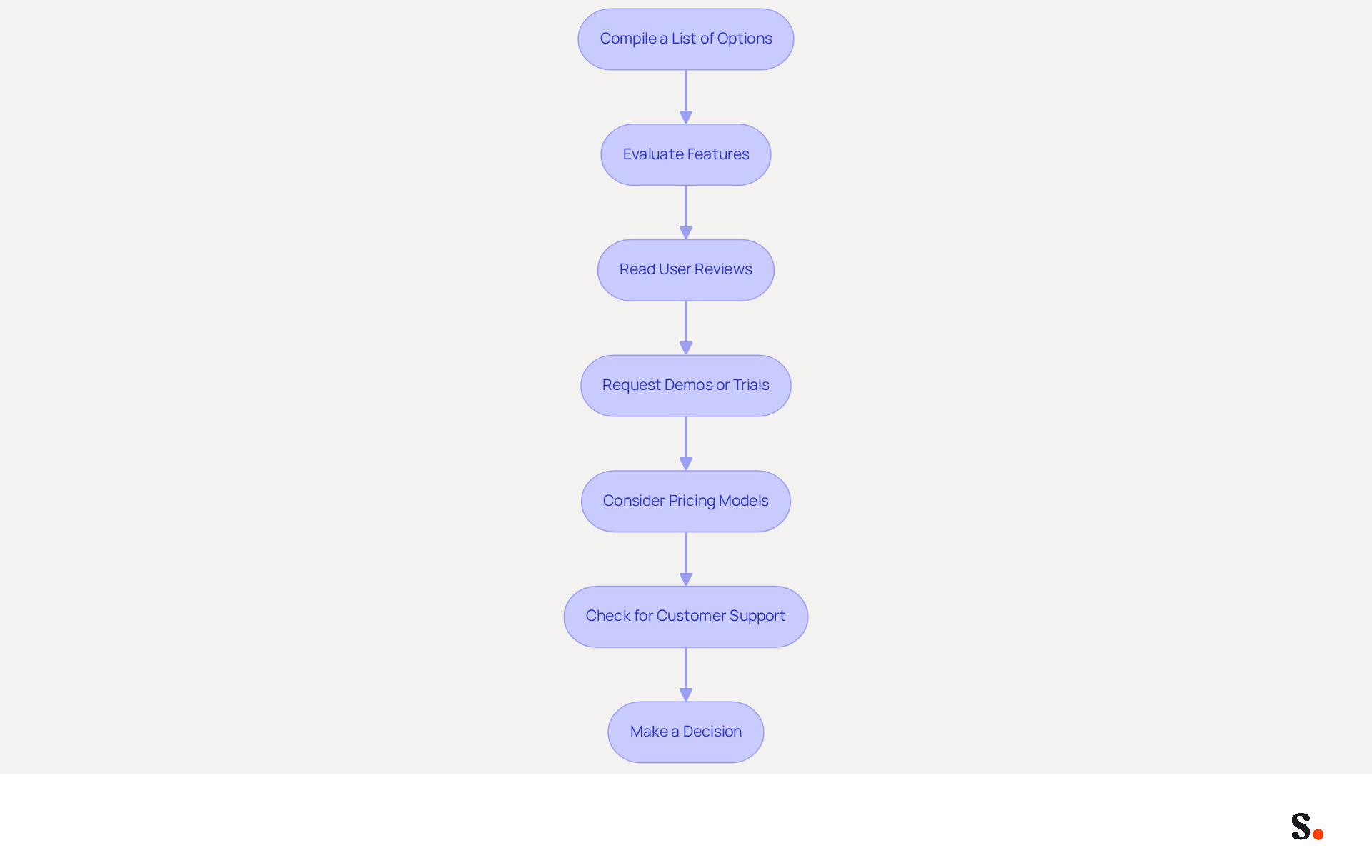
To find the right automated email signature software, follow these steps:
- Compile a List of Options: Begin by creating a comprehensive list of potential application solutions. Utilize online resources, industry reviews, and recommendations from peers to gather a diverse range of options.
- Evaluate Features: Assess the features of each software against essential functionalities. Key features to consider include centralized signature management, email client integration (especially with platforms like Google Workspace and Microsoft 365), brand control, marketing banner capabilities, user segmentation for tailored signature assignments, and analytics for tracking performance. Additionally, consider Scribe's automated synchronization with Aircall, which enhances brand consistency across all communications. A checklist can help ensure that no critical functionalities are overlooked.
- Read User Reviews: Investigate user reviews and testimonials to understand the experiences of other businesses. Platforms like G2 and Capterra offer valuable insights into user satisfaction and common challenges encountered with various solutions.
- Request Demos or Trials: Utilize the free trials or demos that many providers offer. Testing the application firsthand allows you to assess its usability and features in a practical context, ensuring it meets your specific needs.
- Consider Pricing Models: Compare the pricing structures of various application options. Be aware of potential hidden costs, including setup fees or additional charges for premium features, to maintain your budget.
- Check for Customer Support: Assess the level of customer support provided by each vendor. Dependable assistance is essential for troubleshooting and maximizing the application's potential, particularly during the initial setup phase.
- Make a Decision: After thorough research and comparison, select the software that best aligns with your needs and budget. Ensure it aligns with your long-term marketing objectives and improves your messaging strategy. Scribe's rapid implementation and user-friendliness make it an outstanding option for organizations aiming for 100% brand consistency and measurable marketing ROI from digital branding.
By adhering to this organized method, businesses can confidently decide to buy automated email signature software as the appropriate automated messaging tool, ultimately improving brand consistency and marketing effectiveness.
Purchase and Implement Your Chosen Email Signature Software
To maximize the effectiveness of your automated email signature software, a structured approach to purchase and implementation is crucial:
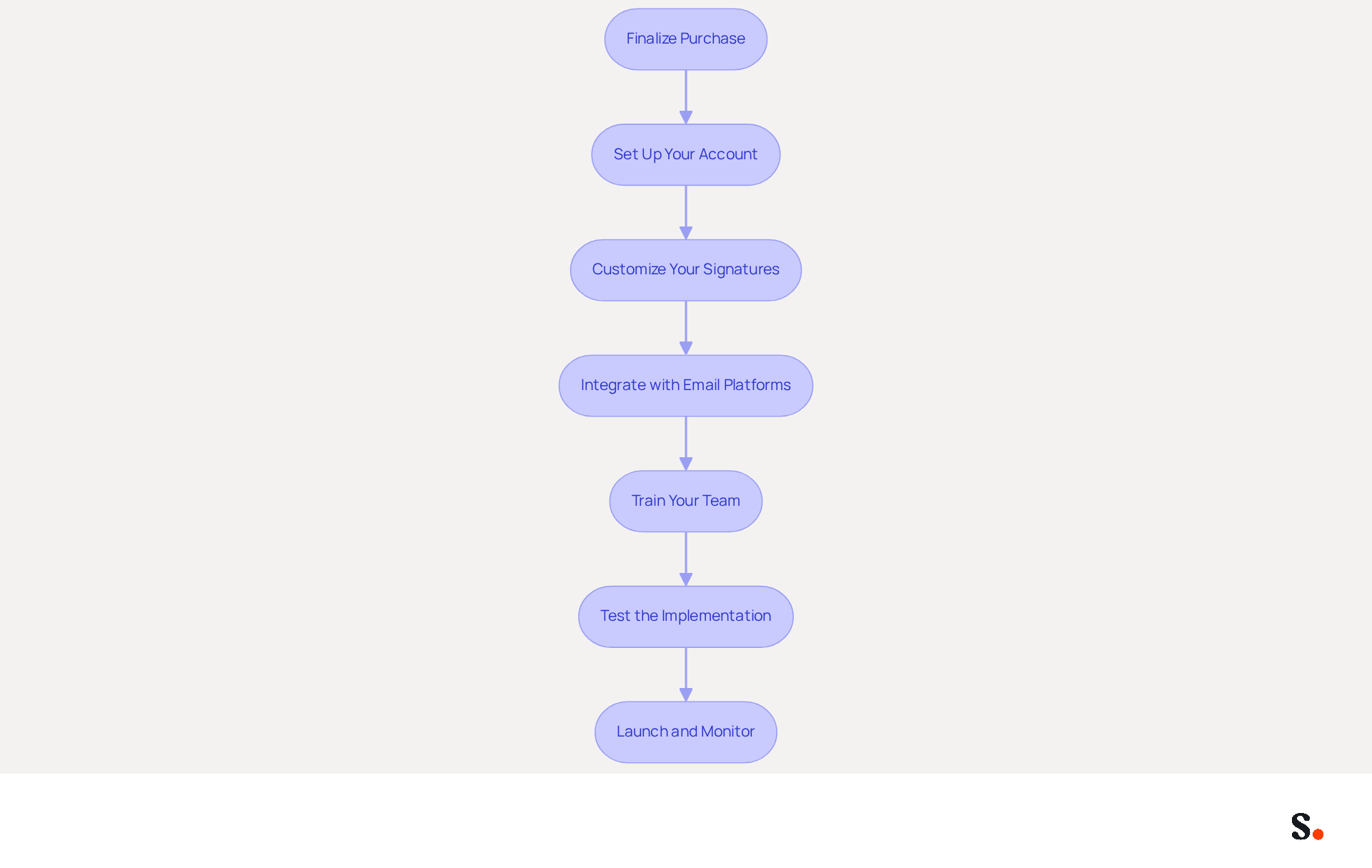
- Finalize your purchase by completing your transaction on the website, ensuring you select the appropriate plan based on your organization's size and needs, or you can choose to buy automated email signature software.
- Set Up Your Account: After purchasing, create an account and follow the setup instructions provided by the platform. You will need to verify your contact information and configure initial settings. Ensure to grant permission for Scribe to connect with your service provider, as you must be a Super Admin to provide these permissions.
- Customize Your Signatures: Use Scribe's template editor to create and modify your digital identifiers. Incorporate branding elements, legal disclaimers, and any promotional content to enhance engagement. Notably, maintaining consistent message formats can boost response rates by 22%, highlighting the significance of well-crafted identifiers.
- Integrate with Email Platforms: Follow the integration instructions to connect the application with your messaging platforms (e.g., Google Workspace, Microsoft 365). This integration is vital for maintaining brand consistency across all outgoing messages. With Scribe's one-click synchronization, you can effortlessly manage identifiers across various clients and brands, ensuring that all modifications made in your provider directory are automatically synced.
- Train Your Team: Provide training for your team on how to use the tool effectively. This may include creating a user guide or hosting a training session to demonstrate key features. As Sophie Grant, an Email Signature Specialist, advises, "Regularly review and update your identifiers to keep them current and relevant."
- Test the Implementation: Before rolling out Scribe organization-wide, conduct tests to ensure that identifiers display correctly in various messaging platforms and devices. Failing to test could result in a disjointed brand image, impacting your professional reputation. Testing identifiers across different messaging platforms helps identify inconsistencies and ensures uniformity.
- Launch and Monitor: Once testing is complete, initiate the application for all users. Monitor its performance and gather feedback from your team to address any issues promptly. Regular monitoring can assist in maintaining compliance and enhancing the effectiveness of your digital identifiers. Implementing centralized management of digital communication branding with Scribe can significantly enhance brand visibility and engagement, making it a valuable marketing channel.
By embracing these strategies, your organization can leverage email signatures as a strategic asset in your marketing efforts. Furthermore, think about joining Scribe's Affiliate Program to earn a 50% commission while promoting brand consistency in digital formats.
Manage and Optimize Your Email Signature Strategy
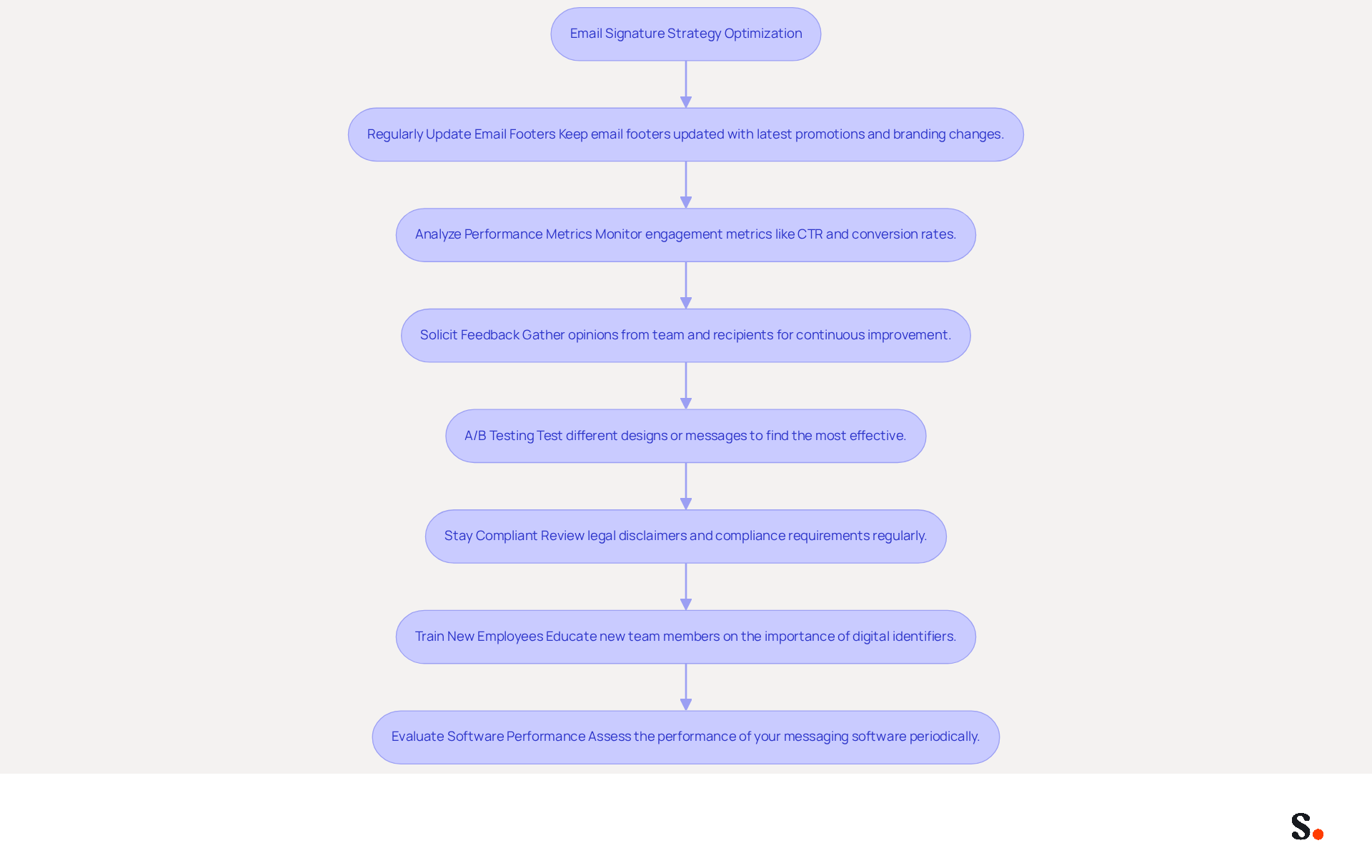
To maximize the effectiveness of your messaging strategy, it is crucial to buy automated email signature software and manage it ongoing. Here are some best practices to consider:
- Regularly Update Email Footers: Make it a habit to keep your email footers updated with the latest promotions and branding changes. This keeps your communications fresh and aligned with current promotions. With Scribe, any modifications made in your Aircall setup will automatically synchronize, ensuring your labels are always current without needing action from your colleagues. Additionally, this tool saves time by auto-filling your teammates' names using your business phone system as a data source.
- Analyze Performance Metrics: Leverage the analytics features of your software to monitor engagement metrics such as click-through rates (CTR) and conversion rates. For example, Scribe has an average CTR of 12% on branded banners, considerably higher than the average of 2.5% for typical marketing messages. Understanding which indicators perform best allows for informed adjustments to your strategy.
- Solicit Feedback: Actively gather opinions from both your team and recipients regarding the effectiveness of the communication identifiers. This input can provide valuable insights for continuous improvement.
- A/B Testing: Implement A/B testing on various design variations or promotional messages to identify which versions yield the highest engagement and conversion rates. This data-driven approach can significantly enhance your marketing effectiveness.
- Stay Compliant: Regularly review legal disclaimers and compliance requirements to ensure your digital identifiers adhere to industry regulations. With 19 states in the US now having comprehensive consumer privacy laws, staying compliant is increasingly important. Scribe's SOC 2 Type II compliance ensures that your data handling meets stringent security standards.
- Train New Employees: Ensure that new team members are educated on the significance of digital identifiers and how to use the application effectively. This fosters a culture of consistency and professionalism in communications.
- Evaluate Software Performance: Periodically assess the performance of your messaging software. If your current software isn't delivering the results you expect, it may be time to consider whether you should buy automated email signature software and reassess your options.
This proactive approach can significantly enhance brand visibility and drive lead generation. For instance, a psychotherapy office enhanced appointment rates by 15% by streamlining their contact information and including a direct link to their booking page. This example highlights the real-world impact of effective email signature management.
Conclusion
Investing in automated email signature software addresses the common challenges of brand inconsistency and compliance in email communications. By ensuring that every email reflects uniform branding and includes essential legal disclaimers, organizations can significantly improve their professional image and compliance. This software simplifies email signature management and turns signatures into effective marketing tools that boost engagement and conversions.
Throughout the article, key points have been highlighted, including the importance of identifying essential features such as template customization, integration capabilities, and analytics. The structured approach to researching, comparing, and implementing email signature solutions ensures that businesses can make informed decisions that align with their marketing objectives. Moreover, ongoing management practices, such as regular updates and performance analysis, are crucial for maximizing the impact of email signatures.
This leads to a stronger professional image and enhanced marketing outcomes. Ultimately, by adopting automated email signatures, businesses can redefine their branding approach and achieve a competitive edge in their market. Embrace the potential of automated email signatures and transform your digital branding today.
Frequently Asked Questions
Why is automated email signature software important for businesses?
Automated email signature software is essential for businesses as it enhances brand consistency, ensures compliance with legal disclaimers, provides marketing opportunities, improves time efficiency, and offers analytics and tracking for better engagement insights.
How does automated email signature software ensure brand consistency?
It ensures that every message sent from the organization features uniform branding elements, such as logos, colors, and fonts, reinforcing brand identity and making it easily recognizable to recipients.
What compliance benefits does automated email signature software provide?
The software ensures that specific legal disclaimers are consistently included in every message, significantly reducing the risk of non-compliance and potential legal issues.
How can businesses leverage email footers for marketing?
Email footers can be used as marketing channels by incorporating promotional banners or call-to-action buttons, which can drive traffic to websites or social media platforms, enhancing engagement and conversion rates.
What time efficiency advantages does automated email signature software offer?
Automated tools streamline the process of updating signatures, allowing for rapid updates across all employee initials with just a few clicks, conserving valuable time and resources.
What analytics features should businesses look for in automated email signature software?
Businesses should look for software that provides analytics to monitor engagement metrics, such as click-through rates on links within email footers, offering valuable insights into the effectiveness of marketing efforts.
What essential features should businesses prioritize when selecting automated email signature software?
Businesses should prioritize template customization, integration capabilities, centralized management, analytics and reporting, mobile responsiveness, compliance features, and a user-friendly interface.
Why is template customization important in email signature software?
Customizable templates ensure that designs reflect the brand's visual identity, which can lead to a 22% increase in response rates, making this feature essential for effective communication.
How does integration capability enhance the efficiency of email signature software?
Seamless integration with existing email platforms and CRM systems enhances workflow efficiency and ensures that approvals are consistently updated across all platforms.
Why is mobile responsiveness a critical feature for email signatures?
Since 42% of emails are accessed on smartphones, a responsive design is essential for maintaining professionalism and engagement across all devices.
What role does a user-friendly interface play in automated email signature software?
A simple and intuitive interface facilitates easy signature creation and management for teams, minimizing the need for extensive training and making it easier for all employees to use the application effectively.
List of Sources
- Understand the Importance of Automated Email Signature Software
- Why Email Signatures Must Be In Your 2026 Marketing Plan | Rocketseed (https://rocketseed.com/blog/2026-marketing-plan-email-signatures)
- Master Company-Wide Email Signature Management for Brand Consistency (https://scribe-mail.com/en-US/blog/master-company-wide-email-signature-management-for-brand-consistency)
- Automating Email Signatures: How IT Teams Streamline Processes & Reduce Risk (https://exclaimer.com/blog/streamlining-it-processes-automated-email-signatures)
- The impact of email signatures on your branding (https://signitic.com/en/resources/the-impact-of-email-signatures-on-your-branding)
- Research Recap: Branded Email Signatures Increase Company Recognition, Trust - Demand Gen Report (https://demandgenreport.com/industry-news/research-recap-branded-email-signatures-increase-company-recognition-trust/47252)
- Identify Essential Features for Your Email Signature Solution
- 40+ Email Signature Statistics for 2026 (Data + Insights) (https://wavecnct.com/blogs/email-signature-statistics)
- The ultimate guide to email signatures in 2026 (https://signitic.com/en/resources/email-signature)
- Email signature statistics: Why every business should optimize their email signatures — Stripo.email (https://stripo.email/blog/email-signature-statistics-why-every-business-should-optimize-their-email-signatures)
- Best Email Signature Management Software: Top 12 Tools (2026)
- NEWOLDSTAMP (https://newoldstamp.com/blog/email-signature-software)
- Research and Compare Available Email Signature Software Options
- 10 Best Email Signature Software Reviewed In 2026 (https://thecmo.com/tools/best-email-signature-software)
- Best Email Signature Management Software (Evaluated May 2026) (https://wisestamp.com/guides/best-email-signature-management-software)
- Best Email Signature Management Software: Top 12 Tools (2026)
- NEWOLDSTAMP (https://newoldstamp.com/blog/email-signature-software)
- Compare 5 Software for Email Signature: Features and Benefits for Marketers (https://scribe-mail.com/en-US/blog/compare-5-software-for-email-signature-features-and-benefits-for-marketers)
- Email Signature Software: The Honest Buyer's Guide for 2026 | Signkit (https://beta.signkit.io/blog/email-signature-software-buyers-guide)
- Purchase and Implement Your Chosen Email Signature Software
- How to Centralize and Standardize Email Signatures at Scale (2026) (https://wisestamp.com/guides/how-to-standardize-email-signatures-for-large-company)
- 60 Critical ERP Statistics: Market Trends, Data and Analysis (https://netsuite.com/portal/resource/articles/erp/erp-statistics.shtml)
- Email Signature Management: Hidden Costs of Manual Methods | Exclaimer (https://exclaimer.com/blog/it-costs-manual-email-signature-management)
- Implement Centralized Email Signature Management in 6 Simple Steps (https://scribe-mail.com/en-US/blog/implement-centralized-email-signature-management-in-6-simple-steps)
- The Hidden Power Behind Email Signature Management | Black Pearl Mail (https://blackpearlmail.com/blog/the-hidden-power-behind-email-signature-management)
- Manage and Optimize Your Email Signature Strategy
- Why Email Signatures Must Be In Your 2026 Marketing Plan | Rocketseed (https://rocketseed.com/blog/what-are-the-biggest-email-trends-for-2026)
- The 5 key metrics to analyze your email signatures (https://signitic.com/en/resources/the-5-key-metrics-to-analyze-your-email-signatures)
- Email signature statistics: Why every business should optimize their email signatures — Stripo.email (https://stripo.email/blog/email-signature-statistics-why-every-business-should-optimize-their-email-signatures)
- Email signatures: Levers for a winning strategy (https://signitic.com/en/white-paper/email-signatures-levers-for-a-winning-strategy)
- Email Signature Analytics: Unlocking Potential for Business Growth (https://wisestamp.com/blog/email-signature-analytics)
Get started with Scribe
Manage signatures across your whole team
Free 14-day trial — no credit card.