Best Practices for a Professional Doctoral Student Email Signature
While a well-crafted email signature is essential, many doctoral students overlook its potential as a powerful networking tool. An effective email signature
Sophie Grant
Email Signature Specialist, Scribe

Introduction
While a well-crafted email signature is essential, many doctoral students overlook its potential as a powerful networking tool. An effective email signature serves as a vital instrument for doctoral students to establish their academic identity and enhance professional communication. By incorporating essential elements such as:
- Full name
- Current position
- Contact information
students can create a signature that conveys professionalism and strengthens their academic branding. Yet, many doctoral students struggle to maintain a consistent and impactful digital presence across different platforms. By refining their email signatures, doctoral students can unlock new avenues for collaboration and growth in their academic careers.
Get started with Scribe
Manage signatures across your whole team
Free 14-day trial — no credit card.
Define Essential Components of Your Email Signature
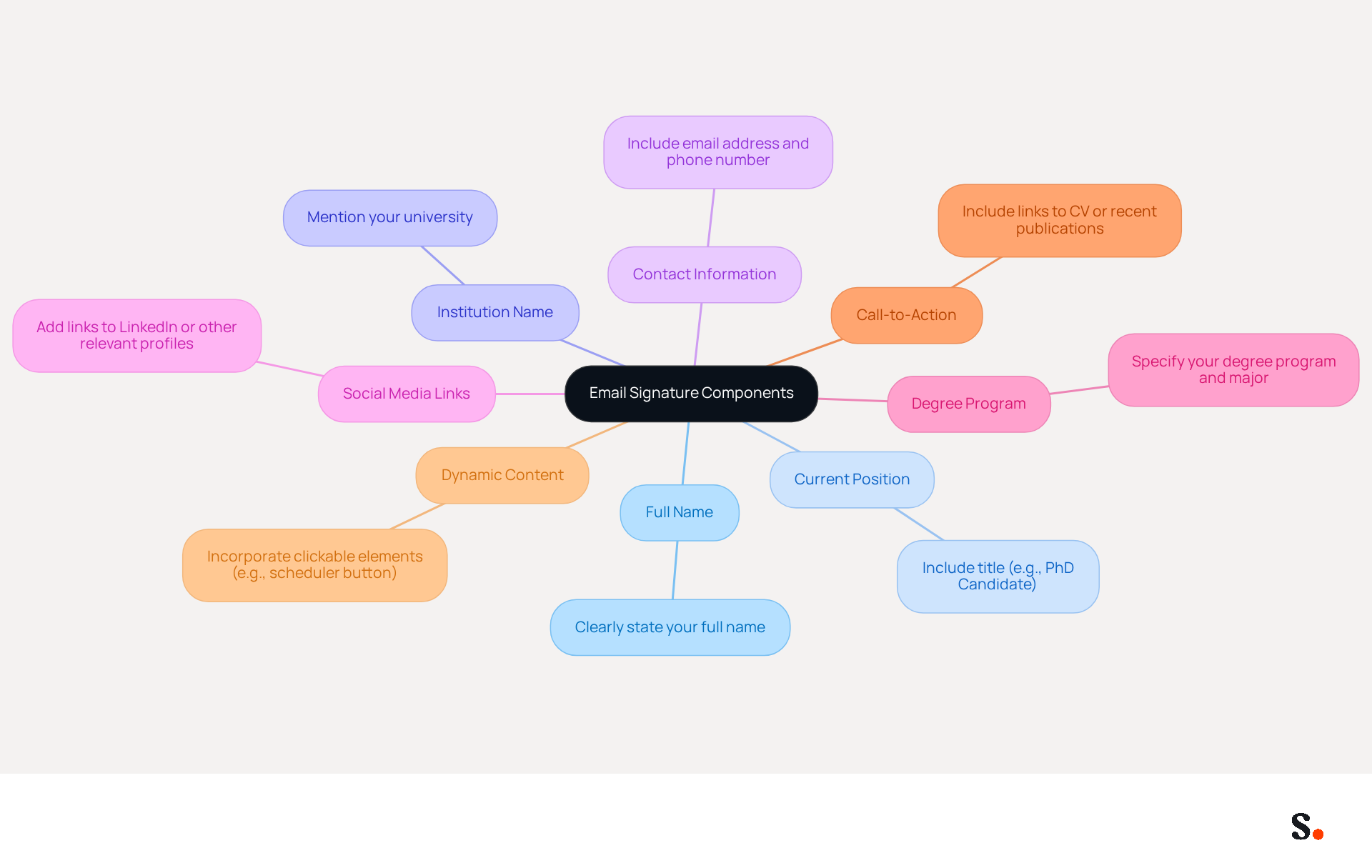
A professional doctoral student email signature is crucial for establishing academic identity and facilitating effective communication. It should encompass several essential components:
- Full Name: Clearly state your full name to ensure recipients can easily identify you.
- Current Position: Include your title, such as 'PhD Candidate' or 'Doctoral Student', to establish your academic status. This clarity enhances perceived professionalism, which is crucial in academic correspondence.
- Institution Name: Mention your university or institution to provide context about your academic affiliation, reinforcing your credibility.
- Contact Information: Include your contact address and phone number for easy communication, ensuring recipients can reach you without hassle.
- Social Media Links: If applicable, add links to relevant social media profiles, such as LinkedIn, to enhance networking opportunities. This can significantly increase your visibility and engagement within your academic community.
- Degree Program: Specify your degree program and major to clarify your area of study, helping recipients understand your academic focus.
- Call-to-Action (CTA): Consider including a CTA, such as a link to your CV or recent publications, to encourage engagement and provide additional information.
- Dynamic Content: Incorporating clickable elements, like a scheduler button, can enhance the effectiveness of your communication footer by facilitating easier interaction.
Including these elements not only ensures your signature is informative and professional but also strengthens your academic branding. With Scribe, you can automate the management of your identifiers, ensuring that any modifications made to your Calendly setup are automatically synced. This integration makes updates easy, helping you keep your brand consistent across all your communications. Furthermore, Scribe's auto-filling capability from your business phone system saves time by automatically refreshing your teammates' email footers without requiring any effort from them. Scribe's SOC 2 Type II compliance guarantees that your data is managed securely, providing you with reassurance as you present a refined digital mark. Research shows that messages with formal sign-offs can boost response rates by 22%, emphasizing the significance of a well-designed sign-off in building connections and promoting collaborations. By leveraging Scribe's solutions, doctoral students can ensure their digital presence, including their doctoral student email signature, is not only professional but also impactful in their academic journey.
Ensure Brand Consistency and Professionalism
To ensure your email signature reflects professionalism and brand integrity, adhere to these essential guidelines:
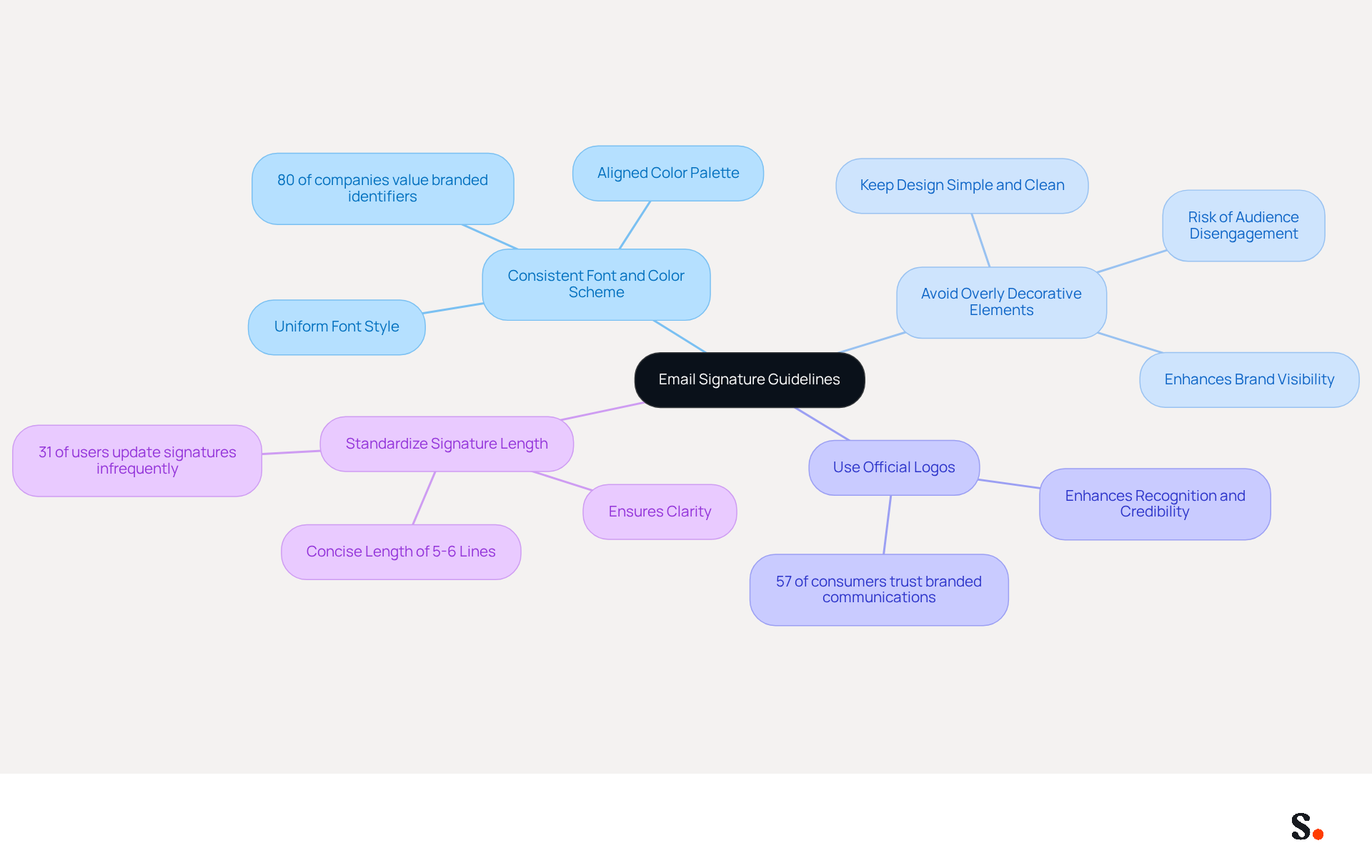
- Consistent Font and Color Scheme: Utilize a uniform font style and color palette that aligns with your institution's branding guidelines. This method promotes a unified appearance that conveys professionalism and boosts brand awareness, as 80% of companies consider branded digital identifiers crucial for branding.
- Avoid Overly Decorative Elements: Keep the design simple and clean. Overly decorative elements can detract from the core message, risking disengagement from the audience. A well-designed doctoral student email signature significantly enhances your brand's visibility and ensures your messages are delivered effectively.
- Use Official Logos: If permitted, include your institution's logo to enhance recognition and credibility. Incorporating logos and brand colors enhances brand recognition, with research indicating that 57% of consumers trust communications from businesses that utilize branded elements.
Standardize the length of signatures by ensuring that the doctoral student email signature is concise and does not exceed 5-6 lines. This ensures clarity and prevents overwhelming the recipient with information. Maintaining design consistency and adhering to legal standards are crucial for sustaining relevance and trust, as 31% of users only refresh their contact information every few years.
By implementing these practices, you not only enhance your professional image but also foster stronger connections with your audience.
Utilize Tools for Efficient Signature Management
Effectively managing a doctoral student email signature is crucial for maintaining a professional image in academic communications. To efficiently manage your email signature, consider utilizing the following tools:
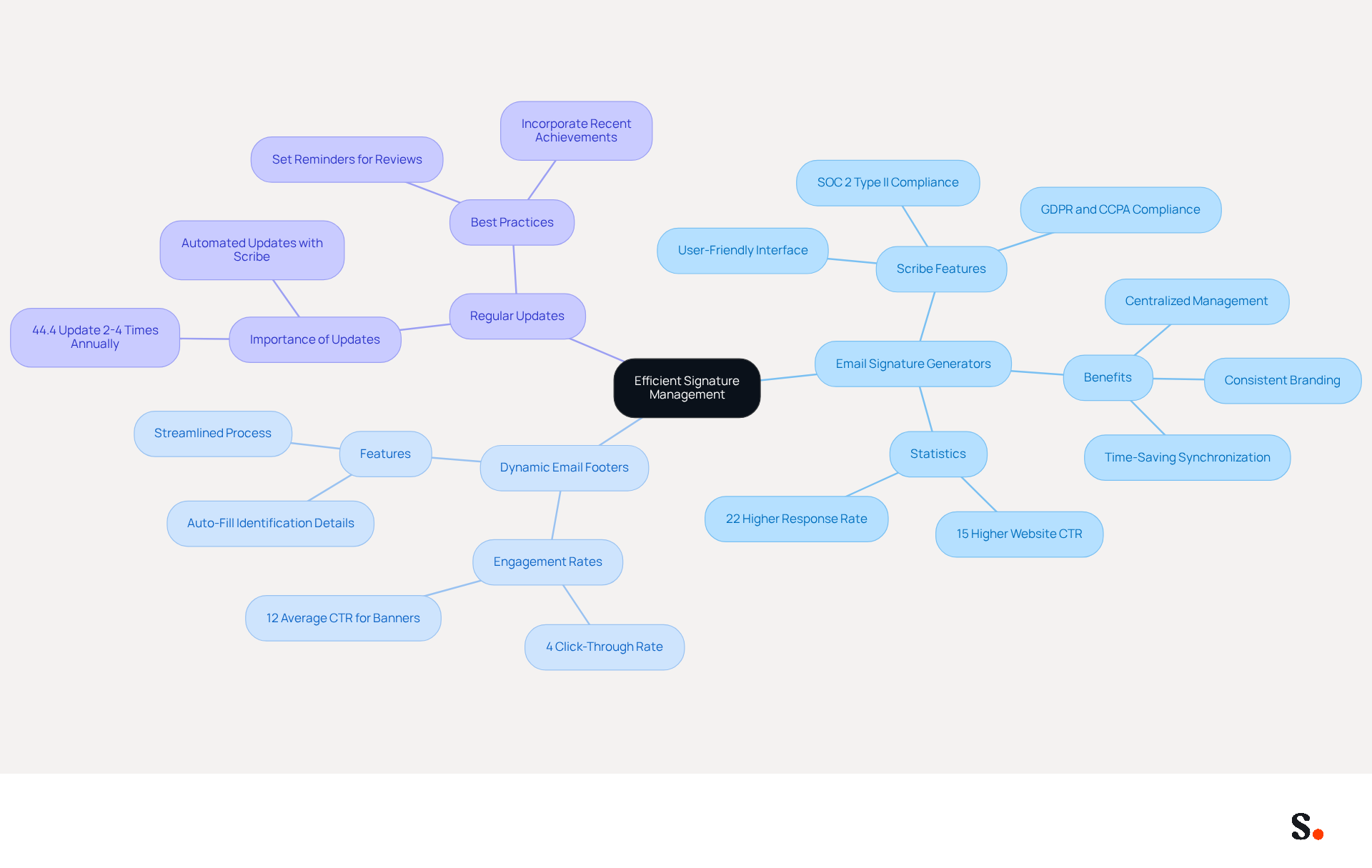
- Email Signature Generators: Platforms like Scribe provide user-friendly interfaces that allow for quick creation and customization of professional email signatures. The platform is SOC 2 Type II compliant and follows GDPR and CCPA regulations, which means your data is managed securely. These tools often include templates that adhere to best practices, ensuring a polished appearance. Without centralized management solutions, academic institutions often struggle with inconsistent doctoral student email signatures across departments. For larger teams, these tools are invaluable, ensuring that all approvals related to the doctoral student email signature remain consistent and up-to-date. Organizations that implement centralized management solutions often experience a significant boost in brand consistency, making it easier for teams to present a unified image, including in their doctoral student email signature. Scribe's integration with Google Workspace enables effortless synchronization of teammate data, ensuring that any modifications, such as job position updates, are automatically reflected in their contact details. This integration not only saves time but also elevates the professionalism of your communications, such as your doctoral student email signature, reflecting positively on your institution.
- Dynamic Email Footers: Dynamic email footers can really boost engagement; they typically achieve a 4% click-through rate, which is higher than the 2.5% for standard marketing emails. With Scribe, you can utilize features that auto-fill your teammates' identification details, streamlining the process and ensuring consistency across your team. Notably, Scribe's distinctive banners achieve an impressive 12% average CTR, showcasing their effectiveness in driving engagement.
- Regular Updates: It's essential to set reminders for regular reviews and updates of your credentials, especially after significant achievements or changes in your academic status. Research indicates that 44.4% of professionals refresh their digital footers 2-4 times annually, highlighting the significance of maintaining your footer up-to-date and polished. By syncing your Google Workspace with Scribe, you can automate these updates, ensuring your email block always reflects the latest information without manual input.
By leveraging these tools, you not only enhance your professional image but also ensure that your doctoral student email signature accurately reflects your academic achievements.
Leverage Your Email Signature for Networking Opportunities
Your doctoral student email signature can be a powerful tool for networking, yet many overlook its potential. Here are some strategies to leverage it effectively:
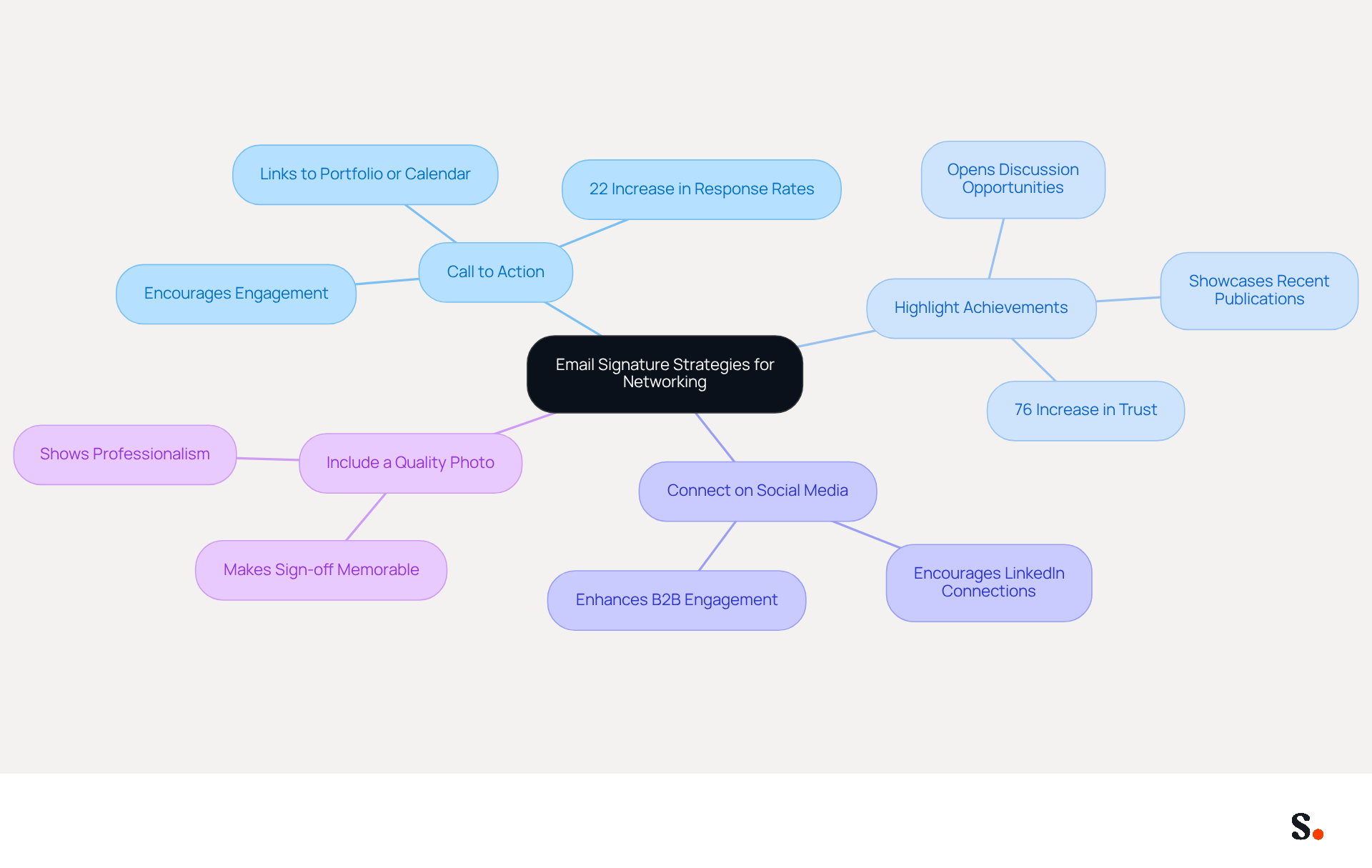
- Include a Call to Action: Adding a call to action (CTA) in your signature, such as a link to your academic portfolio, research publications, or a calendar link for scheduling meetings, encourages recipients to engage further with your work. Research indicates that emails featuring branded elements can drive a 22% increase in response rates, making CTAs even more effective.
- Highlight Achievements: Briefly mentioning recent publications or awards in your email footer showcases your accomplishments and opens the door for further discussions. A study indicates that 76% of recipients report increased trust in senders with branded signatures, enhancing your credibility.
- Connect on Social Media: Encourage recipients to connect with you on platforms like LinkedIn. Research shows that including LinkedIn icons in email footers can enhance B2B engagement significantly, making it a valuable addition.
- Include a Quality Photo: Adding a high-quality image can make your sign-off more personable and memorable, assisting recipients in recalling you more effectively. A thoughtful sign-off not only shows your professionalism but also helps others remember you.
By strategically utilizing your contact information, such as your doctoral student email signature, for networking, you can boost your visibility and create more chances for collaboration and career advancement. Centralized management of digital identifiers through Scribe ensures consistency and adherence, further strengthening your professional presence in communications. Each modification made in your Aircall configuration will automatically be reflected in your documents, as we are syncing the data from there. Furthermore, Scribe's integration with Calendly enables automatic updates to your contact information, ensuring that your branding stays consistent across all platforms. With an average click-through rate of 12% on signature banners, Scribe proves to be a key element in your networking strategy, emphasizing the importance of a doctoral student email signature. By neglecting your email signature, you may be missing out on significant opportunities for professional growth.
Conclusion
A well-crafted email signature is not just a formality; it is a critical component of a doctoral student's professional identity. Incorporating key elements like your full name, position, institution, and contact info makes your signature a powerful branding tool that conveys professionalism. Utilizing platforms like Scribe can streamline the management of these signatures, ensuring consistency and compliance with security standards.
This article highlights how crucial brand consistency and professionalism are for effective communication. Adhering to guidelines regarding font, color schemes, and the inclusion of official logos can significantly enhance the visibility and credibility of your communications. Using tools like email signature generators and dynamic footers can help you save time and keep your signature current, showcasing your academic achievements.
In conclusion, the potential of an email signature extends beyond mere contact information; it is a strategic asset for networking and professional growth. Without a well-managed email signature, doctoral students risk losing valuable networking opportunities. By thoughtfully designing and managing your email signature, doctoral students can create meaningful connections and opportunities within their academic fields. Ultimately, failing to optimize your email signature could restrict your professional opportunities.
Frequently Asked Questions
Why is an email signature important for doctoral students?
An email signature is crucial for establishing academic identity and facilitating effective communication, enhancing perceived professionalism in academic correspondence.
What essential components should be included in a doctoral student email signature?
A doctoral student email signature should include the following components: Full Name, Current Position (e.g., 'PhD Candidate'), Institution Name, Contact Information, Social Media Links, Degree Program, Call-to-Action (CTA), and Dynamic Content.
How does including a full name in an email signature benefit communication?
Including your full name ensures recipients can easily identify you, which is important for clarity and professionalism in academic correspondence.
What role does the current position play in an email signature?
Including your title, such as 'PhD Candidate' or 'Doctoral Student', establishes your academic status and enhances perceived professionalism.
Why is it important to mention the institution name in an email signature?
Mentioning your university or institution provides context about your academic affiliation, reinforcing your credibility in communications.
What contact information should be included in an email signature?
You should include your contact address and phone number to ensure easy communication, allowing recipients to reach you without hassle.
How can social media links enhance a doctoral student’s email signature?
Adding links to relevant social media profiles, such as LinkedIn, can enhance networking opportunities and increase visibility within the academic community.
What is the significance of specifying a degree program in an email signature?
Specifying your degree program and major clarifies your area of study, helping recipients understand your academic focus.
What is a Call-to-Action (CTA) in an email signature?
A CTA is an element that encourages engagement, such as a link to your CV or recent publications, providing additional information to recipients.
How can dynamic content improve an email signature?
Incorporating clickable elements, like a scheduler button, enhances communication effectiveness by facilitating easier interaction.
How does Scribe assist with managing email signatures?
Scribe automates the management of identifiers, syncing modifications made to your Calendly setup and refreshing teammates' email footers automatically, ensuring brand consistency.
What security measures does Scribe provide for managing data?
Scribe's SOC 2 Type II compliance guarantees that your data is managed securely, providing reassurance when presenting a refined digital mark.
What impact does a well-designed email sign-off have on response rates?
Research shows that messages with formal sign-offs can boost response rates by 22%, highlighting the importance of a well-designed sign-off in building connections and promoting collaborations.
List of Sources
- Define Essential Components of Your Email Signature
- 40+ Email Signature Statistics for 2026 (Data + Insights) (https://wavecnct.com/blogs/email-signature-statistics)
- Student Email Signature Examples & Best Practices (https://wisestamp.com/examples/student-email-signature)
- How to create a professional PhD student email signature | Researcher.Life (https://researcher.life/blog/article/how-to-create-a-professional-phd-student-email-signature)
- Academic Email Signature Examples and Tips (https://mysigmail.com/solutions/the-academic-email-signature-solution-boost-credibility-and-citations)
- Ensure Brand Consistency and Professionalism
- Why Are Email Signatures Key to Brand Awareness? | QuickMail (https://quickmail.com/role-of-email-signatures-in-brand-awareness)
- Research Recap: Branded Email Signatures Increase Company Recognition, Trust - B2BMX INSIGHTS (https://demandgenreport.com/industry-news/research-recap-branded-email-signatures-increase-company-recognition-trust/47252)
- The impact of email signatures on your branding (https://signitic.com/en/resources/the-impact-of-email-signatures-on-your-branding)
- Email Signature Branding: Consistency and Impact | Crossware365 (https://crossware365.com/blog/mastering-email-signature-branding-market-presence)
- Why Professional Email Signatures Build Trust - Signite (https://signite.io/blog/why-professional-email-signatures-build-trust)
- Utilize Tools for Efficient Signature Management
- 40+ Email Signature Statistics for 2026 (Data + Insights) (https://wavecnct.com/blogs/email-signature-statistics)
- Email signature statistics: Why every business should optimize their email signatures — Stripo.email (https://stripo.email/blog/email-signature-statistics-why-every-business-should-optimize-their-email-signatures)
- Email Signature Management for Schools and Universities | SyncSignature (https://syncsignature.com/email-signature-management-for-education)
- 4 Best Practices for Email Signature Management for Undergraduates (https://scribe-mail.com/en-US/blog/4-best-practices-for-email-signature-management-for-undergraduates)
- Best Email Signature Management Software: Top 12 Tools (2026)
- NEWOLDSTAMP (https://newoldstamp.com/blog/email-signature-software)
- Leverage Your Email Signature for Networking Opportunities
- 40+ Email Signature Statistics for 2026 (Data + Insights) (https://wavecnct.com/blogs/email-signature-statistics)
- The impact of email signatures on your branding (https://signitic.com/en/resources/the-impact-of-email-signatures-on-your-branding)
- Using Email Signatures for Marketing | CloudM (https://cloudm.io/resources/blog/using-email-signatures-for-marketing-how-every-email-can-boost-your-brand)
- 10 Strategies for Increasing User Engagement with Business Email Signatures (https://exclaimer.com/blog/email-signatures-key-business-tool)
Get started with Scribe
Manage signatures across your whole team
Free 14-day trial — no credit card.