How to Evaluate Email Signature Management Software for Regulated Organizations
Evaluate email signature management software for controlled wording, approvals, audit trails, privacy handling, and tested consistency.
Sophie Grant
Email Signature Specialist, Scribe

On this page
- Define the evaluation test before comparing products
- Separate legal validation from software evaluation
- Test one approved wording change
- Observe the change path in a live scenario
- Reconstruct a decision from the record
- Challenge the record with negative tests
- Follow one data field through its handoffs
- Run a sending-context test set
- Judge integrations by scenario outcomes
- Use Scribe only as a bounded capability example
- Turn the evaluation into a pre-deployment proof exercise
- Decide only when the evidence chain is complete
- What should a regulated organization verify before selecting email signature management software?
- How can I ensure compliance with email signature requirements in regulated industries?
- What should I test when evaluating email signature management software?
- How can I track changes made to email signatures?
- What are the privacy considerations when using email signatures?
- How do I validate the effectiveness of email signature management software?
- Sources
Define the evaluation test before comparing products
Email signature management software is a governed way to define, distribute, change, and review signature content across an organization. For a regulated organization, evaluate the product through repeatable acceptance scenarios rather than its label: give each provider the same approved requirement, observe the result, and record unresolved gaps. The outcome is a comparison of observed behavior, not a conclusion that the software itself establishes compliance.
A basic signature generator usually addresses creation: you enter contact details, choose a layout, and copy the result into an email client. Manual configuration adds a second problem: each employee becomes part of the delivery process. That arrangement may be workable for a small, stable team, but it gives you less control when wording changes, employees use different devices, or several departments need different approved fields.
Email compliance software is described as supporting workflows, approvals, controls, and documentation for sending email. Common capabilities may include audit trails, suppression logic, approval routing, and permission management. Those capabilities describe a control surface, not a legal conclusion. You still need to establish which wording applies to your organization before deciding whether a product supports the resulting process.
Manually managed email signatures can be unreliable for meeting global compliance requirements because employees may update templates incorrectly, ignore IT notices, or forget. The practical consequence is variation: two people may send messages with different wording, outdated contact information, or different versions of an approved disclosure.
That risk changes the shape of your evaluation. Instead of asking only whether a provider has templates, ask whether you can identify the approved content, limit who can change it, route changes for review, apply the result to the required sending contexts, and retain enough history to explain what happened. A product that helps with design but leaves those questions unanswered may solve the presentation problem without solving the governance problem.
Use the product label as a starting category. Use the control question as the decision test.
Get started with Scribe
Manage signatures across your whole team
Free 14-day trial — no credit card.
Separate legal validation from software evaluation
Legal and compliance validation must establish which signature content applies before software capabilities can be assessed against it. Requirements can differ by industry, jurisdiction, entity, role, communication type, and the personal data your organization chooses to include. A general list of disclosures cannot answer those organization-specific questions.
Start by creating a requirements brief for the organization under review. Record the business entities, jurisdictions, regulated activities, employee groups, message types, and sending environments that matter. Then ask the responsible legal or compliance function to identify the wording, privacy statements, contact details, or other controls that apply to each relevant combination.
Keep the requirement and the implementation question separate. “This wording must appear for this population” is a policy decision. “Can the software apply this wording to the right population and show when it changed?” is a product-evaluation question. Mixing the two can make a software demonstration look like a legal review.
Privacy validation deserves its own pass because signature content can include information connected to an employee, office, client-facing role, or legal entity. List the fields you intend to use and the systems that may provide them. Identify who may edit each field, where the data travels, how long relevant records should remain available, and which teams may access them.
Do not turn a familiar regulation or industry practice into a universal signature rule. Ask your legal and compliance contacts to determine the applicable requirement, its jurisdiction, its population, and its effective condition. Ask your privacy contacts to assess the intended personal-data handling. The software evaluation can then test whether the proposed process supports those decisions.
This separation also gives vendors a fair test. You can present an approved requirement, a defined population, and a change scenario instead of asking for a vague demonstration of “compliance.”
Test one approved wording change
Build the first comparison card around one approved wording change. List each required element, its intended population, its owner, the date of the last decision, and the condition that triggers review. Keep legal text distinct from optional branding or campaign content so the scenario tests one controlled change at a time.
Use that card to compare how a provider handles the requirement rather than how many editor features it lists. Ask the provider to demonstrate how you would:
A governed software process should therefore be tested against the failure modes you care about rather than judged by its editor alone. Ask the provider to demonstrate how you would:
- define a required field or wording block;
- distinguish controlled content from employee-editable content;
- assign different approved variants to defined populations;
- prevent an outdated version from remaining in active use; and
- identify the owner and reason for a later change.
Email compliance software often includes controls, permission management, approval routing, and documentation features. Treat each feature as a question to test against your register, not as proof that your own policy has been implemented.
Controlled wording requires a change test that starts with an approved requirement and ends with a visible result. Give the provider a realistic scenario, such as a revised required sentence for one defined group, and ask what happens at each stage. The demonstration should show who can propose the change, who can edit it, who can approve it, how the active version is selected, and how the resulting signature reaches the intended users.
Ask what an employee can alter after deployment. Ask what happens when a person belongs to more than one group, changes role, or sends from a different environment. Ask how an exception is recorded and who can resolve it. These questions expose the boundary between a design tool and a control process.
A useful acceptance condition is simple: you can explain the active wording, its population, its owner, its approval state, and its change history without relying on an employee’s memory.
Observe the change path in a live scenario
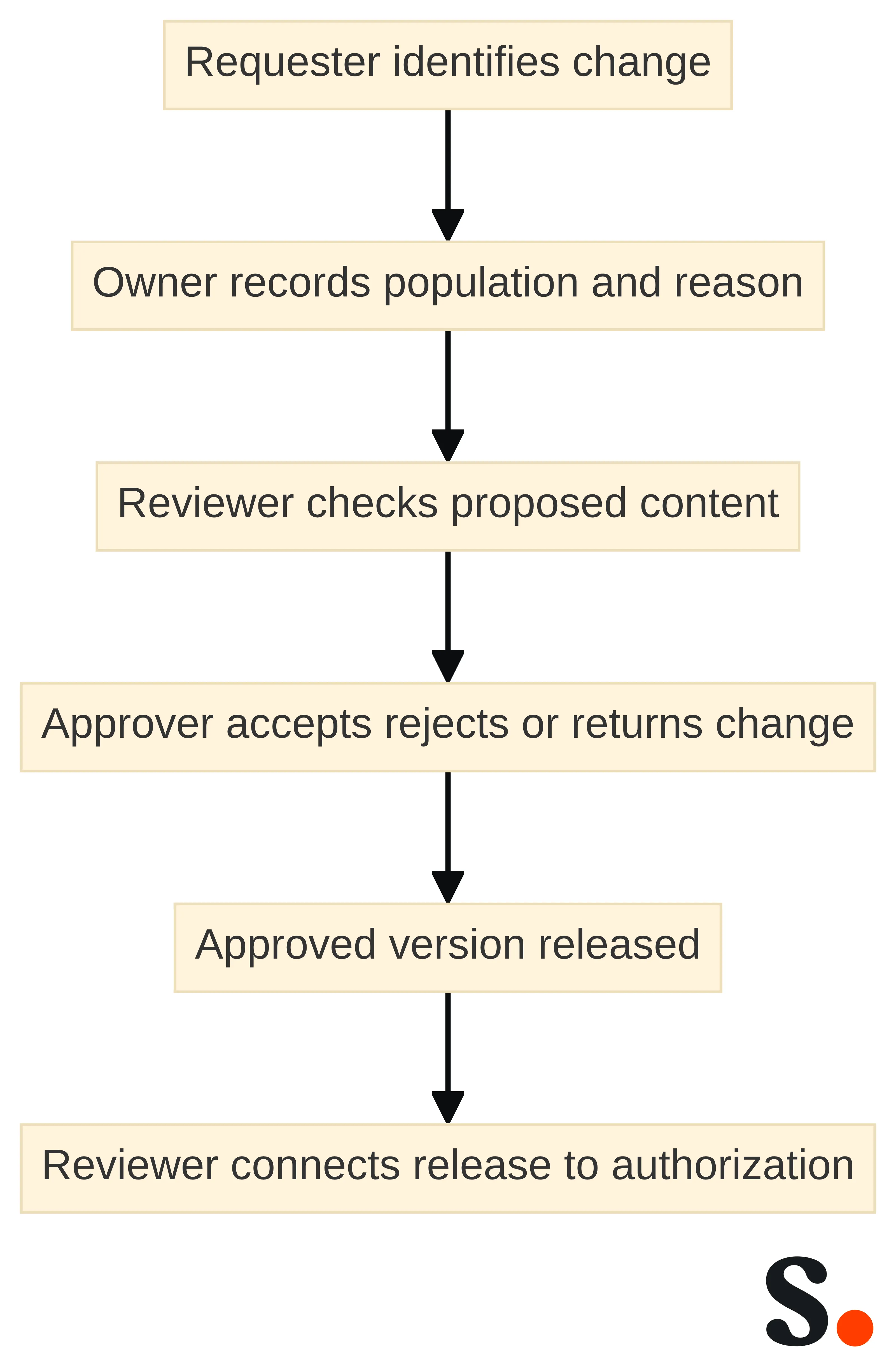
Use a second comparison scenario for one signature change from request through release. Give it a real owner, a defined population, and a stated reason, then ask the provider to show where each decision is recorded. Email compliance software is described as supporting workflows, approvals, controls, and documentation, with approval routing and permission management among the common capabilities. Record the demonstrated path instead of treating a listed workflow as an implemented control.
A practical change path contains these decisions:
- A requester identifies the wording or field that needs to change.
- An owner records the affected population and the reason for the request.
- A designated reviewer checks the proposed content against the approved requirement.
- An authorized approver accepts, rejects, or returns the change.
- The approved version is released to the intended population.
- A later reviewer can connect the released version to the decision that authorized it.
The sequence is an evaluation model, not a claim that every product offers each step. Ask the provider to show where each decision lives and which permissions govern it.
Approval roles should be explicit enough for you to distinguish content ownership, technical execution, and authorization. The person who requests a wording change may understand the business need without having authority to approve it. The person who deploys a template may be able to execute a decision without being the person who made it.
Test at least three scenarios: an ordinary wording update, an urgent correction, and a rejected request. For each scenario, ask what the requester sees, what the approver sees, what remains pending, and how the final state is identified. Ask whether permissions can be limited by role or population and whether an exception follows the same review path.
A product fits this control question when you can assign responsibility before deployment and explain the result afterward. If the path depends on email instructions, spreadsheets, or private notes outside the system, include those dependencies in your operating design instead of treating the software as the whole control.
Reconstruct a decision from the record
Make reconstruction the third comparison scenario: give a reviewer the retained request, approval record, released version, and relevant execution result, then test whether the reviewer can explain the decision without asking the original requester to recreate it.
A basic approval log answers whether something was approved. An approval audit trail provides more context by preserving who made the decision, what changed, and why. That distinction matters when a reviewer must connect approved wording to the version that employees actually used.
Ask whether the record covers rejected, withdrawn, superseded, and returned requests as well as approved requests. Ask whether before-and-after content can be read without reconstructing it from separate exports. Ask whether the record identifies the population affected by the decision. If the product shows only a status and a date, record that limitation in your evaluation.
Treat the audit record as an operational artifact. It should help you answer a specific question about a specific change without asking the original requester to recreate the reasoning.
Challenge the record with negative tests
Apply a negative test to the record produced by the comparison scenario. Ask what happens when an unauthorized person attempts to alter it, when a request is canceled, or when an approver's access changes. Tamper resistance depends on access controls and record integrity; append-only storage, encryption, cryptographic verification, and tightly controlled write access can help protect approval evidence from unauthorized alteration.
Ask the provider to explain which controls apply to the approval record itself. Do not accept a general security description as an answer to a record-integrity question. Ask who can create, amend, delete, export, or administer the record; whether administrative actions are recorded; how access is granted and removed; and how the organization can identify a change to the record after approval.
The evaluation should also cover the boundary around exports. Find out whether an exported record retains the fields needed to connect the decision to the signature version, who controls the export, and how your organization would preserve it under its own retention process. These are operating questions for your governance design.
A reviewable record should support reconstruction without overstating what the record proves. The record can show who approved a wording change, what changed, and why. It does not by itself decide whether the wording satisfied an industry or jurisdiction-specific requirement.
Use a negative test as well as a successful demonstration. Ask what happens when an unauthorized person attempts to alter an approved record, when a request is canceled, or when an approver’s access changes. Ask how exceptions appear in the record and whether the organization can distinguish an approved state from an active deployed state.
Approval audit-trail data can also reveal control weaknesses through approval cycle times, exceptions, unusual activity, and recurring bottlenecks. Use those signals to improve the process you operate around the software. Do not turn a fast approval time into proof that the underlying decision was correct.
Add a reconstruction exercise to the review. Give a reviewer who did not configure the change only the retained request, approval record, released version, and relevant execution result. Ask that reviewer to identify the approved wording, affected population, decision owner, release point, and unresolved exceptions. If answering requires private messages or the original operator’s memory, record a documentation or integration gap. Repeat the exercise for an approved change and a rejected or withdrawn request; a control record should make both outcomes understandable without treating them as equivalent.
Follow one data field through its handoffs
Make the fourth comparison scenario a field-and-flow test rather than a privacy-notice review. List every field your organization proposes to place in the signature, the population associated with it, the system that supplies it, and the teams or services that receive it. Mark fields that may vary by jurisdiction or role and identify the person responsible for approving their use.
Use the map to ask focused questions. Which fields are required for the approved purpose? Which fields are optional? Which systems can change them? Which users can see them? What happens when a person changes role, leaves the organization, or sends on behalf of a different entity? These questions help your legal and privacy teams assess the intended handling without assuming that a software feature settles the issue.
Keep privacy validation separate from formatting validation. A signature can render correctly and still require a separate review of the data it contains, the systems that receive it, and the populations to which it is applied.
Connected systems should be evaluated by the traceability they create, not by the number of names in an integration list. Translate that premise into a test. Start with a privacy or wording request, connect it to the approval decision, identify the resulting signature state, and follow the relevant downstream event. Ask whether each handoff preserves a common identifier, the population affected, the time of the action, and the accountable system or team. If a handoff breaks the chain, record the break and decide whether another control is needed.
Traceability does not replace privacy review. It gives you a way to see how an approved decision moves through connected systems and where responsibility changes.
Run a sending-context test set
The fifth comparison scenario should mirror the environments your organization actually requires. For strict IT control or policy enforcement, test server-side or administrator-configured client-side signatures, then record the resulting formatting and message visibility against the expected result.
The test should use representative messages rather than a single clean demonstration. Check the required wording, sender identity, formatting, links, and any content that must remain visible when a message is forwarded or viewed in another client. Record the sending environment, the message type, the expected result, and the observed result.
Ask who owns a failed test. A formatting defect may belong to the technical team, while an incorrect wording decision may need legal or compliance review. Keep those paths separate so that a visual fix does not silently change approved content.
Mobile and BYOD sending require their own validation path. Server-side signatures are identified as a common fit when messages are composed and sent from iOS or Android mobile devices, and the required mobile contexts should be tested before deployment.
List the devices, mail applications, accounts, and message routes that matter to your organization. Test a new message, a reply, a forward, and any other message type covered by your policy. Check whether the result contains the approved wording, whether the layout remains intelligible, and whether the signature is applied in the expected place.
Do not infer mobile behavior from a desktop demonstration. A product passes this part of the evaluation only when the contexts that matter to you produce the result your approved requirements call for.
Rich content and encrypted mail create separate decision branches. For customer-facing teams that need rich branding, banners, or promotional content, client-side signatures are the relevant approach to test. For encrypted or S/MIME-signed email, client-side signatures are identified when the signature must be included within encrypted messages.
Treat encryption and signing behavior as a separate technical requirement. Test whether the signature appears inside the protected message, whether the recipient sees the intended content, and whether the result changes when the message is signed, encrypted, or both. Record the exact combination of client, message type, and protection state.
Do not use a successful banner test as proof that encrypted-message behavior works. Each branch needs its own expected result and approval boundary.
Judge integrations by scenario outcomes
Finish the comparison with an exception scenario, not only a successful handoff. Change the approved population, reject a request, delay an approval, or create a downstream mismatch. Record where the exception appears, who owns it, and whether the original request remains associated with the later action.
Use the same vocabulary across systems for the request, approved version, affected population, and execution state. If your systems use different names, define the mapping before deployment. Ask whether the mapping can be reviewed by the teams responsible for legal, privacy, IT, and operational controls.
The result you want is not a long feature inventory. The result is a bounded path that lets you explain what was requested, what was approved, what was applied, and what happened afterward.
Use Scribe only as a bounded capability example
Scribe enables centralized installation of email signatures for all team members. That capability is relevant when you are testing whether approved signature content can be installed through a controlled organizational process rather than left to separate employee actions.
Use a representative population during evaluation. Ask how the intended users are identified, how a new or changed assignment is handled, and how you can distinguish the signature that was intended from the signature that was installed. Keep the installation result connected to the approved content and the affected population in your own evaluation record.
Centralized installation addresses one part of the control question. It does not, by itself, determine which wording your organization needs or whether a legal or privacy review has been completed.
Scribe provides conversion tracking to measure the effectiveness of email signatures. That capability may be relevant when marketing or commercial teams need to connect signature activity to a defined outcome, but it should remain separate from the approval decision for required wording.
Define the measurement question before using the capability. Identify the signature element being measured, the population included, the destination or action being tracked, and the owner of the resulting report. Then ask whether the measurement flow uses data that your privacy and legal teams have approved for that purpose.
A marketing measurement is not a compliance approval. Keep performance analysis downstream from the content-control decision and do not use a conversion result as evidence that required wording was correct.
Scribe provides a REST API with endpoints for data ranging from signature status to conversions. Scribe also enables real-time events through webhooks to Zapier, n8n, or proprietary systems, and provides structured JSON through its CLI with real-time webhook events.
These capabilities give you concrete interfaces to test against a governance path. Use a narrow scenario: retrieve the relevant signature state, connect it to the approved change, receive the applicable event, and preserve the resulting record in the system your organization uses for review. Ask which fields identify the affected population, version, event, and time of execution.
Do not treat the presence of an API, CLI, or webhook as proof that your approval or privacy process is complete. Evaluate whether the interface carries the information and control boundaries your process requires.
Scribe is a bounded example of how to assess vendor capabilities, not a universal compliance conclusion. Use the supplied capabilities to test centralized installation, measurement, data access, and event delivery. Assess approval workflows, audit-record contents, privacy handling, and regulatory sufficiency as separate decision questions.
A responsible evaluation records both what a provider demonstrates and what remains an organizational responsibility. That record helps you avoid buying a feature list when your actual need is a controlled process with accountable decisions.
Turn the evaluation into a pre-deployment proof exercise
A pre-deployment proof exercise should move from approved content to tested execution in a bounded sequence. Use the following order:
- Inventory the content. List the required wording, optional content, populations, jurisdictions, and sending contexts that apply to the evaluation.
- Assign owners. Name the content owner, technical owner, approver, privacy contact, and person responsible for the deployment decision.
- Obtain the decision. Have the responsible legal or compliance function determine the applicable wording and conditions before configuration.
- Configure a narrow test. Use a small representative population and the message types, clients, mobile contexts, and protection states that matter.
- Test the data path. Follow the approved content and relevant personal-data fields through connected systems and execution.
The sequence keeps legal validation, technical testing, and operational approval connected without treating them as the same activity.
Post-deployment review should examine the control as it operates, not only as it appeared in a demonstration. Compare the intended population and wording with representative sending results. Review exceptions, unusual activity, delayed approvals, and recurring bottlenecks. Approval audit-trail data can reveal control weaknesses and opportunities to improve workflows through those signals.
Set a review trigger for the conditions your organization has identified. A trigger might be a change to approved wording, a change in population, a new sending environment, a privacy decision, or a recurring exception. The trigger should identify who starts the review and which records must be examined.
Use the results to correct the process, the configuration, or the approved requirement as appropriate. Record the reason for the correction and connect it to the resulting change. That connection is more useful than a general statement that the system was “checked.”
A pre-deployment exercise needs explicit acceptance conditions. Approve the rollout only when you can identify the authorized wording, affected population, approval decision, test results, data path, deployment state, and retained record. If one of those links is missing, name the gap and assign an owner before expanding the population.
Use the same conditions for every shortlisted product. A consistent test prevents a polished demonstration from receiving a different standard than a less familiar interface. It also gives compliance, legal, IT, and operational teams a common basis for the decision.
The exercise should produce a decision package that another responsible person can review without repeating the entire demonstration.
Decide only when the evidence chain is complete
The right software decision is the one that connects approved wording to controlled execution and a reviewable record. A governed approach should therefore let you assess wording control, accountable changes, approval context, tested sending behavior, privacy handling, and traceability together.
Use this decision rule before deployment:
- required content has an identified owner and approved population;
- changes follow an identifiable request and approval path;
- the record shows who acted, what changed, when, why, and with what outcome;
- access controls and record-integrity protections address unauthorized alteration;
- the relevant desktop, mobile, BYOD, rich-content, encrypted, or signed-message contexts have been tested; and
- connected systems preserve the links needed to review execution and downstream handling.
A product can support these activities without establishing legal sufficiency by itself. Software is part of the control design, not a substitute for the decision about what your organization must require.
A complete evaluation ends with a documented choice, a named owner, and a boundary for the next review. If the evidence chain is incomplete, postpone expansion, identify the missing link, and resolve it through the responsible function. If the chain is complete for the defined scope, retain the decision package and monitor the conditions that could change it.
A qualified legal or compliance professional must decide which requirements apply to your organization, industry, jurisdictions, and communications. Your software evaluation can then show whether the selected process supports those requirements through controlled wording, accountable approval, tested delivery, and reviewable records.
Choose on that basis rather than on a product label, a template gallery, or a single successful demonstration.
What should a regulated organization verify before selecting email signature management software?
How can I ensure compliance with email signature requirements in regulated industries?
To ensure compliance, create a requirements brief that outlines the necessary wording, privacy statements, and controls for each relevant employee group and message type, and validate these with your legal or compliance team.
What should I test when evaluating email signature management software?
Test the software's ability to control required wording, manage approval workflows, maintain audit trails, and ensure privacy handling across different sending contexts.
How can I track changes made to email signatures?
Look for software that provides a complete approval audit trail, capturing details such as timestamps, actions taken, and the identities of those involved in the approval process.
What are the privacy considerations when using email signatures?
Identify all fields included in signatures, the systems that supply them, and the teams that access them. Ensure that privacy handling is compliant with relevant regulations and that the software supports these requirements.
How do I validate the effectiveness of email signature management software?
Conduct a pre-deployment proof exercise that includes inventorying required content, assigning ownership, obtaining legal approval, and testing the software in real sending contexts.
Get started with Scribe
Manage signatures across your whole team
Free 14-day trial — no credit card.