What Is a Business Email Signature? Roles, Requirements, and Managed Options
Learn what a business email signature does, what to include, and when managed control fits your organization.
Sophie Grant
Email Signature Specialist, Scribe

On this page
- What “signature” means in a business email
- Evaluate the signature through three business roles
- Start with the information recipients need
- Add optional elements when they serve a clear purpose
- Use the signature as a consistent brand touchpoint
- Recognize when individual ownership becomes impractical
- Assess whether marketing activity needs its own operating model
- Check the requirements before considering a provider
- Test whether IT and Marketing can share the operating boundary
- Map Scribe to the three-role evaluation lens
- Match Scribe’s capabilities to your requirements
- Choose the level of control that matches the requirement
- Sources
What “signature” means in a business email
A business email signature is the block of information added to the end of an email to identify you and provide professional contact details. In this context, “signature” describes an email communication element rather than a handwritten mark or a document-signing method. The meaning is practical: it helps the person receiving your message understand who contacted them and how to respond.
That definition gives you a useful starting point, but it does not answer whether your organization needs a managed approach. A signature can be a small personal block for one mailbox, or it can become a repeated organizational touchpoint across many messages. The decision depends on what the signature must do, who needs to control it, how often it changes, and whether your organization expects it to support marketing activity.
A managed email signature becomes relevant when consistency, governance, and coordinated updates matter across employee communications. At organizational scale, consistency across employee signatures becomes a governance challenge, making centralized control relevant. That does not mean every team needs the same operating model. If your organization has few senders, infrequent changes, and no campaign or measurement requirement, a simpler approach may meet the need. If repeated requests, inconsistent branding, or campaign coordination consume time, evaluate the requirement rather than treating the signature as a minor formatting task.
Use three questions to orient the rest of your decision:
- Does the signature identify the sender with the information recipients need?
- Does it represent the organization consistently across the messages you send?
- Does it create a measurable communication touchpoint when Marketing uses links or promotional content?
The answers point toward the level of control your organization needs.
Get started with Scribe
Manage signatures across your whole team
Free 14-day trial — no credit card.
Evaluate the signature through three business roles
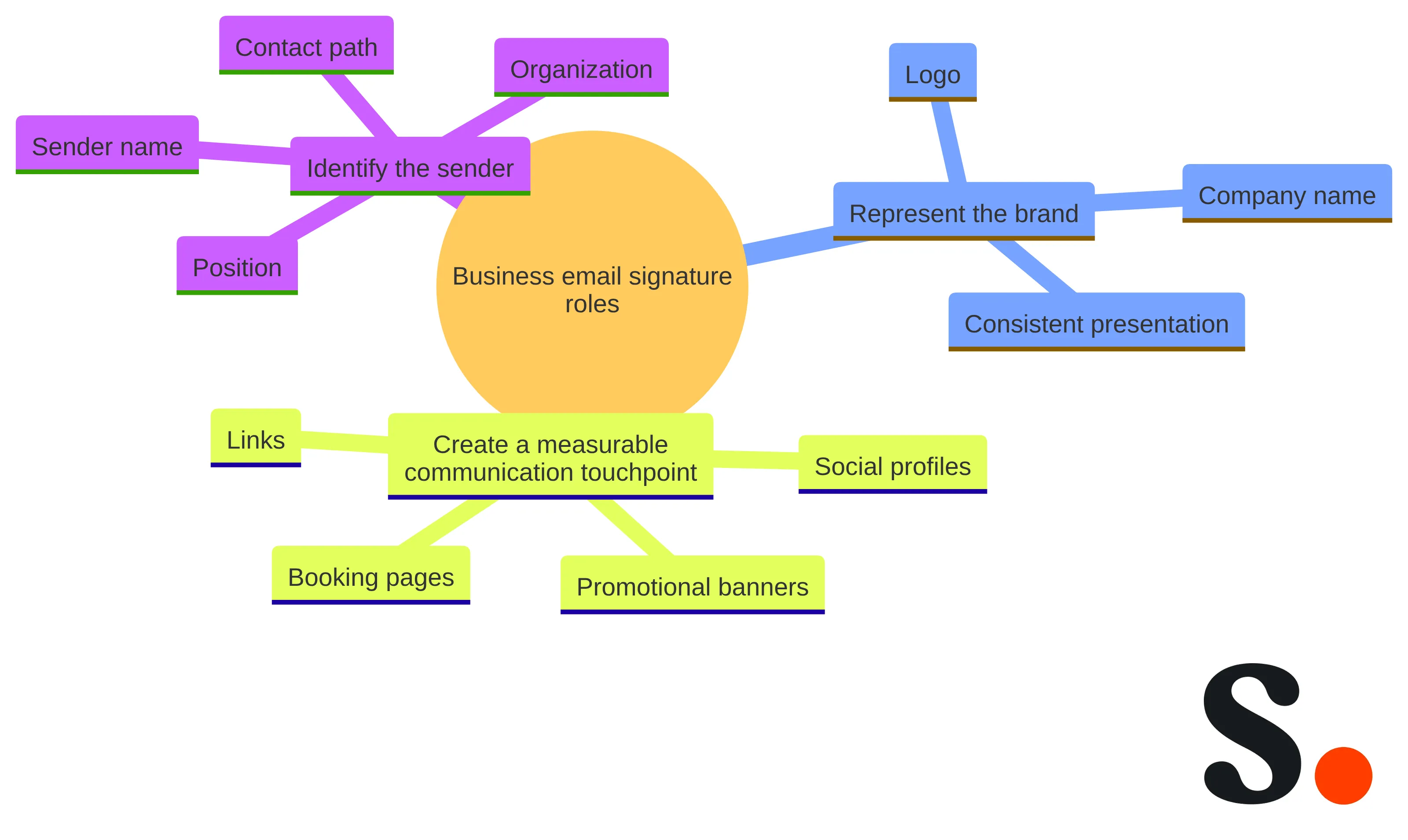
An email signature can be evaluated through three business roles: identifying the sender, representing the brand, and creating a measurable communication touchpoint. These roles give you a decision lens that is broader than asking whether a signature looks polished.
1. Identify the sender. The signature should make the sender’s name, position, organization, and contact path clear. This is the direct-information role. A recipient should be able to understand who sent the message and how to follow up without searching through another channel.
2. Represent the brand. The signature can carry visual and organizational cues such as a company name, logo, and consistent presentation. Well-designed signatures are described as supporting credibility and brand consistency across employee communications. The signature does not replace your broader brand system, but it repeats that system in ordinary business correspondence.
3. Create a measurable touchpoint. Links, booking pages, social profiles, and promotional banners can support marketing and lead-generation activities. This role requires a different standard from basic identification: you need a defined destination, an owner for the content, and a way to interpret engagement. A link added without a purpose is decoration. A link connected to a clear campaign question can become part of a communication workflow.
The three roles also help you separate requirements that are often mixed together. Identification asks whether the contact details are accurate and usable. Brand representation asks whether the presentation is consistent with approved company standards. Measurement asks whether a marketing element has an intended action and a way to connect activity with a business outcome.
A small organization may need only the first role. A growing team may need the first two. A team that uses signatures for campaigns needs to address all three, including ownership and measurement. You can make that distinction before comparing providers, because the right tool depends on the work the signature must support.
Start with the information recipients need
A professional email signature starts with the information recipients need to identify and contact you. A typical foundation includes your name, job title, company name, phone number, and branding such as a logo. Those fields answer basic questions without requiring a separate search.
Build the foundation around communication rather than decoration:
- Name: Use the name you use in business correspondence.
- Role: Add a job title that gives the recipient useful context.
- Organization: Show the company name clearly.
- Contact path: Include the phone number or other contact detail that supports the intended follow-up.
- Brand marker: Use the organization’s approved branding, such as a logo, where it serves the identity role.
The exact field set can vary by role and message context. The test is whether each field helps the recipient identify you or reach the right point of contact. If a detail does neither, it needs a clear reason to remain.
Contact information also creates an ownership requirement. A phone number, title, or company detail can become unhelpful when it is outdated, inconsistent, or difficult to update across the team. That makes field ownership part of the signature decision, even before you consider campaign banners or analytics.
Define the minimum field set your organization can maintain. Then decide who owns each change:
- The sender may own personal details such as name or title.
- A brand or communications owner may approve logos and visual treatment.
- An IT or operations owner may control how approved information reaches employee mailboxes.
This division is a planning recommendation, not a claim that every organization must use the same roles. Its purpose is to keep the basic signature useful. A short, accurate signature is more functional than a crowded block that contains every possible detail.
Add optional elements when they serve a clear purpose
Optional signature elements should earn their space by serving a defined communication purpose. Potential additions include pronouns, credentials, company information, awards, social links, marketing banners, a headshot, or name pronunciation. Links, booking pages, social profiles, and promotional banners can support marketing and lead-generation activities when they are relevant to the message and audience.
Group optional elements by the job they perform:
- Context: Pronouns, credentials, awards, or name pronunciation can provide information about the sender.
- Recognition: A headshot or approved social profile can add a personal or professional reference point.
- Organization: Additional company information can clarify the relationship between the sender and the organization.
- Action: A booking page, social link, or promotional banner can give the recipient a next step.
The list is a set of possibilities, not a template you must copy in full. More content can make the signature harder to scan, maintain, or govern.
Use a simple filter before adding an optional field:
- What question does this element answer?
- Who benefits from seeing it?
- Who owns the content when it changes?
- Does it support identification, brand representation, or a measurable action?
- Does it belong in every signature, or only in a role- or campaign-specific version?
A credential may help establish context for one role but add little value for another. A promotional banner may support a campaign during a defined period but become stale afterward. A social link may be useful when the destination is active and relevant, but not when it sends people to an unused profile. These are selection decisions you can make without treating every available field as mandatory.
Keep the core contact information separate from campaign content. That separation makes it easier to preserve the sender’s identity when a promotion changes.
Use the signature as a consistent brand touchpoint
An email signature is a repeated brand touchpoint because it appears alongside ordinary business messages. Well-designed email signatures are described as supporting credibility and brand consistency across employee communications. At organizational scale, consistency across employee signatures becomes a governance challenge, so the visual details and field rules need an owner.
Brand consistency includes more than placing a logo beside a name. Consider the complete presentation:
- Which company name and role labels are approved?
- Which logo treatment and visual elements are permitted?
- Which contact details must appear for each team or role?
- Which links are permanent, and which belong to a limited campaign?
- Who approves a change before it reaches employee communications?
These questions turn “make it on-brand” into a workable requirement. They also expose the difference between a design file and an operating process. A design can describe what the signature should look like. An operating process determines how the approved version reaches the right people and how changes are handled.
Email signature management software can centralize and standardize signatures across an organization without requiring manual intervention from each employee. Organizations also use centralized signature-management tools to maintain consistent design and deploy updates across teams. Those capabilities address the distribution problem, but they do not decide what your brand standards should be.
Set the standards first. Define the approved fields, visual rules, ownership, review path, and change frequency. Then evaluate whether your chosen operating approach can apply those standards reliably. If you cannot describe who approves a change or how you will retire an old campaign element, the gap is governance rather than design.
Recognize when individual ownership becomes impractical
Individual signature ownership becomes impractical when the organization must keep many senders aligned while responding to repeated changes. At organizational scale, consistency across employee signatures is identified as a primary challenge, and signatures require centralized control and governance. Organizations often use centralized tools to maintain consistent design, update signature content, and deploy changes across teams.
Look for operational signals rather than relying on team size alone:
- You receive recurring requests to change titles, contact details, or brand elements.
- Employees use different versions of the logo, layout, or required fields.
- A campaign needs to reach multiple teams without asking every employee to edit a file.
- You cannot easily tell which version is active across employee communications.
- A change depends on a manual sequence that is easy to miss.
- Marketing and IT spend time resolving the same signature issue more than once.
Each signal points to a control requirement. None, by itself, proves that a particular provider is suitable.
A managed approach is worth evaluating when centralized control reduces a recurring operational burden. Software can centralize and standardize signatures so employees use professional, on-brand signatures without manual intervention from each employee. The practical question is whether that operating model matches your organization’s requirements for ownership, deployment, updates, and exceptions.
Use the following boundary:
- If each sender can maintain an accurate signature and changes are infrequent, keep the process simple.
- If the organization needs coordinated content, repeated updates, or shared governance, document the control requirement and assess managed options.
- If Marketing needs campaign content while IT needs operational control, evaluate whether the two teams can work within a defined boundary rather than choosing a tool on visual output alone.
Choose the approach that addresses the recurring work you actually need to control.
Assess whether marketing activity needs its own operating model
Marketing activity changes the signature requirement because a link or banner can become a message with an intended action. Email signatures can include links, social profiles, booking pages, or promotional banners that support marketing and lead-generation activities. Marketing banners are also identified as potential signature elements that can link to promotional offers.
Before adding campaign content, define the operating model:
- Purpose: State what the recipient should do, such as visit a destination, book a conversation, or learn about an offer.
- Audience: Decide which teams, roles, regions, or message contexts should carry the element.
- Owner: Assign responsibility for approval, launch, revision, and retirement.
- Duration: Set the period during which the content is relevant.
- Measurement: Decide which interaction or downstream outcome will answer whether the campaign is working.
This structure keeps the signature from becoming an unplanned collection of links. It also gives IT a clear implementation requirement and gives Marketing a clear content boundary.
Marketing measurement needs a defined connection between an interaction and the outcome you care about. Scribe shows which signature clicks became customers through one tracking SDK. That is a specific stated capability, not a general result you should assume from every signature platform.
When assessing a provider, ask what the measurement model can actually connect. A click count may answer whether people interacted with a destination. A customer outcome requires a further connection to the organization’s customer record or reporting process. Set the required outcome before reviewing dashboards, and distinguish activity metrics from business outcomes.
A signature campaign also needs an end condition. Remove or replace content when the offer, destination, or audience changes. A marketing owner should be able to explain why the element is present, while the operational owner should be able to apply the approved change without turning every employee into a campaign administrator.
Make the measurement requirement reviewable before selecting a provider. Write down the signature element being assessed, the destination it points to, the audience expected to see it, the interaction that counts as activity, and the customer outcome that counts as success. Then name the owner for interpreting the result and the point at which the element will be reviewed or retired. This turns “measure performance” into a defined question rather than an invitation to collect every available number.
Keep three records separate: the content decision, the activity result, and the business-outcome result. The content decision explains why the link or banner is present. The activity result shows whether recipients used it. The business-outcome result addresses whether that activity contributed to the outcome Marketing selected. If one record is unavailable, mark the gap rather than treating a nearby metric as a substitute. This is especially important when a signature element is used across different teams or contexts, because a single aggregate result may not answer whether the content was appropriate for each intended audience.
Use the same measurement brief when comparing providers. Ask each option to show how the defined element would be identified, how the relevant interaction would be reported, and how the organization could connect that interaction to its selected outcome. If the answer covers only clicks, it may address activity but not the full outcome requirement. If the answer assumes a business outcome without showing the connection, record that as an unresolved requirement. The result is a fairer comparison and a clearer boundary between a platform’s stated capability and the organization’s own reporting process.
Check the requirements before considering a provider
Assess a provider against your operating requirements rather than a list of decorative features. Use the criteria below to distinguish required controls from optional capabilities.
Create a requirement checklist before comparing options:
- Identity fields: Can the required sender and contact information be represented clearly?
- Brand control: Can your approved visual and content rules be applied consistently?
- Deployment: Can the intended scope receive the approved signature without relying on every employee to perform the same manual task?
- Updates: Can you change content and retire old versions through a defined process?
- Ownership: Can Marketing manage its content responsibilities while IT retains the operational boundary it requires?
- Measurement: Can the provider support the interaction or outcome you need to assess?
- Integrations: Can it work with the systems and directories that contain the information or workflows your organization relies on?
- Exceptions: Can you handle legitimate role, team, or campaign differences without losing control of the common standard?
These criteria describe what to evaluate. They do not establish that any particular provider satisfies them.
Requirements should be read as a set rather than isolated features. A provider might represent a logo but not give your team a workable update path; it might support a link but not connect the resulting interaction to the outcome defined by Marketing. Deployment scope also matters: a process for a small group may not answer a requirement covering all team members, while a broad common signature may need controlled exceptions for roles or campaigns. Write the intended scope beside each requirement, along with the owner who will validate it. This makes a comparison more precise without assuming that a vendor’s feature label has the same meaning as your operating requirement. It also keeps the evaluation tied to the work the organization needs to perform, not to a generic list of platform features.
Rank requirements by consequence rather than by feature count on a product page. A missing required field may block adoption. A missing optional design choice may not matter. A reporting feature may be unnecessary if your organization only needs consistent contact information, while it may be central to a campaign-led operating model.
Record a pass condition for each requirement. For example, “brand control” might mean that an approved logo and field structure can be applied across the required scope. “Measurement” might mean that you can connect a signature interaction with the outcome your Marketing team has defined. “Integration” might mean that the provider can work with the data source or workflow your IT team has selected.
Use the same conditions for every option you assess.
Pass conditions should be observable in the organization’s own process. For identity fields, that may mean the required name, role, company, and contact path appear in the intended signature. For brand control, it may mean that the approved presentation remains consistent across the required scope. For measurement, it may mean that the defined interaction can be related to the outcome Marketing chose. For integration, it may mean that the provider works with the selected data source or workflow rather than merely listing a connection. These conditions turn a broad requirement into a question your team can answer during evaluation.
To make these conditions usable in a comparison, create an evidence record for each requirement rather than relying on a general impression. Record the requirement, the intended scope, the person responsible for validating it, the test or question used, the expected result, the observed result, and any unresolved dependency. This record keeps a broad statement such as “support updates” tied to a specific organizational need, such as changing an approved field or retiring campaign content for the intended scope.
A response can show that a provider describes a capability; a walkthrough can show how a user would carry out the process; a controlled test can show whether the process fits the intended scope and ownership. Treat these as different kinds of information. A template preview does not answer whether an approved update reaches the intended senders. A deployment result does not answer whether Marketing can manage a campaign change within the agreed boundary. A click report does not, by itself, answer whether the selected customer outcome can be connected. Mark each gap for follow-up instead of inferring support from a related feature.
Review the record at more than one point in the lifecycle. Check the initial state, a routine change, a campaign-specific change, the retirement of old content, and a legitimate exception. The point is not to create an elaborate test program; it is to see whether the requirement remains true when content, ownership, or scope changes. If a requirement passes only when one person performs an informal workaround, classify that as a process dependency. If it passes through a defined responsibility and produces the expected result at the intended scope, record the condition that made it pass.
Finally, separate unresolved questions from failed requirements. An unresolved question means the team does not yet have enough information to decide. A failed requirement means the tested approach did not meet the written pass condition. Keeping those statuses distinct prevents uncertainty from being mistaken for approval or a missing detail from being treated as a product defect. It also gives IT and Marketing a focused list of questions for the next evaluation conversation.
Test whether IT and Marketing can share the operating boundary
An IT-and-Marketing operating boundary should give each team a defined responsibility without creating two competing signature systems. Scribe allows Marketing and IT teams to create email signatures aligned with their company’s branding. Scribe also enables centralized installation of email signatures for all team members. Those stated capabilities provide a basis for discussing shared ownership, but your organization still needs to define the boundary it requires.
A workable boundary should answer four questions:
- Who defines the approved fields and visual rules?
- Who creates or approves campaign content?
- Who controls the path that installs or updates the signature?
- Who handles an exception when a team or role needs different content?
The answers can vary by organization. The decision guide is the separation itself: Marketing should not need to recreate an operational deployment process for every campaign, and IT should not need to become the author of every marketing message. Assign the responsibilities before evaluating how a provider supports them.
Test the boundary with a concrete change scenario. Ask how the teams would handle a routine field change, a new approved campaign element, and the retirement of an outdated link. For each scenario, record the approver, the person making the change, the scope of the update, and the way the result is checked.
A useful operating model keeps those steps visible. It also gives employees a clear escalation path when their information changes. If a proposed approach depends on informal messages, copied files, or repeated manual edits by every sender, identify that as an operational dependency before adoption. If the approach lets your teams divide content ownership and deployment responsibility, continue testing against the requirements from the previous section.
Map Scribe to the three-role evaluation lens
Scribe addresses the identity-and-brand role through company-aligned signature creation by Marketing and IT. As of October 29, 2026, we allow Marketing and IT teams to create email signatures aligned with their company’s branding. That statement describes the supported creation role; it does not define your brand rules or decide which fields your organization should require.
Use this part of the assessment to ask whether your own field structure and brand standards can be represented. Separate the content decision from the question of who administers it. Your organization still needs to decide which information belongs in the signature, which visual treatment is approved, and which variations are legitimate.
Scribe addresses the distribution role through centralized installation. As of October 29, 2026, we enable centralized installation of email signatures for all team members. That is relevant when your requirement includes coordinated installation rather than an employee-by-employee process.
Treat centralized installation as one requirement in the wider operating model. It does not, by itself, answer who owns campaign content, how changes are approved, or how exceptions are handled. Use your change scenarios to determine whether the stated installation capability fits the scope and responsibility split your organization needs.
Scribe addresses the measurable-touchpoint role through stated tracking of signature clicks that became customers. As of October 29, 2026, we show which signature clicks became customers through one tracking SDK. This gives you a specific capability to examine when customer outcomes, rather than clicks alone, are part of the marketing requirement.
Keep the measurement question precise. Decide which signature element should be tracked, which customer outcome matters, and who will use the result. The stated capability is not a promise that every organization will see a particular result, and it does not replace your own definition of a qualified outcome.
Match Scribe’s capabilities to your requirements
Scribe allows Marketing and IT teams to create email signatures aligned with their company’s branding, enables centralized installation for all team members, and shows which signature clicks became customers through one tracking SDK. Those areas map to the identity-and-brand, distribution, and measurable-touchpoint roles.
Use that scope to decide whether Scribe belongs in your evaluation. If your requirement is limited to aligned signature creation and coordinated installation, the first two areas are the relevant starting points. If Marketing also needs to connect signature engagement with customer outcomes, include the tracking capability in the requirement. If your organization needs a different function, define that function separately instead of assuming that a related capability answers it.
A disciplined assessment keeps three statements separate:
- What your organization needs: the fields, brand rules, ownership, deployment scope, update process, measurement model, and integrations required for your work.
- What Scribe offers in this guide: company-aligned signature creation by Marketing and IT, centralized installation for team members, and the stated tracking capability.
- What your decision must resolve: whether those areas match your operating requirements and whether the remaining requirements have a clear owner.
That separation prevents a broad product impression from becoming an unsupported conclusion. It also makes the next conversation more useful because you can discuss a defined requirement instead of asking whether a signature platform is generally “good.”
Choose the level of control that matches the requirement
Your organization should choose the level of signature control that matches the work the signature must perform. A simple process can fit when the sender information is stable, changes are infrequent, and no coordinated marketing activity is required. A managed approach deserves consideration when consistent design, coordinated updates, shared ownership, or measurable campaign activity creates recurring operational work.
Use this decision path:
- Choose a simple process when each sender can maintain accurate core information and the organization has limited governance needs.
- Define a managed requirement when repeated changes, inconsistent branding, or coordinated distribution creates work that individual senders should not have to repeat.
- Add a marketing requirement when the signature carries links, booking pages, social profiles, or promotional banners and your team needs ownership, timing, and measurement.
- Evaluate providers against written conditions for identity, brand control, deployment, updates, ownership, measurement, integrations, and exceptions.
- Assess Scribe as one possible option against those conditions using its stated support for aligned signature creation by Marketing and IT, centralized installation, and tracking that shows which signature clicks became customers.
A qualified professional should decide any individual legal, compliance, security, or IT-architecture suitability question for your organization. Your next step is to write the required fields, ownership boundary, update scenarios, and measurement outcome before comparing tools.
Get started with Scribe
Manage signatures across your whole team
Free 14-day trial — no credit card.