Create an Animated Email Signature: Step-by-Step Guide for Marketers
As digital communication becomes increasingly crowded, marketers face the pressing challenge of distinguishing their messages. Animated email signatures offer
Sophie Grant
Email Signature Specialist, Scribe

On this page
- Introduction
- Understand Animated Email Signatures and Their Benefits
- Follow Step-by-Step Instructions to Create Your Animated Email Signature
- Navigate Challenges and Best Practices for Animated Email Signatures
- Integrate Your Animated Email Signature into Marketing Campaigns
- Conclusion
- Frequently Asked Questions
- List of Sources
Introduction
As digital communication becomes increasingly crowded, marketers face the pressing challenge of distinguishing their messages. Animated email signatures offer a dynamic solution, transforming mundane sign-offs into engaging visual experiences that capture attention and enhance brand identity. The challenge is to balance creativity with professionalism, ensuring that animations enhance rather than distract from the message.
This guide will walk you through the essential steps for creating animated email signatures, exploring their benefits, best practices, and integration strategies to elevate marketing efforts and drive engagement.
Understand Animated Email Signatures and Their Benefits
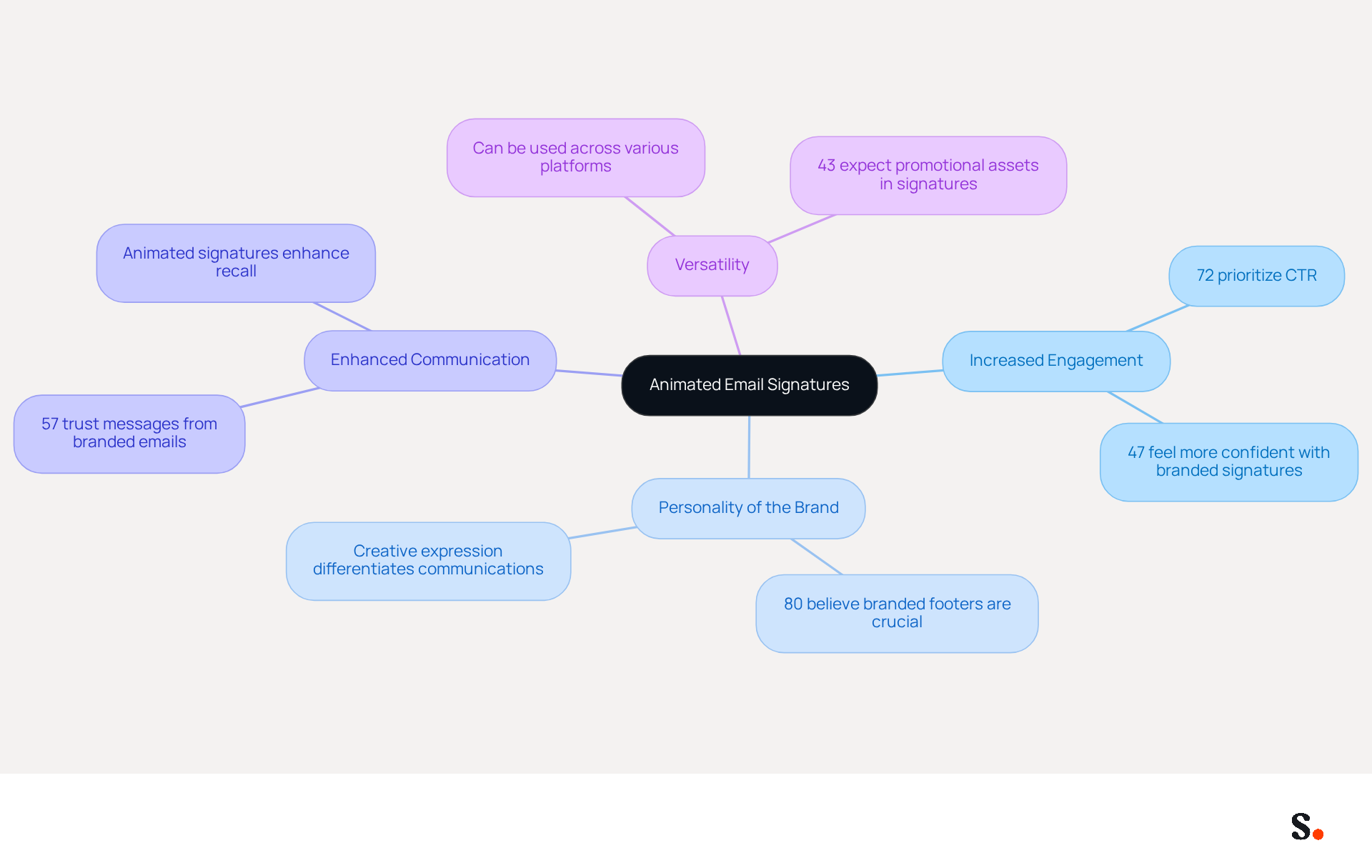
Incorporating animated visual elements into communications can significantly elevate engagement and brand identity. Unlike static designs, animated visuals capture attention and effectively convey your identity's personality. Here are some key benefits:
- Increased Engagement: Animated signatures can lead to higher click-through rates (CTR), with studies indicating that 72% of marketers prioritize CTR as a key metric for measuring email effectiveness. The visual appeal of animations draws the recipient's eye, making them more likely to interact with your content.
- Personality of the Brand: These identifiers enable you to display your creativity and distinctiveness, assisting in distinguishing your communications from the competition. In fact, 80% of respondents believe that a branded message footer is crucial for a company's brand identity, reinforcing the significance of visual branding in communications.
- Enhanced Communication: An animated email signature allows you to incorporate animations that convey messages or calls to action in a more engaging manner, which enhances the likelihood of recipients recalling your messages. Research indicates that 57% of consumers have confidence in messages from businesses that utilize branded identifiers, emphasizing the importance of professional presentation in establishing trust.
- Versatility: Animated graphics can be utilized across various messaging platforms, making them a flexible tool for marketers. They can be created to align with overall branding strategies and can include components like promotional assets and social media links, which 43% of consumers anticipate seeing in digital correspondence.
Furthermore, every modification made in your Aircall setup will automatically be reflected in your Scribe identifiers, ensuring seamless synchronization and improved consistency. Integrating an animated email signature into your communication strategy can greatly enhance your marketing initiatives, making it a valuable investment for any enterprise. Investing in dynamic footers not only enhances interaction but also solidifies your brand's presence in a competitive market.
Follow Step-by-Step Instructions to Create Your Animated Email Signature
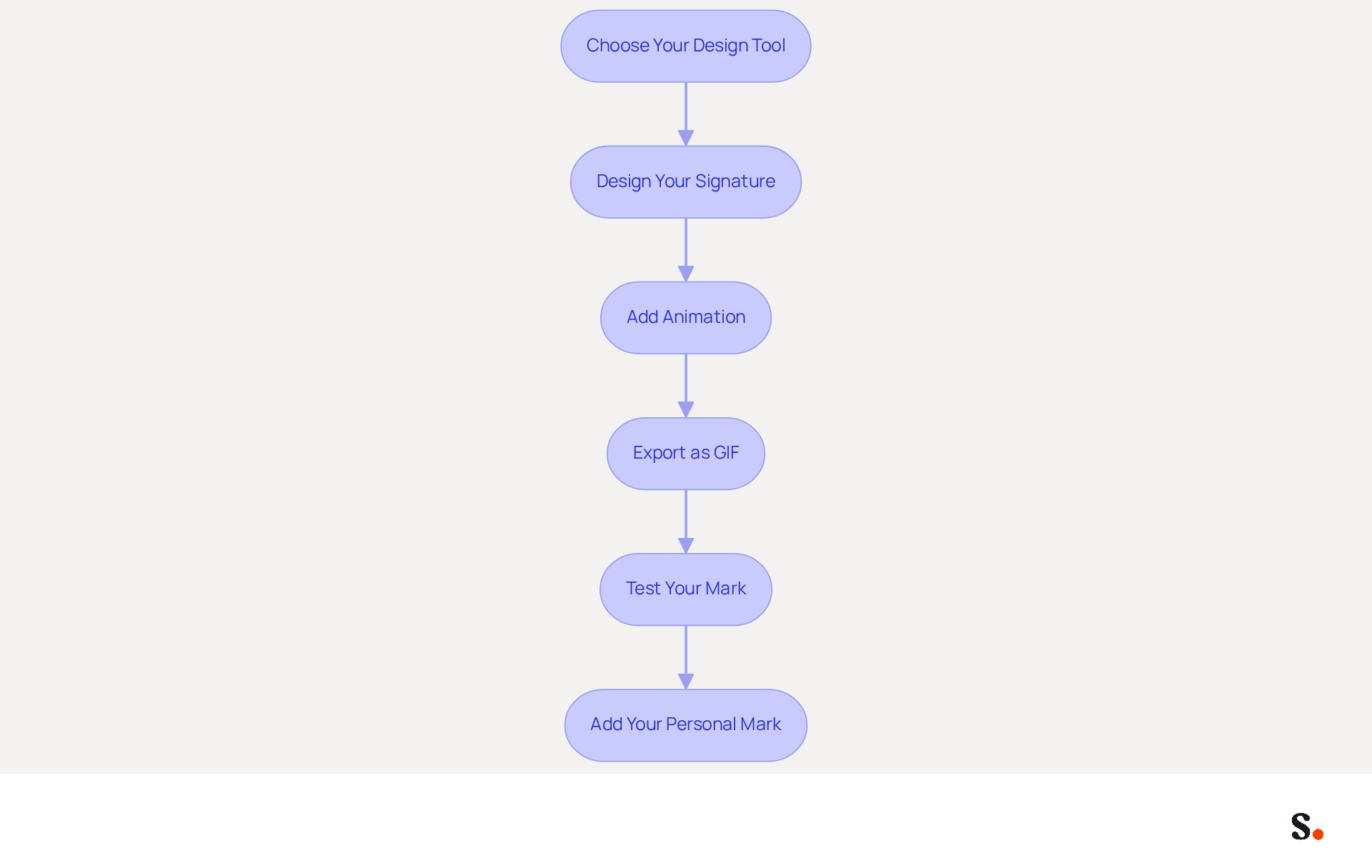
Creating an animated email signature involves a series of methodical steps that ensure both functionality and professionalism:
- Choose Your Design Tool: Select a design tool that supports animation, such as Canva, Adobe Photoshop, or GIMP. For beginners, Canva is user-friendly and offers templates. You can also explore tools like EZGIF, Giphy, and InVideo for creating GIFs.
- Design Your Signature: Start by designing your signature layout. Include essential elements like your name, title, contact information, and social media links. Ensure brand consistency in colors and fonts to maintain a professional appearance.
- Add Animation: Incorporate moving elements. You can use GIFs or create simple animations within your design tool. Animations should be subtle, enhancing the design without overwhelming it; excessive animation can distract recipients. Using GIFs can lead to compatibility issues in professional settings, which may hinder effective communication.
- Export as GIF: Once your design is complete, export it as a GIF file. This format is extensively compatible with various messaging clients, making it a practical option for dynamic identifiers.
- Test Your Mark: Before finalizing, send test messages to yourself and check how the mark appears in different mail clients (Gmail, Outlook, etc.). Adjust as necessary to ensure compatibility, particularly since Outlook versions 2007 to 2016 do not support moving GIFs and will only display the first frame.
- Add Your Personal Mark: Finally, upload your moving personal mark to your client settings. For Gmail, go to Settings > Signature and paste your GIF. For Outlook, follow similar steps in the settings for your email.
When used appropriately, an animated email signature can significantly improve engagement with recipients. Finding the right balance in animation can elevate your email signature from ordinary to impactful, enhancing your professional image.
Navigate Challenges and Best Practices for Animated Email Signatures
While animated email signatures can boost engagement, they also present challenges that marketers must navigate:
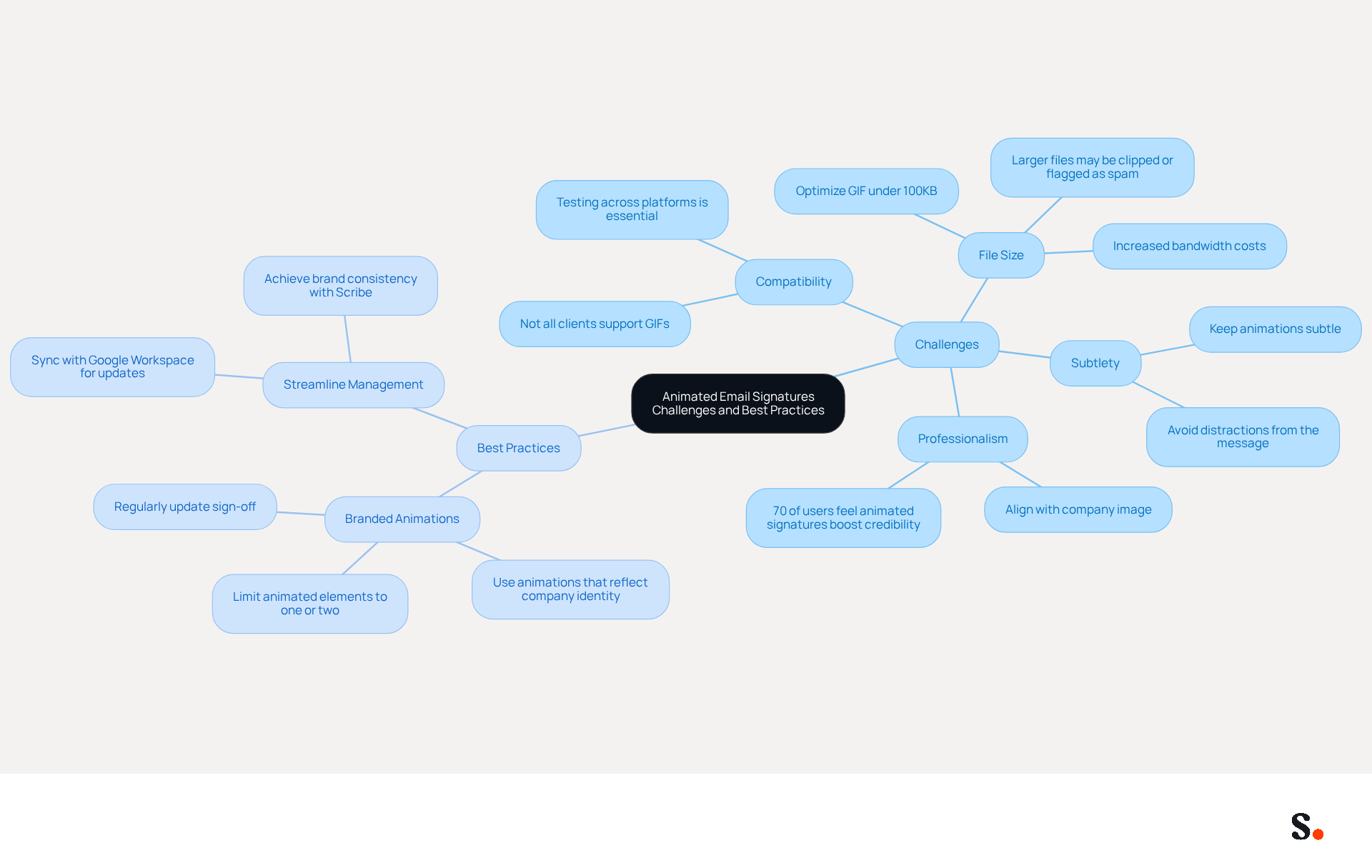
- File Size: Optimizing your GIF is crucial. Large files can be clipped by messaging clients or flagged as spam, so aim for a file size under 100KB to ensure smooth delivery. Sending larger GIFs can also increase bandwidth costs, potentially straining your marketing budget.
- Compatibility: Not all messaging clients support animated GIFs, particularly older versions. Testing your mark across various platforms is essential to confirm it displays correctly for all recipients.
- Subtlety: Keep animations subtle to avoid distracting from your message. A balanced approach enhances your message content without overwhelming the recipient.
- Professionalism: Your animated emblem should align with your image. Avoid animations that may appear unprofessional or out of place, especially in formal industries. Research shows that 70% of users feel that an animated email signature boosts their credibility, emphasizing the necessity of maintaining a refined appearance.
Best Practices:
- Use branded animations that reflect your company’s identity, reinforcing brand recognition. Research shows that almost 55% of employees are more inclined to open an email with a well-crafted closing, emphasizing the significance of professionalism. Limit the number of animated elements to one or two to maintain focus and clarity in your branding. Regularly update your sign-off to keep it fresh and relevant, ensuring it continues to engage your audience effectively.
- Streamline Management: By syncing your Google Workspace with Scribe, you can save time and ensure that any changes to your teammates' information are automatically reflected in their communication details. This integration allows for seamless updates, reducing manual input and enhancing consistency across your organization. With Scribe, organizations can achieve 100% brand consistency and measurable marketing ROI from their digital branding.
By adhering to these guidelines, you can ensure your digital representation captivates your audience while maintaining professionalism. Scribe's users have reported an average click-through rate of 12% on banner displays, illustrating the potential effect of dynamic visuals when implemented thoughtfully.
Integrate Your Animated Email Signature into Marketing Campaigns
Integrating animated email signatures can be a game-changer to enhance your marketing campaigns. Consider the following strategies for maximizing their effectiveness:
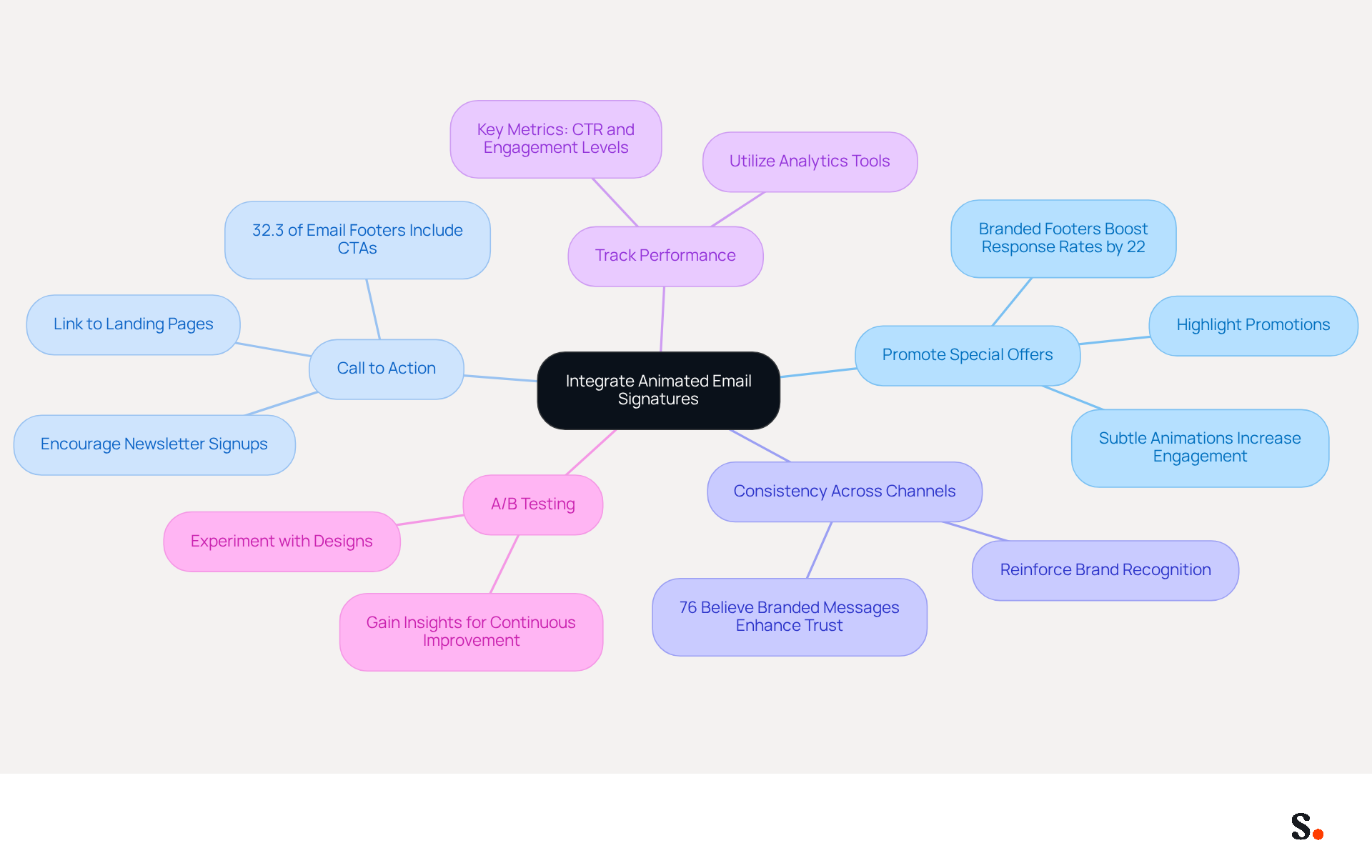
- Promote Special Offers: Use your animated signature to highlight special promotions or events. Subtle animations can draw attention to limited-time offers, making them more enticing to recipients. Branded email footers can increase response rates by 22%, making them a valuable asset for marketers.
- Call to Action: Incorporate a clear call to action (CTA) within your email footer. This could link to a landing page, a newsletter signup, or a social media follow button, encouraging recipients to engage further with your brand. Notably, calls to action are included in 32.3% of email footers, providing a benchmark for effectiveness.
- Consistency Across Channels: Ensure that your branding and messaging across all marketing channels include an animated email signature that aligns with your overall brand. Consistency reinforces brand recognition and builds trust with your audience. In fact, 76% of respondents believe that branded messages enhance their trust in the sender.
- Track Performance: Many marketers struggle to gauge the impact of their email signatures. Utilize analytics tools to assess the effectiveness of your messaging. Key metrics such as click-through rates and engagement levels will help guide necessary adjustments. Many marketers leverage digital identifiers to enhance their strategies.
- A/B Testing: Experiment with various moving designs to determine which options resonate best with your audience. A/B testing can yield valuable insights into what works and what doesn’t, allowing for continuous improvement.
By leveraging these strategies, you can transform your email communications into a more effective marketing tool. This can result in improved engagement and marketing outcomes.
Conclusion
Incorporating animated email signatures into marketing strategies addresses the challenge of capturing audience attention in a crowded digital space. Dynamic visuals in animated email signatures allow marketers to effectively capture attention and express their brand's personality, surpassing the impact of static designs. This strategy enhances click-through rates and strengthens brand recognition, making it a valuable asset in a competitive landscape.
The article outlines a comprehensive step-by-step guide for creating animated email signatures, emphasizing the importance of choosing the right design tools, maintaining professionalism, and ensuring compatibility across various email clients. Key challenges such as file size and subtlety in animation are addressed, alongside best practices that promote brand consistency and effective communication. Additionally, integrating animated signatures into marketing campaigns can drive engagement through special offers and clear calls to action, ultimately leading to improved marketing outcomes.
Marketers looking to elevate their email communications can leverage animated email signatures to stand out and engage their audiences more effectively. By utilizing the insights and strategies discussed, organizations can enhance their digital branding efforts, ensuring that every email sent not only represents their identity but also contributes to measurable marketing success.
Frequently Asked Questions
What are animated email signatures?
Animated email signatures are email footers that incorporate animated visual elements to enhance engagement and convey a brand's personality.
What are the benefits of using animated email signatures?
The benefits include increased engagement, enhanced brand personality, improved communication, and versatility across various messaging platforms.
How do animated email signatures increase engagement?
Animated signatures can lead to higher click-through rates (CTR), as they capture the recipient's attention and encourage interaction with the content.
Why is brand personality important in email signatures?
Animated signatures allow brands to showcase their creativity and distinctiveness, helping to differentiate their communications from competitors. A branded message footer is considered crucial for brand identity by 80% of respondents.
How do animated email signatures enhance communication?
They allow for the incorporation of animations that convey messages or calls to action in a more engaging way, which can improve message recall among recipients.
What percentage of consumers trust messages from businesses with branded identifiers?
Research indicates that 57% of consumers have confidence in messages from businesses that utilize branded identifiers.
Can animated email signatures be used across different platforms?
Yes, animated graphics can be utilized across various messaging platforms, making them a flexible tool for marketers.
How do animated email signatures align with branding strategies?
They can be created to align with overall branding strategies and can include promotional assets and social media links, which 43% of consumers expect to see in digital correspondence.
How does Scribe ensure consistency in animated email signatures?
Every modification made in your Aircall setup will automatically be reflected in your Scribe identifiers, ensuring seamless synchronization and improved consistency.
Why should businesses invest in animated email signatures?
Integrating an animated email signature into a communication strategy can enhance marketing initiatives, increase interaction, and solidify a brand's presence in a competitive market.
List of Sources
- Understand Animated Email Signatures and Their Benefits
- Research Recap: Branded Email Signatures Increase Company Recognition, Trust - Demand Gen Report (https://demandgenreport.com/industry-news/research-recap-branded-email-signatures-increase-company-recognition-trust/47252)
- Elevate Your Emails with Custom Animated Signatures | The Business Toolkit® (https://thebusinesstoolkit.com/aices?srsltid=AfmBOoqM3es2j1a6-wL2CYEvGbtSk3Pe0dV1UBXvZl7QKPe8450RVojY)
- Benefits of animated email signatures in marketing — salamandra.uk (https://salamandra.uk/news/success-with-animated-email-signatures)
- "Adding animation to an email increased its negative word count by 40%" | Jaina Mistry (https://linkedin.com/posts/jainamistry_adding-animation-to-an-email-increased-its-activity-7383617657352355841-Eysk)
- Animated email signature: how to implement it? (https://letsignit.com/blog/animated-email-signature)
- Follow Step-by-Step Instructions to Create Your Animated Email Signature
- Animated GIF's and Email Signatures - Everything You Need to Know - Gimmio (https://blog.gimm.io/animated-gifs-and-email-signatures-everything-you-need-to-know)
- How To Create An Animated Email Signature (https://mailsoftly.com/blog/how-to-create-an-animated-email-signature)
- Utilizing dynamic email sign-offs (https://mailslurp.com/blog/animated-email-signature)
- Animated email signatures – bring your signatures back to life (https://mail-signatures.com/articles/animated-email-signatures)
- How to Create Animated Email Signatures (https://makeuseof.com/how-to-create-animated-email-signatures)
- Navigate Challenges and Best Practices for Animated Email Signatures
- Email signature statistics and trends in 2024 (https://wisestamp.com/blog/email-signature-statistics)
- Benefits of animated email signatures in marketing — salamandra.uk (https://salamandra.uk/news/success-with-animated-email-signatures)
- Utilizing dynamic email sign-offs (https://mailslurp.com/blog/animated-email-signature)
- Animated GIF's and Email Signatures - Everything You Need to Know - Gimmio (https://blog.gimm.io/animated-gifs-and-email-signatures-everything-you-need-to-know)
- Animated Email Signatures: Should You Do It? | Crossware365 (https://crossware365.com/blog/animated-email-signatures-should-you-do-it)
- Integrate Your Animated Email Signature into Marketing Campaigns
- 40+ Email Signature Statistics for 2026 (Data + Insights) (https://wavecnct.com/blogs/email-signature-statistics)
- Email signature statistics and trends in 2024 (https://wisestamp.com/blog/email-signature-statistics)
- Email signature statistics: Why every business should optimize their email signatures — Stripo.email (https://stripo.email/blog/email-signature-statistics-why-every-business-should-optimize-their-email-signatures)
- How to create an eye-catching GIF email signature — Stripo.email (https://stripo.email/blog/how-to-create-an-eye-catching-gif-email-signature)
- Benefits of animated email signatures in marketing — salamandra.uk (https://salamandra.uk/news/success-with-animated-email-signatures)
Get started with Scribe
See why teams switch to Scribe
Free 14-day trial — no credit card.