How to End an Email Professionally: 4 Essential Steps
In a world where digital communication is paramount, mastering the art of a professional email closing is essential for fostering strong relationships. A
Sophie Grant
Email Signature Specialist, Scribe
Introduction
In a world where digital communication is paramount, mastering the art of a professional email closing is essential for fostering strong relationships. A well-crafted email closing not only reflects professionalism but also encourages responses and reinforces brand consistency, especially for organizations like Scribe that prioritize effective communication. Navigating the myriad of email sign-off options can be overwhelming, leading to uncertainty in professional communication. Ultimately, the ability to craft a thoughtful email sign-off can significantly influence the success of your professional interactions.
Understand the Importance of a Professional Email Ending
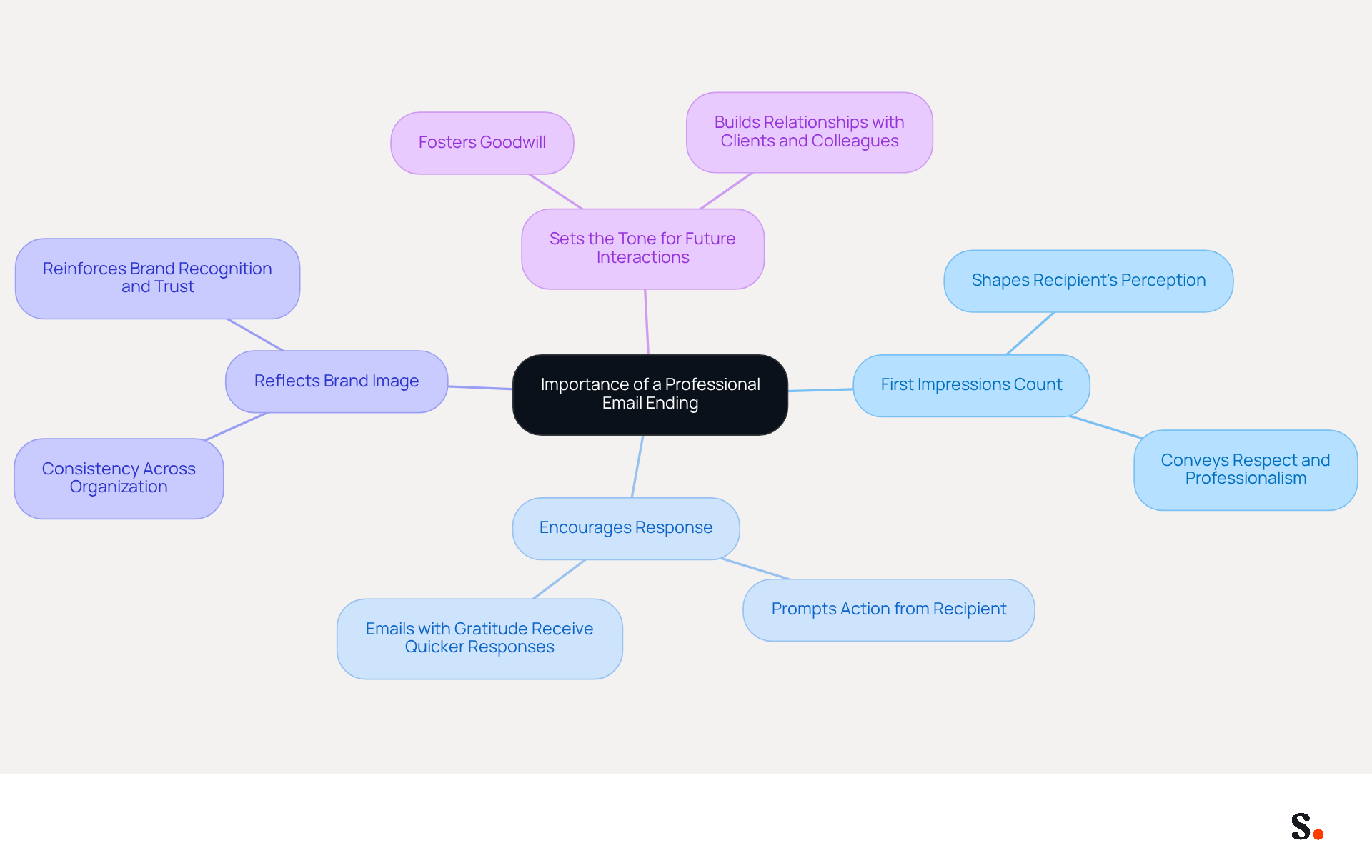
Understanding how to end an email professionally is essential for effective communication. Here are key reasons why a professional email ending matters:
- First Impressions Count: The conclusion of your email shapes the recipient's perception of you and your organization. Knowing how to end an email professionally conveys respect and professionalism, setting a positive tone for future interactions.
- Encourages Response: A well-crafted ending prompts the recipient to take action, whether it’s replying to your message, scheduling a meeting, or following up on a request. Studies indicate that emails that show how to end an email professionally receive quicker responses, enhancing overall communication efficiency.
- Reflects Brand Image: Consistency in communication endings across your organization is crucial for maintaining a cohesive brand image. For businesses like Scribe, which prioritize professionalism and marketing effectiveness, uniformity in email sign-offs reinforces brand recognition and trust among recipients. By syncing your Google Workspace with Scribe, you can automatically update your teammates' signature information, ensuring that any changes-such as job positions or group assignments-are reflected in real-time, saving time and maintaining brand consistency.
- Sets the Tone for Future Interactions: A positive closing fosters goodwill and lays the groundwork for future exchanges, making it easier to build relationships with clients and colleagues. In 2026, the dynamics of workplace interaction continue to change, highlighting the significance of considerate message conclusions in building rapport and credibility.
Recognizing how to end an email professionally is crucial and can be your first step toward mastering effective correspondence. This practice not only enhances your communication but also builds stronger professional relationships.
Choose the Right Sign-Off for Your Email
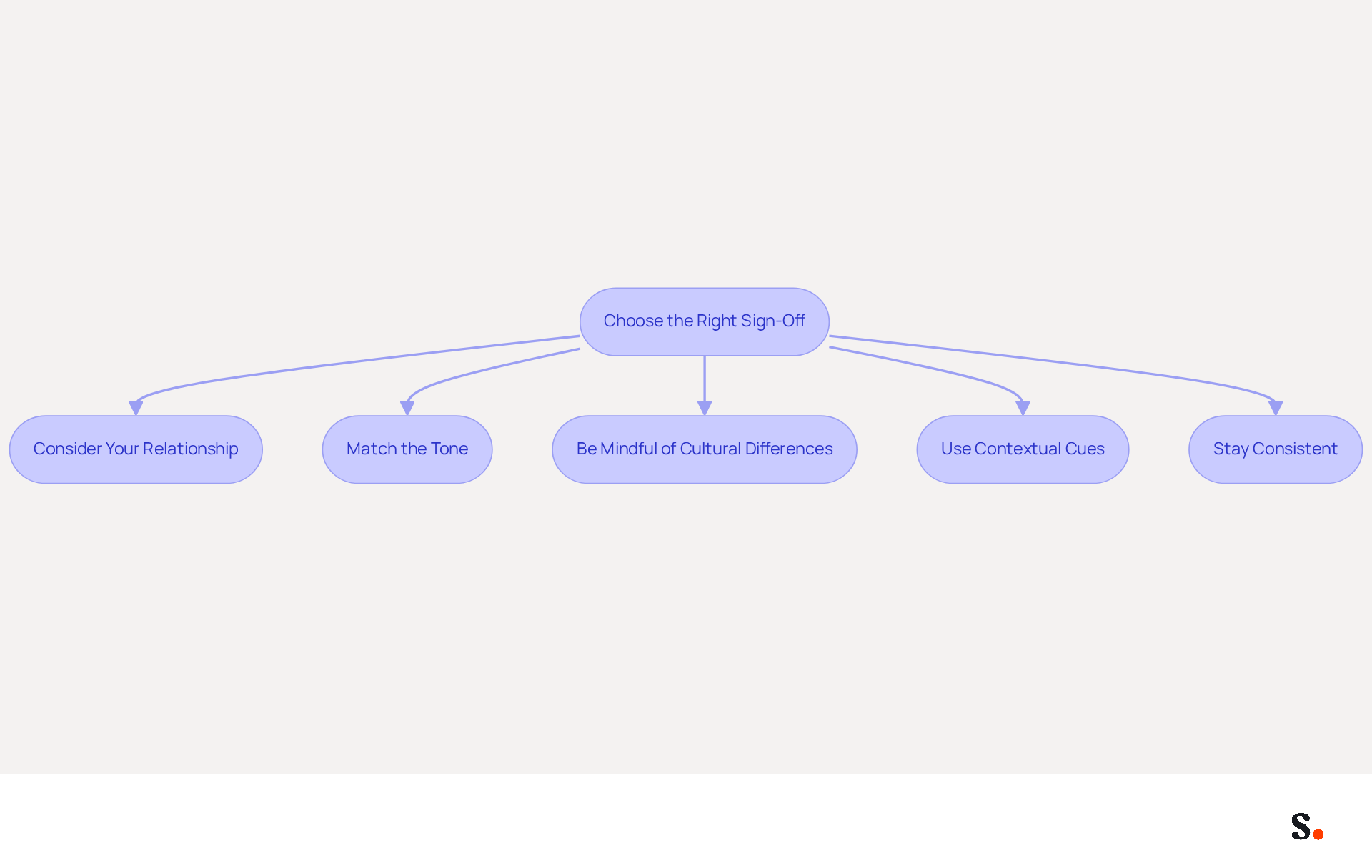
Choosing the right sign-off is essential when considering how to end an email professionally, as it can significantly impact the effectiveness of your correspondence. Here are steps to help you choose the right sign-off:
- Consider Your Relationship with the Recipient: If you have a formal relationship, opt for traditional sign-offs like "Sincerely" or "Best regards." For more casual interactions, you might use "Thanks" or "Cheers."
- Match the Tone of Your Message: Ensure your sign-off aligns with the overall tone of your correspondence. For example, if your message is formal, maintain that tone with a corresponding sign-off.
- Be Mindful of Cultural Differences: Different cultures may have varying expectations regarding correspondence etiquette. Research appropriate sign-offs if you are communicating with international contacts.
- Use Contextual Cues: If your message includes a request or expresses gratitude, consider sign-offs like "Thank you" or "Looking forward to your response."
- Stay Consistent: Consistency in your sign-offs across messages helps reinforce your professional image. Choose a few go-to sign-offs and stick with them.
Ultimately, understanding how to end an email professionally can be the difference between a message that resonates and one that falls flat.
Create a Consistent and Professional Email Signature
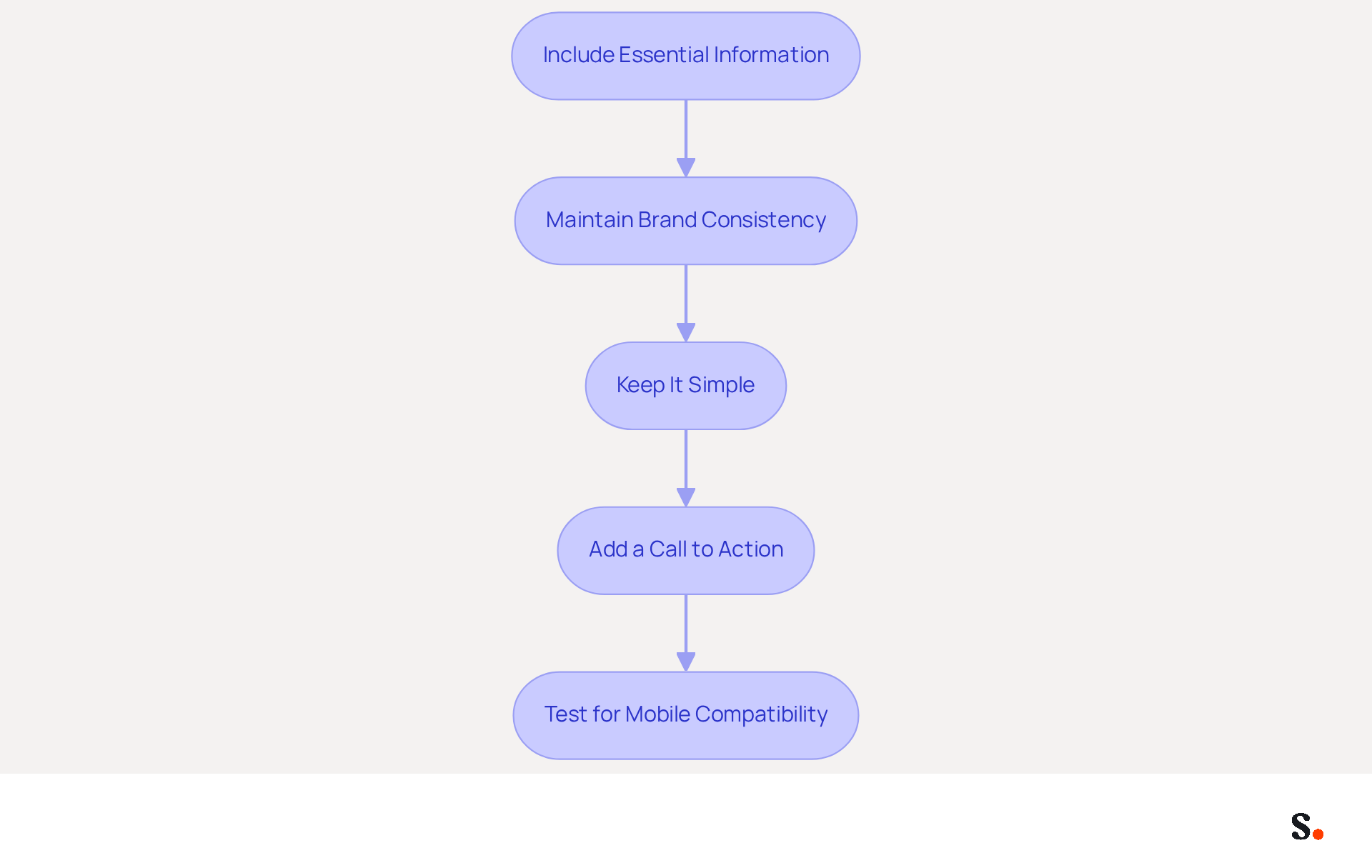
Creating a professional email signature is essential for effective communication and brand representation. To create a consistent and professional email signature, follow these steps:
- Include Essential Information: Ensure your identification includes your full name, job title, company name, and contact details, such as your phone number and email address. This foundational information is crucial for establishing credibility.
- Maintain Brand Consistency: Incorporate your company’s branding elements, including logos, colors, and fonts, to align your identity with your brand image. It's noteworthy that a significant 78% of marketers agree that consistent branding fosters trust in communications.
- Keep It Simple: Many professionals struggle with cluttered email signatures that dilute their message, making a clean and straightforward design essential. Avoid excessive information or graphics, as simplicity enhances professionalism. Studies indicate that well-crafted designs can enhance the average professionalism score from 6.2 to 8.5 out of 10.
- Add a Call to Action: In fact, research indicates that nearly one-third of digital correspondences effectively leverage calls to action, transforming your message into a powerful marketing tool. This drives engagement and promotes key initiatives.
- Test for Mobile Compatibility: With 42% of messages accessed on mobile devices, it’s essential to ensure your identifier displays well on both desktop and mobile platforms. A mark that appears appealing on all devices improves user experience and upholds professionalism.
By implementing these steps, you can create a formal signature that not only enhances your communication but also reinforces your brand image. Ultimately, a well-crafted email signature can be a decisive factor in how your brand is perceived in the digital landscape.
Avoid Common Mistakes in Email Closings
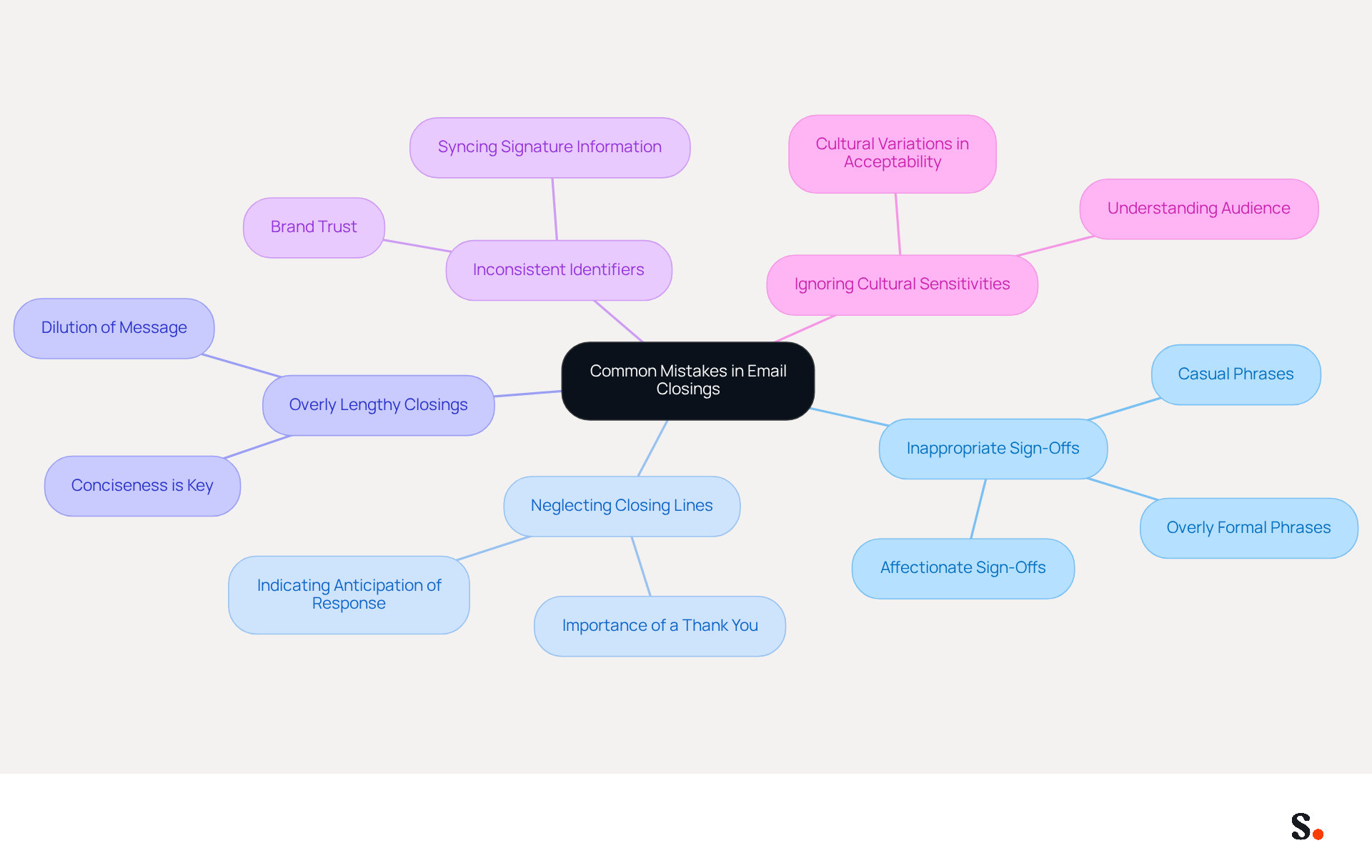
To enhance the professionalism of your email communications, it is essential to recognize and avoid common pitfalls:
- Using Inappropriate Sign-Offs: Avoid overly casual or personal sign-offs in professional correspondence. Phrases like 'Cheers' or 'Love' may not be suitable for formal communications, as they can come across as unprofessional or overly familiar. As Sean Butcher, Founder of Reflect Consultancy, observes, 'if there’s any doubt about your sign-off’s appropriateness, it’s always best to trust your instincts and play it safe.'
- Neglecting to include a closing line is a mistake; it's important to know how to end an email professionally before your sign-off. A simple thank you or a statement indicating you look forward to their response can enhance the tone of your message and show respect for the recipient's time. In fact, a study by Boomerang found that gratitude sign-offs like 'Thanks in advance' received a 65.7% response rate, highlighting their effectiveness.
- Overly Lengthy Closings: Keep your closing concise. Lengthy sign-offs can dilute your message and may be perceived as unprofessional. A concise closing helps keep the reader engaged and focused on your message.
- Inconsistent Identifiers: Ensure that your email identifier is consistent across all communications. Inconsistencies in email identifiers can lead to confusion, undermining your professional image. This consistency is vital for fostering brand trust and professionalism. Syncing your Google Workspace with Scribe ensures that your teammates' signature information is consistently updated, reinforcing your professional image. Scribe's compliance with security standards like SOC 2 Type II, GDPR, and CCPA further enhances your credibility and trustworthiness.
- Ignoring Cultural Sensitivities: Different cultures have varying standards for correspondence; what’s acceptable in one may not be in another, so understanding your audience is crucial.
By addressing these pitfalls, you can significantly improve how your messages are perceived and understand how to end an email professionally to strengthen your professional relationships.
Conclusion
Mastering professional email conclusions is often overlooked, yet it plays a crucial role in effective communication. A well-crafted email ending leaves a positive impression and encourages responses. It also reflects a cohesive brand image. By understanding the nuances of professional sign-offs and the importance of a consistent email signature, many professionals struggle with the subtleties of effective email communication, making it challenging to foster stronger relationships and establish credibility.
Key insights discussed include:
- The importance of selecting the right sign-off based on the relationship with the recipient.
- The tone of the message.
- Cultural considerations.
- Creating a professional email signature that includes essential information and aligns with brand identity.
- Avoiding common mistakes, such as using inappropriate sign-offs or neglecting to include a closing line.
As digital communication becomes increasingly prevalent, the significance of professional email endings is critical. Organizations seeking to improve their communication strategies should prioritize these practices to ensure brand consistency and foster trust. Focusing on these practices can lead to improved communication outcomes and enhanced brand perception. By leveraging tools like Scribe, which enables marketing teams to manage email signatures independently while ensuring compliance with security standards, businesses can enhance their professional image and drive measurable marketing ROI. Ultimately, these refinements can reshape organizational perceptions in the digital landscape.
Frequently Asked Questions
Why is it important to end an email professionally?
Ending an email professionally is essential because it shapes the recipient's perception of you and your organization, conveys respect and professionalism, encourages responses, reflects brand image, and sets a positive tone for future interactions.
How does a professional email ending influence first impressions?
A professional email ending shapes the recipient's perception and creates a positive impression, which is crucial for future interactions.
In what way does a well-crafted email ending encourage responses?
A well-crafted ending prompts the recipient to take action, such as replying, scheduling a meeting, or following up on a request, leading to quicker responses and enhanced communication efficiency.
How does a professional email ending reflect a brand's image?
Consistency in email endings across an organization helps maintain a cohesive brand image. For businesses like Scribe, uniformity in email sign-offs reinforces brand recognition and trust among recipients.
What role does Scribe play in maintaining email signature consistency?
By syncing Google Workspace with Scribe, organizations can automatically update teammates' signature information in real-time, ensuring that any changes are reflected and maintaining brand consistency.
How does a positive email closing affect future interactions?
A positive closing fosters goodwill and lays the groundwork for future exchanges, making it easier to build relationships with clients and colleagues.
What is the overall significance of mastering professional email endings?
Mastering how to end an email professionally enhances communication and builds stronger professional relationships, which is increasingly important in evolving workplace dynamics.
List of Sources
- Understand the Importance of a Professional Email Ending
- How to End a Professional Email (2026) (https://getinboxzero.com/blog/post/how-to-end-a-professional-email)
- Email Sign Offs Professional: Best Practices for Business Emails (https://mailwarm.com/blog/professional-email-sign-offs-best-practices)
- How to End an Email: 43 Ways to Sign Off on an Email (2026) (https://respona.com/blog/how-to-end-an-email)
- How to End an Email Professionally (With Examples) (https://iconnect.isenberg.umass.edu/blog/2024/07/10/how-to-end-an-email-professionally-with-examples)
- Mastering Professional Email Sign-Offs in 2026 (https://linkedin.com/pulse/mastering-professional-email-sign-offs-2026-bulksignature-qsr4e)
- Choose the Right Sign-Off for Your Email
- 12 Email Sign-Offs That Get Responses [2026 Data] (https://lagrowthmachine.com/email-sign-offs-get-responses)
- Best Email Sign-Offs in 2026: Data-Backed Picks (https://prospeo.io/s/best-email-sign-offs)
- Forget “Best” or “Sincerely,” This Email Closing Gets the Most Replies – The Boomerang Blog (https://blog.boomerangapp.com/2017/01/how-to-end-an-email-email-sign-offs)
- Best and Worst Ways to Sign an Email: Professional Communication Tips from UMD-Smith Experts (https://prnewswire.com/news-releases/best-and-worst-ways-to-sign-an-email-professional-communication-tips-from-umd-smith-experts-300674226.html)
- The beautiful ways different cultures sign emails (https://bbc.com/worklife/article/20190508-why-the-way-you-close-your-emails-is-causing-confusion)
- Create a Consistent and Professional Email Signature
- The impact of email signatures on your branding (https://signitic.com/en/resources/the-impact-of-email-signatures-on-your-branding)
- Email Signature Statistics: A Closer Look at Email Signatures in 2026 (https://mysignature.io/blog/email-signature-statistics)
- Exclaimer Research: 67% of Marketers Expect Email Signatures to Support With Lead Gen In 2023 (https://businesswire.com/news/home/20230612141095/en/Exclaimer-Research-67-of-Marketers-Expect-Email-Signatures-to-Support-With-Lead-Gen-In-2023)
- 40+ Email Signature Statistics for 2026 (Data + Insights) (https://wavecnct.com/ar/blogs/email-signature-statistics)
- Email signature statistics and trends in 2024 (https://wisestamp.com/blog/email-signature-statistics)
- Avoid Common Mistakes in Email Closings
- How to Sign Off on an Email Correctly | Rocketseed (https://rocketseed.com/blog/correct-way-to-sign-off-emails)
- 11 Common Email Mistakes Everyone Makes (https://linkedin.com/pulse/11-common-email-mistakes-everyone-makes-betty-liu)
- 7 Common Email Mistakes to Avoid (https://theinterngroup.com/our-blog/common-email-mistakes-to-avoid)
- The Best (and Worst) Ways To Sign an Email | Robert H. Smith School of Business (https://rhsmith.umd.edu/research/best-and-worst-ways-sign-email)
- 5 professional email mistakes you need to stop making (https://bhsg.com/resources/5-professional-email-mistakes-you-need-to-stop-making)
Get started with Scribe
Build a professional email signature
Free 14-day trial — no credit card.