Master Cursive Font for Email Signature in 4 Simple Steps
Selecting the right cursive font for email signatures presents a unique challenge that can significantly influence professional communication. Cursive fonts
Sophie Grant
Email Signature Specialist, Scribe
On this page
- Introduction
- Understand Cursive Fonts and Their Impact on Email Signatures
- Evaluate Readability and Professionalism in Cursive Fonts
- Implement Your Chosen Cursive Font in Email Signature Platforms
- Utilize Tools and Resources for Effective Font Management
- Conclusion
- Frequently Asked Questions
- List of Sources
Introduction
Selecting the right cursive font for email signatures presents a unique challenge that can significantly influence professional communication. Cursive fonts can add a touch of elegance and personality to email signatures, making them stand out in a crowded inbox. However, the challenge lies in selecting a style that balances creativity with professionalism, ensuring clarity across various devices.
In this article, we will discuss essential steps to effectively use cursive fonts in email signatures, ensuring clarity and brand consistency.
What are the key factors to consider when implementing cursive fonts, and how can they impact the effectiveness of email correspondence?
Get started with Scribe
Manage signatures across your whole team
Free 14-day trial — no credit card.
Understand Cursive Fonts and Their Impact on Email Signatures
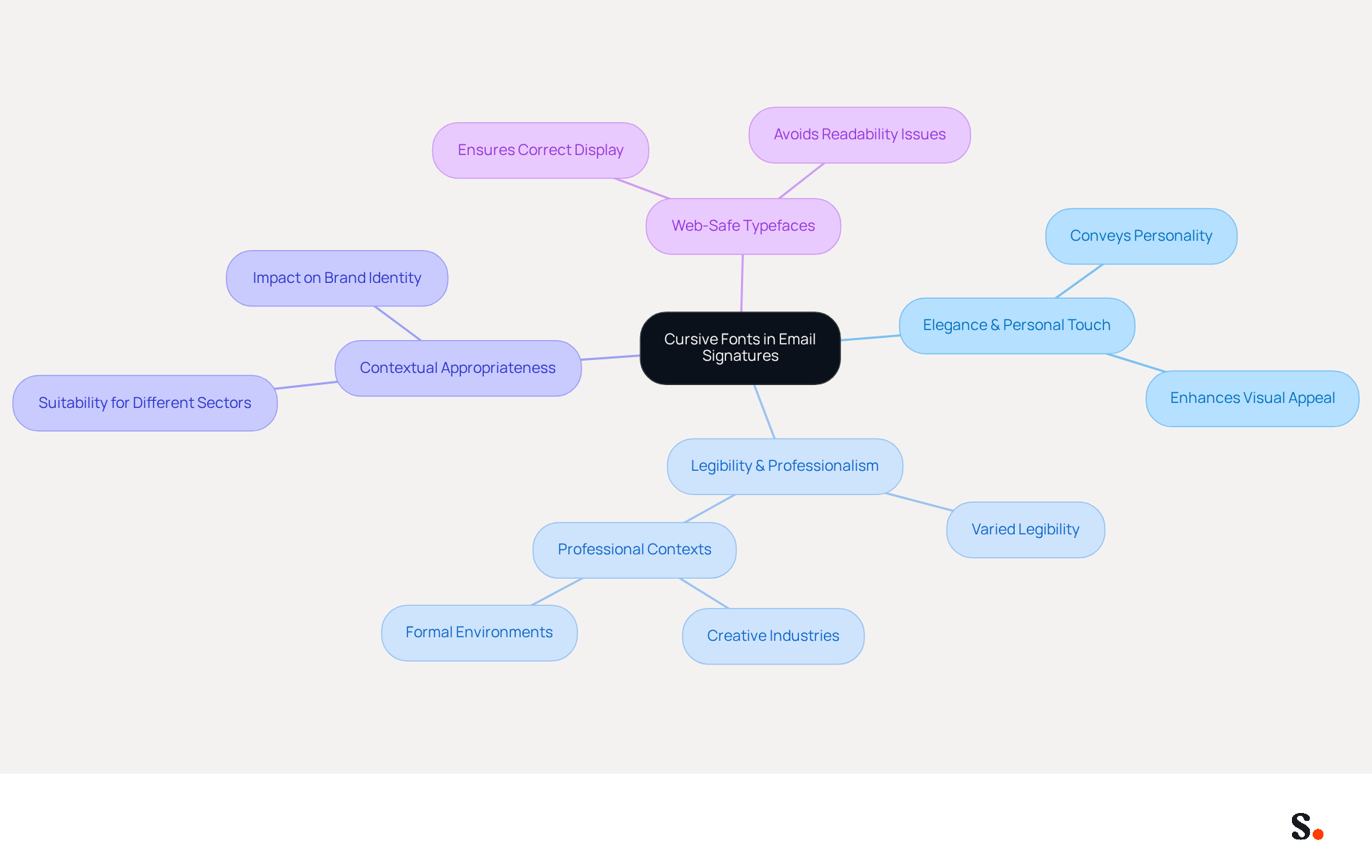
Cursive styles imitate the fluidity of handwritten text, conveying elegance and a personal touch. Using a cursive font for an email signature can enhance visual appeal and create a memorable impression. However, not all handwritten styles offer the same level of legibility and professionalism. For instance, a flowing typeface may be suitable for creative sectors but could appear unprofessional in more formal environments.
Choosing the right handwritten style can be challenging due to varying legibility and appropriateness in different contexts. Understanding the characteristics of flowing scripts - like style, movement, and legibility - helps ensure your choice reflects your brand's identity and message.
Furthermore, using web-safe typefaces is crucial to guarantee that your correspondence appears correctly on different devices and mail clients, avoiding any possible readability concerns. Moreover, while handwritten styles can introduce a distinctive touch, using a cursive font for an email signature is vital for striking the right balance between creativity and professionalism in effective communication.
Evaluate Readability and Professionalism in Cursive Fonts
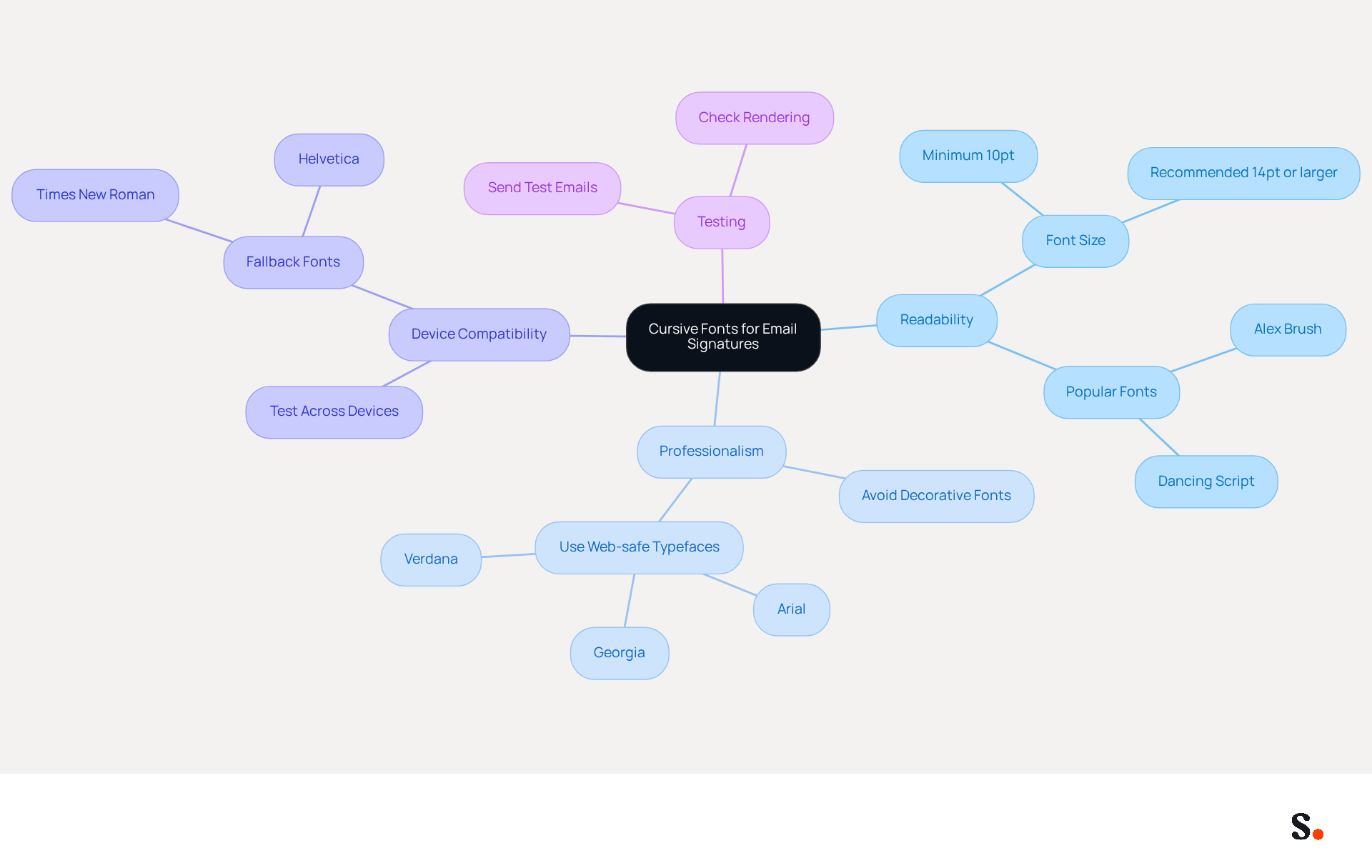
Selecting the right script style for your email signature is crucial for maintaining professionalism and clarity across devices. An attractive typeface on a desktop might not render well on mobile, leading to potential miscommunication of your contact details. Aim for a handwritten style that remains clear at smaller sizes without compromising professionalism. Popular options like 'Alex Brush' and 'Dancing Script' strike a balance between aesthetic appeal and readability.
Enhancing the professionalism of your signature can be achieved by incorporating a cursive font for email signature along with web-safe typefaces, such as Arial or Georgia, ensuring consistent rendering across all platforms. Additionally, avoid decorative or custom typefaces, as they can undermine your brand's professionalism.
Test your chosen typeface by sending messages to yourself and viewing them on various devices; failing to ensure clarity can damage your professional image. Remember to use a text size of at least 10pt to maintain legibility, especially on mobile devices.
Implement Your Chosen Cursive Font in Email Signature Platforms
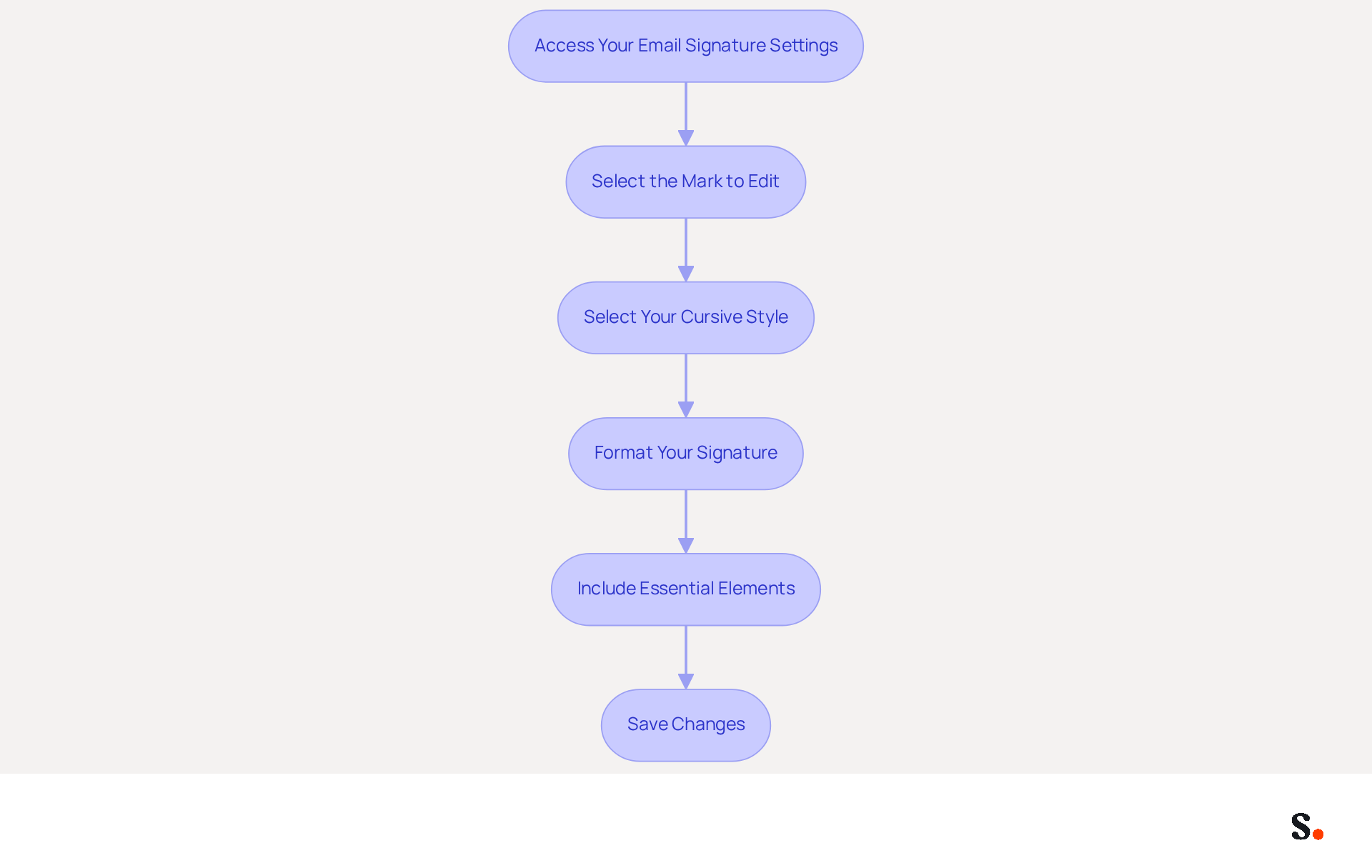
To effectively implement a cursive font in your email signature, follow these straightforward steps:
- Access Your Email Signature Settings: Open your email client (e.g., Gmail, Outlook) and navigate to the settings menu. Look for the 'Signature' section.
- Select the Mark to Edit: If you have multiple marks, choose the one you wish to modify.
- Select Your Cursive Style: In the editor, find the style selection dropdown. Scroll through the list to find your chosen italicized style. If it’s not accessible, consider utilizing a generator that accommodates custom styles.
- Format Your Signature: Add your name, title, and contact information, ensuring that the cursive font is applied. Without branded elements, your emails may not achieve their full potential in response rates, making it essential for effective communication.
- Include Essential Elements: Ensure your sign-off contains key components such as your full name, job title, company name, contact info, and social media links. This corresponds with optimal approaches for electronic correspondence, enhancing professionalism and engagement.
- Save Changes: After formatting, preserve your modifications and send a test message to yourself to confirm that the content displays as intended.
Using a cursive font for email signature enhances the visual appeal of your email footer. This contributes to a more personalized and engaging communication style. Regular updates to your branding element, ideally 2-4 times a year, can help maintain its relevance and effectiveness in marketing. As Yuliia Savchuk, a content writer at Stripo, notes, 'Email branding marketing is another communication channel with your customers that can support brand loyalty and lead generation.'
Furthermore, if you know anyone seeking to uphold brand consistency across their communication formats, consider sharing Scribe's Affiliate Program with them. By promoting Scribe, you can earn a 50% commission on their subscriptions while offering them a $30 credit on their subscription. This not only assists in enhancing team collaboration in managing contact details but also creates a new marketing avenue for you.
Utilize Tools and Resources for Effective Font Management
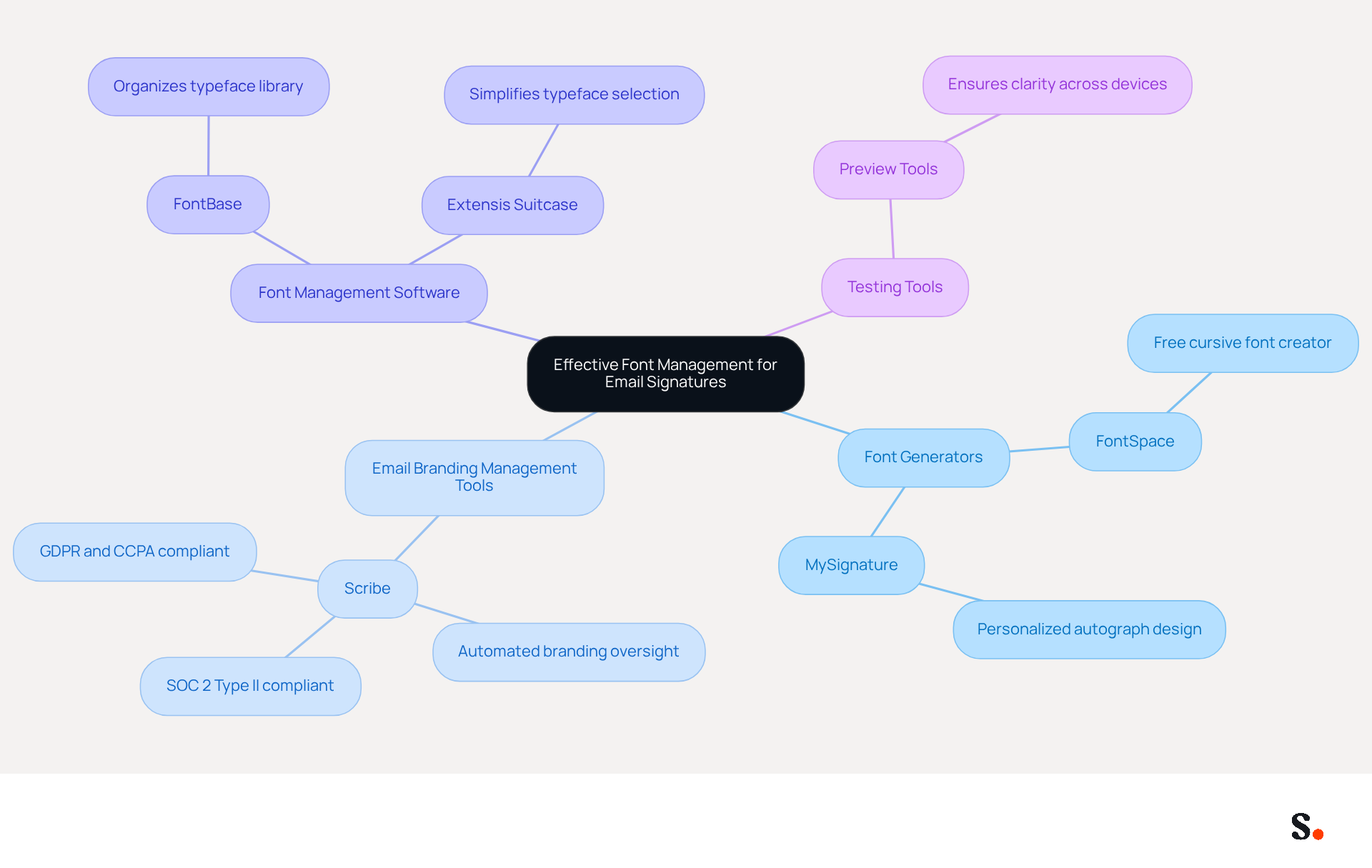
To ensure your email signatures reflect your brand's identity, effective management of cursive font for email signature is essential. Consider utilizing the following tools:
- Font Generators: Websites like FontSpace and MySignature provide free cursive font creators that enable you to design and personalize your autograph effortlessly, ensuring a unique touch that reflects your brand's personality.
- Email Branding Management Tools: Scribe offers automated solutions for overseeing branding across teams, ensuring brand consistency and simple updates. By streamlining updates, Scribe saves time and enhances brand consistency, making it an ideal choice for businesses looking to improve communication. Notably, Scribe is SOC 2 Type II compliant and adheres to GDPR and CCPA regulations, ensuring secure data handling. Furthermore, Scribe enables Marketing teams to manage their digital identifiers independently after the initial IT setup, further streamlining the process.
- Font Management Software: Tools such as FontBase and Extensis Suitcase assist in organizing and managing your typeface library, making it easier to access and apply your selected script styles. These applications simplify the process of typeface selection, ensuring that your decorative styles are easily accessible for use in your correspondence.
- Testing Tools: Utilize testing tools to preview how your identifier appears across various messaging clients and devices. This step is essential to ensure that your handwritten style retains its intended appearance and clarity, avoiding any possible miscommunication or brand inconsistency. Remember, consistent branding can boost revenue by as much as 23%, underscoring the importance of maintaining a professional image in all communications.
By leveraging these tools, especially Scribe's automated synchronization features, you can effectively manage cursive font for email signature, enhancing both aesthetics and professionalism in your communications.
Conclusion
While cursive fonts can enhance the visual appeal of email signatures, they also pose challenges in maintaining professionalism. It's crucial that your signature reflects your brand's identity effectively. By understanding how cursive fonts affect readability, professionals can make informed choices that resonate with their audience.
Throughout this guide, key insights have been shared on:
- Evaluating cursive fonts for clarity and professionalism
- Implementing them in various email platforms
- Utilizing tools for effective font management
The importance of web-safe typefaces, testing for readability across devices, and maintaining brand consistency has been emphasized as crucial steps in creating an impactful email signature. Additionally, leveraging Scribe's automated solutions can streamline the management of email signatures, ensuring that marketing teams can maintain control and consistency with ease.
Choosing the right cursive font can transform your email signature into a strategic asset that enhances your brand's presence. By implementing the strategies discussed in this guide, professionals can enhance their email communications, foster brand loyalty, and drive measurable marketing results. Embrace the art of cursive fonts in your email signatures and watch as your communications transform into memorable interactions that leave a lasting impression.
Frequently Asked Questions
What are cursive fonts and how do they impact email signatures?
Cursive fonts imitate the fluidity of handwritten text, conveying elegance and a personal touch. Using a cursive font for an email signature can enhance visual appeal and create a memorable impression.
Are all cursive fonts suitable for professional use?
No, not all handwritten styles offer the same level of legibility and professionalism. A flowing typeface may be suitable for creative sectors but could appear unprofessional in more formal environments.
What should I consider when choosing a cursive font for my email signature?
It's important to consider the characteristics of flowing scripts, such as style, movement, and legibility, to ensure your choice reflects your brand's identity and message.
Why is it important to use web-safe typefaces in email signatures?
Using web-safe typefaces is crucial to guarantee that your correspondence appears correctly on different devices and mail clients, avoiding any possible readability concerns.
How can I balance creativity and professionalism in my email signature?
While handwritten styles can introduce a distinctive touch, it's vital to strike the right balance between creativity and professionalism to ensure effective communication.
List of Sources
- Understand Cursive Fonts and Their Impact on Email Signatures
- 40+ Email Signature Statistics for 2026 (Data + Insights) (https://wavecnct.com/blogs/email-signature-statistics)
- Email Signature Statistics: A Closer Look at Email Signatures in 2026 (https://mysignature.io/blog/email-signature-statistics)
- How to Choose Best Email Signature Fonts for Professionalism - NEWOLDSTAMP (https://newoldstamp.com/blog/how-to-choose-the-best-email-signature-fonts-to-make-your-email-look-professional)
- Professional Fonts for Email: Choosing a Font for Business Emails | iContact (https://icontact.com/blog/blog-professional-fonts-for-email)
- 10 Best Fonts That Look Like Signatures: 2026 Handwriting Picks (https://certifier.io/blog/fonts-look-like-signatures)
- Evaluate Readability and Professionalism in Cursive Fonts
- Best Fonts for Email Signatures – secure and legible fonts (https://gsignature.com/blog-post/the-best-fonts-for-email-signatures---secure-professional-and-legible)
- 4 Best Practices for Choosing a Professional Email Signature Font (https://scribe-mail.com/en-US/blog/4-best-practices-for-choosing-a-professional-email-signature-font)
- Professional Fonts for Email: Choosing a Font for Business Emails | iContact (https://icontact.com/blog/blog-professional-fonts-for-email)
- 19 Best Email Fonts That Won't Let You Down in 2025 (https://twilio.com/en-us/blog/insights/best-email-fonts)
- Best fonts for Email Signatures: 7 Email-Safe Options (https://wisestamp.com/guides/what-are-the-best-fonts-for-email-signatures)
- Implement Your Chosen Cursive Font in Email Signature Platforms
- Email signature statistics: Why every business should optimize their email signatures — Stripo.email (https://stripo.email/blog/email-signature-statistics-why-every-business-should-optimize-their-email-signatures)
- Adding Signature In Cursive Font - Web Browsing/Email and Other Internet Applications (https://bleepingcomputer.com/forums/t/83824/adding-signature-in-cursive-font)
- Best fonts for Email Signatures: 7 Email-Safe Options (https://wisestamp.com/guides/what-are-the-best-fonts-for-email-signatures)
- How to Add a Downloaded Font to Your Gmail Signature (https://anyleads.com/how-do-you-add-a-font-to-your-gmail-signature)
- 40+ Email Signature Statistics for 2026 (Data + Insights) (https://wavecnct.com/blogs/email-signature-statistics)
- Utilize Tools and Resources for Effective Font Management
- What is the Best Font for Your Email Signature? (https://scribe-mail.com/en-US/blog/what-is-the-best-font-for-your-email-signature)
- Best Email Signature Generators & Management Software [2026] (https://syncsignature.com/blog/best-email-signature-generators)
- Best Email Signature Management Software (Evaluated May 2026) (https://wisestamp.com/guides/best-email-signature-management-software)
- Top 10 Email Signature Management Tools in 2026 (Compared) (https://mailbutler.io/blog/email/email-signature-management-tools)
- Best Email Signature Management Software: Top 12 Tools (2026)
- NEWOLDSTAMP (https://newoldstamp.com/blog/email-signature-software)
Get started with Scribe
Manage signatures across your whole team
Free 14-day trial — no credit card.