Master Setting Up Email Signatures with Scribe: A Step-by-Step Guide
Email signatures, often underestimated, are crucial for enhancing brand visibility and professionalism in communications. With Scribe, organizations can turn
Sophie Grant
Email Signature Specialist, Scribe

Introduction
Email signatures, often underestimated, are crucial for enhancing brand visibility and professionalism in communications. With Scribe, organizations can turn these digital footers into effective marketing tools that not only ensure brand consistency but also drive engagement through strategic elements like promotional banners and calls to action. Yet, many organizations struggle to manage these signatures effectively while ensuring compliance and security. This guide provides a clear roadmap for creating and optimizing email signatures with Scribe, helping marketing teams enhance their brand presence.
Understand the Importance of Email Signatures in Marketing
Despite their frequent undervaluation, email footers present a significant opportunity for businesses to elevate their marketing efforts. Each message sent serves as a platform to reinforce brand identity and convey essential messages. Consider the following key reasons that illustrate the importance of email signatures in marketing:
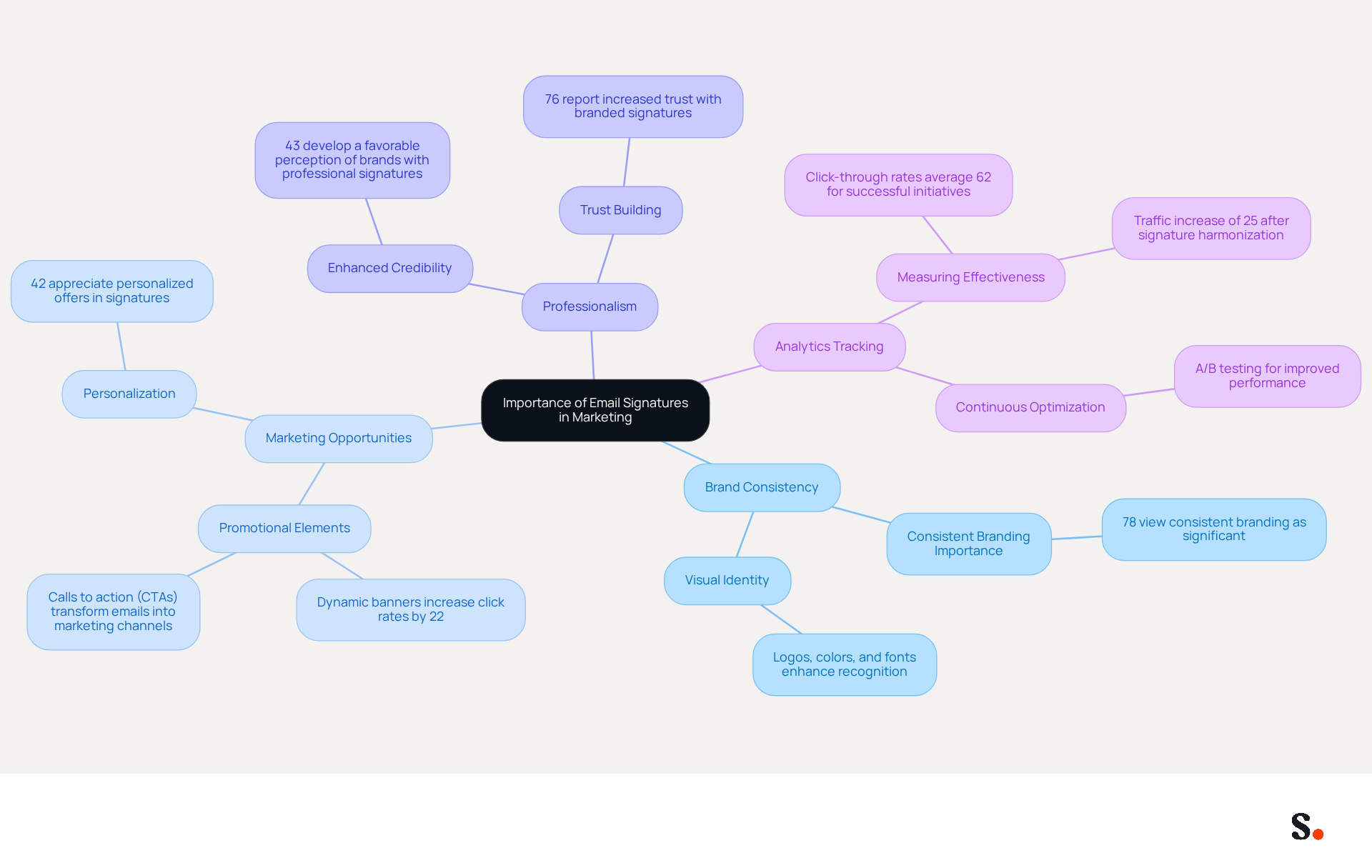
- Brand Consistency: A well-crafted email signature guarantees that every communication embodies the company's branding, including logos, colors, and fonts. This consistency is vital, as 78% of respondents view consistent branding as one of the most significant functions of digital communications.
- Marketing Opportunities: Signatures can incorporate promotional banners, calls to action (CTAs), and links to social media, effectively transforming every message into a marketing channel. Dynamic banners can increase click rates by 22%, showcasing the potential for engagement.
- Professionalism: A refined communication footer enhances the credibility of messages, leaving a positive impression on recipients. Research shows that 43% of consumers develop a more favorable perception of brands with professional endorsements.
- Analytics Tracking: By integrating tracking links, businesses can evaluate the effectiveness of their communication footers in driving traffic and engagement. Metrics such as click-through rates (CTR) and conversion rates are crucial for assessing the impact of campaigns, with CTRs averaging 62% for successful initiatives.
Investing in a professional solution for setting up email signature can transform how businesses engage with their audience, ultimately driving better results.
Identify Key Elements for Your Email Signature
In a digital landscape where first impressions matter, setting up an effective email signature can significantly impact professional communication. Creating an effective signature involves incorporating several key elements that convey professionalism and reinforce identity. Here’s what to include:
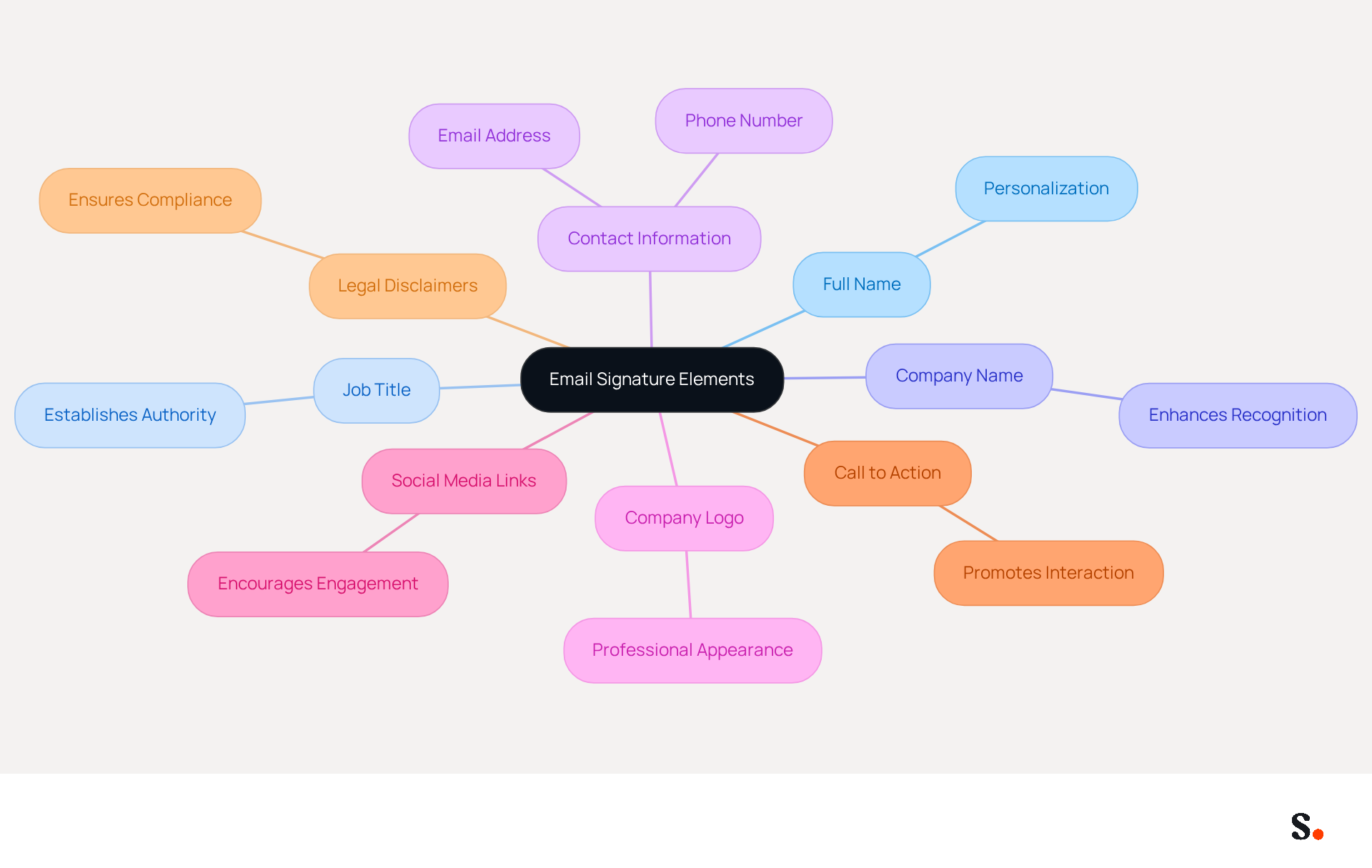
- Full Name: Clearly state the sender's name to personalize communication, enhancing the recipient's connection.
- Job Title: Including your position establishes authority and provides context for the communication.
- Company Name: Mentioning Scribe enhances recognition and credibility in every message.
- Contact Information: Provide a phone number and email address to facilitate easy communication, ensuring recipients can reach you without hassle.
- Company Logo: Incorporating your logo enhances visibility and creates a professional appearance.
- Social Media Links: Adding links to your company’s social media profiles encourages engagement and connectivity with your audience.
- Call to Action: Consider including a CTA, such as a link to a current promotion or a newsletter signup, to drive further interaction.
- Legal Disclaimers: If necessary, include any legal disclaimers relevant to your industry to ensure compliance and transparency.
When you include these elements, you create an identity that effectively represents your organization and facilitates communication. Setting up an email signature that is well-designed serves as both a mark of professionalism and a strategic marketing tool, potentially enhancing engagement rates and recognition of the company. For example, organizations that uphold consistent digital identifiers have reported enhanced trust and credibility in their communications, illustrating the effect of a unified brand image.
Create and Implement Your Email Signature Using Scribe
Many users find the process of setting up email signatures daunting due to the technical requirements involved, but Scribe simplifies this task significantly. Setting up email signature with Scribe enhances your branding while ensuring adherence to security standards. To enable one-click synchronization, you must grant permission for Scribe to connect with your mail provider. You need to be a Super Admin of your email provider to provide these permissions. Follow these steps:
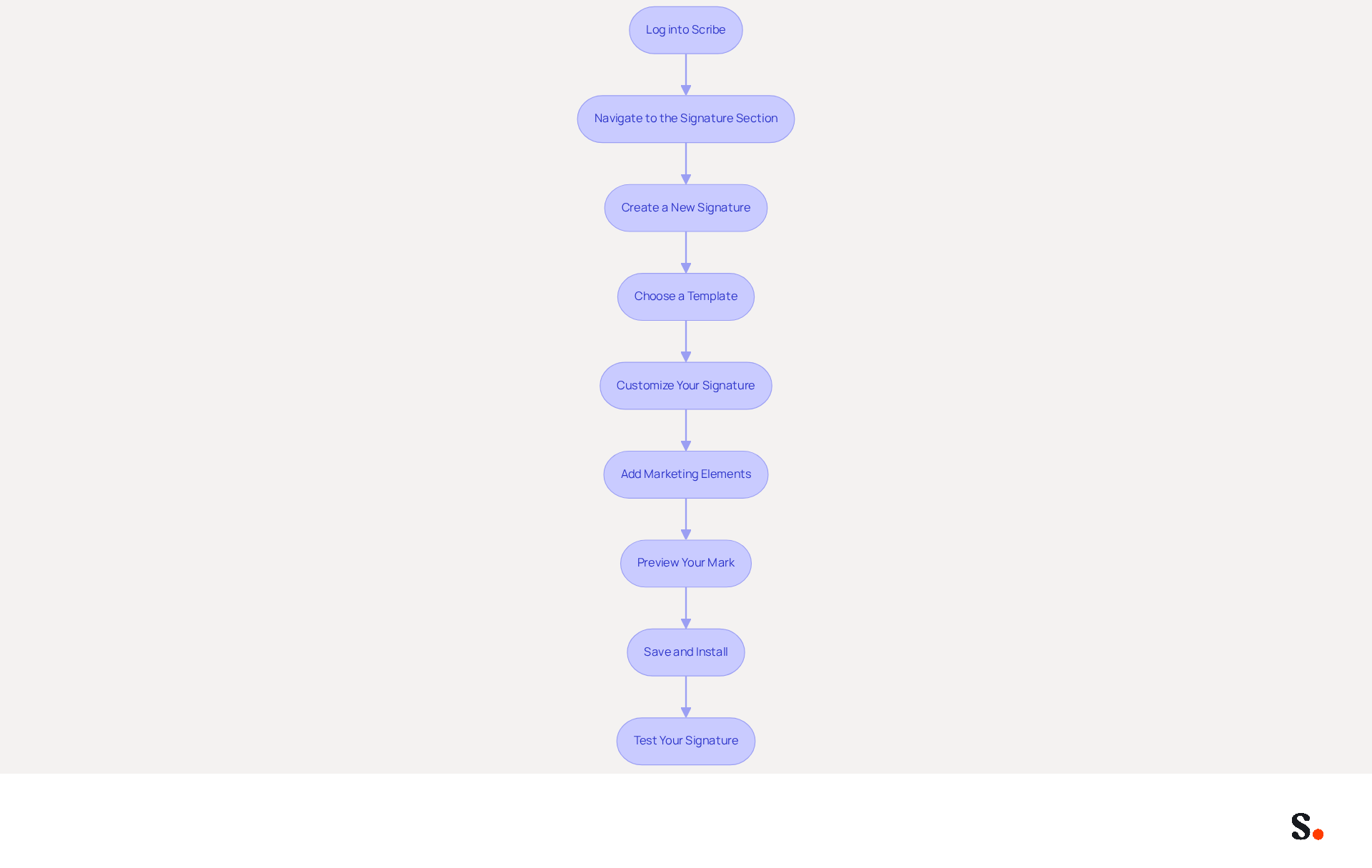
- Log into Scribe: Access your account using your credentials.
- Navigate to the Signature Section: Click on the 'Signatures' tab in the dashboard.
- Create a New Signature: Click on the 'Create New Signature' button.
- Choose a Template: Select from the available templates that align with your brand’s visual identity.
- Customize Your Signature: Fill in the key elements identified earlier, such as your name, title, and contact information. Upload your company logo and add any social media links. Customization options available include altering colors and fonts to align with your branding.
- Add Marketing Elements: If desired, include promotional banners or CTAs to enhance engagement. In fact, users have reported that Scribe's digital identifiers achieve an impressive 12% average click-through rate on banner displays, showcasing their effectiveness as a marketing tool.
- Preview Your Mark: Utilize the preview feature to see how your mark will look in messages.
- Save and Install: Once satisfied, save your signature and follow the prompts to install it across your messaging platform (e.g., Google Workspace, Microsoft 365). This feature allows for seamless synchronization, ensuring that any changes in your provider directory are updated automatically.
- Test Your Signature: Send a test message to ensure everything displays correctly.
By following these steps for setting up email signature, you will not only simplify the process but also enhance your brand's professionalism in communications. Ultimately, a well-configured signature can significantly elevate your brand's presence in every email you send.
Manage and Optimize Your Email Signatures for Consistency
To ensure effective setting up email signatures, ongoing management is essential. Here are some strategies to consider:
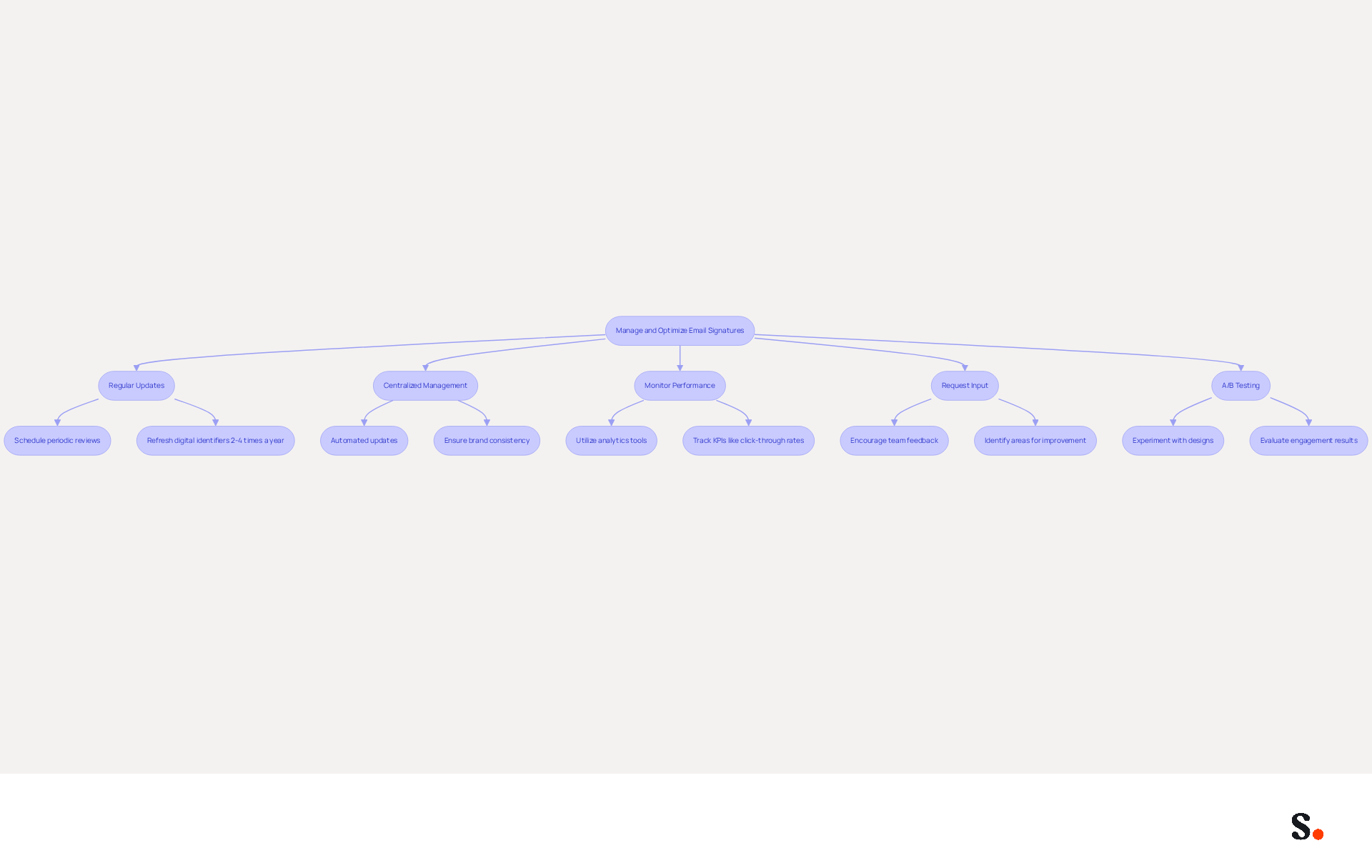
- Regular Updates: Schedule periodic reviews of your email signatures to ensure all information is current, especially if there are changes in personnel or branding. Refreshing digital identifiers 2 to 4 times a year keeps them relevant and aligned with marketing goals.
- Centralized Management: Scribe’s centralized management features save companies time and boost efficiency through automated updates. This ensures that all team members have the latest version, reducing the risk of outdated information and maintaining brand consistency. Additionally, Scribe's SOC 2 Type II certification and compliance with GDPR and CCPA ensure that your data is handled securely.
- Monitor Performance: Utilize analytics tools to track the effectiveness of your messaging. Key performance indicators (KPIs) such as click-through rates on CTAs can provide insights into effectiveness, assisting you in evaluating the impact of your marketing campaigns. Digital identifiers have an average click-through rate of 12%, considerably higher than conventional marketing messages, making performance monitoring essential.
- Request Input: Encourage team members to provide feedback on communication identifiers for better alignment with recipient expectations. Identifying areas for improvement can be challenging without team input, ensuring that the endorsements resonate well with recipients and boosting engagement rates.
- A/B Testing: Experiment with different designs or CTAs to see which versions yield better engagement results. A/B testing can result in significant enhancements in messaging footer performance, as shown by organizations like Nike, which have effectively optimized their footers.
Implementing these strategies helps maintain a consistent messaging program that effectively supports marketing goals. Setting up email signature through centralized management not only saves time but also transforms each email into a strategic communication opportunity, reinforcing your brand identity with every interaction.
Conclusion
Setting up email signatures with Scribe is a strategic decision that directly impacts brand visibility and professionalism. Using Scribe's easy-to-navigate platform, organizations can make sure every email showcases their brand identity and acts as an effective marketing tool.
Throughout this guide, we have emphasized the importance of email signatures in marketing, highlighting their role in maintaining brand consistency, creating marketing opportunities, and enhancing professionalism. Key elements for effective signatures have been outlined, including:
- The necessity of incorporating contact information
- Company logos
- Calls to action
Additionally, the step-by-step process for creating and implementing signatures using Scribe has been detailed, showcasing how easy it is to manage and optimize these digital identifiers for maximum impact.
In conclusion, email signatures represent a valuable marketing asset that organizations should actively leverage. By adopting best practices and utilizing Scribe's capabilities, organizations can transform their email communications into powerful, engaging marketing tools. Embrace the opportunity to elevate your brand's presence with every email sent, and consider implementing Scribe to streamline the process and ensure compliance with security standards. Optimizing your email signatures today can lead to significant improvements in brand engagement and recognition.
Frequently Asked Questions
Why are email signatures important in marketing?
Email signatures are important in marketing because they serve as a platform to reinforce brand identity and convey essential messages, transforming every email into a marketing opportunity.
How do email signatures contribute to brand consistency?
A well-crafted email signature ensures that every communication reflects the company's branding, including logos, colors, and fonts, which is vital for maintaining a consistent brand image.
What marketing opportunities can be included in email signatures?
Email signatures can include promotional banners, calls to action (CTAs), and links to social media, effectively turning each message into a marketing channel.
How can dynamic banners in email signatures impact engagement?
Dynamic banners can increase click rates by 22%, showcasing their potential to enhance engagement with recipients.
How do email signatures enhance professionalism?
A refined email signature enhances the credibility of messages, leading to a more favorable perception of brands, as 43% of consumers view brands with professional endorsements more positively.
What is the role of analytics tracking in email signatures?
Integrating tracking links in email signatures allows businesses to evaluate the effectiveness of their communication footers in driving traffic and engagement, using metrics like click-through rates (CTR) and conversion rates.
What are the average click-through rates for successful email signature campaigns?
The average click-through rates (CTR) for successful email signature campaigns are around 62%.
How can investing in a professional email signature solution benefit businesses?
Investing in a professional solution for email signatures can transform how businesses engage with their audience, ultimately driving better marketing results.
List of Sources
- Understand the Importance of Email Signatures in Marketing
- Research Recap: Branded Email Signatures Increase Company Recognition, Trust - Demand Gen Report (https://demandgenreport.com/industry-news/research-recap-branded-email-signatures-increase-company-recognition-trust/47252)
- The impact of email signatures on your branding (https://signitic.com/en/resources/the-impact-of-email-signatures-on-your-branding)
- Why Are Email Signatures Key to Brand Awareness? | QuickMail (https://quickmail.com/role-of-email-signatures-in-brand-awareness)
- Why Email Signatures Must Be In Your 2026 Marketing Plan | Rocketseed (https://rocketseed.com/blog/2026-marketing-plan-email-signatures)
- Identify Key Elements for Your Email Signature
- The Importance Of Email Signatures | Email Marketing Blog | Mail Blaze (https://mailblaze.com/thinking/email-signatures-in-email-marketing)
- Email signature statistics: Why every business should optimize their email signatures — Stripo.email (https://stripo.email/blog/email-signature-statistics-why-every-business-should-optimize-their-email-signatures)
- Crafting the Perfect Email Signature: Tips, Types, and Best Practices for Today's Professionals - Frey Design (https://freydesigngroup.com/blog/crafting-the-perfect-email-signature)
- 20 Tips for Creating an Effective Email Signature — SitePoint (https://sitepoint.com/creating-an-effective-email-signature)
- Email Signature Best Practices - NEWOLDSTAMP (https://newoldstamp.com/blog/email-signature-best-practices)
- Create and Implement Your Email Signature Using Scribe
- Master Automatic Email Signatures: Boost Branding and Efficiency (https://scribe-mail.com/en-US/blog/master-automatic-email-signatures-boost-branding-and-efficiency)
- 4 Best Practices for Using a Custom Email Signature Creator (https://scribe-mail.com/en-US/blog/4-best-practices-for-using-a-custom-email-signature-creator)
- How to Manage Email Signatures Effectively with Scribe (https://scribe-mail.com/en-US/blog/how-to-manage-email-signatures-effectively-with-scribe)
- Create Your Email Signature with Scribe's AI Email Signature Generator (https://scribe-mail.com/en-US/blog/create-your-email-signature-with-scribe-s-ai-email-signature-generator)
- Create Captivating Email Signatures with Scribe: a Review (https://languedoc121tech.fr/create-captivating-and-engaging-email-footers-with-scribe)
- Manage and Optimize Your Email Signatures for Consistency
- The impact of email signatures on your branding (https://signitic.com/en/resources/the-impact-of-email-signatures-on-your-branding)
- Exclaimer Research: 67% of Marketers Expect Email Signatures to Support With Lead Gen In 2023 (https://businesswire.com/news/home/20230612141095/en/Exclaimer-Research-67-of-Marketers-Expect-Email-Signatures-to-Support-With-Lead-Gen-In-2023)
- Company-Wide Email Signature Management | CloudM (https://cloudm.io/blog/optimize-your-process-with-company-wide-email-signature-management)
- 10 ideas for marketing campaigns in email signatures (https://signitic.com/en/resources/10-ideas-for-marketing-campaigns-in-email-signatures)
- Best Practices for a Standard Email Signature That Boosts Marketing ROI (https://scribe-mail.com/en-US/blog/best-practices-for-a-standard-email-signature-that-boosts-marketing-roi)
Get started with Scribe
Manage signatures across your whole team
Free 14-day trial — no credit card.