Master Your Email Signature Template for Outlook: Best Practices
Creating a professional email signature template in Outlook is crucial for effective business communication, yet many organizations overlook its significance
Sophie Grant
Email Signature Specialist, Scribe

Introduction
Creating a professional email signature template in Outlook is crucial for effective business communication, yet many organizations overlook its significance. An email signature serves as a vital touchpoint that can enhance brand identity and foster trust. By mastering the essential components and best practices for email signatures, organizations can ensure that every message sent reflects their professionalism and commitment to brand consistency.
Many organizations find it challenging to create email signatures that are both professional and consistent. This article explores best practices for creating and managing email signature templates in Outlook, offering insights that can transform routine communications into powerful branding tools. By implementing these best practices, businesses can ensure their email signatures not only convey professionalism but also enhance their brand's credibility.
Define Essential Components of an Email Signature
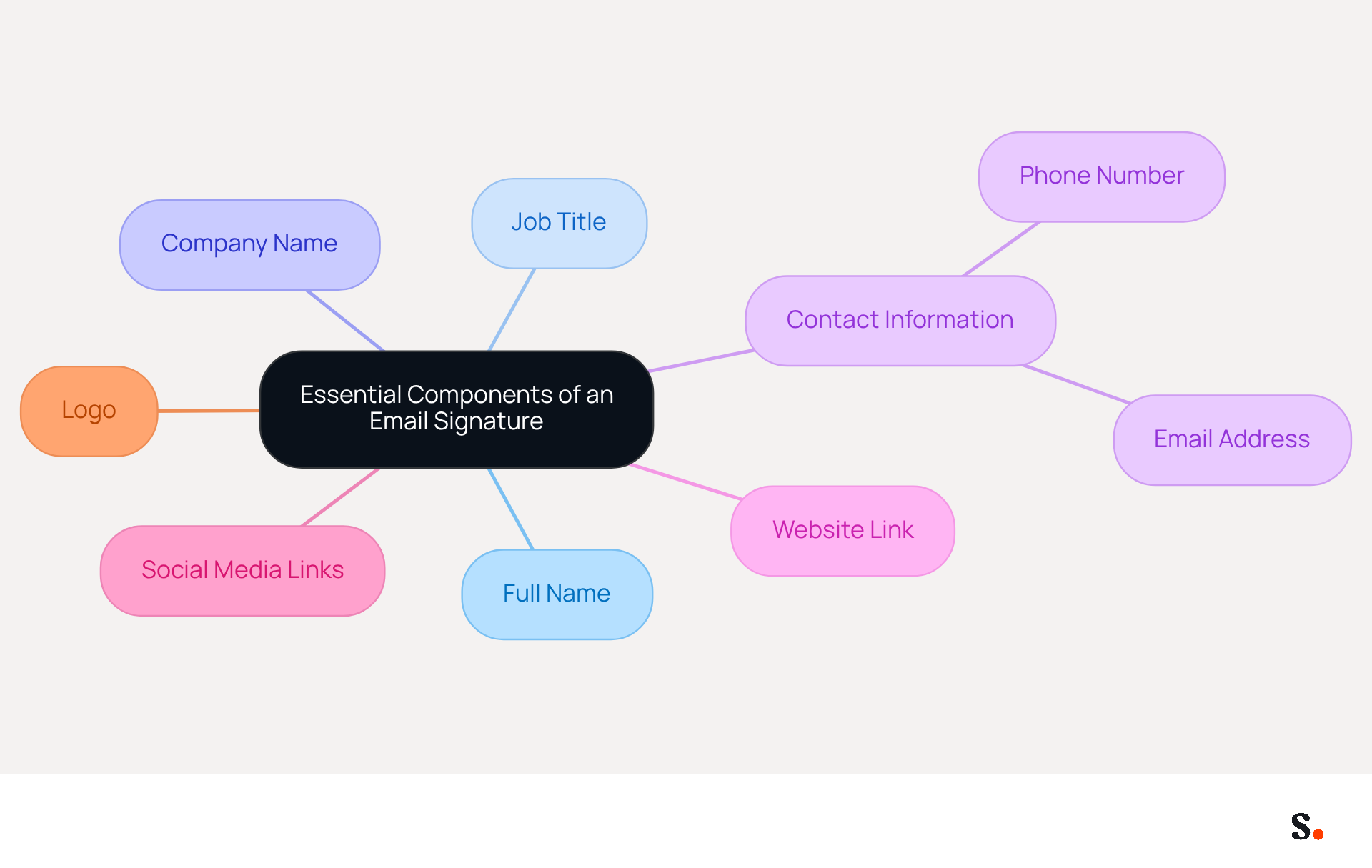
An effective email signature template for Outlook is crucial for establishing professionalism and ensuring clear communication in business interactions. It should include the following essential components:
- Full Name: Clearly state your name to ensure the recipient knows who the message is from.
- Job Title: Include your position to provide context about your role within the organization.
- Company Name: This reinforces identity and helps recipients recognize your organization.
- Contact Information: Provide a phone number and email address for easy communication.
- Website Link: Direct recipients to your company’s website for more information.
- Social Media Links: Include links to professional social media profiles to enhance connectivity.
- A small, strategically placed logo can improve visibility without overshadowing the mark.
Neglecting these components in your email signature template for Outlook may result in missed opportunities for connection and professionalism.
Ensure Brand Consistency Across Platforms
To enhance brand consistency in email signatures, organizations must adopt strategic best practices that reinforce their identity:
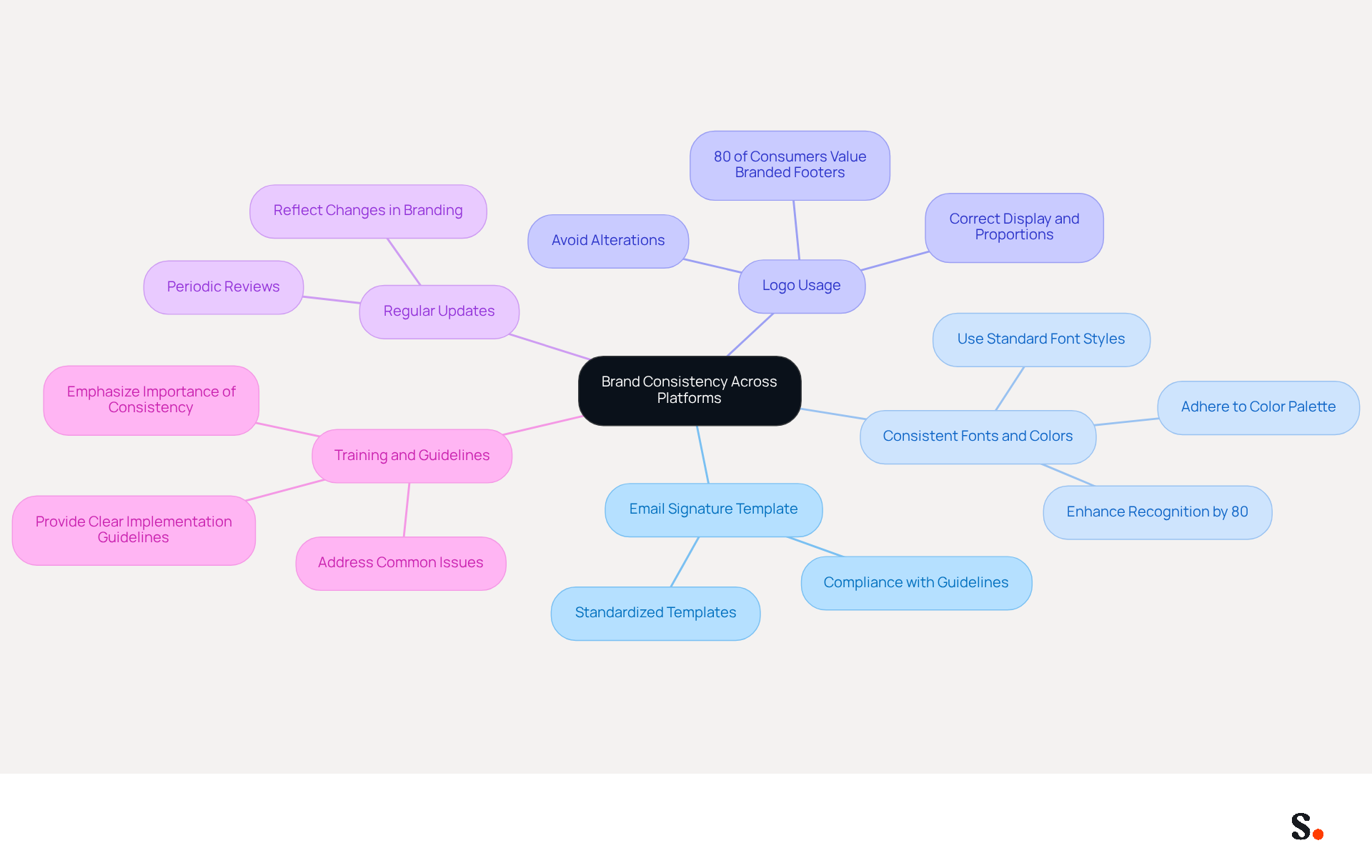
- Use an email signature template for Outlook to create standardized templates that comply with your guidelines, ensuring uniformity across all employee signatures. This approach reinforces identity and enhances recognition.
- Consistent Fonts and Colors: Adhere to the established color palette and font styles. Consistency in these elements can enhance recognition by up to 80%, making it easier for recipients to identify your organization.
- Logo Usage: Ensure the logo is displayed correctly, maintaining its proportions and avoiding any alterations that could misrepresent the brand. Proper logo usage is essential, as 80% of consumers view a branded email footer as a significant element of a company's identity.
- Regular Updates: Periodically review and refresh identifiers to reflect any changes in branding or company information. This practice keeps your communications up to date and shows professionalism and attention to detail.
- Training and Guidelines: Provide employees with clear guidelines on how to implement and maintain their signatures, emphasizing the importance of consistency. Training can assist in alleviating common problems, such as spelling errors, which can lead to misunderstandings and reduce the professionalism of your communications.
By following these practices, organizations can improve their professional image and ensure that every message sent, utilizing an email signature template for Outlook, contributes positively to recognition. Centralized management of communication identifiers can further support these efforts, ensuring that all interactions align with company objectives and maintain a cohesive presence. Furthermore, by joining Scribe's Affiliate Program, marketing managers can earn a 50% commission while promoting consistency across email communications, and they can offer a $30 credit to new subscribers. Moreover, syncing Google Workspace with Scribe enables automatic updates of team members' details, conserving time and ensuring that any modifications in employee data are shown without manual entry. This streamlined approach boosts collaboration and helps keep your brand's integrity intact in every message. Significantly, Scribe is SOC 2 Type II certified and adheres to GDPR and CCPA, guaranteeing that your correspondence management is secure and reliable.
Implement the Template in Outlook Effectively
Implementing an email signature template for Outlook is a straightforward process that enhances professional communication.
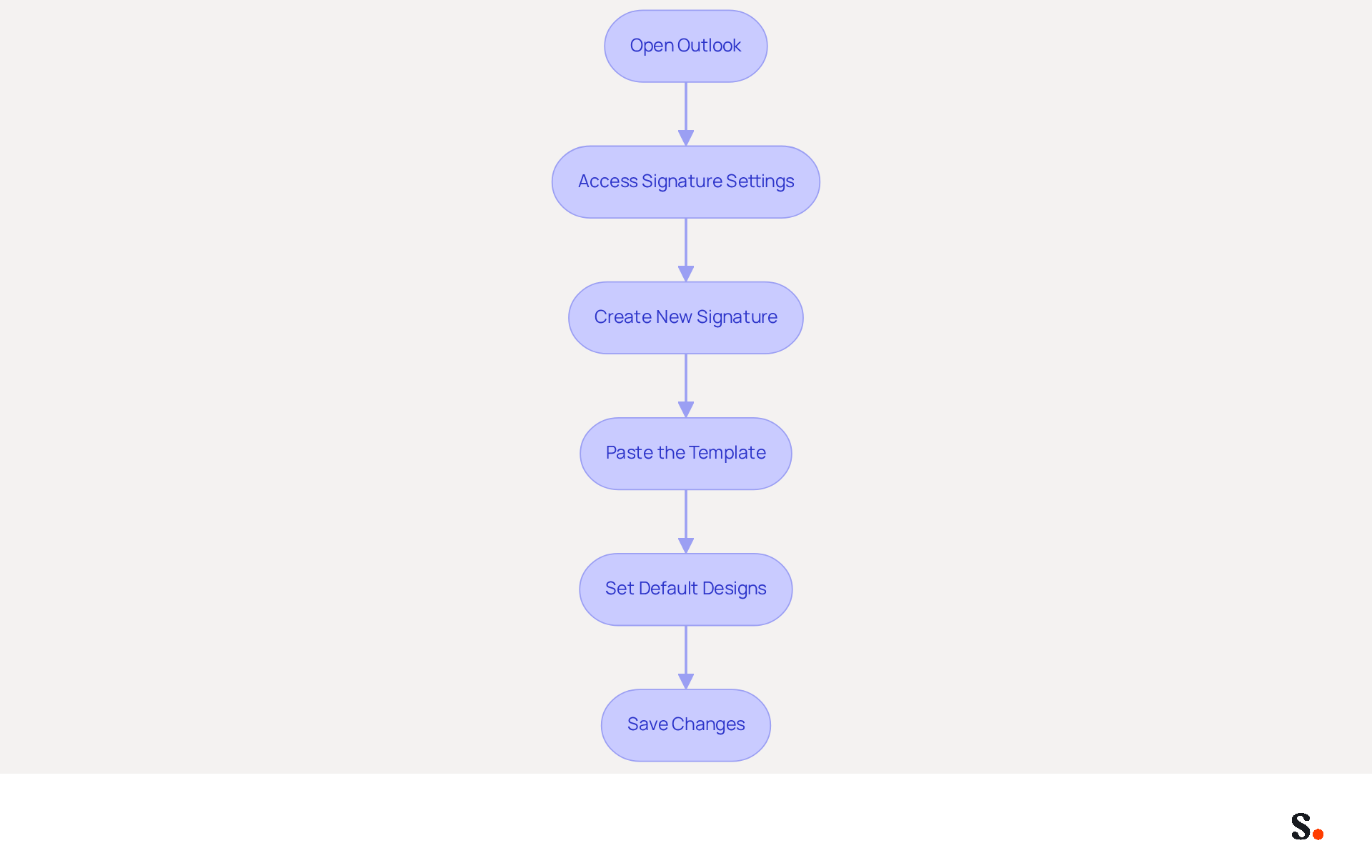
- Open Outlook: Launch the Outlook application on your computer.
- Access Signature Settings: Navigate to the 'File' menu, select 'Options', and then click on 'Mail'. Under 'Compose messages', click on 'Signatures'.
- Create New Signature: Click 'New' to generate a new sign-off. Assign a name for easy identification.
- Paste the Template: Copy your pre-designed layout and paste it into the editing box. Adjust the formatting as needed.
- Set Default Designs: Select your new design as the default for new messages and replies/forwards if desired.
- Save Changes: Click 'OK' to preserve your settings.
By following these steps, employees can efficiently establish their communication identifiers, ensuring a consistent and professional appearance in all correspondences. With 89.9% of professionals using a single electronic identifier, a well-designed template can boost brand visibility and trust, resulting in a 22% increase in response rates. Regular updates to signatures are also essential; without regular updates, signatures may become stale, diminishing their effectiveness; research shows refreshing them every 4 to 8 weeks keeps them relevant, with 44.4% of users updating theirs 2-4 times a year.
Make sure you have Super Admin permissions to sync your email provider for a smoother process. Consider syncing your Google Workspace with the application. This integration allows for one-click synchronization, automatically updating your teammates' information without any manual effort. Changes made in your Google Workspace, such as moving teammates or updating their job positions, will be reflected in the application, saving time and ensuring brand consistency. The automatic daily sync feature ensures that your data is consistently current. Furthermore, Scribe's SOC 2 Type II compliance ensures the protection of your information, making it a reliable option for managing electronic identifiers. By ensuring your email signatures are consistently updated and synchronized, you position your brand for greater recognition and trust.
Leverage Automation for Efficient Signature Management
To maximize the effectiveness of email signature management, organizations must adopt strategic automation practices:
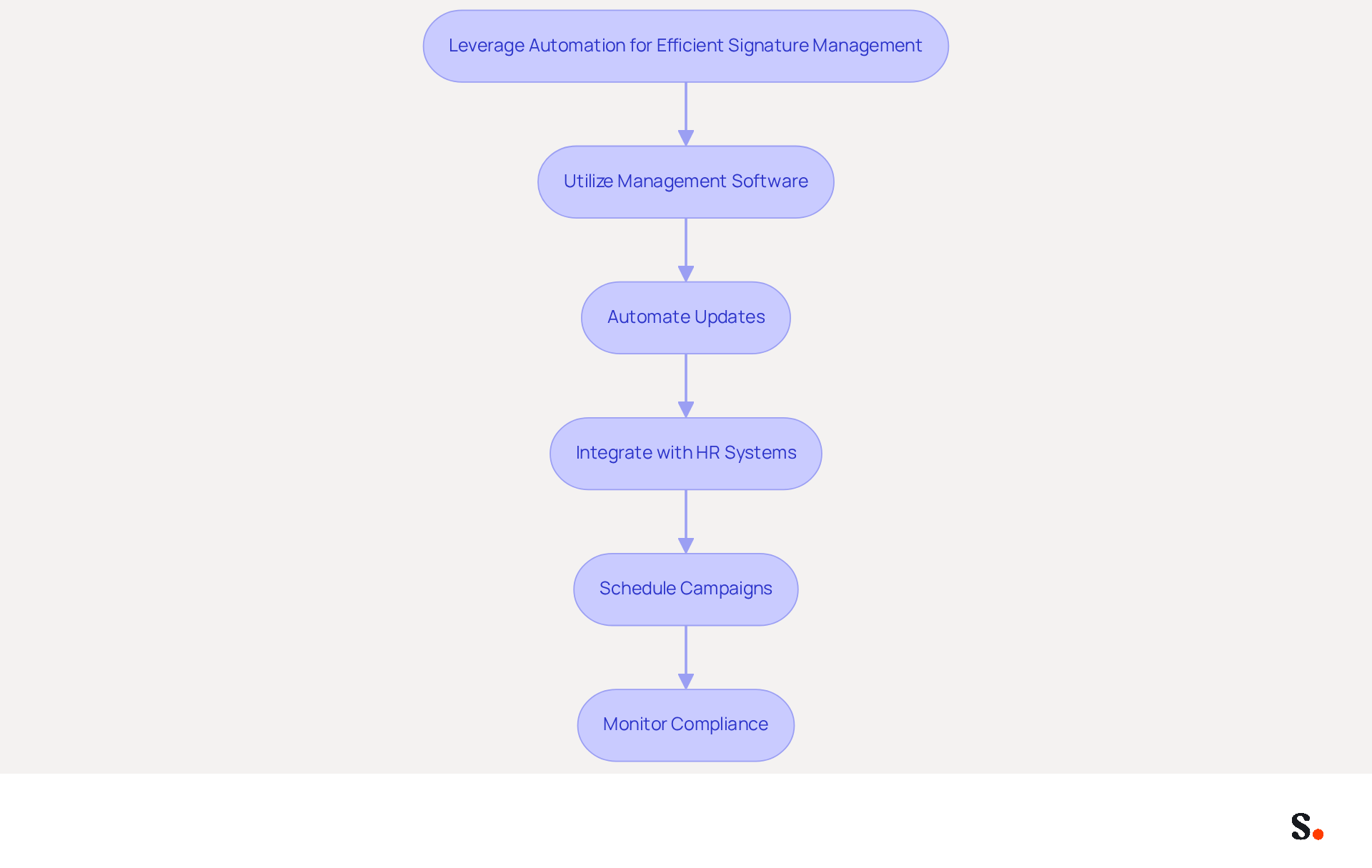
- Utilize Management Software: Implement centralized management tools like Scribe, which enable consistent email formats across the organization, enhancing recognition and trust. Companies using such solutions report 85% better brand consistency.
- Automate Updates: Establish automated updates for email footers to ensure they reflect the latest branding, contact information, or promotional campaigns without requiring manual intervention. Every modification made in your Aircall setup will automatically be reflected in your Scribe content, as we are syncing the data from there. This approach significantly reduces errors and compliance risks, allowing for a more streamlined communication process. With Scribe's quick setup and ease of use, Marketing teams can take charge of their messaging identities right after IT gets everything started.
- Integrate with HR Systems: Connect your management tool with HR systems to automatically update documents based on employee data changes. This integration minimizes the risk of outdated information being sent to clients, ensuring that all communications are accurate and professional.
- Schedule Campaigns: Use the software to arrange marketing campaigns that incorporate email branding, ensuring timely promotions and consistent messaging. Organizations that adopt distinctive marketing strategies can see a notable increase in engagement rates, with some reporting three times higher campaign engagement. Scribe's average click-through rate on banners is 12%, demonstrating its effectiveness in driving engagement.
- Monitor Compliance: Regularly review signatures to ensure compliance with branding guidelines and legal disclaimers. Automated tools can help maintain accurate and compliant disclaimers without IT involvement, allowing marketing and legal teams to operate independently while IT retains oversight. Scribe is SOC 2 Type II certified and complies with GDPR and CCPA, which guarantees that data is handled securely and meets all legal requirements.
Ultimately, utilizing an email signature template for Outlook can enhance effective email signature management, transforming how organizations communicate and fostering stronger connections with clients and stakeholders.
Conclusion
Mastering the email signature template for Outlook is essential for any organization striving to uphold professionalism and brand integrity. By implementing a well-structured signature, businesses can enhance their communication, ensuring that every email sent reflects their identity and values. However, without a structured approach, organizations risk losing credibility and brand identity. This not only fosters trust among recipients but also reinforces the brand's presence in every interaction.
Key practices discussed include:
- Defining essential components such as full name, job title, and contact information.
- Emphasizing the importance of consistent branding through uniform fonts, colors, and logo usage.
- Highlighting the significance of regular updates and employee training to maintain professionalism and avoid common pitfalls.
- Leveraging automation tools like Scribe to streamline the management of email signatures, ensuring that all communications are accurate and up-to-date.
By prioritizing email signature management, organizations can significantly enhance their communication effectiveness and brand perception. Investing in a cohesive email signature strategy is not just a best practice; it is a necessity. Organizations should take proactive steps to implement these strategies, utilizing tools that allow for easy management and compliance. Embracing effective email signature management will contribute to measurable marketing ROI and brand consistency.
Frequently Asked Questions
What is the purpose of an email signature template for Outlook?
An effective email signature template for Outlook is crucial for establishing professionalism and ensuring clear communication in business interactions.
What essential components should be included in an email signature?
An email signature should include the following components: Full Name, Job Title, Company Name, Contact Information, Website Link, Social Media Links, and a small logo.
Why is it important to include your full name in an email signature?
Including your full name ensures that the recipient knows who the message is from, which is important for clear communication.
How does including a job title in an email signature benefit the recipient?
Including your job title provides context about your role within the organization, helping the recipient understand your position.
What role does the company name play in an email signature?
The company name reinforces identity and helps recipients recognize your organization.
Why should contact information be included in an email signature?
Providing a phone number and email address allows for easy communication, making it convenient for recipients to reach out.
What is the benefit of including a website link in an email signature?
A website link directs recipients to your company’s website for more information, enhancing their understanding of your organization.
How can social media links in an email signature enhance connectivity?
Including links to professional social media profiles allows recipients to connect with you on various platforms, fostering better networking opportunities.
What is the impact of neglecting essential components in an email signature?
Neglecting these components may result in missed opportunities for connection and professionalism in business communications.
List of Sources
- Define Essential Components of an Email Signature
- Email Signature Best Practices for 2026 (+ 15 Pro Examples) (https://wavecnct.com/blogs/email-signature-best-practices-2026)
- 20 best email signature design examples for 2026 — Stripo.email (https://stripo.email/blog/10-best-email-signature-design-examples)
- Email Signature: Best Practices, Examples, and Design Tips (https://learn.g2.com/email-signature-design)
- Best Practices for Email Signatures for Business Owners (https://scribe-mail.com/en-US/blog/best-practices-for-email-signatures-for-business-owners)
- Best practices for business email signatures in 2026 (https://bybrand.io/blog/best-practices)
- Ensure Brand Consistency Across Platforms
- Research Recap: Branded Email Signatures Increase Company Recognition, Trust - B2BMX INSIGHTS (https://demandgenreport.com/industry-news/research-recap-branded-email-signatures-increase-company-recognition-trust/47252)
- 50+ Branding Statistics for 2026 That Explain Brand Loyalty (https://wearetenet.com/blog/branding-statistics)
- 40+ Email Signature Statistics for 2026 (Data + Insights) (https://wavecnct.com/blogs/email-signature-statistics)
- Why Email Signatures Must Be In Your 2026 Marketing Plan | Rocketseed (https://rocketseed.com/blog/2026-marketing-plan-email-signatures)
- Master Corporate Email Signature Management for Brand Consistency (https://scribe-mail.com/en-US/blog/master-corporate-email-signature-management-for-brand-consistency)
- Implement the Template in Outlook Effectively
- 4 Best Practices for Your Outlook Signature Line in Marketing (https://scribe-mail.com/en-US/blog/4-best-practices-for-your-outlook-signature-line-in-marketing)
- Email Signature Statistics: A Closer Look at Email Signatures in 2026 (https://mysignature.io/blog/email-signature-statistics)
- 40+ Email Signature Statistics for 2026 (Data + Insights) (https://wavecnct.com/blogs/email-signature-statistics)
- Email signature statistics: Why every business should optimize their email signatures — Stripo.email (https://stripo.email/blog/email-signature-statistics-why-every-business-should-optimize-their-email-signatures)
- neowin.net (https://neowin.net/news/microsoft-is-making-it-easier-to-add-signatures-to-outlook-emails)
- Leverage Automation for Efficient Signature Management
- Why Email Signature Management Software is Essential for Marketing Success (https://scribe-mail.com/en-US/blog/why-email-signature-management-software-is-essential-for-marketing-success)
- 4 Best Practices for Your Work Email Signature Strategy (https://scribe-mail.com/en-US/blog/4-best-practices-for-your-work-email-signature-strategy)
- How to Automate Email Signature Updates | Exclaimer (https://exclaimer.com/email-signature-handbook/automate-email-signature-updates)
- Email Signature Trends 2026: Centralized Control & Automation | SIGNandGO posted on the topic | LinkedIn (https://linkedin.com/posts/signngo_email-signature-trends-to-watch-in-2026-activity-7401523471786217473-zAVL)
Get started with Scribe
Build a professional email signature
Free 14-day trial — no credit card.