Signature Data Auto-Fill: A Source-of-Truth Test for Accurate Employee Signatures
Learn how to test sources, field ownership, updates, and employee lifecycle behavior before adopting signature data auto-fill.
Sophie Grant
Email Signature Specialist, Scribe

On this page
- Build the field map before syncing employee data
- Define signature data auto-fill as a controlled pipeline
- Assign ownership before choosing a source
- Build a field-and-owner inventory
- Resolve title, phone, and custom-field gaps before launch
- Separate update triggers from synchronization frequency
- Trace promotions, transfers, phone changes, and departures
- Define behavior for blanks, stale values, and conflicts
- Pilot with records that can fail
- Measure exception handling rather than assuming workload reduction
- Evaluate APIs, webhooks, CLI, and custom fields as mechanisms
- Assess Scribe against the verified data path
- Produce a source-system data contract from the pilot
- Which source-system questions should IT answer first?
- What is signature data auto-fill in the context of business email signatures?
- What should organizations consider when handling missing or outdated job titles and phone numbers?
- What are the key factors to evaluate when deciding whether to implement signature data auto-fill?
- How should organizations test the behavior of signature data auto-fill during employee changes?
- What are the implications of using APIs and webhooks in signature data auto-fill?
- How can organizations measure the effectiveness of their signature data auto-fill implementation?
- Sources
Build the field map before syncing employee data
Signature data auto-fill is a field-mapping problem: employee data in an external directory or other approved source is matched to fields rendered in a business email signature. A directory-synchronization model reads corporate-directory records and uses them to build, assign, and update signatures. When a promotion, department change, or phone-number update is recorded in the source, that changed value may be available to the signature. The result depends on the record and attribute being mapped, not merely on the existence of a template.
Build a field-and-owner inventory as the primary working artifact. Give each displayed field one row with:
- the field shown in the signature;
- the system that owns the value;
- the source record and attribute;
- the event or synchronization cycle that should move a change; and
- the treatment for a blank, stale, or conflicting value.
This inventory turns a request to keep signatures current into explicit mappings. It also exposes a field with no owner or two systems that appear to own the same value. Treat those unresolved rows as decisions to settle before configuring synchronization rather than as template problems.
Populate the inventory with the fields the organization actually needs, such as name, job title, department, phone, office location, and approved custom fields. Microsoft Entra ID or Google Workspace Directory can supply employee details and add new hires automatically; an HR or phone source can fill fields that the directory does not contain. If a directory attribute is empty, the corresponding signature value can also be empty, so required attributes need attention before synchronization.
The useful handoff is a source-system data contract for the signature fields: each row names its owner, mapping, change condition, and missing-value decision. That artifact keeps data ownership separate from signature rendering and gives IT a concrete basis for checking whether the intended data path is defined.
A reliable signature data path starts with field requirements, not with a template. Entra ID guidance recommends auditing fields such as name, job title, department, phone, office location, and approved custom fields before configuring synchronization. Our guide identifies Microsoft Entra ID and Google Workspace Directory as sources that can import employee details, while HR or phone sources can fill fields that a directory does not contain.
Start with the smallest useful test. Choose the fields your organization actually needs, identify their owners, and trace representative records through the intended mapping. Keep the result as a written acceptance checklist. If you cannot explain where a value comes from or what happens when it is absent, the data path is not ready for automation.
Get started with Scribe
See why teams switch to Scribe
Free 14-day trial — no credit card.
Define signature data auto-fill as a controlled pipeline
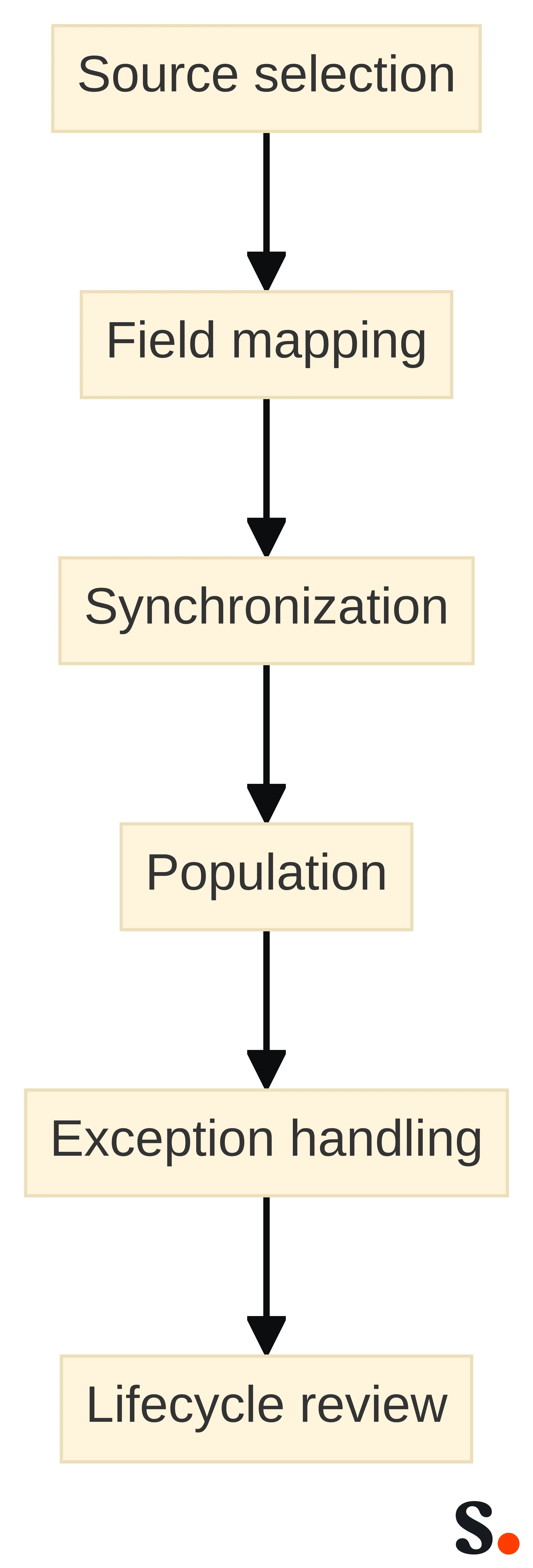
Signature data auto-fill is a controlled pipeline that takes approved employee attributes from external systems and places those attributes into defined signature fields. The pipeline has several separate stages: source selection, field mapping, synchronization, template population, exception handling, and lifecycle review.
Directory sync descriptions commonly separate the source record from the signature output. A corporate directory provides employee records; a signature system uses those records to build, assign, and update signatures. Our guide describes connecting Microsoft Entra ID or Google Workspace Directory so employee details can be imported and new hires can be added automatically. Those statements describe specific supported connections in Scribe’s guide, not a universal rule for every identity or HR system.
Treat each stage as a question with an observable answer:
- Source selection: Which directory, identity system, HR system, phone system, or custom data store supplies the value?
- Field mapping: Which source attribute maps to the signature field, and what format does the output require?
- Synchronization: What event, scheduled cycle, manual action, or integration path moves a changed value?
- Population: Which template or signature assignment receives the value?
- Exception handling: What happens when the field is blank, malformed, duplicated, or inconsistent with another source?
- Lifecycle review: What happens when the person changes title, department, phone number, or employment status?
A pipeline is controlled when each answer has an owner and a boundary. A source can be authoritative for job title but not for office phone. A directory can identify a person while an HR system determines whether that person remains active. A custom field can carry an approved value without becoming authoritative by default.
Avoid treating “automatic” as a single operating mode. A platform may read records periodically, react to an event, accept an API update, or require a review before publishing a changed value. Your evaluation should identify which mechanism applies to each field and change type.
Synchronization frequency and update behavior are separate properties. AdSigner describes directory synchronization as a process that periodically connects to a selected data source and updates employee information. Neither description should be turned into an assumption about every product or every source.
Write the expected behavior in operational terms. For example, “a changed phone number enters the source record, reaches the mapped signature field through the approved synchronization path, and appears in the assigned signature after the defined review or publication step” is testable. “The signature updates automatically” leaves the trigger, timing, and exception path undefined.
Assign ownership before choosing a source
Source ownership determines whether an auto-filled value is trustworthy enough for a signature. A directory may contain a job title, but the team that maintains the directory may not own the organization’s official title vocabulary. An HR system may own employment status, while a phone platform owns a direct number. Choose the source by field, not by convenience.
Create an ownership decision for every field:
- Name: Identify the system that owns the employee’s approved display name.
- Job title: Identify the system responsible for the official title and its update process.
- Department: Identify the organizational record that determines department membership.
- Phone number: Identify whether the value comes from a directory, phone system, HR record, or approved manual source.
- Office location: Identify the source that reflects the location used in the signature.
- Custom fields: Identify who defines the field, who populates it, and who approves its use.
- Employment status: Identify the system that determines whether the person is active, transferring, or departed.
Our guide recommends adding HR or phone sources for fields a directory does not contain. Together, those points support a field-by-field ownership model rather than a single-source assumption.
Ownership also defines the correction route. If the job title is wrong, the signature team should know whether to contact HR, directory administration, a manager, or another data owner. If a phone number is missing, the answer should not be “edit the signature.” It should identify the approved record that must be corrected and the path by which the correction reaches the output.
Record one owner and one escalation route per field. Where two systems contain the same value, name the authoritative system and treat the other value as a comparison or fallback only if your policy allows it.
An ownership map is ready for evaluation when every required field has a named system, a responsible team, a permitted value format, and a correction path. If a field has two competing owners, resolve that conflict before you compare synchronization capabilities. A faster connection to an undecided source will only move the disagreement into the signature.
Build a field-and-owner inventory
A field-and-owner inventory turns signature requirements into a concrete test packet. A selected HRIS example includes employee titles, work locations, email addresses, employee numbers, and custom properties such as division and office extension. Those examples show why a field inventory should cover both standard identity attributes and organization-specific data.
Use one row for each signature field. Include these columns:
- Signature field: The label or output position, such as job title or office phone.
- Required status: Whether the field is mandatory, optional, or conditional.
- Source system: The directory, identity system, HR system, phone source, or custom store that owns the value.
- Source attribute: The exact record property used for the mapping.
- Format rule: The permitted text, number, location, or display format.
- Owner: The team responsible for correcting the source value.
- Update trigger: The event or process expected to begin the change.
- Exception action: The response to a blank, invalid, or conflicting value.
- Lifecycle effect: The expected result for a promotion, transfer, number change, or departure.
Do not use a field name as if it were a mapping. “Phone” can mean a mobile number, office number, extension, or formatted public line. “Title” can mean an HR title, directory title, or marketing-facing title. The inventory should identify the exact attribute and the intended signature representation.
Custom fields deserve their own review. A custom property can hold a division, office extension, certification, or another approved value, but its presence does not establish who owns it or whether it is suitable for a customer-facing signature. Define the field before you connect it.
Keep the inventory versioned by business decision, not only by technical change. If HR changes its title vocabulary or the organization changes which phone number is public, the mapping decision has changed even if the integration itself has not.
A useful inventory example might map an office extension to an approved custom property, map work location to the HRIS location field, and leave employee number out of the signature even though the source record contains it. The example demonstrates selection, not a required signature design. Include only fields with a defined business purpose, owner, format, and exception path.
Resolve title, phone, and custom-field gaps before launch
Missing title and phone values are source-data problems before they become signature problems. Use a gap review for every required field:
- Find records with a blank job title.
- Find records with a blank or incomplete phone value.
- Find records where the directory and another approved source disagree.
- Find custom fields that exist in some records but not others.
- Find values that use inconsistent abbreviations, punctuation, or formats.
- Assign each gap to the team that owns the source record.
The review should distinguish three conditions. A missing value has no usable source entry. A stale value exists but no longer represents the employee’s current information. A conflicting value appears in more than one source with no settled authority. Each condition needs a different correction decision.
Do not hide a gap by inserting a placeholder unless the signature requirement explicitly permits one. A placeholder can make a populated field look complete while leaving the underlying ownership problem unresolved. If a field is optional, decide whether it should disappear when blank. If it is required, decide which source or review step must supply it before publication.
Phone data often needs narrower rules than text fields. Decide whether an extension can appear without a main number, whether a mobile number is permitted, and which format is acceptable. Make those decisions before testing the template so the test measures source quality and mapping behavior rather than ad hoc formatting.
Title data also needs a vocabulary decision. If HR uses a formal title and a directory uses a shortened version, choose the approved output and document the mapping. Do not make the signature system responsible for deciding which title is correct.
A gap is resolved when the responsible source owner has corrected the record, the mapped field produces the intended output, and the exception route is recorded for future cases. If the gap cannot be resolved before evaluation, mark the field as an explicit pilot exception rather than treating an empty result as a successful test.
Separate update triggers from synchronization frequency
An update trigger is the event that changes a source record; synchronization frequency is how often a connected system checks or receives that change. The two concepts answer different questions. A promotion may trigger an HR record update today, while a periodic synchronization may not read that update until a later cycle. An event-driven path may carry the change when the source emits it, but that does not by itself prove that the final signature has been published.
AdSigner describes directory synchronization as periodic: its platform connects to a selected data source and updates employee information. Another explanation describes directory records being used to build, assign, and update signatures automatically. This distinction does not establish a universal timing model.
Document the expected path for each change:
- Trigger: What event changes the source record?
- Source commit: When is the new value considered authoritative?
- Transport: How does the value move to the signature system?
- Processing: What mapping, validation, or assignment step occurs?
- Publication: When does the changed signature become available in the intended email environment?
- Exception: What happens if one step fails or the value remains blank?
Ask for evidence of each step during evaluation. A successful source import does not prove a successful signature update. A webhook event does not prove that a downstream field was accepted. A periodic check does not specify how quickly a business change should appear.
Use a written timing expectation only when your team can test it. Otherwise, record the timing as an open requirement and avoid promising that a change will appear immediately.
The practical boundary is simple: do not describe a signature as current until you have tested the complete route from source change to signature output. If your required timing cannot be demonstrated, treat synchronization frequency as an unresolved evaluation criterion rather than an assumed capability.
Trace promotions, transfers, phone changes, and departures
Employee lifecycle changes are the clearest test of whether signature data stays aligned with its source. Directory-sync guidance gives promotions, department changes, and phone-number updates as examples of changes that can update a signature. AdSigner says that a change to an employee's job title, phone number, department, or office location can refresh the related signature through synchronization. Use those changes as test cases, not as proof that every implementation handles them identically.
Build one scenario for each lifecycle event:
- Promotion or title change: Change the approved title in its source, then trace the new value through mapping, assignment, and publication. Check whether the old title remains anywhere in the output.
- Department transfer: Change the employee’s department or organizational group. Check whether the assigned template, conditional field, or department-specific value follows the approved rule.
- Phone-number change: Replace the old number in the authorized source. Check formatting, propagation, and any fallback behavior when the new number is absent.
- Office-location change: Change the source location and confirm that the mapped location field follows the intended authority.
- Departure: Change the employment-status record according to your test protocol. Confirm what your organization requires for the person’s signature, access, assignment, and remaining messages.
A departure requires a defined business outcome before you test technology. Your team may require the signature to be removed, suppressed, reassigned, or handled through another control. The correct choice depends on your operating policy; do not treat a directory connection as proof that any one departure behavior occurs.
Use before-and-after records with deliberately selected changes. Keep the original value, changed value, source owner, expected signature result, and observed result in the test record. Include a case where the title changes but the department does not, and another where the phone changes without a title change. These cases show whether the mapping responds to the right field rather than to a broad record refresh.
Lifecycle testing should include a reversal or correction where practical. If a title is entered incorrectly and then corrected, check whether the current approved value replaces the incorrect one and whether any stale output remains.
A lifecycle path passes only when the expected action is explicit for each event and the observed output matches that action. If departure behavior or assignment changes remain undefined, mark the path incomplete and resolve the policy before relying on auto-filled signatures.
Define behavior for blanks, stale values, and conflicts
Exception handling determines whether a source-of-truth design remains dependable when records are imperfect. Empty values in Active Directory produce empty values in email signatures, and our guide recommends correcting missing titles and adding another source for fields that a directory does not contain. Those premises make blank-value behavior a design decision, not a formatting detail.
Define a response for each condition:
- Blank: Leave the field empty, omit the field, use an approved fallback, or hold the record for review.
- Stale: Keep the existing value temporarily, remove it, or stop publication until the source is corrected.
- Conflict: Prefer the authoritative source, route the record to review, or block the update until ownership is resolved.
- Invalid format: Reject the value, normalize it under a documented rule, or route it to the source owner.
- Unexpected field: Ignore it, map it only after approval, or record it for investigation.
Do not silently substitute values from a less authoritative source. A fallback can be useful for a field that the primary source does not hold, but it should be explicit and limited. For example, an HR source may supply a field that the directory does not contain, while a phone source may supply a direct number. The inventory should state when that fallback applies and who can correct it.
Conflicts deserve a record-level decision. If the directory says “Marketing,” HR says “Growth,” and no owner has approved the difference, the signature should not choose one merely because it is available. Route the conflict to the designated owner or exclude the field until the organization resolves the vocabulary.
Blank handling also affects new hires and transfers. A newly imported record may exist before every required attribute has been populated. Decide whether the record can receive a partial signature, must wait for required fields, or needs a temporary exception. Document the choice before the pilot so a partial result is interpreted correctly.
An exception rule is usable when it names the condition, the allowed output, the responsible owner, and the next action. Test at least one blank, one stale value, one conflicting value, and one malformed value. A pipeline that works only with complete records has not passed the data-quality test.
Pilot with records that can fail
A useful pilot includes records that expose weak mappings, incomplete fields, lifecycle changes, and conflicting ownership. A pilot made only of complete, stable records can show that a template renders; it cannot show that the source-of-truth design works under normal change.
Select a small test set across the conditions your inventory identifies:
- A complete record with every required field populated.
- A record with a missing job title.
- A record with a missing or outdated phone number.
- A record with a custom field present in one source but absent in another.
- A record undergoing a title or department change.
- A record with a phone-number change.
- A record whose employment status requires the departure behavior you defined.
- A record with competing values across two sources.
Use that premise to include both populated and unpopulated records in the pilot. Our guide also recommends correcting missing titles before launch, so a missing-title record should test the exception process rather than be dismissed as an irrelevant anomaly.
Capture the pilot as a trace, not a screenshot. Record the source value, mapped field, expected result, observed result, update trigger, synchronization path, exception decision, and owner of any correction. Keep the before-and-after values for changed records. A screenshot may show the final output while hiding how it got there.
Test the same changed record more than once when the path includes a synchronization cycle or event. The first observation may show the source update, while the later observation shows the signature output. Record each stage separately so you can identify where a failure occurred.
Do not expand the pilot simply to increase the number of records. Expand it when a field, source, lifecycle event, or exception rule has not been represented. Coverage of conditions matters more than a large but repetitive sample.
A pilot passes when every tested condition has an expected result, an observed result, and an owner for any exception. If a failure cannot be assigned to a source, mapping, transport, processing, publication, or policy decision, keep the data path open and investigate that boundary before proceeding.
Measure exception handling rather than assuming workload reduction
The first useful measurement is whether the data path handles the conditions that create signature-change requests. Directory synchronization can update employee information and related signatures from source records, but your evaluation still needs to show where exceptions occur and how they are resolved.
Track a small set of operational measures:
- Number of required fields with a defined source owner.
- Number of tested fields with a verified mapping.
- Number of pilot records with blank, stale, conflicting, or malformed values.
- Number of lifecycle scenarios with the expected output.
- Number of exceptions assigned to a source owner.
- Number of exceptions that reach the signature output incorrectly or remain unresolved.
- Time between a source correction and the observed signature result, when timing is a requirement you can test.
Do not turn these measures into a promise that auto-fill will remove all IT requests. The measures describe your test and operating boundary. They help you determine whether routine changes follow a defined path and whether unresolved cases are visible to the right owner.
Separate source-data work from signature-system work. If a missing title must be corrected in HR, count that as a source exception rather than as a failure of the signature template. If a correct source value fails to reach the mapped field, investigate synchronization or processing. If the mapped value reaches the system but not the intended output, investigate assignment or publication.
Use the results to decide what the team must maintain after launch. A low exception count is not enough if the remaining exceptions affect required fields or departures. A higher count may be acceptable when every exception has a clear owner and a practical correction route.
The measurement decision is straightforward: proceed only when your team can see which records need attention, why they need attention, and who acts next. Treat unclassified exceptions as unresolved design risk, not as evidence that the system is working.
Evaluate APIs, webhooks, CLI, and custom fields as mechanisms
APIs, webhooks, CLI access, and custom fields are integration mechanisms, not proof that a particular HRIS or identity system is supported. Evaluate each mechanism against the data path you have already defined.
Use the mechanisms for different questions:
- REST API: Can the system expose or accept the specific signature, employee, status, or conversion data your workflow requires? We provide a REST API with endpoints for data including signature status and conversions.
- Webhooks: Can a source or connected system send the event you need when a record changes? We provide real-time webhook events to Zapier, n8n, or your own systems.
- CLI: Can your technical workflow retrieve or transform structured data in the format your mapping requires? We provide structured JSON through our CLI and real-time events through webhooks.
- Custom fields: Can the approved organization-specific attribute be represented, mapped, validated, and assigned without creating an undocumented second source of truth?
The API question is not simply whether an endpoint exists. Ask which object, field, event, direction, authentication boundary, and error response apply to your test. The webhook question is not simply whether events are available. Ask which source change emits an event, what payload identifies the employee and field, how retries or failures are handled, and what downstream action follows. The CLI question is not simply whether JSON can be produced. Ask whether the output preserves the field names, values, and lifecycle states your inventory requires.
A custom field needs the same discipline as a standard field. Define its owner, permitted values, mapping, blank behavior, conflict rule, and lifecycle effect. A custom property in an HRIS example can represent division or office extension, but that example does not establish that your own system or provider supports the same property.
Keep integration evaluation separate from product preference. First write the required event and data path. Then test whether the mechanism can satisfy that requirement with the source systems and policies you actually use.
The supported conclusion is limited: API, webhook, CLI, and custom-field features can be evaluated as ways to connect or move data, but they do not by themselves confirm a named HRIS or identity integration. Confirm the specific system, fields, events, and lifecycle behavior separately before treating the mechanism as a fit.
Assess Scribe against the verified data path
Scribe should be evaluated against your verified field map and lifecycle test, not against a general promise of automatic updates. We identify Microsoft Entra ID and Google Workspace Directory as connections that can import employee details and add new hires automatically. For an API-based workflow, check whether the available endpoints cover the signature-status and conversion data your evaluation requires. We provide structured JSON through our CLI and real-time events through webhooks. These are distinct mechanisms for connecting workflows and inspecting or moving data; they do not establish that a particular HRIS, identity system, custom field, or departure policy is supported in the way your team requires.
Use your inventory to assess the fit in four passes:
- Source fit: Can each authoritative system in your inventory provide the required fields?
- Mapping fit: Can each approved attribute map to the intended signature field with the required format and blank behavior?
- Change fit: Can the system support the update triggers, synchronization path, and publication behavior your pilot requires?
- Exception fit: Can your team identify and route missing, stale, conflicting, or departed records without creating an informal manual workaround?
Treat Scribe’s stated capabilities as inputs to those tests. An API may help connect a custom workflow. A webhook may help pass a real-time event. CLI output may help inspect structured data. None of those facts answers which source owns your employee’s title or what your organization wants to happen after a departure.
The same boundary applies to the directory connections. A supported directory source can provide employee details, but it does not make every directory attribute accurate. If your required path passes the source, mapping, change, and exception tests, Scribe becomes a concrete option to evaluate. If one of those tests fails, record the missing capability or unresolved policy precisely rather than treating a broad integration label as sufficient.
Before you move from evaluation to configuration, keep this short decision record:
- Authoritative source identified for every required field.
- Exact source attribute mapped to every signature field.
- Missing title and phone rules documented.
- Custom-field ownership and permitted values documented.
- Update triggers distinguished from synchronization frequency.
- Promotion, transfer, phone-change, and departure cases tested.
- Blank, stale, conflicting, and malformed values assigned an action.
- Specific API, webhook, CLI, or directory behavior tested where required.
That record keeps the commercial evaluation tied to the data path your IT team must operate.
Produce a source-system data contract from the pilot
Use the pilot to produce a source-system data contract. Record each approved signature field in a compact map:
field → source → owner → update trigger → synchronization frequency → blank, stale, conflict, and departure handling
Apply the map to a title change, a phone-number change, and an approved custom field. For each case, identify the source attribute and owner, then record what the signature should do when the value is missing, outdated, or changed. Record the departure path separately.
Pass the contract test only when every required field has an assigned source and owner, these change cases have defined handling, and the relevant records have been tested. If any field or lifecycle case remains unassigned or untested, pause and resolve that gap before relying on auto-fill.
For an individual implementation decision, involve the qualified IT, identity, HR, or security professionals responsible for your systems and policies.
Which source-system questions should IT answer first?
What is signature data auto-fill in the context of business email signatures?
Signature data auto-fill refers to a controlled pipeline that takes approved employee attributes from external systems and populates those attributes into defined signature fields. It involves several stages, including source selection, field mapping, synchronization, and exception handling.
What should organizations consider when handling missing or outdated job titles and phone numbers?
Organizations should conduct a gap review to identify records with missing or outdated information and assign responsibility for correcting these gaps to the appropriate data owners.
What are the key factors to evaluate when deciding whether to implement signature data auto-fill?
Key factors include verifying the ownership of data fields, ensuring proper field mapping, understanding update triggers, and assessing how the system handles exceptions like missing or stale data.
How should organizations test the behavior of signature data auto-fill during employee changes?
Organizations should build scenarios for lifecycle events such as promotions, department transfers, and phone number changes to ensure that the signature updates correctly reflect these changes.
What are the implications of using APIs and webhooks in signature data auto-fill?
APIs and webhooks are integration mechanisms that can facilitate data transfer and updates. However, they do not guarantee support for specific HRIS or identity systems; each mechanism must be evaluated against the organization's requirements.
How can organizations measure the effectiveness of their signature data auto-fill implementation?
Organizations can track metrics such as the number of required fields with defined owners, the number of exceptions resolved, and the time taken for updates to reflect in signatures after source corrections.
Get started with Scribe
See why teams switch to Scribe
Free 14-day trial — no credit card.