What to Put on Your Email Signature as a Student: Key Elements Explained
A well-crafted email signature is essential for establishing professionalism and identity in academic and career pursuits. It serves as a digital business
Sophie Grant
Email Signature Specialist, Scribe

Introduction
A well-crafted email signature is essential for establishing professionalism and identity in academic and career pursuits. It serves as a digital business card, playing a crucial role in how students are perceived in their professional interactions. By understanding the essential elements to include - such as full name, degree program, and contact information - students can significantly enhance their credibility and communication effectiveness. A poorly crafted signature can lead to misinterpretations of professionalism.
We will explore the key components and best practices for creating an impactful email signature that reflects personal branding and opens doors to valuable networking opportunities.
Define Email Signature: Importance for Students
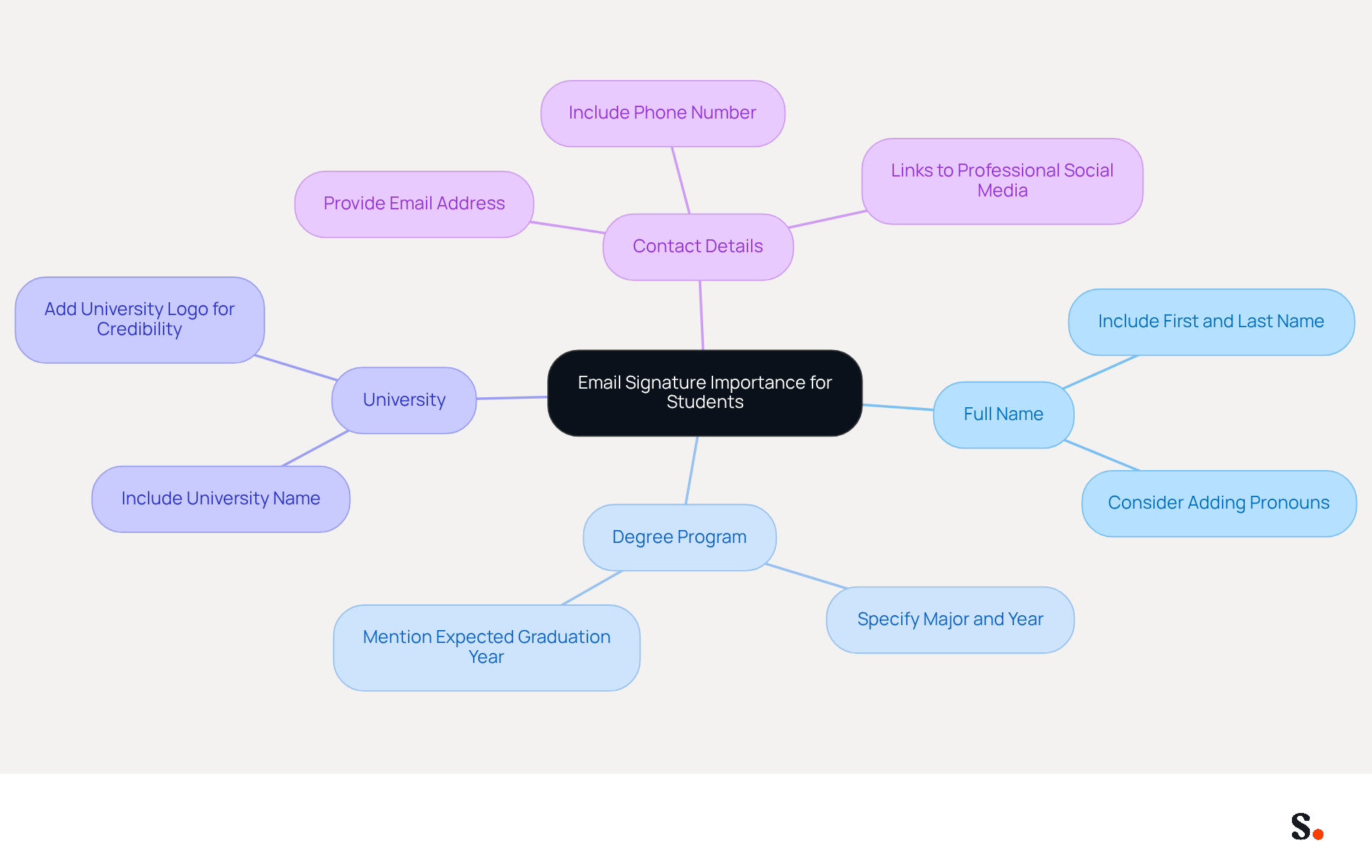
A well-crafted message footer is not just an accessory; it is a vital tool for establishing professionalism and identity in digital correspondence. For students, knowing what to put on an email signature typically includes essential information such as:
- Full name
- Degree program
- University
- Contact details
The significance of a well-designed message footer cannot be overstated; it boosts the sender's credibility and enables smoother communication by offering recipients all essential contact details at a glance. In a competitive academic setting, a refined contact footer can greatly enhance response rates, creating a favorable impression on professors, peers, and prospective employers.
Research indicates that effective digital identifiers can boost engagement significantly, with strategic elements increasing interaction by as much as 40%. Furthermore, incorporating key components like a clear call to action and links to professional social media profiles can enhance visibility and networking opportunities.
Regular updates to contact details are crucial, as 44.4% of users refresh their information two to four times each year, ensuring that the details remain current and relevant. Scribe allows students to automatically sync their identifiers with Google Workspace and Aircall, ensuring their information is always up to date. Scribe also ensures compliance with important security standards, giving users confidence in their data management. By prioritizing effective design in their digital identifiers, students can significantly enhance their professional outreach and networking potential.
Identify Essential Elements of a Student Email Signature
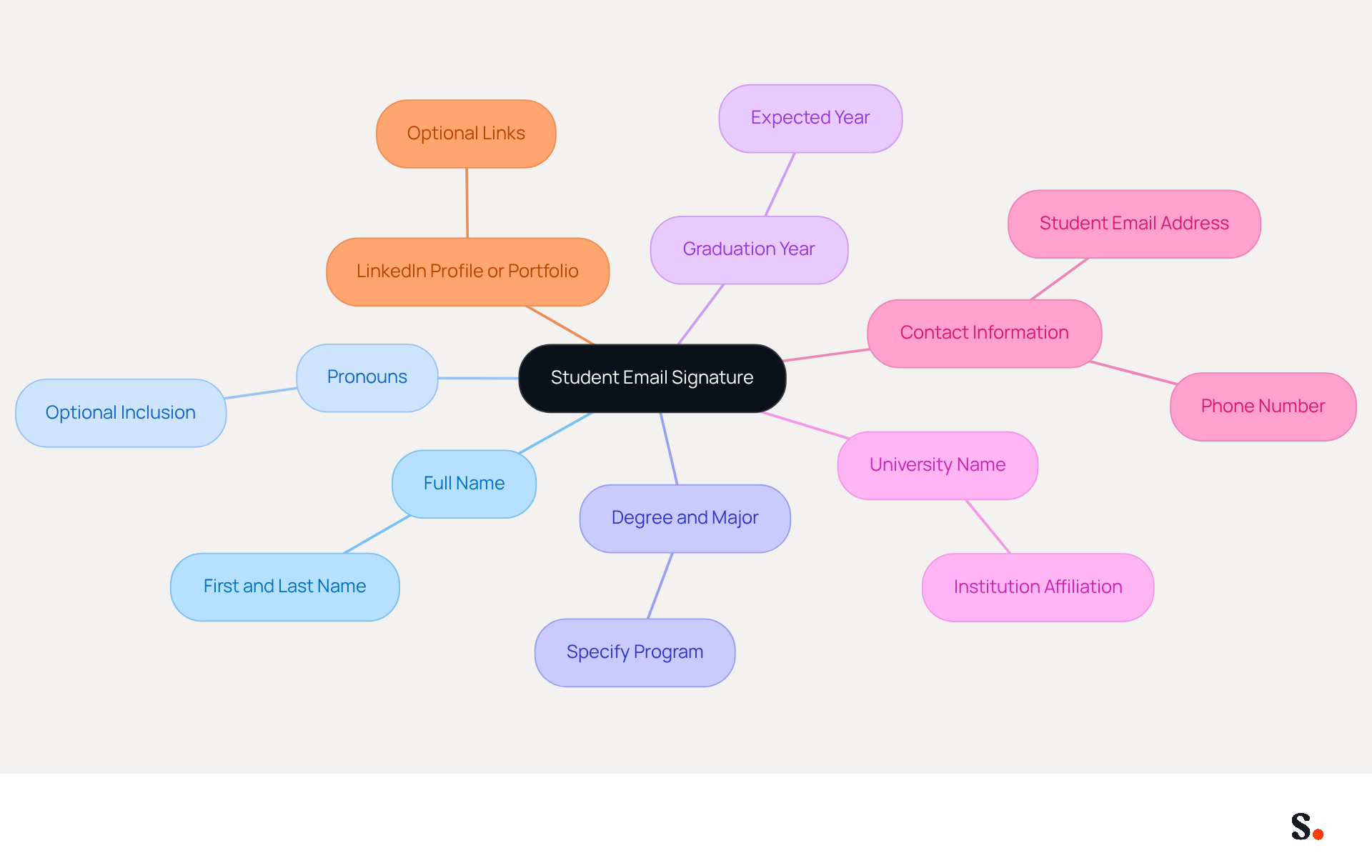
A well-crafted student email signature is essential for establishing professionalism and facilitating effective communication:
- Full Name: Clearly state your first and last name to ensure recipients can easily identify you.
- Pronouns: Optionally include your pronouns to foster inclusivity and respect for diversity.
- Degree and Major: Specify your degree program and major, providing context about your academic focus and aspirations.
- Graduation Year: Indicate your expected graduation year, helping recipients understand your academic timeline and availability.
- University Name: Include the name of your institution to establish credibility and affiliation.
- Contact Information: Provide your student contact address and, if comfortable, a phone number for direct communication, ensuring recipients can reach you easily.
- LinkedIn Profile or Portfolio: Optionally, include links to your LinkedIn profile or an online portfolio to showcase your work and professional achievements, enhancing your digital presence.
Together, these components create a strong representation of your professional image and enhance communication, helping you understand what to put on email signature as a student. Research indicates that including key elements in your email signature can significantly boost engagement, with studies showing a 40% increase in interaction rates when calls to action are included. Furthermore, following best practices, such as keeping sign-offs concise and limiting them to 3-4 lines, ensures clarity and readability, which are essential in professional correspondence. Moreover, numerous universities have particular guidelines concerning digital correspondence formats, including restrictions on images and personal quotes, which learners should be informed about. Using system fonts in black text on a white background is also recommended for maximum readability. By implementing these elements, students not only present themselves professionally but also open doors to valuable networking opportunities.
Apply Best Practices for Formatting and Design
Creating an effective email footer requires careful attention to formatting and design principles. Here are some guidelines:
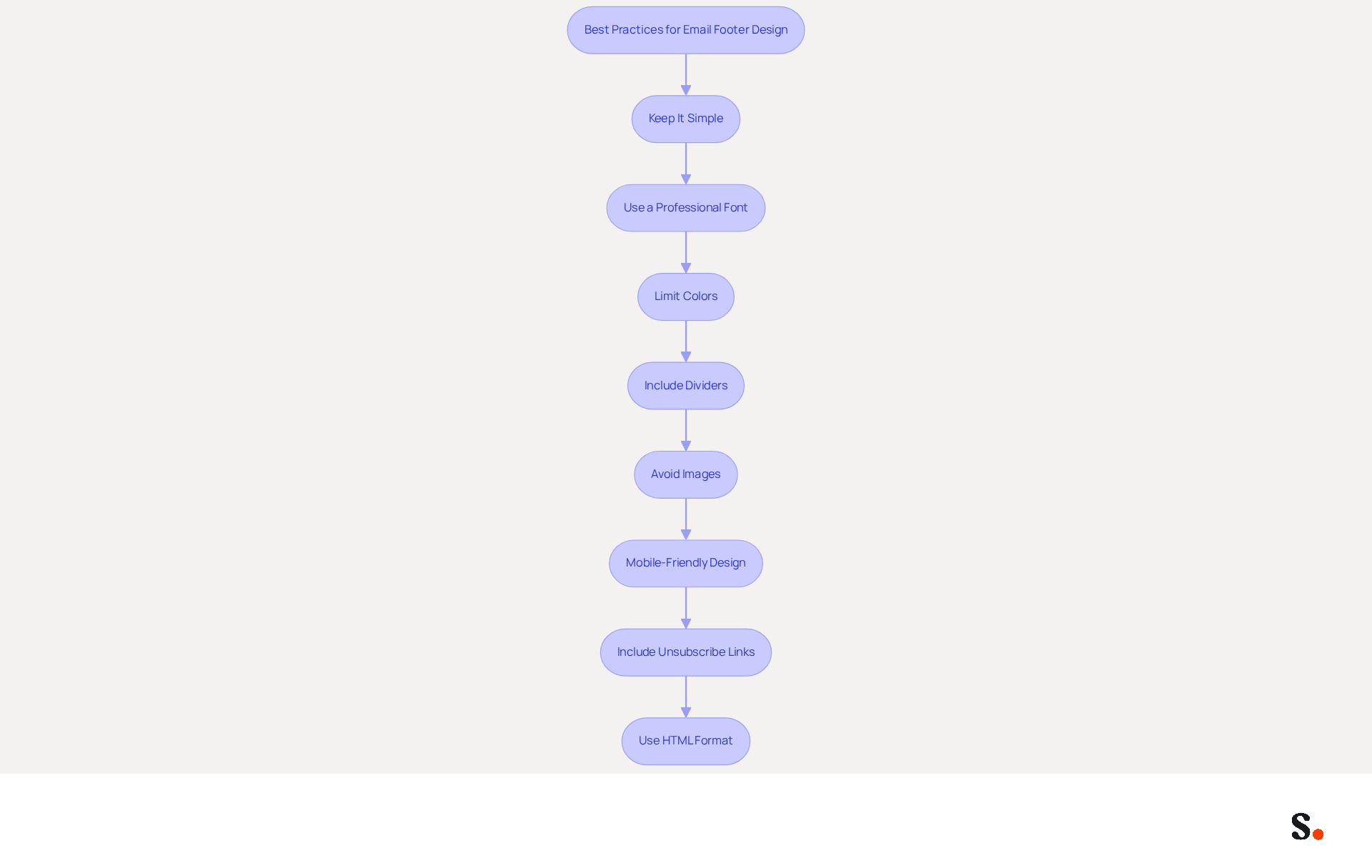
- Keep It Simple: A concise sign-off is more effective. Avoid clutter by limiting the amount of information included. Studies indicate that clear and simple designs are proven to enhance engagement significantly.
- Use a Professional Font: Opt for clean, legible fonts like Arial or Calibri, maintaining a font size between 10-12 points for readability. This guarantees that your mark is easily readable across various devices.
- Limit Colors: Stick to a simple color palette that aligns with your university's branding. Too many colors can overwhelm the recipient, leading to disengagement. Using a maximum of two colors helps maintain brand identity and visual appeal.
- Include Dividers: Use horizontal lines or spacing to separate different sections of your mark, enhancing readability. This practice ensures a polished and professional appearance.
- Avoid Images: While logos can enhance branding, they may not render correctly in all messaging clients. Rely on text for reliability. Research indicates that email footers featuring clear calls-to-action can improve conversion rates by up to 40%.
- Mobile-Friendly Design: Ensure your mark is visually appealing on both desktop and mobile devices, as many recipients view messages on their phones. Testing your mark across different messaging platforms is essential to guarantee proper display and functionality.
- Include Unsubscribe Links: For individuals engaging in marketing or outreach activities, incorporating unsubscribe links is crucial for adherence to regulations such as CAN-SPAM and GDPR.
- Use HTML Format: Creating your message footer in HTML format guarantees uniform formatting across various mail clients, which is essential for upholding professionalism.
By adhering to these optimal methods, learners can discover what to put on email signature as a student to develop a professional and visually attractive communication footer that improves their interactions. Ultimately, a well-crafted email footer can significantly enhance your professional image and communication effectiveness.
Examine Examples of Effective Student Email Signatures
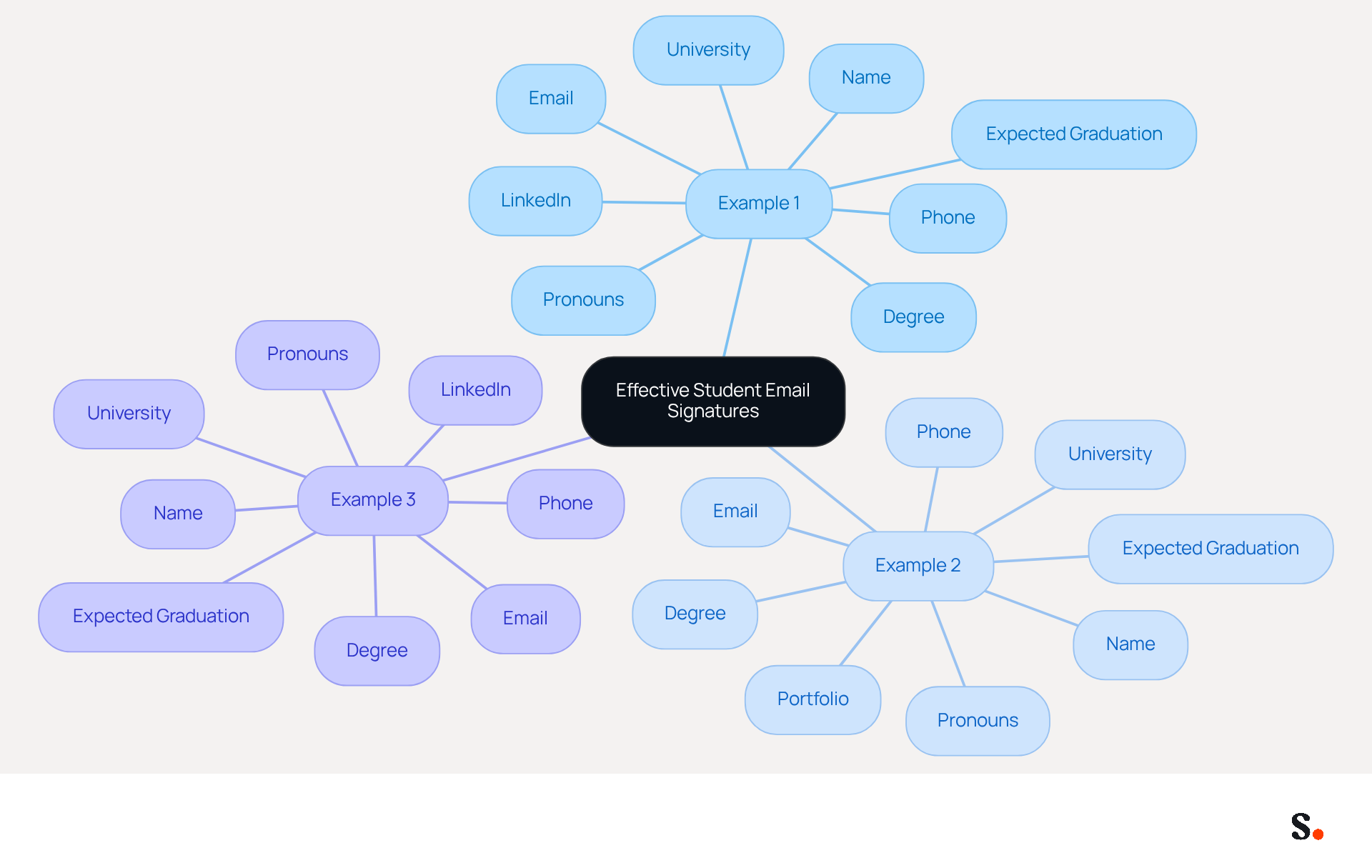
Understanding what to put on email signature as a student is essential for establishing professionalism in digital communication. To illustrate how to do this, consider the following examples:
- Example 1:
Jane Doe
Pronouns: she/her
Bachelor of Arts in Psychology
Expected Graduation: May 2026
University of XYZ
Email: jane.doe@university.edu
Phone: (123) 456-7890
LinkedIn: linkedin.com/in/janedoe - Example 2:
John Smith
Pronouns: he/him
Bachelor of Science in Computer Science
Expected Graduation: December 2025
University of ABC
Email: john.smith@university.edu
Phone: (987) 654-3210
Portfolio: johnsmithportfolio.com - Example 3:
Emily Johnson
Bachelor of Business Administration
Expected Graduation: June 2027
University of DEF
Email: emily.johnson@university.edu
Phone: (555) 123-4567
LinkedIn: linkedin.com/in/emilyjohnson
These examples demonstrate how to effectively incorporate essential elements and best practices. Each mark is clear, concise, and professional, making it easy for recipients to identify the sender and their contact information. Interestingly, about 76% of consumers tend to trust branded digital identifiers, emphasizing their importance as a crucial element of professional communication. In fact, 42% of consumers view businesses less favorably when they receive messages without a branded closure, highlighting the significance of professionalism in message branding. Furthermore, students should think about developing various digital identifiers for different situations, ensuring they represent themselves suitably based on the audience. Testing email signatures on both desktop and mobile devices is also recommended to ensure proper formatting and display across various platforms. Ultimately, understanding what to put on email signature as a student can significantly influence how recipients perceive your professionalism and credibility.
Conclusion
For students, a well-crafted email signature is not just a formality; it is a crucial element in establishing professionalism and effective communication. By incorporating key elements such as full name, degree program, university affiliation, and contact details, students can create a digital identity that reflects their academic pursuits and fosters credibility in their interactions. A polished email footer plays a critical role in shaping how recipients perceive the sender, ultimately influencing response rates and networking opportunities.
Throughout the article, we have discussed various essential components and best practices for designing an effective student email signature. These include:
- Maintaining simplicity in design
- Using professional fonts
- Ensuring mobile-friendliness
Additionally, examples of effective signatures illustrate how to implement these guidelines, showcasing the importance of clarity and professionalism. When students follow these strategies, they can truly boost their outreach and engagement, making a lasting impression on professors, peers, and potential employers.
In conclusion, the significance of a well-designed email signature extends beyond mere aesthetics; it serves as a vital component of professional communication in the academic world. Students are encouraged to take the time to craft their signatures thoughtfully, ensuring they represent their personal brand effectively. By investing time in crafting a thoughtful email signature, students can significantly enhance their professional image and open doors to new opportunities.
Frequently Asked Questions
What is an email signature and why is it important for students?
An email signature is a well-crafted message footer that serves as a vital tool for establishing professionalism and identity in digital correspondence. For students, it typically includes essential information such as full name, degree program, university, and contact details.
How does a well-designed email signature benefit students?
A well-designed email signature boosts the sender's credibility and enables smoother communication by providing recipients with all essential contact details at a glance. It can enhance response rates and create a favorable impression on professors, peers, and prospective employers.
What impact can effective digital identifiers have on engagement?
Research indicates that effective digital identifiers can significantly boost engagement, with strategic elements increasing interaction by as much as 40%.
What key components should be included in an email signature?
Key components of an email signature should include a clear call to action and links to professional social media profiles to enhance visibility and networking opportunities.
How often should students update their email signature?
Regular updates to contact details are crucial, as 44.4% of users refresh their information two to four times each year to ensure that the details remain current and relevant.
How does Scribe assist students with their email signatures?
Scribe allows students to automatically sync their identifiers with Google Workspace and Aircall, ensuring their information is always up to date. It also ensures compliance with important security standards, giving users confidence in their data management.
What is the overall benefit of prioritizing effective design in digital identifiers for students?
By prioritizing effective design in their digital identifiers, students can significantly enhance their professional outreach and networking potential.
List of Sources
- Define Email Signature: Importance for Students
- Email Signatures for College & Uni Students | Rocketseed (https://rocketseed.com/blog/email-signatures-for-students)
- Email signatures for students in 2026: tips and real templates (https://mysignature.io/blog/why-do-students-need-personal-email-signatures)
- Email signatures for students – a professional guide (https://mail-signatures.com/articles/email-signatures-for-students)
- 4 Best Practices for Email Signatures for Undergraduate Students (https://scribe-mail.com/en-US/blog/4-best-practices-for-email-signatures-for-undergraduate-students)
- Crafting a Professional Email Signature for Students: Key Practices (https://scribe-mail.com/en-US/blog/crafting-a-professional-email-signature-for-students-key-practices)
- Identify Essential Elements of a Student Email Signature
- 4 Best Practices for Email Signatures for Undergraduate Students (https://scribe-mail.com/en-US/blog/4-best-practices-for-email-signatures-for-undergraduate-students)
- Student Email Signature: Examples, Best Practices & Setup Guide (https://getmailbird.com/student-email-signature-examples-setup-guide)
- Best Practices for Crafting a Student Email Signature Example (https://scribe-mail.com/en-US/blog/best-practices-for-crafting-a-student-email-signature-example)
- How to create the perfect college student email signature (with examples) — Stripo.email (https://stripo.email/blog/how-to-create-the-perfect-college-student-email-signature)
- Create A Professional Student Email Signature Navigation (https://rhmdb.irs.kg.gov.ng/kg-news/create-a-professional-student-email-signature-1767648259)
- Apply Best Practices for Formatting and Design
- Email Signature Best Practices - NEWOLDSTAMP (https://newoldstamp.com/blog/email-signature-best-practices)
- Email Signature Best Practices Guide With Examples - MailerLite (https://mailerlite.com/blog/email-signature-best-practices)
- 12 Best Email Signature and Disclaimer Practices (https://cloud-awards.com/12-tips-for-effective-use-of-email-signatures-and-disclaimers)
- Email Signature Best Practices for 2026 (+ 15 Pro Examples) (https://wavecnct.com/blogs/email-signature-best-practices-2026)
- Best Practices Designing Email Signatures - Lynne Golodner (https://lynnegolodner.com/articles/best-practices-designing-email-signatures)
- Examine Examples of Effective Student Email Signatures
- The best email signatures for students: get your own for free (https://mail-signatures.com/articles/student-email-signature)
- How to create the perfect college student email signature (with examples) — Stripo.email (https://stripo.email/blog/how-to-create-the-perfect-college-student-email-signature)
- Email Signatures For University, College And School Students - NEWOLDSTAMP (https://newoldstamp.com/blog/email-signatures-for-university-college-and-school-students)
- 40+ Email Signature Statistics for 2026 (Data + Insights) (https://wavecnct.com/blogs/email-signature-statistics)
- Best Practices for Crafting a Student Email Signature Example (https://scribe-mail.com/en-US/blog/best-practices-for-crafting-a-student-email-signature-example)
Get started with Scribe
See why teams switch to Scribe
Free 14-day trial — no credit card.