Crafting a Professional Email Signature for Students: Key Practices
Crafting a professional email signature is crucial for students aiming to establish a strong personal brand in academic and professional settings. A
Sophie Grant
Email Signature Specialist, Scribe

On this page
Introduction
Crafting a professional email signature is crucial for students aiming to establish a strong personal brand in academic and professional settings. A well-designed signature not only conveys vital information but also reflects one's identity and aspirations, making it a powerful tool for networking and communication. Yet, students often find it challenging to create a signature that reflects both their professional image and personal style. Identifying the key components and strategies can turn a simple email footer into a powerful representation of their brand.
Identify Essential Components of a Professional Email Signature
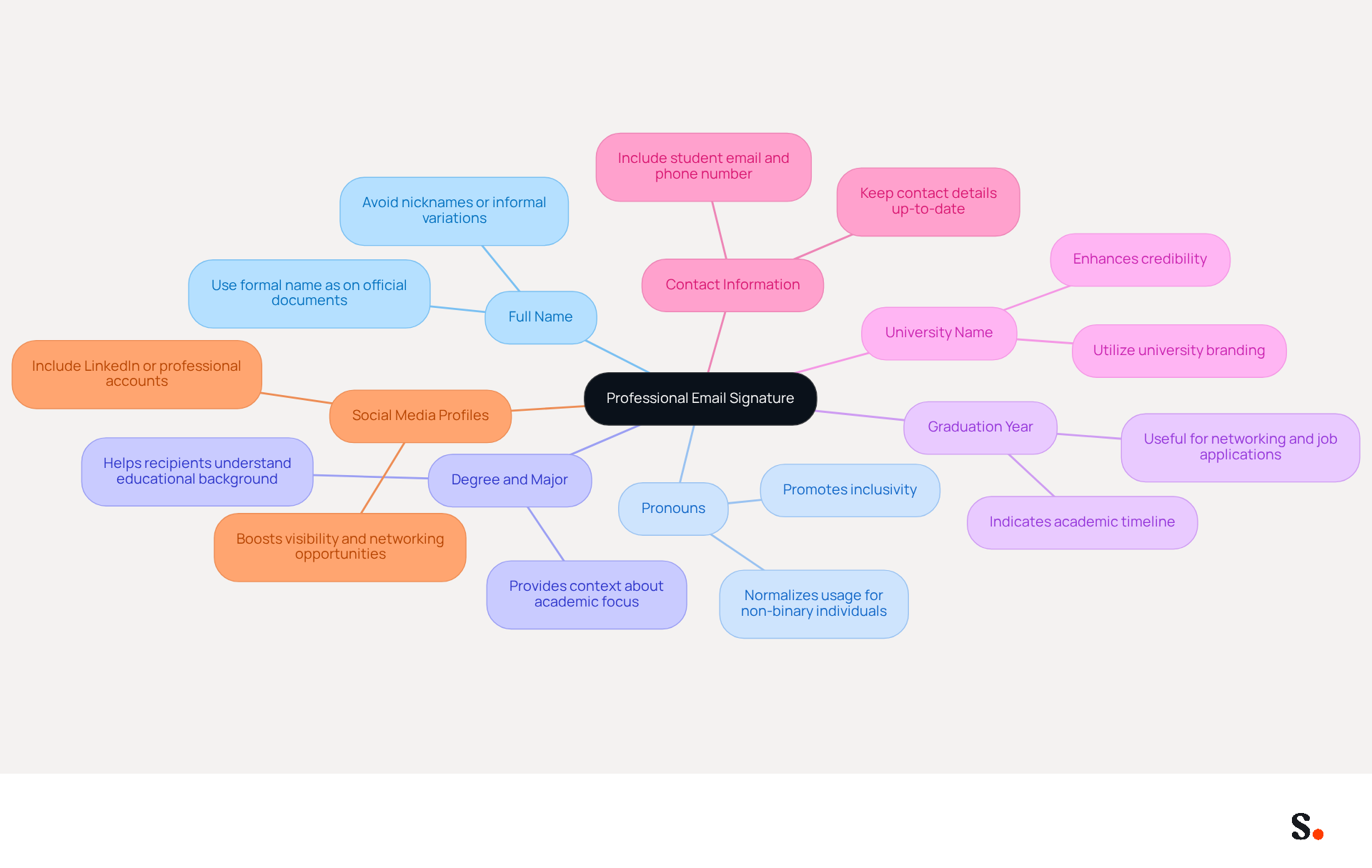
A professional email signature is not just a formality; it is a critical component of your professional identity. A professional email signature should include the following key components:
- Full Name: Clearly state your full name to establish your identity. Using your formal name as it appears on official documents helps ensure clarity and professionalism.
- Pronouns: If comfortable, include your pronouns to promote inclusivity and respect in communications. This practice is increasingly recognized as a way to foster a welcoming environment.
- Degree and Major: Specify your current degree and major to provide context about your academic focus. This information helps recipients understand your educational background and aspirations.
- Graduation Year: Mention your expected graduation year to inform recipients of your academic timeline. This detail can be particularly useful for networking and job applications, as it indicates your availability for internships or employment.
- University Name: Include the name of your university to enhance credibility. Utilizing university branding, such as logos and colors, can further reinforce your affiliation and professionalism, as it helps establish a recognizable identity.
- Contact Information: Provide your student email and phone number for easy communication. Ensuring that your contact details are up-to-date is crucial, as 44.4% of users refresh their contact information 2-4 times annually.
- Social Media Profiles: Optionally, include addresses to professional social media accounts like LinkedIn to showcase your professional network. Studies show that including links to professional social media accounts can significantly boost visibility and networking opportunities, with students who do so often experiencing increased engagement.
It's also important to check how your email footer looks in different email clients to avoid any display issues that might undermine your professionalism. Common pitfalls to avoid include using excessive graphics or informal names, which can detract from the overall effectiveness of your branding.
Ultimately, a well-crafted email signature can be the difference between being overlooked and making a lasting impression. By incorporating these elements, students can create a professional email signature that effectively conveys essential information and reflects their professional identity. A well-crafted email footer can greatly influence academic interactions, as students who use professional footers report better responses from professors and increased interest from internship coordinators. Furthermore, with Scribe's seamless integration with Calendly, any modifications made to your Calendly settings automatically sync with your documents, ensuring effortless updates and consistent branding across all communications. Importantly, Scribe is SOC 2 Type II compliant and adheres to GDPR and CCPA regulations, ensuring secure data handling and compliance.
Establish Your Brand and Professional Identity in Signatures
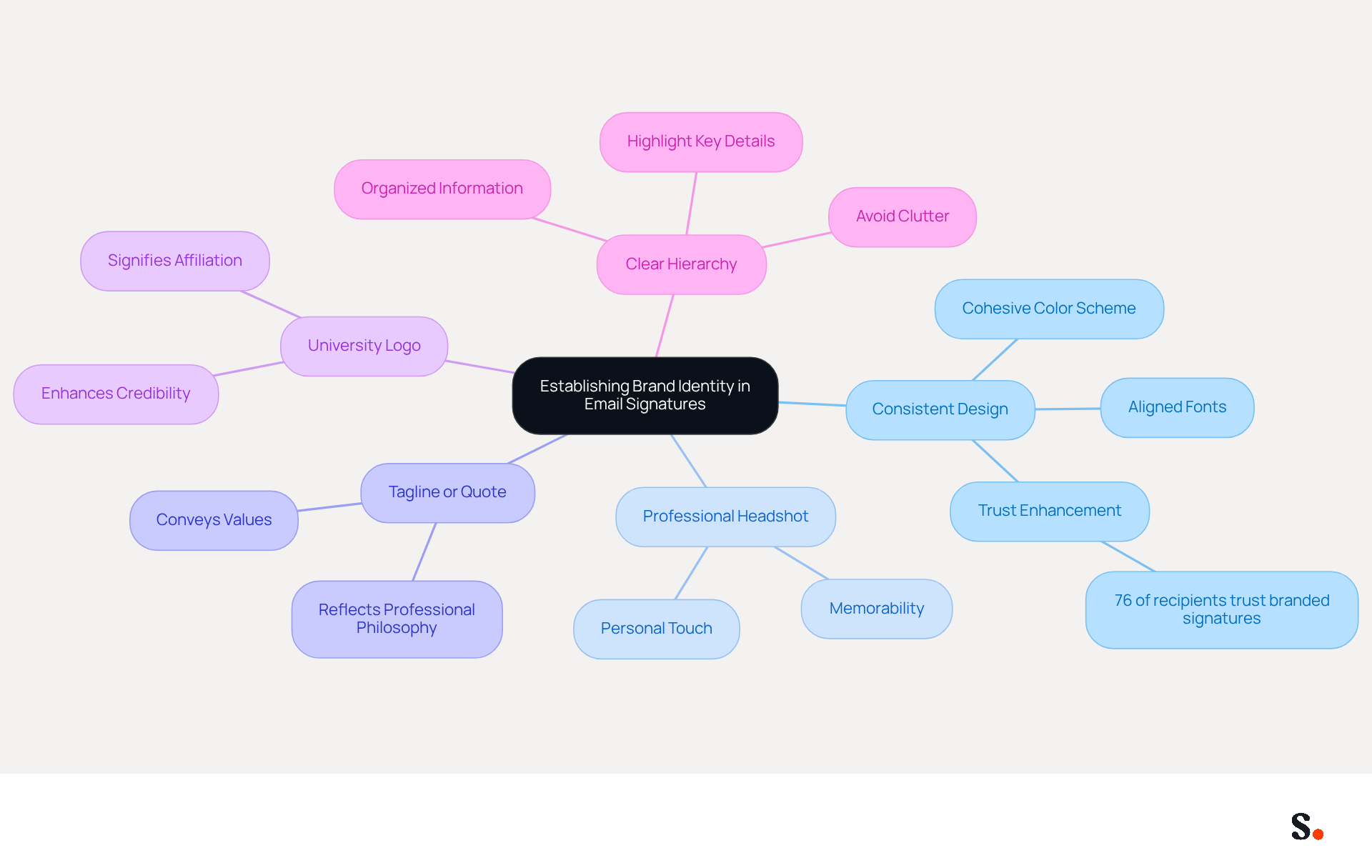
To effectively establish your brand and professional identity through your email signature, it is crucial to implement strategic design elements:
- Consistent Design: Utilize a cohesive color scheme and font that aligns with your personal or university branding. This consistency enhances recognition and reinforces your identity. Research shows that 76% of recipients trust senders who use branded digital identifiers.
- Professional Headshot: Adding a professional photo makes your signature more personal and memorable for recipients.
- Tagline or Quote: If appropriate, add a brief tagline or quote that reflects your professional philosophy or aspirations. This personal touch can convey your values and make a lasting impression. As expert Manasa Goli points out, 'Your message footer might seem like a minor detail - something you set once and forget. But here’s the truth: every email you send is a branding opportunity.'
- University Logo: Incorporating your university's logo enhances credibility and signifies your affiliation, which can be particularly beneficial in academic and professional contexts. The case study on 'The Academic Signature' illustrates how Professor Daniel Kim effectively uses his institutional affiliation to add authority and credibility.
- Clear Hierarchy: Organize information to highlight the most important details first, ensuring that recipients can quickly find key information. Avoid cluttering your sign-off with excessive links or large promotional banners, as these can lead to confusion and a lack of professionalism.
By concentrating on these elements, students can develop a professional email signature that not only conveys essential information but also reinforces their professional identity. Regular evaluations of electronic correspondences are also essential to uphold brand consistency and ensure that all components align with current branding guidelines. With Scribe, any modifications made in your Aircall configuration will automatically be reflected in your communications, ensuring effortless updates and enhanced brand consistency. Furthermore, Scribe's SOC 2 Type II certification and adherence to GDPR and CCPA guarantee secure data management, making it a trustworthy option for handling digital identities. These strategies demonstrate how thoughtful design and strategic elements in digital identifiers can lead to greater engagement and recognition, with Scribe users experiencing an average click-through rate of 12% on banner displays.
Optimize Your Signature for Engagement and Marketing
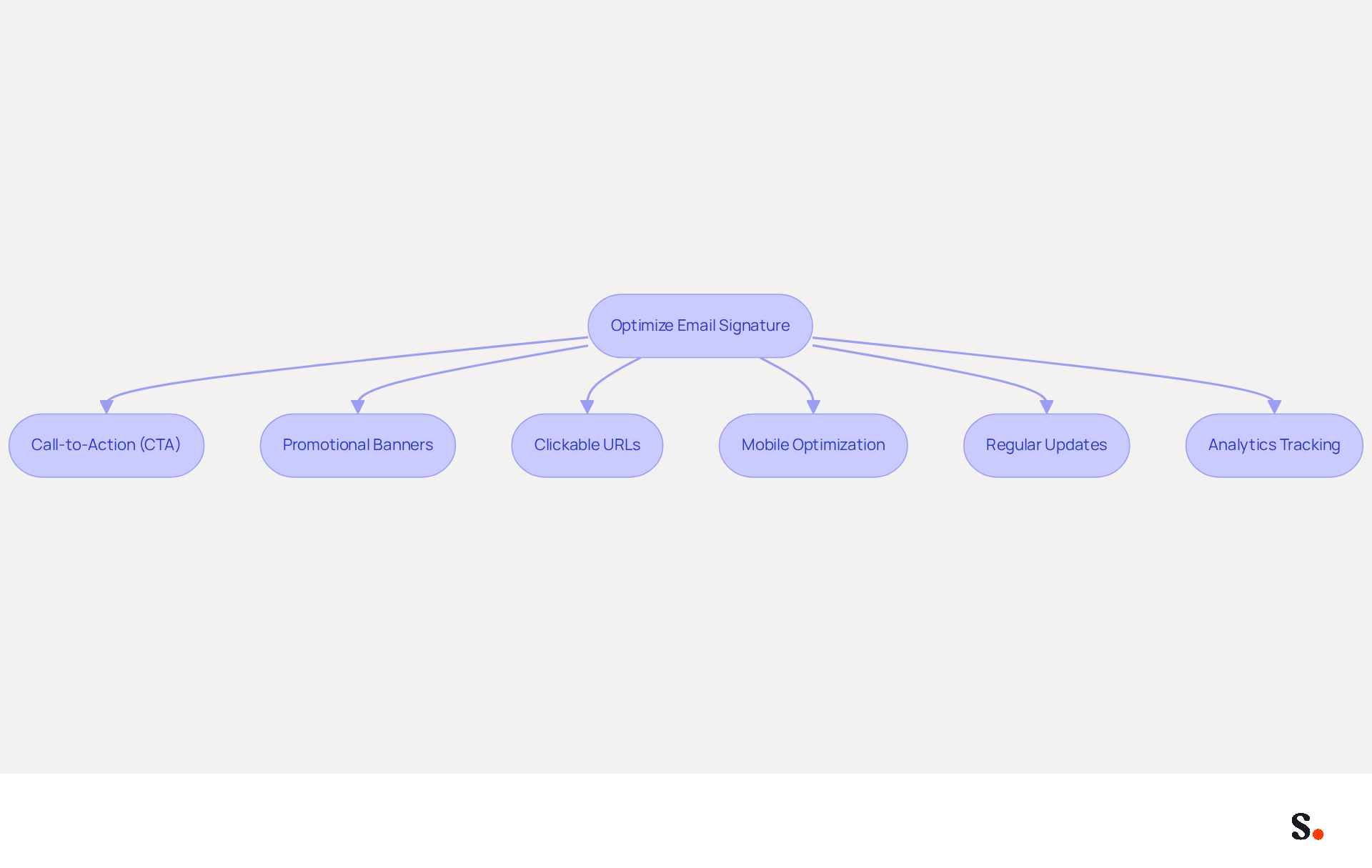
To enhance engagement and marketing effectiveness, optimizing your email signature is essential:
- Call-to-Action (CTA): Incorporate a clear CTA, such as a reference to your portfolio, blog, or LinkedIn profile, to encourage recipients to engage further. Research shows that strategic CTAs can increase engagement rates by up to 40%.
- Promotional Banners: Capturing attention in a crowded inbox can be challenging; consider adding a small banner promoting an upcoming event, project, or achievement. This approach significantly enhances visibility and engagement, with Scribe's average click-through rate on banners being 12%.
- Clickable URLs: Ensure that all URLs are interactive and direct to relevant content, making it easy for recipients to access additional information. Emails with branded footers receive a 22% higher response rate than those without, highlighting the significance of effective link placement.
- Mobile Optimization: Design your identifier to be mobile-friendly, ensuring it displays correctly on various devices. With many recipients viewing messages on their phones, a responsive design is essential for maintaining professionalism and accessibility.
- Regular Updates: Regularly refresh your email footer to reflect any changes in your position, company, or contact details. Syncing your Google Workspace with Scribe saves you time, as any changes will be automatically reflected in the platform without any input on your part. This practice helps maintain brand integrity and ensures that your mark remains relevant and effective. Additionally, Scribe's SOC 2 Type II certification and compliance with GDPR and CCPA ensure that your data is handled securely and responsibly.
- Analytics Tracking: Utilize tracking links to measure engagement with your email, allowing you to adjust strategies based on performance. Examining metrics from electronic correspondence, such as click-through rates and engagement levels, can offer valuable insights into customer behavior and preferences.
By adopting these strategies, you position your digital identifiers as powerful tools for engagement and opportunity creation. Regular updates and thoughtful design can further ensure that digital identifiers remain relevant and impactful.
Customize Your Signature for Individual Needs and Contexts
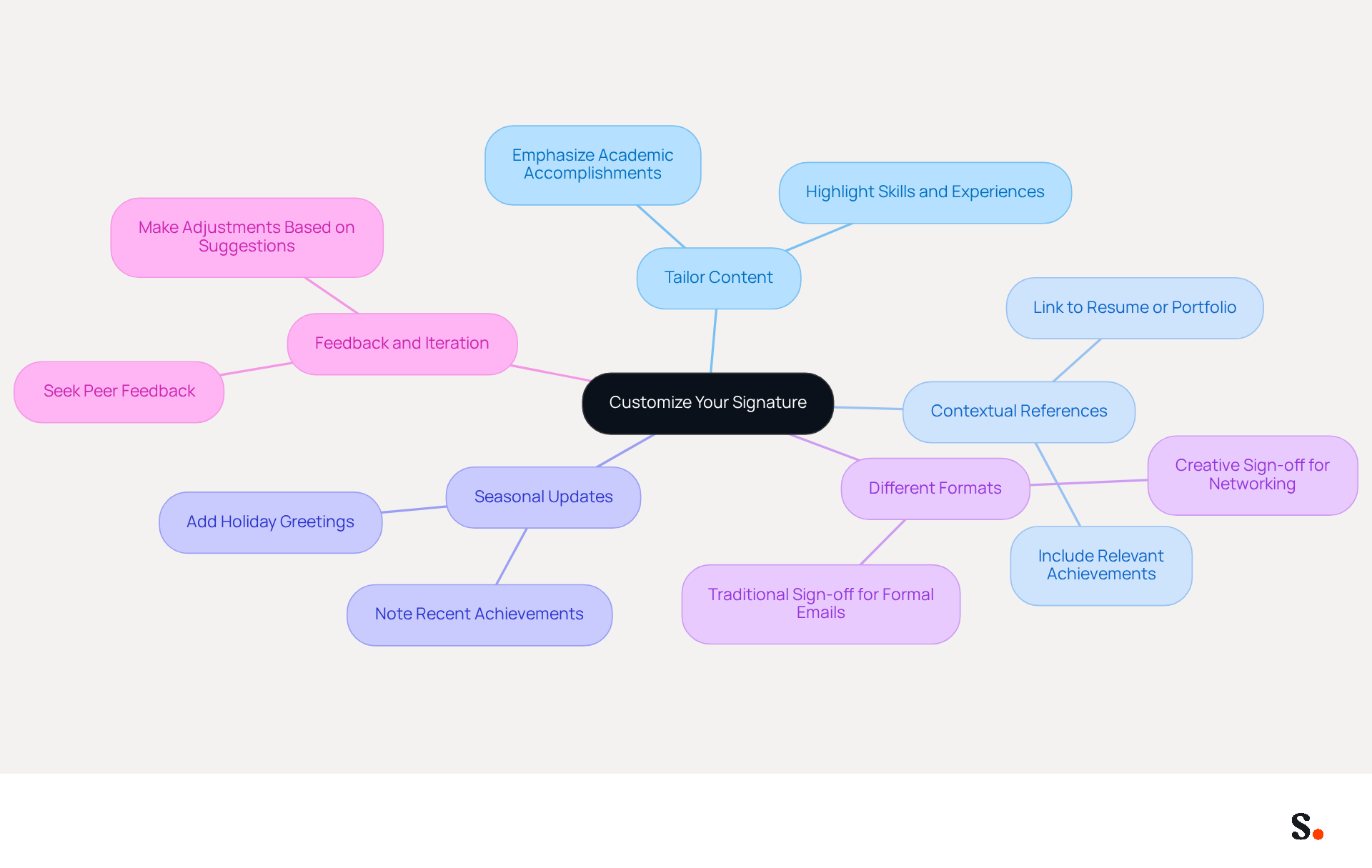
Effective communication hinges on the ability to tailor your message footer to suit various contexts. Here are some essential tips:
- Tailor Content: Adjust the information in your signature based on the recipient. For instance, when contacting a professor, emphasize your academic accomplishments, while a job application message should highlight your skills and experiences.
- Contextual References: Include connections relevant to the specific context of your email. If applying for an internship, link to your resume or portfolio to provide immediate access to your qualifications.
- Seasonal Updates: Update your email footer for special occasions, like adding a holiday greeting or noting a recent achievement to keep your communication timely and personal.
- Different Formats: Use varied formats for different types of emails. A more traditional sign-off may be appropriate for formal communications, while a creative sign-off might be suitable for networking events, reflecting your personality and the context.
- Feedback and Iteration: Seek feedback on your work from peers or mentors and be open to making adjustments based on their suggestions. This iterative process can assist in refining your identity to better resonate with your audience.
Additionally, utilizing Scribe's integration with Calendly enables automatic updates to your email branding, ensuring consistency across all communications. With this integration, any updates you make in Calendly will automatically reflect in your Scribe materials, making it easier to manage your professional image. With Scribe, you can effortlessly maintain compliance with SOC 2 Type II standards, ensuring secure data handling while you focus on crafting effective messages.
By personalizing your message footer, you ensure that it resonates with your audience and serves its intended purpose effectively. For example, a psychotherapy office that revamped its contact information to prominently include a direct link for booking appointments experienced a 15% rise in consultations, showing how clear calls to action can significantly enhance engagement in contact details. Similarly, companies utilizing Scribe's AI-driven email signature solutions have reported a 20% increase in click-through rates, emphasizing the impact of personalization and context in email communications. This approach not only enhances engagement but also drives measurable results in your communication efforts.
Conclusion
Crafting a professional email signature is not just a formality; it is a crucial step in establishing a strong professional identity. A well-crafted signature conveys essential information and reflects personal branding, serving as a vital tool in both academic and professional communications. By including key elements like your full name, degree, contact info, and social media links, students can craft a signature that truly stands out and engages others.
Throughout the article, various strategies have been discussed to enhance the effectiveness of email signatures. These include:
- Maintaining a consistent design
- Optimizing for mobile devices
- Regularly updating content to reflect current information
Additionally, the importance of tailoring signatures to specific contexts and audiences has been emphasized, showcasing how personalization can significantly improve engagement rates. Utilizing tools like Scribe can streamline this process, ensuring compliance with security standards while allowing for easy updates and integration with other platforms.
Ultimately, a professional email signature serves as a powerful branding opportunity for students. By applying the strategies discussed, students can enhance their visibility and forge meaningful connections in their academic and professional journeys. Investing time in crafting a thoughtful email signature can open doors to new opportunities and enhance professional relationships.
Frequently Asked Questions
What is the purpose of a professional email signature?
A professional email signature is a critical component of your professional identity, helping to establish clarity and professionalism in communications.
What key components should be included in a professional email signature?
A professional email signature should include your full name, pronouns, degree and major, graduation year, university name, contact information, and optionally, social media profiles.
Why is it important to include pronouns in an email signature?
Including pronouns promotes inclusivity and respect in communications, fostering a welcoming environment.
How does mentioning your degree and major benefit your email signature?
Specifying your degree and major provides context about your academic focus, helping recipients understand your educational background and aspirations.
What is the significance of including your graduation year in an email signature?
Mentioning your expected graduation year informs recipients of your academic timeline, which can be useful for networking and job applications.
Why should you include your university name in your email signature?
Including your university name enhances credibility and helps establish a recognizable identity, especially when utilizing university branding.
What contact information should be provided in a professional email signature?
You should provide your student email and phone number to facilitate easy communication, ensuring that your contact details are up-to-date.
How can including social media profiles in your email signature be beneficial?
Including links to professional social media accounts like LinkedIn can boost visibility and networking opportunities, leading to increased engagement.
What common pitfalls should be avoided when creating an email signature?
Avoid using excessive graphics or informal names, as these can detract from the overall effectiveness of your branding.
How can a well-crafted email signature impact academic interactions?
A well-crafted email signature can lead to better responses from professors and increased interest from internship coordinators.
What compliance standards does Scribe adhere to regarding data handling?
Scribe is SOC 2 Type II compliant and adheres to GDPR and CCPA regulations, ensuring secure data handling and compliance.
List of Sources
- Identify Essential Components of a Professional Email Signature
- Best Practices for Crafting a Student Email Signature Example (https://scribe-mail.com/en-US/blog/best-practices-for-crafting-a-student-email-signature-example)
- Email Signature for Students: Professional Templates for Internships & Networking (https://syncsignature.com/blog/email-signature-for-students)
- 10 Essential Email Signature Tips for PhD Students (https://scribe-mail.com/en-US/blog/10-essential-email-signature-tips-for-phd-students)
- How to Set Up Professional Email Signatures in College — InternQueen (https://internqueen.com/blog/how-set-professional-email-signatures-college)
- Email signatures for students – a professional guide (https://mail-signatures.com/articles/email-signatures-for-students)
- Establish Your Brand and Professional Identity in Signatures
- The impact of email signatures on your branding (https://signitic.com/en/resources/the-impact-of-email-signatures-on-your-branding)
- Email Signature Branding: Consistency and Impact | Crossware365 (https://crossware365.com/blog/mastering-email-signature-branding-market-presence)
- Email Signature Examples for Professionals: Do’s & Don’ts (https://oppora.ai/blog/email-signature-examples-for-professionals)
- Essential Tips for an Effective Email Signature (https://blog.gravatar.com/2025/02/28/what-to-include-in-email-signature)
- How to Create a Professional Email Signature for UK SMBs (https://computercentric.com/blog/create-professional-email-signature)
- Optimize Your Signature for Engagement and Marketing
- Email signature statistics: Why every business should optimize their email signatures — Stripo.email (https://stripo.email/blog/email-signature-statistics-why-every-business-should-optimize-their-email-signatures)
- Best Practices for a Standard Email Signature That Boosts Marketing ROI (https://scribe-mail.com/en-US/blog/best-practices-for-a-standard-email-signature-that-boosts-marketing-roi)
- 10 Strategies for Increasing User Engagement with Business Email Signatures (https://exclaimer.com/blog/email-signatures-key-business-tool)
- The impact of email signatures on your branding (https://signitic.com/en/resources/the-impact-of-email-signatures-on-your-branding)
- Customize Your Signature for Individual Needs and Contexts
- Email signature statistics and trends in 2024 (https://wisestamp.com/blog/email-signature-statistics)
- The ultimate guide to email signatures in 2026 (https://signitic.com/en/resources/email-signature)
- Ultimate guide to dynamic signatures (https://signitic.com/en/resources/ultimate-guide-to-dynamic-signatures)
- 7 Reasons You Need Multiple Email Signatures (https://wisestamp.com/guides/why-you-need-multiple-versions-of-your-email-signature)
- Email signature statistics: Why every business should optimize their email signatures — Stripo.email (https://stripo.email/blog/email-signature-statistics-why-every-business-should-optimize-their-email-signatures)
Get started with Scribe
Signatures for every role on your team
Free 14-day trial — no credit card.