Master Professional Email Closing Salutations for Effective Communication
Selecting the right email closing salutation can significantly impact how your message is received, yet many professionals find this task challenging. The
Sophie Grant
Email Signature Specialist, Scribe
Introduction
Selecting the right email closing salutation can significantly impact how your message is received, yet many professionals find this task challenging. The challenge of selecting an appropriate closing that aligns with the email's tone and context can lead to misunderstandings or missed opportunities. Mastering this skill can transform your professional interactions and ensure your communications resonate effectively.
Identify Essential Components of Email Closings
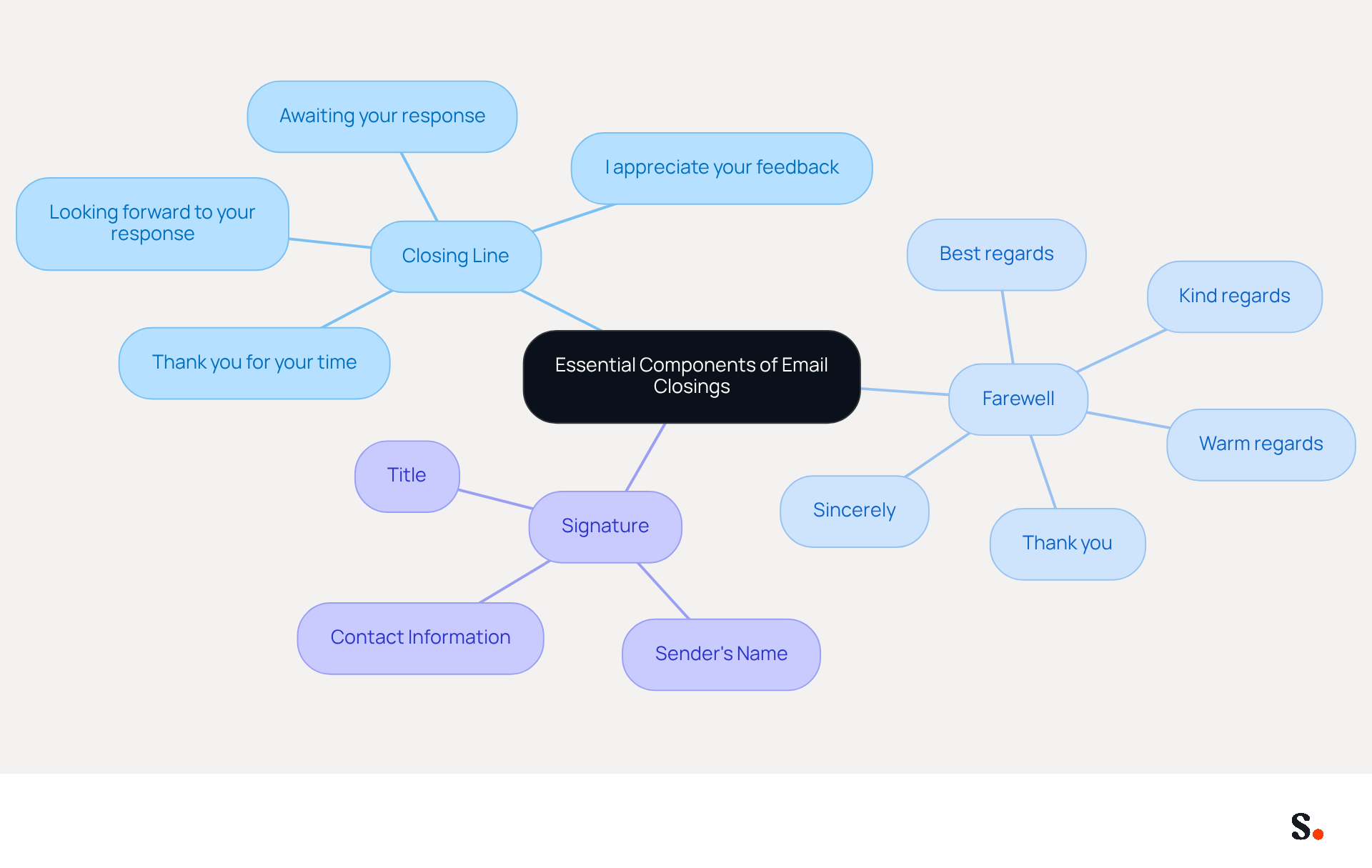
Crafting professional email closing salutations is crucial for effective communication. Professional email closing salutations typically include three essential elements: a closing line, a farewell, and a signature. The closing line can effectively summarize your message or convey appreciation, such as 'Thank you for your time' or 'Looking forward to your response.' The professional email closing salutations, which follow the closing line, can vary in formality and should align with the email's tone. Professional email closing salutations commonly include:
- 'Sincerely,'
- 'Best regards,'
- 'Thank you.'
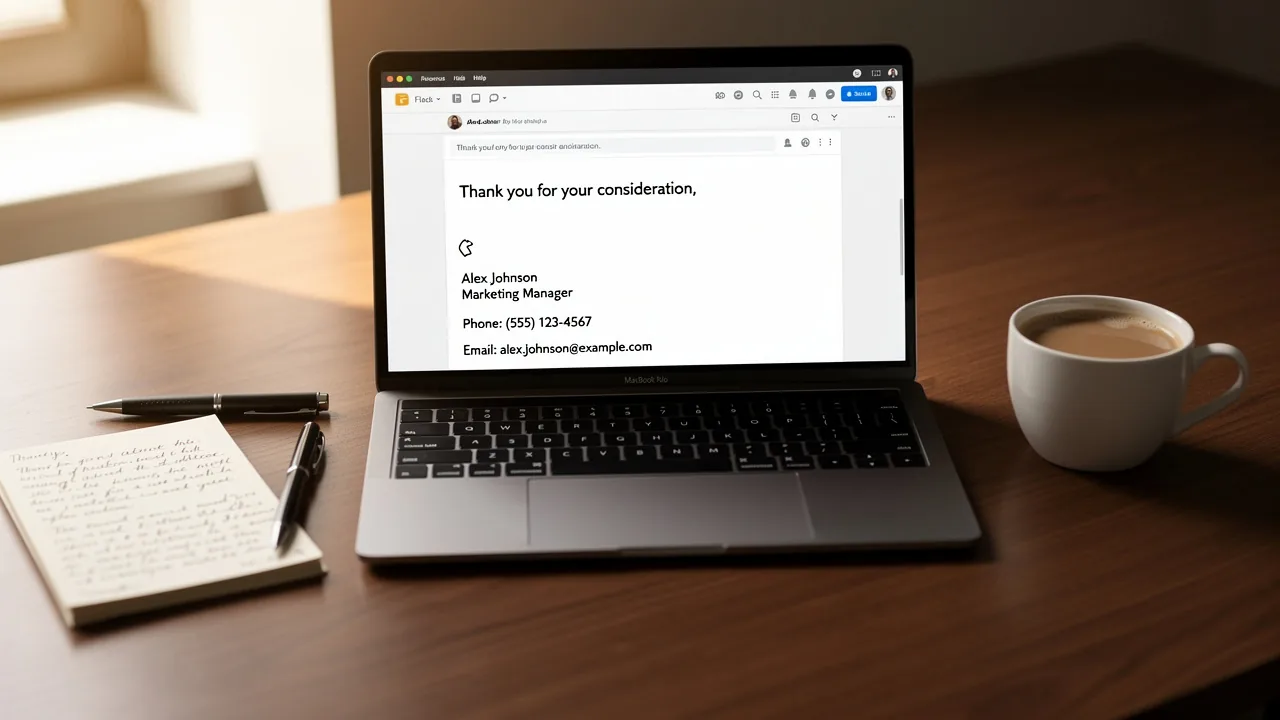
Finally, the signature block should include the sender's name, title, and contact information, which enhances clarity and facilitates a prompt response from the recipient. For example, a closing might read:
Thank you for your consideration.
Best regards,
[Your Name],
[Your Title],
[Your Contact Information].
Explore Different Types of Email Sign-Offs
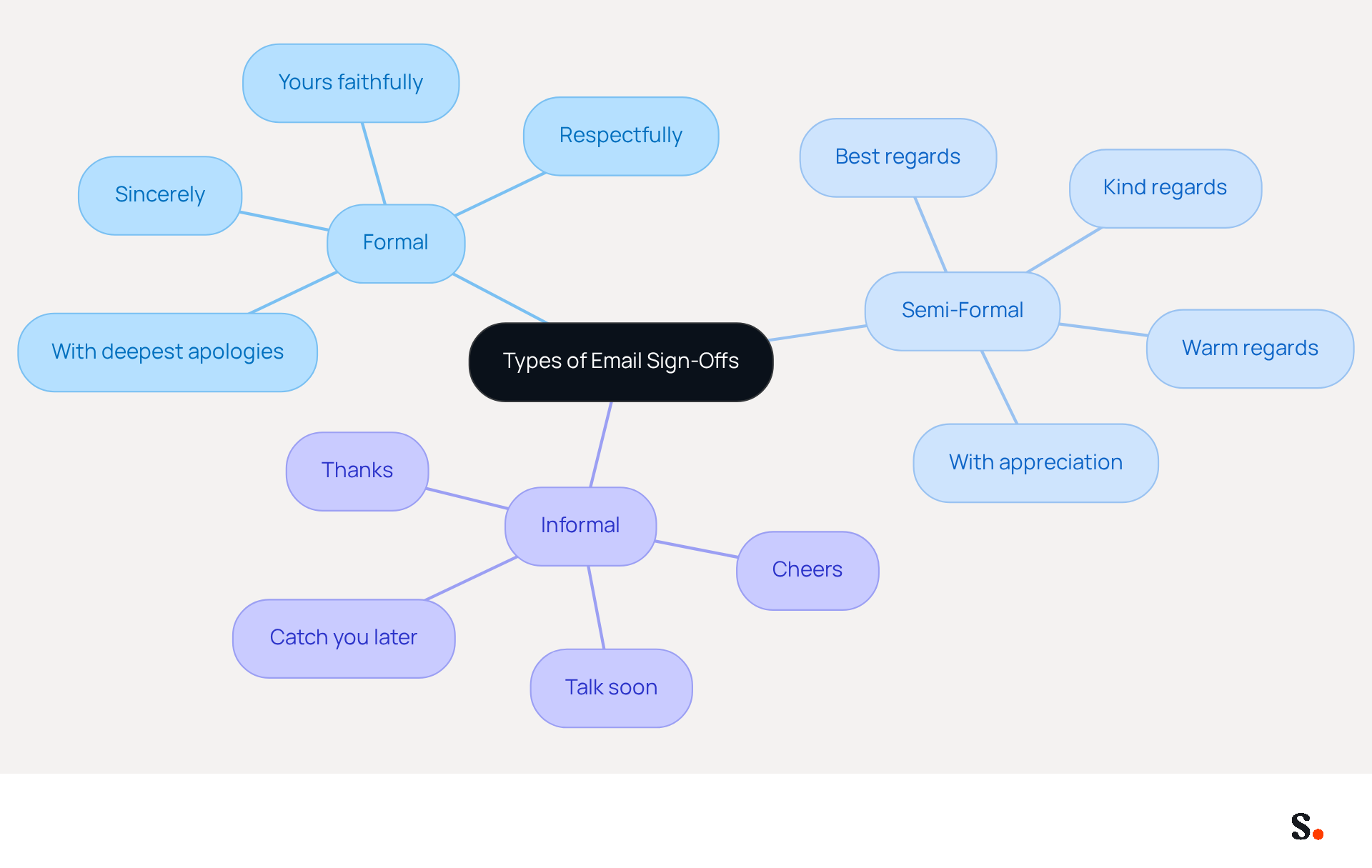
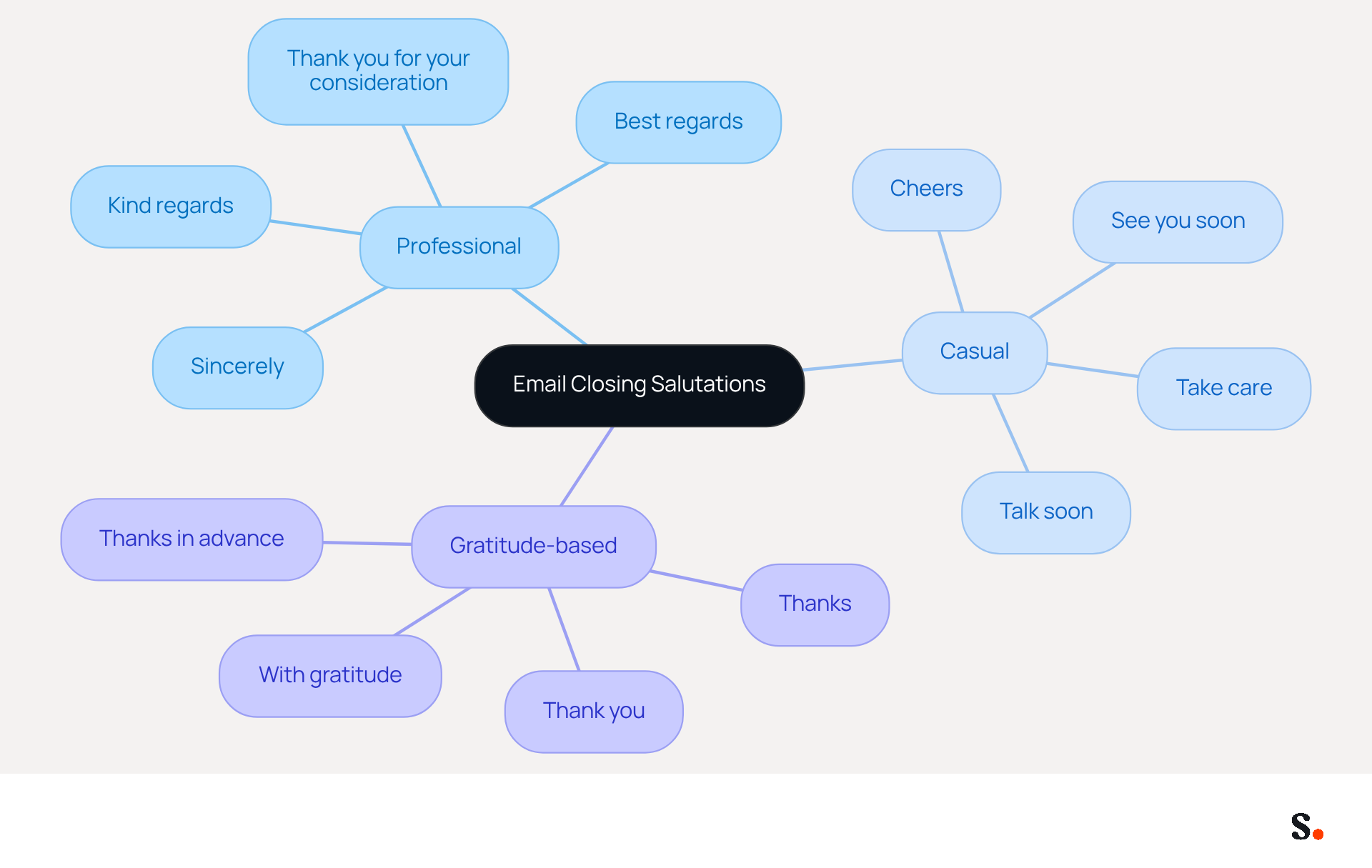
Understanding the nuances of professional email closing salutations is crucial for effective communication in professional settings. Professional email closing salutations can be categorized into formal, semi-formal, and informal types. Professional email closing salutations, such as 'Sincerely' or 'Yours faithfully,' are suitable for business correspondence, particularly when addressing clients or superiors. These professional email closing salutations demonstrate respect and professionalism, which is especially important for initial interactions or sensitive topics.
It's important to note that 'Thank you' is a more formal choice for first-time contacts, which highlights the need for careful selection of professional email closing salutations in these situations. Semi-formal options like 'Best regards' or 'Kind regards' are considered professional email closing salutations that strike a balance between professionalism and warmth, making them suitable for colleagues or clients with whom you have an established relationship.
'Best regards' is among the most effective professional email closing salutations, proving effective in approximately 95% of professional situations and being slightly more common in American business interactions. In contrast, 'Kind regards' is often preferred among professional email closing salutations in British English contexts. Informal sign-offs, such as 'Cheers' or 'Talk soon,' are best reserved for casual interactions with friends or close colleagues.
Choosing the wrong professional email closing salutations can result in misunderstandings or a lack of professionalism. By syncing your Google Workspace with Scribe, you can simplify the management of these signatures. This integration saves time by automatically updating your teammates' information, ensuring that any changes in their roles or details are reflected in Scribe without manual input. This feature not only enhances efficiency but also maintains consistency across your communications.
Ultimately, the right professional email closing salutations can significantly influence the tone of your message and the perception of your professionalism.
Match Sign-Offs to Email Tone and Context
To ensure effective communication, it is essential to align professional email closing salutations with the tone and context. For instance, when following up on a job application, using professional email closing salutations such as 'Sincerely' or 'Thank you for your consideration' conveys respect and professionalism. In contrast, when communicating with a colleague about a project update, using professional email closing salutations such as 'Best' or 'Looking forward to your feedback' fosters a collaborative atmosphere.
For casual communications, such as a quick check-in with a teammate, using phrases like 'Cheers' or 'Take care' enhances friendliness and approachability. Research indicates that gratitude-based closings, like 'Thanks' or 'Thank you,' can boost response rates by up to 65.7%, making them highly effective. Aligning the sign-off with the email's tone is crucial for clarity and building rapport with the recipient.
Case studies indicate that professionals who standardize their approvals across teams maintain a cohesive brand image and enhance communication effectiveness. However, many professionals struggle with maintaining the right tone in their professional email closing salutations. It is essential to avoid common pitfalls, such as using overly casual or inappropriate professional email closing salutations, as they can undermine professionalism. This misalignment can lead to misunderstandings and weakened connections. Ultimately, the right closing can transform an email from a simple message into a powerful tool for relationship building.
Avoid Common Mistakes in Email Sign-Offs
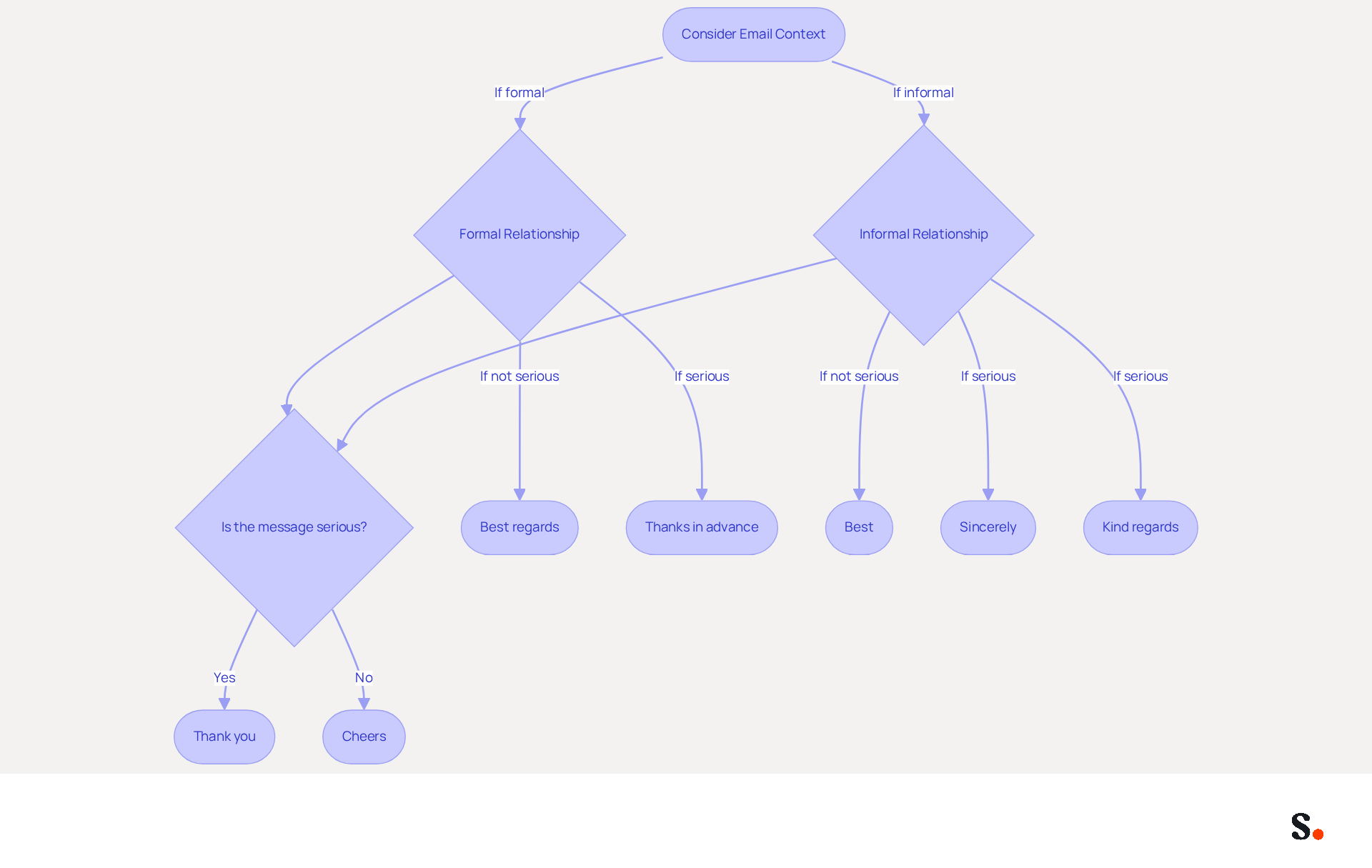
Common errors in professional correspondence can undermine the effectiveness of professional email closing salutations. Many professionals encounter errors in their closing statements, often due to overly informal language or mismatched tones in their professional email closing salutations. For instance, using 'Cheers' in formal emails can detract from professionalism, whereas a closing like 'Best' may lack the specificity needed in serious contexts.
Additionally, omitting a signature block can hinder the recipient's ability to respond or follow up effectively. Statistics indicate that messages ending with a more formal 'Thank you' secure a 57.9% reply rate, while those concluding with 'Thanks in advance' achieve an impressive 65.7% response rate, highlighting the significance of thoughtful sign-offs.
To avoid these pitfalls, always consider the relationship with the recipient and the purpose of the message before selecting professional email closing salutations. Selecting an appropriate sign-off, such as professional email closing salutations, not only boosts professionalism but also clarifies the message's intent, increasing its impact on the recipient.
Furthermore, by syncing your Google Workspace with Scribe, you can save time and ensure that your signatures are always up-to-date, automatically reflecting any changes in your team’s information, including the ability to auto-fill signature details using our attribute feature. This integration allows you to focus on crafting the perfect message without worrying about outdated signature details.
A study analyzing 350,000 messages found that incorporating gratitude in sign-offs significantly improves response rates. By addressing these common pitfalls, you can significantly enhance your email communication and strengthen professional relationships.
Conclusion
Effective email closing salutations are crucial for shaping how recipients perceive and respond to messages. Understanding the key components of email closings - like a thoughtful closing line, an appropriate farewell, and a clear signature - helps professionals enhance their communication and maintain a polished image.
Throughout the article, various types of email sign-offs were explored, highlighting the importance of matching the tone and context of the message. Formal closings like 'Sincerely' and 'Thank you' are ideal for initial interactions, while semi-formal options such as 'Best regards' foster warmth in established relationships. Additionally, the article emphasized the need to avoid common mistakes, such as using overly casual language or omitting signature blocks, which can undermine professionalism and clarity.
The right email closing can turn a simple message into a powerful way to build relationships and improve communication. Many professionals struggle with inconsistent email signatures that can lead to confusion and a lack of professionalism. By leveraging tools like Scribe, they can ensure consistency and focus on crafting impactful messages. This not only enhances communication but also fosters stronger relationships and better engagement with recipients. Adopting these strategies not only enhances communication but also positions professionals as credible and reliable in their interactions.
Frequently Asked Questions
What are the essential components of professional email closings?
Professional email closings typically include three essential elements: a closing line, a farewell, and a signature.
What is a closing line in an email?
A closing line can effectively summarize your message or convey appreciation, such as 'Thank you for your time' or 'Looking forward to your response.'
How should the farewell in an email closing be chosen?
The farewell should vary in formality and align with the email's tone. Common professional farewells include 'Sincerely,' 'Best regards,' and 'Thank you.'
What should be included in the signature block of an email?
The signature block should include the sender's name, title, and contact information to enhance clarity and facilitate a prompt response from the recipient.
Can you provide an example of a professional email closing?
An example of a professional email closing might read: 'Thank you for your consideration. Best regards, [Your Name], [Your Title], [Your Contact Information].
List of Sources
- Identify Essential Components of Email Closings
- How to end an email: Best sign-offs for every business situation | Proton (https://proton.me/business/blog/how-to-end-an-email)
- Mastering Professional Email Sign-Offs in 2026 (https://linkedin.com/pulse/mastering-professional-email-sign-offs-2026-bulksignature-qsr4e)
- How to End Any Professional Email (Plus a List of Sign-Offs for When You’re Tired of Saying “Best”) (https://careerservices.upenn.edu/blog/2021/01/08/how-to-end-any-professional-email-plus-a-list-of-sign-offs-for-when-youre-tired-of-saying-best)
- How to End an Email: 43 Ways to Sign Off on an Email (2026) (https://respona.com/blog/how-to-end-an-email)
- Explore Different Types of Email Sign-Offs
- How to end an email: 70+ professional sign-offs & examples (https://blog.superhuman.com/how-to-end-an-email)
- Mastering Professional Email Sign-Offs in 2026 (https://linkedin.com/pulse/mastering-professional-email-sign-offs-2026-bulksignature-qsr4e)
- How to Sign Off on an Email Correctly | Rocketseed (https://rocketseed.com/blog/correct-way-to-sign-off-emails)
- Email Sign Offs for Every Industry and Situation | Mailchimp (https://mailchimp.com/resources/email-sign-offs)
- 80+ Professional Email Sign-Offs for Every Situation, Role, and Industry (https://syncsignature.com/blog/email-sign-offs)
- Match Sign-Offs to Email Tone and Context
- Mastering Professional Email Sign-Offs in 2026 (https://linkedin.com/pulse/mastering-professional-email-sign-offs-2026-bulksignature-qsr4e)
- How to Sign Off on an Email Correctly | Rocketseed (https://rocketseed.com/blog/correct-way-to-sign-off-emails)
- 80+ Professional Email Sign-Offs for Every Situation, Role, and Industry (https://syncsignature.com/blog/email-sign-offs)
- Best Email Sign-Offs for Any Correspondence (https://wisestamp.com/examples/email-sign-offs)
- 12 Email Sign-Offs That Get Responses [2026 Data] (https://lagrowthmachine.com/email-sign-offs-get-responses)
- Avoid Common Mistakes in Email Sign-Offs
- 10 Common Email Mistakes - Mindtools Membership (https://mindtools.com/at253lr/10-common-email-mistakes)
- 10 Email Etiquette Mistakes That Damage Your Reputation (https://simaraguard.com/blog/email-etiquette-mistakes)
- How to Sign Off on an Email Correctly | Rocketseed (https://rocketseed.com/blog/correct-way-to-sign-off-emails)
- Best Email Sign-Offs: 15 Examples for Every Situation (https://beanstalkconsulting.co/blogs/best-email-sign-offs)
Get started with Scribe
Build a professional email signature
Free 14-day trial — no credit card.