What's a Good Email Signature? Key Components vs. Common Mistakes
An email signature is not merely a digital sign-off; it is a critical element in professional communication that often goes underutilized. Recognizing the key
Sophie Grant
Email Signature Specialist, Scribe

Introduction
An email signature is not merely a digital sign-off; it is a critical element in professional communication that often goes underutilized. Recognizing the key components of an effective email signature enables organizations to turn this often-overlooked element into a strategic marketing tool. Yet, many organizations struggle to leverage this potential effectively. By identifying the essential elements that make an email signature effective, organizations can avoid the common pitfalls that detract from their branding and enhance their communication effectiveness.
Get started with Scribe
See why teams switch to Scribe
Free 14-day trial — no credit card.
Key Components of an Effective Email Signature
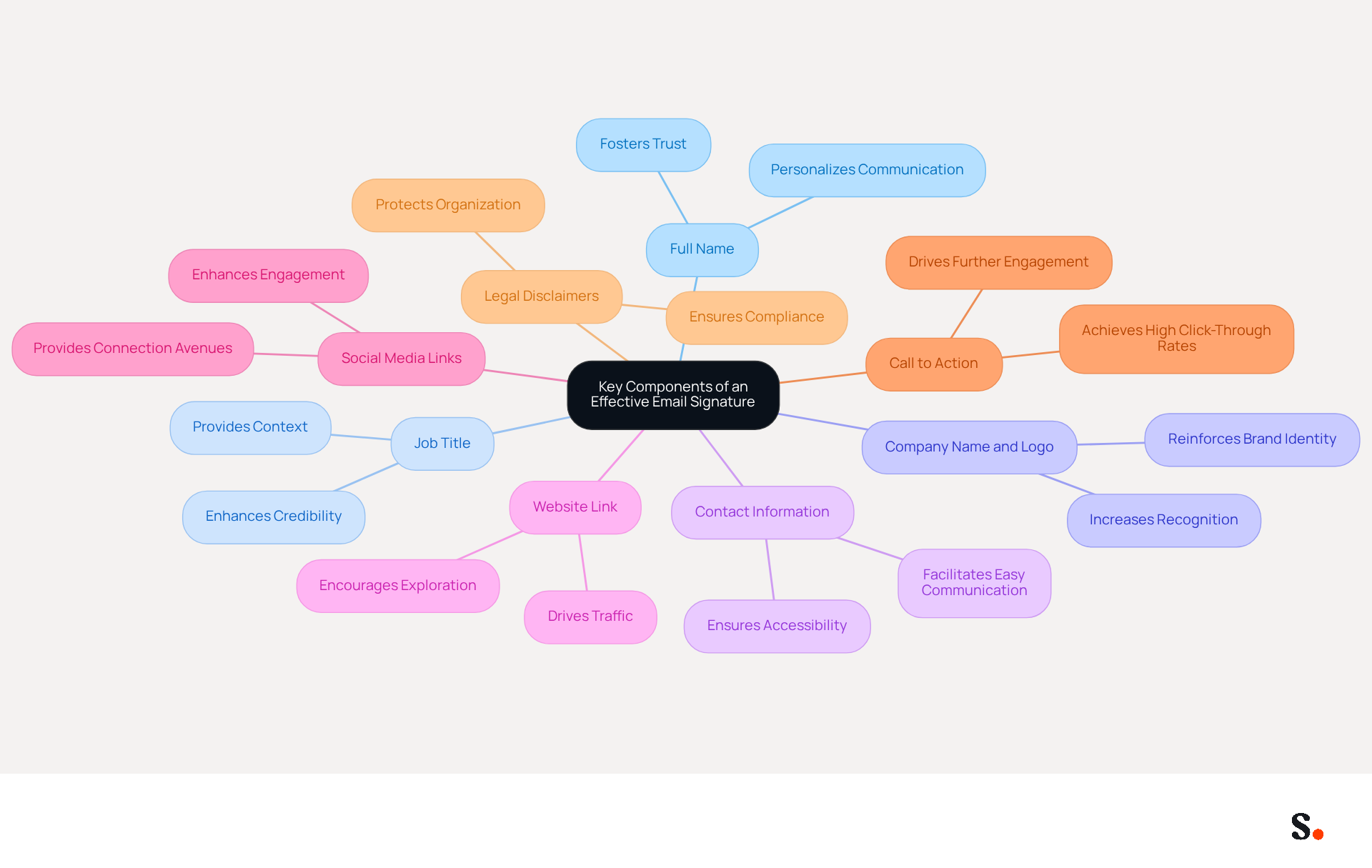
An effective email signature raises the question of what's a good email signature, as it is not just a digital formality but a critical component of professional communication that can significantly impact engagement. An effective email signature should encompass several key components that not only enhance professionalism but also serve as powerful marketing tools:
- Full Name: Clearly stating the sender's name personalizes communication and fosters trust, which is crucial for establishing rapport with recipients.
- Job Title: Including the sender's job title provides context about their role within the organization, enhancing credibility and authority in the communication.
- Company Name and Logo: Displaying the company name and logo reinforces brand identity and professionalism, making the communication instantly recognizable and trustworthy.
- Contact Information: Essential details such as phone numbers and email addresses facilitate easy communication, ensuring recipients can reach out without hassle.
- Website Link: A link to the Scribe website encourages recipients to explore more about the business, driving traffic and potential engagement.
- Social Media Links: Adding links to professional social media profiles can enhance engagement and provide additional avenues for connection, allowing recipients to follow the company’s updates.
- Call to Action: A brief call to action, such as a link to a current promotion or newsletter signup, can significantly drive further engagement, with well-crafted CTAs achieving click-through rates of 5% to 7% according to industry research.
- Legal Disclaimers: Depending on the industry, including legal disclaimers may be necessary to comply with regulations, ensuring that the organization adheres to legal standards.
These elements enhance the professionalism of what's a good email signature, transforming it into a strategic asset that drives traffic and engagement. With Scribe, the automated synchronization of communication identifiers with Aircall ensures that any updates made in your business phone system are effortlessly reflected in your communication identifiers, maintaining brand consistency without requiring action from your teammates. This feature conserves time by automatically filling in names, making it simple for non-technical users to handle their signatures efficiently. Plus, with Scribe's SOC 2 Type II compliance, you can trust that your data is secure, giving you peace of mind while you use digital branding as a marketing tool. For instance, companies that utilize branded footers have reported a 25% increase in traffic to targeted landing pages, showcasing the effectiveness of cohesive branding in communications, as highlighted in industry reports. Additionally, Scribe boasts an average click-through rate of 12% on branded banners, further demonstrating the potential for measurable marketing ROI.
Common Mistakes in Email Signature Design
Design errors can significantly undermine effective communication and the overall perception of a company. Here are key pitfalls to avoid:
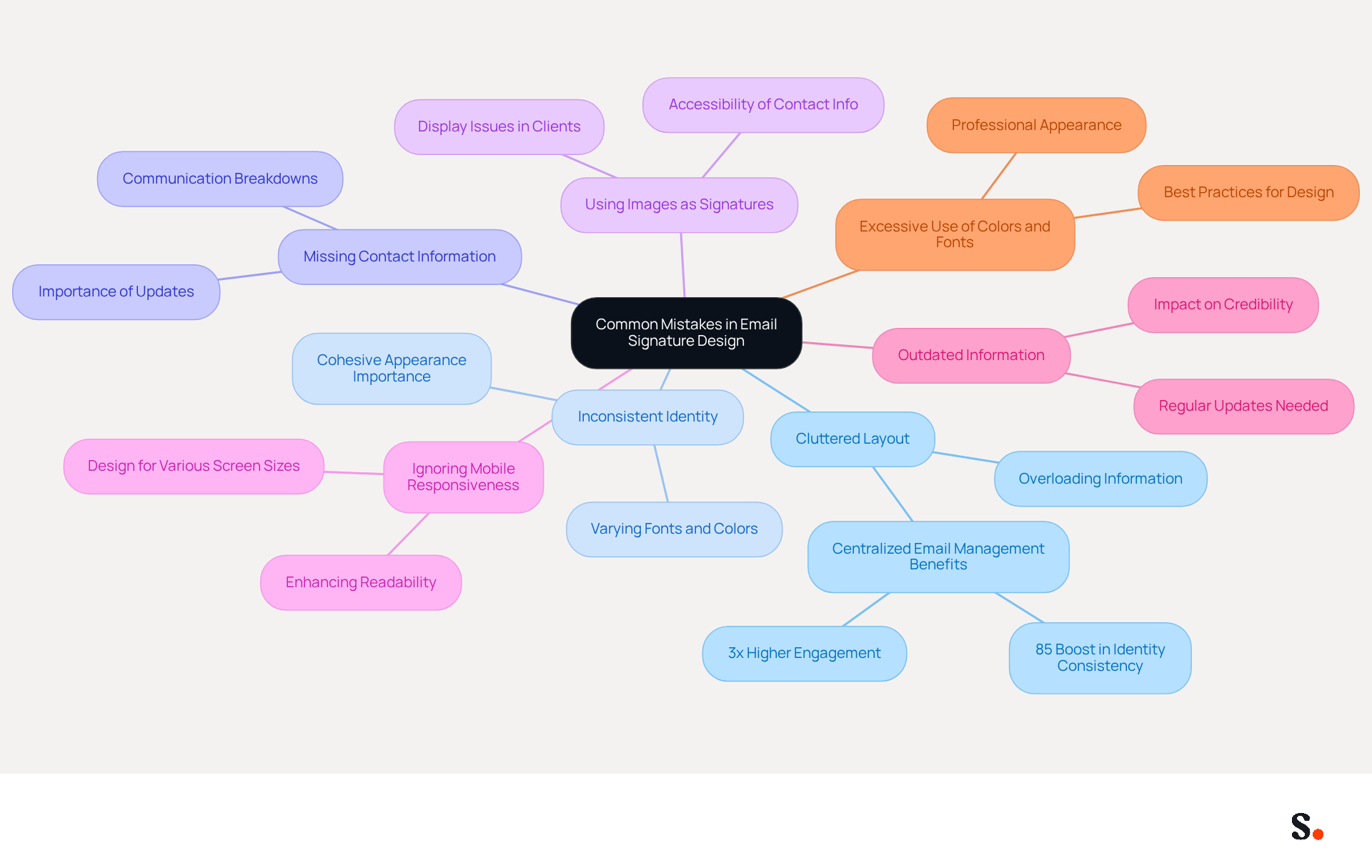
- Cluttered Layout: Overloading identifiers with excessive information can overwhelm recipients, detracting from essential messages. Research indicates that teams using centralized email management see an 85% boost in identity consistency and three times the engagement in their campaigns.
- Inconsistent Identity: Utilizing varying fonts, colors, or logos can confuse recipients and dilute identity recognition. Maintaining a cohesive appearance across all representations is crucial for reinforcing brand recognition.
- Missing Contact Information: Missing contact details can lead to communication breakdowns, leaving recipients frustrated and uninformed. It's crucial to keep your digital identifiers updated; outdated info can mislead recipients and damage your credibility. Scribe's integration with Google Workspace allows for automatic updates, ensuring that any changes in your directory are reflected in real-time, thus maintaining professionalism.
- Using Images as Signatures: Relying solely on images can lead to display issues in messaging clients that block images, rendering the identification ineffective. It's essential to ensure that contact information is accessible even when images are not displayed.
- Ignoring Mobile Responsiveness: With a significant number of emails being read on mobile devices, email footers must be designed to display correctly across various screen sizes. A well-structured layout enhances readability and organization, improving user experience.
- Outdated Information: Regularly updating identifiers is essential; outdated information can mislead recipients and harm credibility. Scribe's daily synchronization with your provider ensures that all information remains precise and reflects the company's branding, removing the risk of outdated identifiers.
- Excessive Use of Colors and Fonts: Utilizing too many colors or fonts can cause the branding to seem unprofessional and chaotic. Best practices recommend using a maximum of two fonts and a limited color palette to maintain a clean and professional appearance.
Avoiding these common mistakes while leveraging Scribe's automated management features can significantly enhance your digital identifiers. Addressing these common pitfalls is essential for maintaining a strong corporate identity and ensuring effective communication with your audience.
The Role of Branding in Email Signatures
Effective branding in email signatures is not just an option; it's a necessity for modern communication.
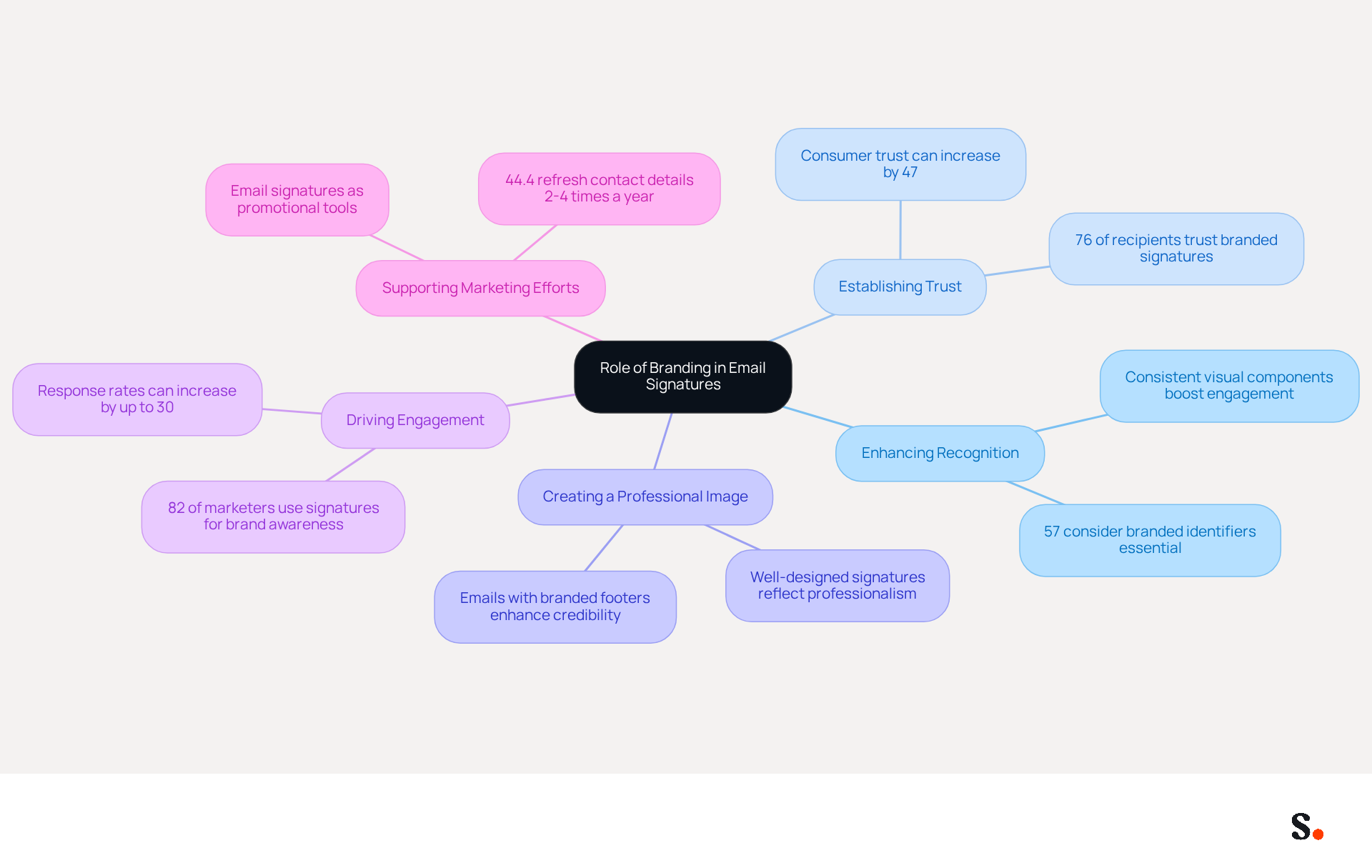
- Enhancing Recognition: Consistent use of logos, colors, and fonts enables recipients to quickly identify the sender's organization, reinforcing awareness of the identity. Research shows that 57% of consumers consider branded electronic identifiers essential for identity, emphasizing the significance of visual consistency. With Scribe, every modification made in your Aircall configuration will automatically be reflected in your communication identifiers, ensuring that your branding stays consistent across all interactions. Additionally, integrating with Calendly allows for automatic branding updates, enhancing consistency.
- Establishing Trust: A professional and cohesive email footer fosters trust and credibility. Research indicates that when emails include branded elements, consumer trust can increase by as much as 47%, making recipients more likely to engage with the sender.
- Creating a Professional Image: Well-designed email footers reflect the organization's values and professionalism, positively influencing recipient perceptions. In fact, 76% of recipients indicate heightened trust in senders who utilize branded identifiers, underscoring the significance of a polished appearance.
- Driving Engagement: Including branded elements such as promotional banners or calls to action can encourage recipients to interact with the company further. Emails with branded footers can enhance response rates by up to 30%, showing how effective branding can significantly boost engagement. Moreover, 82% of marketers utilize electronic footers to enhance awareness of their identity, demonstrating their marketing capabilities.
- Supporting Marketing Efforts: Email footers act as subtle yet effective promotional tools, advertising products, services, or events directly within digital communications. With 82% of email marketers utilizing sign-offs to enhance awareness of their identity, they can convert every message into a marketing chance. Yet, many professionals find it challenging to keep their contact details up to date, as 44.4% refresh their contact details 2-4 times a year, ensuring consistency and effectiveness.
By incorporating strong branding elements into digital communication footers, Scribe can enhance its overall communication strategy and improve recipient engagement. Ultimately, neglecting branding in email signatures can result in missed opportunities for connection and engagement.
Manual vs. Automated Email Signature Management
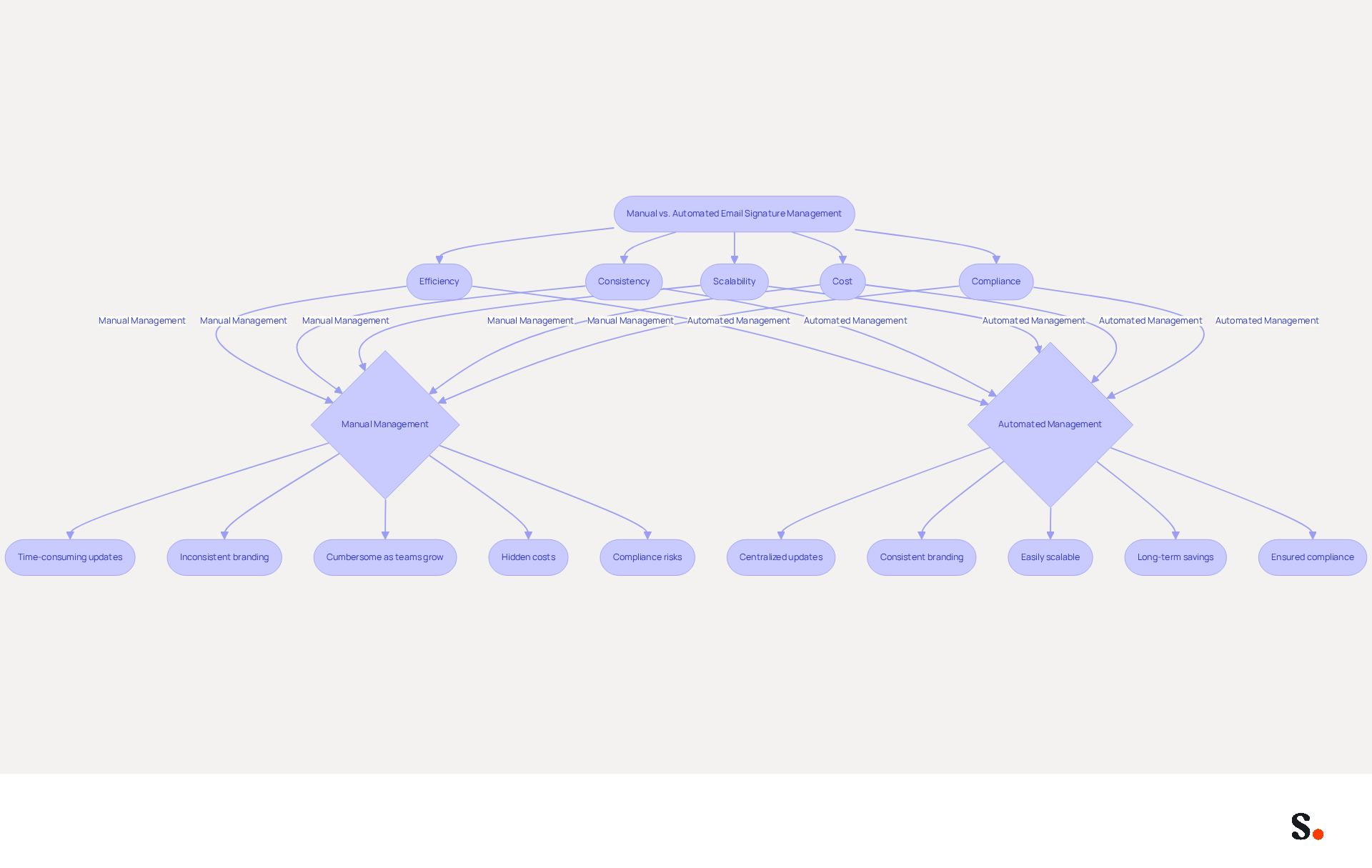
When evaluating email signature management methods, the contrast between manual and automated approaches reveals significant operational differences:
-
Efficiency:
- Manual Management: Requires individual updates for each employee, which can lead to considerable time costs, especially for larger organizations. IT teams often spend 30-45 minutes updating each employee, increasing the likelihood of errors.
- Automated Management: Centralizes control, enabling quick updates throughout the entity with minimal effort. This allows IT to focus on higher-value projects, improving overall efficiency. Scribe's automated management enables organizations to update email identifiers quickly and securely, allowing IT teams to focus on strategic initiatives.
-
Consistency:
- Manual Management: Frequently results in inconsistencies in branding and information, particularly if employees do not adhere to established guidelines. Without proper enforcement, outdated markings can slip through, negatively impacting how the company is perceived.
- Automated Management: Ensures consistency in markings, preserving brand integrity across all communications. Automated systems enforce governance at the field level, ensuring that legal disclaimers and branding elements remain locked and compliant. Scribe's automated management ensures that all approvals meet GDPR compliance, reducing the risk of legal issues.
-
Scalability:
- Manual Management: Becomes increasingly cumbersome as organizations expand, complicating the maintenance of control over signatures. This often leads to inefficiencies and a fragmented brand presentation.
- Automated Management: Easily scales with the entity, allowing for seamless updates as new employees join or branding changes occur. For instance, a 100-employee company generates approximately 60,000-80,000 branded signature impressions monthly, highlighting the need for a scalable solution. Scribe's system is designed to grow with your business, ensuring that brand consistency is maintained at all levels.
-
Cost:
- Manual Management: Can incur hidden costs related to time spent on updates and potential errors, which can accumulate significantly as the organization grows.
- Automated Management: While there may be initial setup costs, the long-term savings in time and resources often outweigh these expenses. Organizations that implement automated systems report improved operational efficiencies and reduced manual workloads. Scribe's automated management not only saves time but also ensures compliance with SOC 2 Type II standards, providing peace of mind regarding data handling.
-
Compliance:
- Manual Management: Inconsistent signatures can lead to compliance risks, particularly in regulated industries where legal disclaimers are essential.
- Automated Management: Ensures that all approvals consistently meet legal and regulatory requirements, reducing the risk of compliance issues. Automated systems can automatically apply updates across all employee identifiers, ensuring that compliance is maintained without manual intervention. With Scribe, businesses can confidently manage their digital identifiers while complying with GDPR and CCPA regulations, supported by SOC 2 Type II compliance.
In summary, while manual management may appear straightforward, the substantial benefits of automated email signature management are evident, especially for organizations aiming to enhance efficiency, maintain brand consistency, and ensure compliance. Read how automated email signature management works in practice. Ultimately, embracing automated email signature management can transform how organizations operate, ensuring efficiency and compliance in a rapidly evolving digital landscape.
Conclusion
Email signatures are not merely formalities; they are essential tools for enhancing professional communication and brand visibility. By incorporating key elements such as the sender's name, job title, company logo, and contact information, organizations can create signatures that convey professionalism and serve as powerful marketing tools. Maintaining brand consistency in email signatures is crucial for effective communication, as it fosters trust and enhances the overall perception of the organization.
Throughout this article, we discussed the key components of an effective email signature and highlighted common mistakes to avoid. Without careful design, email signatures can fail to engage recipients, resulting in lost opportunities. By leveraging automated management solutions like Scribe, organizations can ensure their email signatures remain consistent, compliant, and up-to-date, ultimately driving better engagement and measurable marketing ROI.
In today's digital landscape, branding through email signatures is more important than ever. Organizations must recognize the potential of their email footers as marketing assets that enhance recognition, build trust, and drive engagement. Embracing automated email signature management not only streamlines the process but also empowers marketing teams to maintain control over their branding efforts. By focusing on effective email signature design and management, organizations can turn each email into a chance to connect and reinforce their brand identity.
Frequently Asked Questions
What is the purpose of an effective email signature?
An effective email signature is a critical component of professional communication that enhances professionalism and serves as a powerful marketing tool, significantly impacting engagement.
What are the key components of an effective email signature?
The key components include the sender's full name, job title, company name and logo, contact information, website link, social media links, a call to action, and legal disclaimers.
Why is including the sender's full name important?
Clearly stating the sender's name personalizes communication and fosters trust, which is crucial for establishing rapport with recipients.
How does a job title in an email signature enhance communication?
Including the sender's job title provides context about their role within the organization, enhancing credibility and authority in the communication.
What role does the company name and logo play in an email signature?
Displaying the company name and logo reinforces brand identity and professionalism, making the communication instantly recognizable and trustworthy.
Why is contact information essential in an email signature?
Essential details such as phone numbers and email addresses facilitate easy communication, ensuring recipients can reach out without hassle.
How can a website link in an email signature benefit a business?
A link to the Scribe website encourages recipients to explore more about the business, driving traffic and potential engagement.
What is the advantage of including social media links in an email signature?
Adding links to professional social media profiles can enhance engagement and provide additional avenues for connection, allowing recipients to follow the company’s updates.
What is a call to action in an email signature, and why is it important?
A brief call to action, such as a link to a current promotion or newsletter signup, can significantly drive further engagement, with well-crafted CTAs achieving click-through rates of 5% to 7%.
Are legal disclaimers necessary in email signatures?
Depending on the industry, including legal disclaimers may be necessary to comply with regulations, ensuring that the organization adheres to legal standards.
How does Scribe enhance the management of email signatures?
Scribe automates the synchronization of communication identifiers with Aircall, ensuring updates in the business phone system are reflected in email signatures, maintaining brand consistency without requiring action from teammates.
What security measures does Scribe provide for email signatures?
Scribe is SOC 2 Type II compliant, ensuring that user data is secure while utilizing digital branding as a marketing tool.
What impact can branded footers have on traffic?
Companies that utilize branded footers have reported a 25% increase in traffic to targeted landing pages, showcasing the effectiveness of cohesive branding in communications.
What is the average click-through rate for branded banners with Scribe?
Scribe boasts an average click-through rate of 12% on branded banners, demonstrating the potential for measurable marketing ROI.
List of Sources
- Key Components of an Effective Email Signature
- 12 email signature marketing examples that drive clicks (2026) (https://signitic.com/en/resources/12-email-signature-marketing-examples-that-actually-drive-clicks)
- What to Include in a Business Email Signature (https://rocketseed.com/blog/email-signature-what-to-include)
- What Should Be Included in an Email Signature for Marketing Success (https://scribe-mail.com/en-US/blog/what-should-be-included-in-an-email-signature-for-marketing-success)
- Email Signature Best Practices - NEWOLDSTAMP (https://newoldstamp.com/blog/email-signature-best-practices)
- Email Signature Best Practices for 2026 (+ 15 Pro Examples) (https://wavecnct.com/blogs/email-signature-best-practices-2026)
- Common Mistakes in Email Signature Design
- Email Signature Best Practices for 2026 (+ 15 Pro Examples) (https://wavecnct.com/blogs/email-signature-best-practices-2026)
- 5 Common Mistakes You’re Making With Your Email Signature (https://fastcompany.com/3025208/5-common-mistakes-youre-making-with-your-email-signature)
- 11 Common Email Signature Mistakes to Avoid (2026) (https://inboxsign.com/guides/common-email-signature-mistakes)
- "Email Signature Trends for 2026: What's In, What's Out" | Crossware posted on the topic | LinkedIn (https://linkedin.com/posts/crossware-ltd_new-year-new-trends-even-for-your-email-activity-7394554686046908416-vD_O)
- Email Signature Best Practices (https://uschamber.com/co/grow/thrive/email-signature-best-practices)
- The Role of Branding in Email Signatures
- What Email Signatures Really Mean for Your Marketing Strategy (https://scribe-mail.com/en-US/blog/what-email-signatures-really-mean-for-your-marketing-strategy)
- Why Are Email Signatures Key to Brand Awareness? | QuickMail (https://quickmail.com/role-of-email-signatures-in-brand-awareness)
- Research Recap: Branded Email Signatures Increase Company Recognition, Trust - B2BMX INSIGHTS (https://demandgenreport.com/industry-news/research-recap-branded-email-signatures-increase-company-recognition-trust/47252)
- Why Email Signatures Must Be In Your 2026 Marketing Plan | Rocketseed (https://rocketseed.com/blog/2026-marketing-plan-email-signatures)
- The impact of email signatures on your branding (https://signitic.com/en/resources/the-impact-of-email-signatures-on-your-branding)
- Manual vs. Automated Email Signature Management
- 40+ Email Signature Statistics for 2026 (Data + Insights) (https://wavecnct.com/blogs/email-signature-statistics)
- Automating Email Signatures: How IT Teams Streamline Processes & Reduce Risk (https://exclaimer.com/blog/streamlining-it-processes-automated-email-signatures)
- Automated vs Manual Email Signature Management (https://wisestamp.com/guides/automated-vs-manual-email-signature-management)
- Company-Wide Email Signature Management | CloudM (https://cloudm.io/resources/blog/optimize-your-process-with-company-wide-email-signature-management)
- One moment, please... (https://paayatech.com/blog/5-effective-ways-to-manage-email-signatures)
Get started with Scribe
See why teams switch to Scribe
Free 14-day trial — no credit card.