Which Scribe Integration Interface Fits Your Workflow?
Compare Scribe's REST API, webhooks, and CLI to connect signature data, events, and operations to your systems.
Sophie Grant
Email Signature Specialist, Scribe

On this page
- Choose the interface by what starts the work
- Write the workflow contract before comparing options
- Overview
- Key Highlights
- Use the REST API when your system owns timing
- Use webhooks when an event should start the next action
- Use the CLI when terminal execution is the operating boundary
- Test a webhook-to-API resource path before expanding it
- Treat webhook delivery as an event contract
- Validate the documented contract before implementation
- Run one narrow test before expanding the workflow
- Keep the decision within documented capabilities
- Open the documentation for your selected path
- Connect Scribe Webhook Events to API Resources
- Which documented events can start this webhook-to-API flow?
- How can I test one webhook-to-API path?
- Where should I verify the event and resource details?
- Can this path send conversion data to external systems?
- Sources
Choose the interface by what starts the work
The integration decision becomes clearer when you identify what starts the work. A system that decides when to request a change needs a caller-controlled interface. A workflow that should react to activity needs event delivery. A terminal-based operating process needs a command surface that can return structured output.
The Scribe REST API manages email signatures, teammates, smart fields, and marketing campaigns using JSON over HTTPS. Use that path when your system owns the timing of a request and needs to work with documented Scribe resources.
Scribe webhooks push events from your workspace to your own systems instead of requiring API polling. Use them when a change in the workspace should start the next action, such as routing a conversion event or responding to a failed installation.
The Scribe CLI provides structured JSON output. Use it when terminal execution is the natural boundary for an operator, shell script, scheduled job, or local automation process.
The practical answer is to choose by workflow contract rather than by the label integration. First write down the initiating system, the Scribe resource or event involved, the timing requirement, and the result that will count as a successful test. Then select the narrowest interface that matches those conditions.
Get started with Scribe
See why teams switch to Scribe
Free 14-day trial — no credit card.
Write the workflow contract before comparing options
The workflow contract gives your interface decision a testable boundary. It describes what starts the work, what your system expects from Scribe, and how you will recognize a usable result. Without that description, an interface can appear suitable simply because it is familiar.
Write the contract in five parts:
- Initiating system: Name the system or operator that starts the action. This might be a directory process, an internal service, an event receiver, or a terminal workflow.
- Scribe object or event: Identify the documented resource you need to change or read, or the event that should trigger your next step.
- Timing model: State whether your system chooses when work begins, whether the work begins when Scribe emits an event, or whether an operator starts it from a terminal.
- Operational boundary: Record where authentication, request handling, event intake, output parsing, and recovery decisions will live in your environment.
- Success condition: Define the observable result, such as a permitted resource response, a received event with the expected fields, or structured command output that your process can consume.
The initiating system should determine the first comparison. If your process already owns a schedule or a user action, begin with the REST API. If your process should wait for an occurrence in the workspace, begin with webhooks. If a person or script works from a shell, begin with the CLI.
The success condition should stay narrower than the eventual integration. A first test might prove that one permitted resource operation returns the expected response, that one selected event reaches an endpoint with its required fields, or that one CLI command produces parseable JSON. Expansion belongs after that first condition is met.
The contract should also name the boundary between Scribe and your systems. Your process may own scheduling, storage, routing, retries, or downstream updates, while Scribe supplies the documented resource operation, event, or command output. Recording that division prevents assumptions about behavior that the selected interface does not promise.
Overview
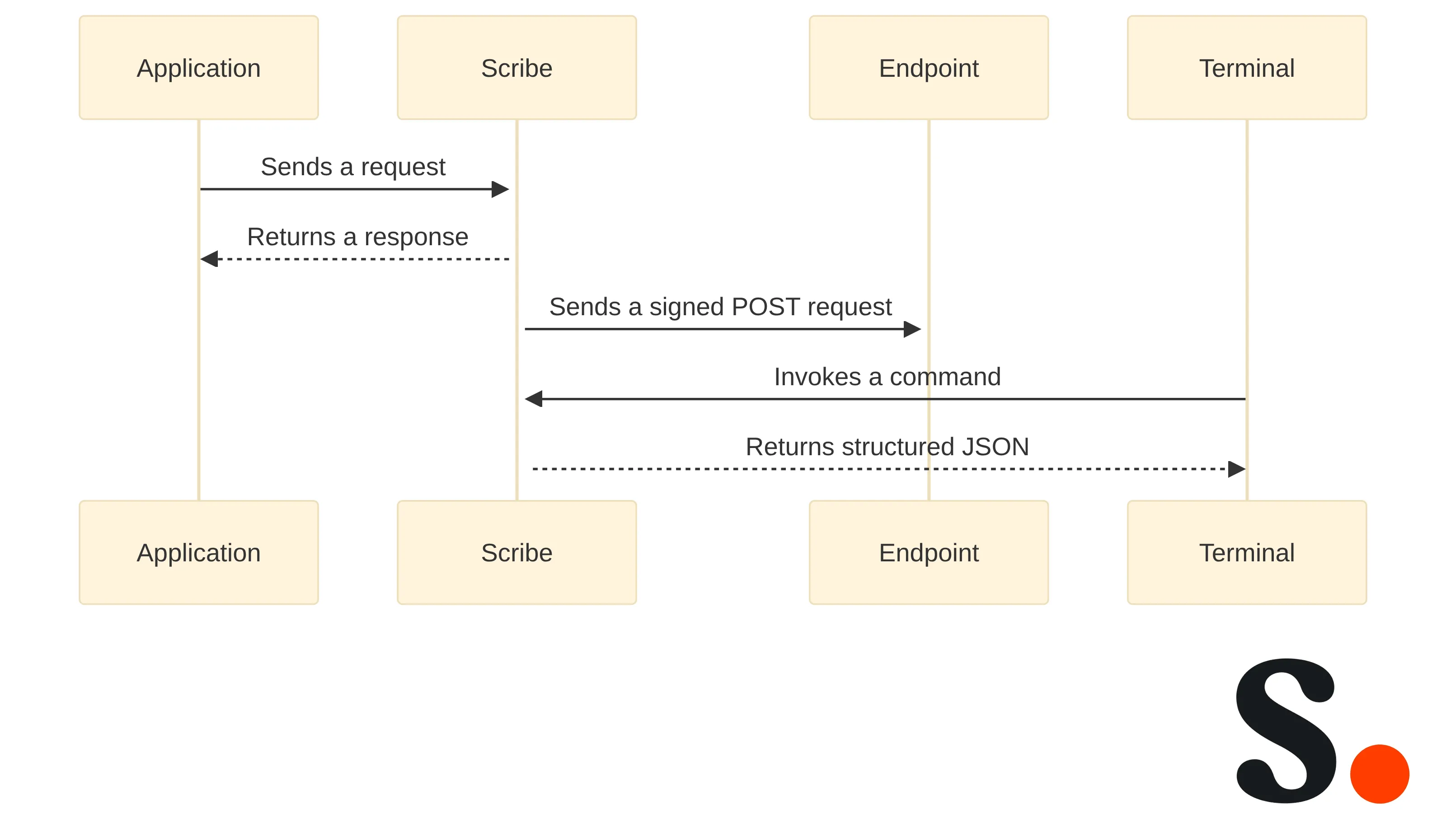
The three interfaces solve different timing and execution problems. The REST API gives your system a caller-controlled way to work with Scribe resources. Webhooks deliver selected workspace events to an endpoint you operate. The CLI exposes terminal commands and structured JSON for supported operational tasks.
The comparison below turns that distinction into a selection rule. It describes the workflow boundary rather than ranking the interfaces.
| Interface | What starts the work | Direction of flow | Operating context | Choose it when |
|---|---|---|---|---|
| REST API | Your application, service, or scheduled process | Your system sends a request to Scribe and handles the response | Application code or an integration service | Your system controls timing and needs documented resource operations |
| Webhooks | A selected event in your Scribe workspace | Scribe sends a signed POST request to your endpoint | Event receiver, automation boundary, or internal service | The next action should begin when workspace activity occurs |
| CLI | An operator, shell script, or terminal automation | Your terminal process invokes a command and consumes output | Developer or operations environment | Repeatable terminal execution and structured JSON fit the workflow |
The REST API manages email signatures, teammates, smart fields, and marketing campaigns using JSON over HTTPS. Scribe webhooks push events to your own systems instead of requiring API polling. The CLI provides structured JSON output.
The interfaces can also appear in one larger workflow without having the same job. For example, an event receiver may begin with a webhook, while a later step uses an API operation to fetch the resource identified by that event. A terminal process may prepare or inspect data separately. Treat each interface as a boundary with a defined responsibility instead of forcing one path to handle every stage.
A useful selection question is simple: who decides that work should happen? Your application decides for REST API work, Scribe activity decides for webhook work, and the terminal operator or script decides for CLI work. If the answer is unclear, return to the workflow contract before writing integration code.
Key Highlights
The interface choice should produce a short, testable implementation path. Keep these four points visible while you compare options:
- Match the interface to the workflow trigger: caller, event, or terminal execution.
- Name the exact documented resource, event, or command before building around it.
- Test one narrow path with a defined response, delivery, or output condition.
- Expand only after the first path behaves as your workflow contract requires.
Webhook delivery changes the timing model because Scribe pushes workspace events to your systems instead of requiring repeated API polling. That makes webhooks a natural starting point when a downstream action depends on an occurrence rather than on a schedule chosen by your application.
Your first test should record whether the selected event reaches the intended receiver.
The CLI has a different boundary. Its structured JSON output can give a shell process or operator workflow a predictable data shape, while the documented command determines which signature, teammate, analytics, or documentation task is actually supported.
A narrow test is a decision tool, not a reduced version of the final project. It should answer one question: does this interface expose the documented behavior your workflow needs, at the boundary where you plan to operate it? If the answer is no, revise the interface choice before adding more moving parts.
Use the REST API when your system owns timing
The Scribe REST API fits workflows in which your application or service decides when to act. The API manages email signatures, teammates, smart fields, and marketing campaigns using JSON over HTTPS. That makes the request boundary explicit: your system initiates a documented operation, receives a response, and decides what happens next.
The REST API supports creating, updating, publishing, installing, and assigning signature templates. Choose this route when your workflow needs a controlled sequence of resource changes and your application can determine when each request should run.
The REST API can add teammates and set their smart field values. A directory or identity process can therefore remain the initiating system while your integration maps the permitted data it needs to send into the documented Scribe operation. Keep the mapping limited to the fields and resource behavior your contract names.
The REST API can manage teammate email addresses and aliases. This fits a workflow that owns an explicit update sequence for those records, provided the workflow contract identifies the permitted operation and the response condition you will test.
The REST API can schedule, pause, and resume promotional banner campaigns. That makes it suitable for an application-controlled campaign workflow in which the timing decision belongs to your system. The interface choice does not by itself define the campaign rules; those rules remain part of your own workflow contract.
The REST API can read the integrations connected to your workspace. Use that capability when your workflow needs to inspect the documented connected-integration resource as part of a controlled request sequence. Do not treat a resource-reading operation as proof that every external system or synchronization action is available through the API.
The REST API is usually the clearest starting point when your workflow has a known initiator, a defined request order, and a response that should control the next step. Before implementation, write down the first resource operation, the input your system will send, the result it expects, and the boundary where your process stops. Then test that one operation rather than designing the full synchronization at once.
A caller-controlled path also requires a decision about timing inside your own environment. Your application may run the request after a directory change, on a schedule, or after an operator action; the interface does not choose that policy for you. Record the trigger and the acceptable response behavior before you add scheduling or downstream updates.
Use webhooks when an event should start the next action
Scribe webhooks fit workflows in which activity in your workspace should start the next action. Webhooks push events to your own systems instead of requiring API polling, so your event receiver can begin its process after the selected event arrives rather than repeatedly asking whether something changed.
We support real-time events through webhooks to Zapier, n8n, or your own systems. Select the destination that matches the boundary you already operate: an automation service can handle a defined handoff, while your own endpoint gives your team direct control of event processing.
Documented webhook use cases include syncing conversions into a CRM or data warehouse, alerting on signature installation failures, mirroring teammate changes into internal tools, and reacting to campaigns going live. These examples show the event-driven pattern without requiring you to treat every workspace event as a reason to build a new workflow.
Choose one event and one downstream action for the first test. For example, your contract might state that a selected conversion event should reach one receiver, or that a signature installation failure should create one internal alert. Keep the receiver and downstream action narrow enough that you can tell whether delivery worked before adding routing for additional events.
Webhooks do not remove the need to define what happens after delivery. Your system still needs a stated rule for parsing the event, deciding whether the event belongs to the intended workflow, handling the response at your boundary, and recording the result. Those are operating decisions for your integration, not reasons to assume unsupported webhook behavior.
A webhook path fits when waiting for an event is more natural than choosing a polling schedule. If your workflow needs your application to request a resource at a chosen time, compare the REST API instead. If a terminal operator is the natural initiator, compare the CLI.
Use the CLI when terminal execution is the operating boundary
The Scribe CLI fits workflows that begin in a terminal and need structured output. The CLI provides structured JSON, giving an operator, shell script, or local automation process a defined output format to inspect or pass to the next step.
The Scribe CLI installation instructions specify npm install -g @scribemail/cli and require Node.js 20 or newer. Treat the runtime requirement as part of the operating boundary when you decide whether a terminal workflow fits your environment.
The Scribe CLI uses scribe login for sign-in and scribe whoami to check the session. A first CLI test should establish the documented local setup, confirm the session, and then run one command that matches the workflow contract.
The Scribe CLI documentation shows commands for listing, creating, and publishing signatures; listing teammates with automatic pagination; querying analytics views by date range and signature template; and searching documentation. Select a command by the task you need to perform, not by the fact that it is available from a terminal.
A documented analytics example queries views with a date range and groups the result by signature template. If your workflow needs an analytics check, define the date range, grouping, and output condition before running the command. The test should establish whether the returned structure is usable for your process.
The CLI is a useful boundary when an operator or script already owns execution. It can keep a repeatable task close to the environment where the task is performed, while structured JSON gives the next step something explicit to parse. That does not make the CLI a substitute for event delivery when the workflow must begin with workspace activity.
Keep the first command narrow. List one supported resource, query one defined analytics range, or search the documentation for one implementation question. Record the command, the expected output shape, and the condition that will make the test pass before you connect the result to a larger process.
Test a webhook-to-API resource path before expanding it
A directory-to-Scribe workflow should begin with the REST API when your own process controls when teammate data is sent. The API can add teammates and set their smart field values. Define the source record, the permitted Scribe operation, and the response that confirms the first record was handled before you consider a wider synchronization.
A conversion-to-business-system workflow should begin with webhooks when the conversion event should trigger the handoff. Scribe webhook use cases include syncing conversions into a CRM or data warehouse. Start with one receiving destination and one event path, then record whether the expected request reaches the destination.
We allow you to send conversion data to CRM, data warehouses, or marketing tools via API and webhooks. Use that supported boundary to decide whether the first implementation should be caller-controlled or event-driven; do not extend it into an unsupported claim about a particular CRM, schema, or revenue workflow.
A failed-installation alert should begin with webhooks when the failure event should initiate the alert. Documented webhook use cases include alerting on signature installation failures. Keep the first test limited to the event receiver and alert destination so the result is attributable to the selected interface.
A Zapier, n8n, or internal-system handoff belongs at the webhook boundary when the next action should start with an event. We support real-time events through webhooks to those destinations or to your own systems. Choose one destination whose response and ownership you can define clearly.
A terminal-based reporting or inspection task should begin with the CLI when the operator or script owns execution. The documented CLI commands include analytics views queried by date range and signature template, as well as signature and teammate operations. Select one command and one output condition rather than treating every documented command as part of the first workflow.
When a webhook event includes a resource reference, use that identifier for a follow-up REST API request. Treat those two steps as one bounded test: confirm delivery, correlate the identifier, and compare the returned resource with the workflow's defined result before expanding the path.
Use this bounded pattern for each candidate workflow:
- Name the external system or operator that starts the work.
- Select one documented Scribe resource, event, or command.
- State the single downstream result you need to observe.
- Define which system owns the next decision.
- Test the path before adding more records, event types, destinations, or commands.
Treat webhook delivery as an event contract
Scribe documents webhook events including [conversion.recorded](https://www.scribe-mail.com/en-US/webhooks), visitor.identified, signature.published, signature.installation.failed, teammate.created, teammate.deleted, campaign.scheduled, campaign.started, campaign.paused, campaign.resumed, campaign.ended, integration.connected, integration.access_lost, and integration.disconnected. Subscribe only to the event types that belong to the workflow you have defined.
Event type selection should follow the downstream action. A conversion-handling workflow needs a conversion event, an installation alert needs the installation-failure event, and an internal teammate-mirroring workflow needs the relevant teammate event. Naming a plausible event is not enough; select the documented event whose meaning matches the action you intend to start.
The receiver should also have a local record of the event contract. Record the event type, event-time field, resource reference, destination action, and result condition. If the workflow needs fuller resource data, record the point at which your process uses the shared reference for a documented API retrieval.
Your own system should define what it does with a received request after the contract fields are available. That includes deciding whether the event belongs to the intended workflow, recording the processing result, and determining what your team does when the downstream action does not meet its condition. Keep those operational rules distinct from claims about Scribe delivery behavior.
Validate the documented contract before implementation
The documentation check should happen before integration code locks in an assumption. Confirm the exact API operation, webhook event and payload fields, authentication path, or CLI command that your workflow contract names. A current interface decision depends on the operation you will actually use, not on a broad description of integrations.
For the API path, turn the selected workflow into a documentation check rather than a broad capability review. Start with one line that names the initiating system, the Scribe resource, the operation, the input, and the result that will end the test. For example, the line might describe a process that adds one teammate and sets its smart field values, or a process that reads the integrations connected to a workspace. Keep the example to operations documented for Scribe; do not infer an endpoint from a familiar pattern.
Next, use the API reference to verify the exact operation and its method, path, required fields, response shape, and authentication requirements. This check is about the operation you intend to run, not the full range of resources. If the test concerns signature templates, state whether it creates, updates, publishes, installs, or assigns a template. If it concerns teammate data, state whether it adds a teammate or sets smart field values. If it concerns email data, name the address or alias operation. If it concerns promotional banners, state whether the action schedules, pauses, or resumes a campaign. Each wording choice narrows the test to a documented action.
Then define the handoff at your system's boundary. Record which system supplies the input, where request construction occurs, where the response is recorded, and which response condition permits the next step. The selected API operation is the Scribe-side part of the request; your environment decides when to call it and how to use the result. Do not treat a successful request for one resource as proof that a different resource or external synchronization is supported.
Use a limited test record. Include one target resource or one defined record, the operation name, the fields the test sends, the expected response condition, and the result observed. If the operation changes a signature template or teammate record, keep the first run limited to the scope named in your contract. If it reads a connected-integration resource, record what the response must contain before the process continues. This record makes a failed input, an unavailable operation, and an unexpected response distinguishable without turning the first check into a full integration.
Separate documentation confirmation from local implementation choices. The reference can establish the operation and its documented request and response contract; it does not choose your schedule, storage, routing, or downstream update. Record those local choices beside, rather than inside, the API capability you are testing. If the first response is usable but the later handoff is not, keep that result attached to the local boundary. This prevents a limitation in your process from being mistaken for a missing API operation and keeps the next test narrow.
Finally, compare the API result with the other interface boundary only if the workflow contract changes. A webhook remains the starting point when workspace activity must initiate work; a CLI remains the starting point when a terminal operator or script initiates it. The API check answers a narrower question: can the caller-controlled operation required by this contract be performed and evaluated at the chosen boundary? If yes, keep the next expansion separate from the first test. If no, revise the operation or interface choice before adding more records or downstream steps.
Webhook validation should cover the endpoint setup, the event subscription, and the payload fields used by your handler. Scribe documents the event types and identifies the type field and occurred_at timestamp in event payloads. Check that the selected event and fields match the action in your workflow contract.
CLI validation should cover the runtime requirement, session commands, and the exact command that produces the output you need. The documented setup requires Node.js 20 or newer, uses scribe login and scribe whoami, and shows commands for signatures, teammates, analytics views, and documentation search.
Use the documentation pages as a contract checklist:
- API reference: match the resource and operation to the first request.
- Webhook overview and event catalog: match the endpoint, subscription, event type, and payload fields.
- CLI documentation: match the runtime, session steps, command, arguments, and output condition.
- Workflow record: match every selected interface detail to the initiating system and success condition.
Run one narrow test before expanding the workflow
The first implementation test should prove one workflow contract, not the entire integration. Choose one initiator, one documented Scribe operation or event, one destination or output consumer, and one observable success condition. That scope gives you a clear result to evaluate before additional records or branches make the outcome harder to interpret.
Run the test in a short sequence:
- Select one path. Choose the REST API, webhooks, or CLI based on what starts the work.
- Confirm the documented contract. Match the resource operation, event type and fields, or command and arguments to your written workflow.
- Prepare the operating boundary. Establish the endpoint, terminal environment, or application process that will perform the test.
- Use limited scope. Work with one defined resource, one selected event, or one command rather than a broad rollout.
- Record the result. Capture the response, received event, or structured output that the success condition names.
- Check the next decision. Confirm that your process knows what to do after success and what boundary requires attention when the condition is not met.
The REST API test should answer whether your application can perform the selected documented operation and interpret the result at its boundary. The webhook test should answer whether the selected event reaches the registered endpoint in the form your handler expects. The CLI test should answer whether the documented command runs in the chosen terminal environment and produces output your next step can use.
Record delivery, response, and recovery as separate observations. Delivery asks whether the initiating action reached the intended boundary. Response asks whether the returned result or event payload contains what the contract requires. Recovery asks what your own process does when the result is incomplete or the downstream condition is not met. This record keeps an implementation issue from being mistaken for an interface mismatch.
Expand only after the narrow test meets its condition. Add another event, resource, destination, or command one at a time, keeping the original contract visible. If the workflow changes from caller-controlled work to event-driven work, write a new contract rather than quietly adding a second interface with a different timing model.
Keep the decision within documented capabilities
The interface decision should stay within the Scribe operations, events, payload fields, and CLI commands documented for the workflow you selected. A familiar integration pattern does not establish that an undocumented endpoint, event behavior, or resource operation exists.
Use the REST API for the documented resource operations it exposes, webhooks for the documented events and delivery contract, and the CLI for the documented terminal commands and structured output. If your intended workflow requires a behavior outside those boundaries, pause the implementation and identify a supported path instead of filling the gap with an assumption.
Keep examples bounded to the evidence-backed workflows: controlled teammate or signature resource operations, event delivery for conversions or installation failures, and terminal commands for supported signature, teammate, analytics, or documentation tasks. The boundary protects the decision from becoming a general architecture recommendation.
The final choice should be explainable in one sentence: your system controls timing, so you selected the REST API; a workspace event starts the action, so you selected webhooks; or terminal execution is the operating boundary, so you selected the CLI. If that sentence is difficult to write, the workflow contract still needs clarification.
Open the documentation for your selected path
Your next implementation step is to turn the workflow contract into one narrow documented test. Choose the interface that matches the trigger, identify the supported resource, event, or command, define the observable result, and keep the first run limited enough to evaluate clearly.
If the CLI is your selected path, install it with npm install -g @scribemail/cli, use scribe login, check the session with scribe whoami, and then run the documented command that matches your test. The installation instructions require Node.js 20 or newer, and the CLI documentation covers signature, teammate, analytics-view, and documentation-search commands.
If the REST API or webhooks are your selected path, begin with the relevant resource operation or event contract rather than adding a second interface immediately. For decisions with security, compliance, or architectural consequences, a qualified professional should determine individual suitability for your environment.
Connect Scribe Webhook Events to API Resources
Which documented events can start this webhook-to-API flow?
Scribe documents events including conversion.recorded, visitor.identified, signature.published, signature.installation.failed, teammate.created, teammate.deleted, campaign.scheduled, campaign.started, campaign.paused, campaign.resumed, campaign.ended, integration.connected, integration.access_lost, and integration.disconnected.
How can I test one webhook-to-API path?
Select one documented event, record its type and occurred_at values, then use its shared resource UUID to fetch the full resource through the REST API before expanding the workflow.
Where should I verify the event and resource details?
Use Scribe's webhook overview and event catalog for webhook and payload details, then consult the REST API documentation for the resource operation you plan to use.
Can this path send conversion data to external systems?
Scribe allows sending conversion data to CRM systems, data warehouses, or marketing tools via API and webhooks.
Get started with Scribe
See why teams switch to Scribe
Free 14-day trial — no credit card.